
Are you curious about the cost of WordPress? If you’re considering building a website, you might be wondering just how much this popular platform will set you back.
You’re not alone. Many people want to harness the power of WordPress for their online presence, but the pricing can seem like a mystery. Understanding the financial aspects of WordPress can empower you to make smart decisions for your website.
In this post, we’ll unravel the details about WordPress costs, helping you to budget effectively and avoid any unexpected expenses. By the end, you’ll know exactly what to expect, ensuring you start your WordPress journey with confidence and clarity. Let’s dive in and discover how to make the most of your investment in WordPress!
Credit: www.elegantthemes.com
WordPress.com Vs WordPress.org
WordPress.com and WordPress.org are very different. WordPress.com is a hosted platform. WordPress.org is self-hosted. With WordPress.com, your site is on their server. WordPress.org lets you host your site yourself. Customization is limited on WordPress.com. WordPress.org allows more freedom. Users have more control on WordPress.org. Themes and plugins are also more flexible. WordPress.com offers some free features. WordPress.org requires you to manage everything. This includes backups and updates. Some users prefer WordPress.com for simplicity. Others like WordPress.org for control.
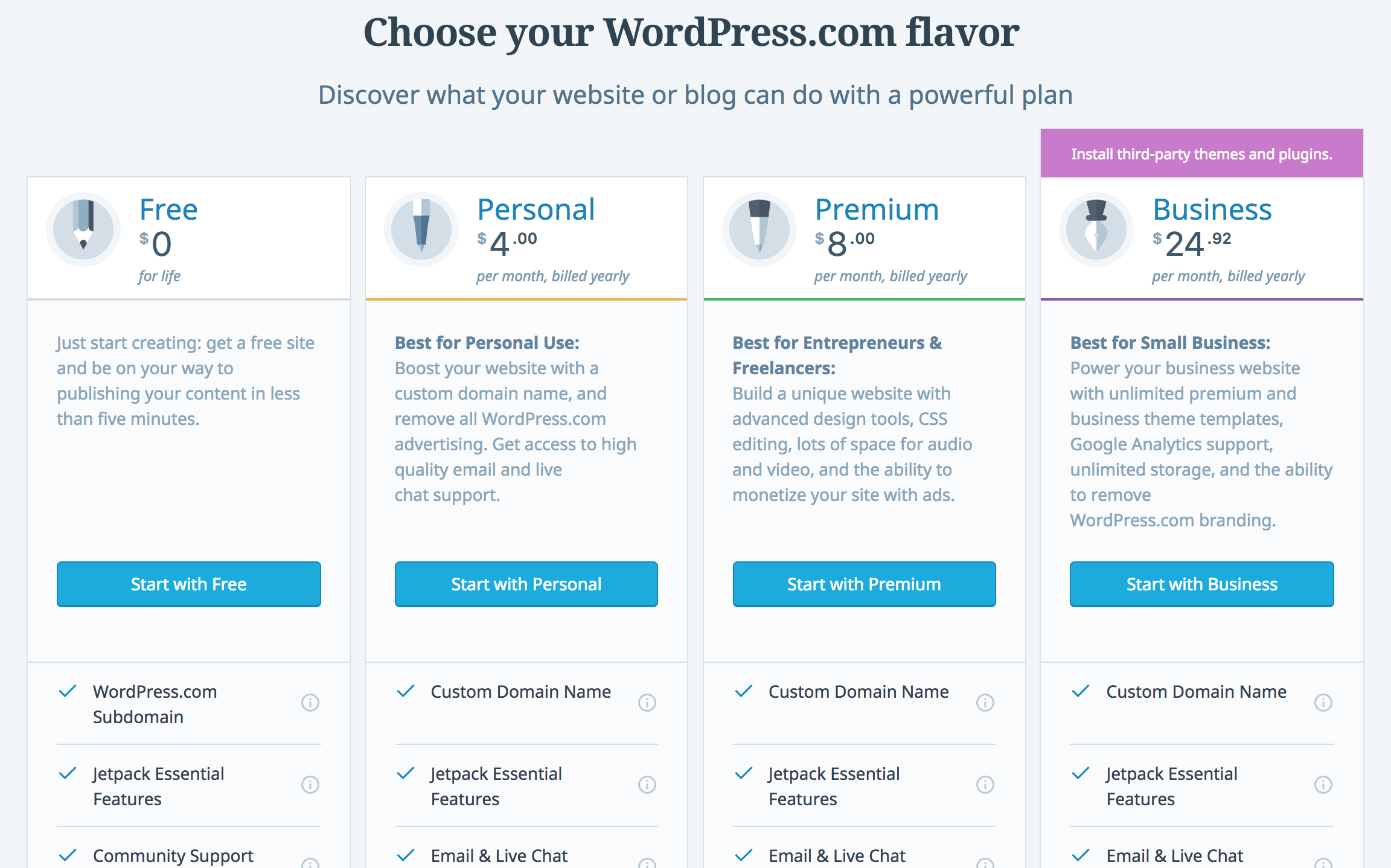
WordPress.com can be free. But it has paid plans too. Paid plans offer more features. WordPress.org is free to use. But you need to pay for hosting. Hosting costs vary. Themes might also cost money. Plugins can be free or paid. WordPress.org might have hidden costs. WordPress.com has more predictable fees. Many people choose based on their budget. Both platforms offer value for money. Choose wisely based on needs.
Credit: kinsta.com
Domain Name Expenses
Picking a domain registrar is an important step. Each registrar has its own pricing. Some are cheap. Others can be costly. It’s wise to compare prices. Look for hidden fees. Some registrars charge for privacy.
Annual costs vary. They usually range from $10 to $20. You pay this fee every year. Some registrars offer discounts. These are for the first year only. Be sure to check renewal prices. They might be higher.
Web Hosting Fees
Shared hosting means many sites use the same server. Cheaper but slower. Dedicated hosting gives one site its own server. More expensive, but faster. Which one you choose depends on your needs. Do you need speed or do you want to save money?
Many companies offer hosting. Bluehost is popular for WordPress. SiteGround is also good. HostGator is another option. All have different plans. Check them out and pick what suits you.
Theme And Design Costs
Free themes are available for everyone. They have basic designs. Premium themes cost money. They have extra features. Better support. Premium themes look more unique. They can be expensive. Prices can start from $20. Some can go up to $100. Developers update them often. Free themes may not have updates. Premium themes can improve your site. They make it look more professional.
Custom designs are special. They are made just for you. They can be very costly. Prices can start from $500. They go higher. Custom designs need more work. Designers need time. They make the site look unique. They follow your ideas. Custom designs are good for big sites. They help stand out. They are a big investment.
Plugin And Extension Charges
WordPress has many essential plugins. These plugins help your site work better. Some plugins are free. You can find them on the WordPress website. Free plugins offer basic functions. But some plugins need payment. They offer more features. Paid plugins can cost from $10 to $100 each year. Choose plugins that match your needs. This saves both time and money.
Premium plugins provide extra features. These are more advanced. The cost can vary a lot. Some plugins charge $20. Others might ask for $200 each year. The price depends on the features. Some plugins offer support and updates. This is part of the cost. Comparing plugins is important. This helps find the best one for your site.
Maintenance And Security
Regular updates keep your WordPress site safe. Updates fix bugs and improve performance. They are important for your site’s health. Missed updates can cause problems. A broken site costs more to fix. Keep plugins updated too. Check for new versions often. Update themes as needed. This keeps everything running smoothly.
Security is vital for your WordPress site. Protect your data from hackers. Use strong passwords and change them often. Install security plugins for extra protection. Plugins like Wordfence help monitor threats. Back up your site regularly. A backup saves time if something goes wrong. Choose a reliable hosting provider. Good hosts offer security features. SSL certificates encrypt data. They make your site safer.
E-commerce And Advanced Features
WooCommerce is a popular choice for online stores. It’s a free plugin for WordPress. Many basic features are included. But some extra features cost money. Premium themes can improve your store’s look. They start from $30.
Extensions add functions. Prices vary. Some are $20. Others might be $100. Payment gateways like PayPal are often free. Still, some require transaction fees.
WordPress offers many additional features. Some are free, others need payment. SEO plugins help your website rank. Basic versions are free. Paid ones cost more.
Security plugins protect your site. Free options are available. Premium versions cost around $50 yearly. Backup services keep your data safe. These can be free or $30 yearly.

Credit: wordpress.com
Developer And Designer Fees
Exploring the cost of WordPress often includes developer and designer fees. Professionals charge based on experience and project complexity. Fees can range from $50 to $150 per hour.
Hiring Freelancers
Freelancers can be a good choice for WordPress projects. They often charge hourly rates. These rates can be between $20 to $100 per hour. Some freelancers may offer fixed project rates. This depends on the complexity of the work. Hiring freelancers offers flexibility. You can find them on platforms like Upwork or Freelancer. Choosing the right freelancer is important. Always check their reviews and portfolio.
Agency Services
Agencies provide a team of experts. They handle design, development, and support. Agency fees are usually higher than freelancers. Costs can range from $2,000 to $10,000 for projects. Agencies have more resources and offer consistent quality. They are ideal for larger projects. Agencies offer ongoing support and maintenance. This can be beneficial for businesses. Always compare services before deciding.
Budgeting Tips
Discovering the cost of WordPress involves understanding its free basic version and optional paid features. Hosting and premium themes can add to expenses. Plugins and custom design choices may influence the budget further.
Cost-saving Strategies
Use free themes and plugins to save money. Many themes are free and look great. You can find free plugins that do many tasks. Only buy premium tools if you really need them. Some paid tools have free trials. Try them before buying.
Long-term Planning
Think about your future needs. You might need more features later. Plan for these costs now. This helps avoid surprises. Set aside some money each month. This way, you are ready for future costs. Always keep some funds for emergencies.
Frequently Asked Questions
How Much Does WordPress Cost Annually?
WordPress itself is free. However, costs arise from hosting, domain, premium themes, and plugins. Hosting typically ranges from $3 to $50 monthly. Domain names can cost around $10 to $20 yearly. Premium themes and plugins may add additional expenses. Overall, annual costs can vary widely based on your choices.
Are There Free WordPress Themes Available?
Yes, WordPress offers thousands of free themes. These can be found in the WordPress repository. Free themes are suitable for beginners and small projects. However, premium themes provide more features and customization options. It’s essential to select themes based on your specific needs and goals.
Do I Need To Pay For WordPress Plugins?
WordPress plugins come in both free and paid versions. Free plugins offer basic features and functionalities. Paid plugins provide advanced features, support, and updates. Costs for premium plugins vary, typically between $20 to $100. Your choice depends on your site’s requirements and budget constraints.
Is WordPress Hosting Expensive?
WordPress hosting costs vary based on the provider and plan. Shared hosting is the most affordable, starting at $3 monthly. Managed WordPress hosting offers better performance, with prices ranging from $20 to $50 monthly. VPS and dedicated hosting are more expensive, suitable for larger sites.
Conclusion
Understanding the cost of WordPress helps plan your budget smartly. It varies based on needs and choices. Basic setup can be affordable. Premium options may be costly. Hosting, themes, and plugins add extra costs. Balancing features with expenses is key.
Research and compare before spending. Choose what fits your needs best. Free versions offer good starting points. Paid versions add more features and flexibility. Costs can rise with customization. Plan wisely to avoid surprises. Aim for value, not just low prices.
Your WordPress journey starts with informed decisions. Keep your goals clear, and your budget will follow.



