
Have you ever wondered what makes a WordPress website come alive? Or how you can organize your website content in a way that is user-friendly and attractive?
The answer lies in understanding what site pages are in WordPress. Whether you’re new to WordPress or looking to sharpen your skills, knowing about site pages is crucial. They are the building blocks of your website, helping you present information in a structured and appealing way.
By mastering site pages, you can enhance your site’s performance and improve user experience, leading to increased engagement and satisfaction. Dive into this article to discover how site pages can transform your WordPress website and give you the edge you’ve been searching for.
Site Pages Basics
Site pages are important parts of a website. They are static. Unlike blog posts, they don’t change often. Examples include the Home, About, and Contact pages. They help people navigate and find information. Each page has a unique purpose. Site pages make a website organized and user-friendly. They are essential for any WordPress site.
Site pages help build your website’s structure. They provide valuable information to visitors. A well-designed page can engage users. It can also boost your site’s credibility. Search engines use site pages to understand your site. They help improve your site’s visibility online. Having clear and concise pages is vital. It ensures users find what they need quickly.
Creating Site Pages
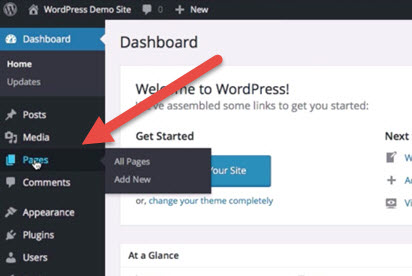
Start by logging into your WordPress dashboard. Look for the “Pages” menu on the side. Click it. Then click “Add New”. A blank page will appear.
Add a title in the top box. Below, add your content. Use the blocks to add text, images, or videos. Preview your page by clicking “Preview”.
If satisfied, press “Publish”. Your page is now live. You can edit it anytime. Find it in the “Pages” menu.
Every site page needs a clear title. It tells what the page is about. Use headings to organize content.
Add images to make it interesting. Use simple words. Short sentences are best. This helps everyone understand.
Finally, check for errors. Make sure links work. Your page should be easy to read. This makes it user-friendly.
Customizing Site Pages
Themes and templates change how your site looks. Choosing the right theme is important. Some themes are simple, while others have many features. Templates help you to add special designs. You can make pages look cool with templates.
It’s easy to switch themes and templates. You can try different styles. Find what fits your taste. Explore colors, fonts, and layouts. Make sure your site looks nice and works well.
Multimedia makes your site fun. You can add photos and videos. These can make your pages lively. Adding audio and graphics also helps. Visitors like sites with multimedia. It keeps them on the page longer.
Use tools to add multimedia. Keep the content simple and clear. Too much can confuse visitors. Balance is key. Make sure everything loads quickly. Slow sites can lose visitors.

Credit: www.youtube.com
Managing Site Pages
Site pages help keep a website neat and tidy. Each page should have a clear purpose. Use a simple menu to help visitors find pages easily. Pages can be grouped by topics. This makes browsing easy. Keep important pages at the top. Place less important pages lower. Organize pages in a way that makes sense to visitors. Use categories to group pages. This helps with navigation.
Updating pages keeps a site fresh. Edit pages often for accuracy. Check for spelling and grammar mistakes. Fix these quickly. Add new information when needed. Remove outdated info. Improving content keeps readers happy. Use simple words for easy reading. Editing is important for good user experience.
Seo For Site Pages
Site pages in WordPress are static web pages that offer essential information about your website. They typically include content like the homepage, contact pages, and about sections. These pages help users navigate and understand your site’s purpose.
On-page Seo Techniques
Use keywords in your page titles. This helps search engines. Write clear meta descriptions for each page. They should explain the page content. Add alt text for images. This helps people and search engines understand them. Use header tags like H1, H2, and H3. They organize your content. This makes it easier to read. Keep URLs short and simple. Use keywords in them if you can. Create internal links to other pages. This helps people find more content.
Seo Tools And Plugins
WordPress has many plugins for SEO. Yoast SEO is very popular. It helps optimize your pages. All in One SEO Pack is another choice. It offers similar features. Rank Math is also useful. It gives you many options. These plugins can improve your site’s visibility. They guide you step by step. Each plugin has unique features. Choose one that fits your needs.

Credit: learn.wordpress.org
Common Mistakes
Site Pages in WordPress often confuse beginners. Mixing up pages with posts is a common mistake. Failing to set permalinks correctly can harm site visibility and SEO.
Avoiding Overcomplicated Layouts
Many people make site pages too complex. They add too many colors and fonts. This makes the page look messy. Visitors get confused easily. Simple designs are better. They help people find what they need quickly. Use easy navigation links. Keep the layout clean. This makes your site easy to understand.
Ensuring Mobile Responsiveness
Mobile responsiveness is important. Many people use phones to browse. Pages should look good on all devices. Ensure images are not too big. Text should be clear and readable. Buttons must be easy to click. Test your site on different devices. Make sure it works well everywhere. This keeps visitors happy.
Best Practices
Site Pages in WordPress are static pages for essential content. They include details like About Us or Contact. Different from posts, they don’t have dates or tags, focusing on timeless information.
Maintaining Consistency
Use the same layout and colors on all pages. This helps users feel at ease. Consistent design makes sites look professional. It also helps users find information faster. Keep fonts and button styles the same. This gives a neat and clean look. A consistent header and footer guide users. It acts like a map. Never forget, simplicity is key.
Enhancing User Experience
Ensure pages load quickly. Fast sites keep users happy. They stay longer and read more. Use clear and simple words. Everyone should understand the content easily. Use images to tell a story. Pictures speak louder than words. Ensure buttons are easy to find. Navigation should be smooth. Users love an easy-to-browse site.
Credit: docs.presscustomizr.com
Frequently Asked Questions
What Are Site Pages In WordPress?
Site pages in WordPress are static content sections. They typically include the About, Contact, and Services pages. Unlike posts, pages are not time-sensitive and don’t appear in chronological order. They help structure your website’s information, making it easy for visitors to navigate and find essential details about your site.
How To Create A WordPress Site Page?
Creating a WordPress site page is simple. First, log into your WordPress dashboard. Navigate to Pages and click Add New. Enter a title and content for your page, then click Publish. You can also customize the page’s layout using themes or page builders to enhance its appearance.
Can Site Pages Have Comments?
Typically, site pages in WordPress don’t have comments enabled. However, you can allow comments by adjusting settings. Go to your WordPress dashboard, click Pages, select the desired page, and enable the comments option. This feature is usually reserved for posts to encourage discussion and engagement.
Are Site Pages The Same As Posts?
Site pages and posts are different in WordPress. Pages are static and focus on evergreen content. Posts are dynamic and appear in chronological order. Pages like About or Contact are often used for permanent information, while posts are ideal for news, blogs, and updates.
Conclusion
Site pages in WordPress are essential for organizing your website. They provide structure and help visitors navigate easily. Understanding their role can improve your site’s user experience. Use pages to present key information clearly. This includes contact details, about us, and services.
Remember, a well-structured site boosts engagement. It also enhances SEO performance. Keep pages simple and focused. Regular updates ensure content stays relevant and fresh. With the right approach, site pages can greatly benefit your WordPress site. Embrace their potential to create a user-friendly environment.



