
Ever find yourself wondering how to keep track of all your favorite blog updates without missing a beat? You’re not alone.
Many WordPress users are on the hunt for a simple way to streamline their content consumption. Enter the RSS URL—a powerful tool that can transform how you engage with blogs. This little piece of tech magic ensures you never miss a post and keeps your content flow organized and stress-free.
Curious about how it works and how you can harness its potential for your WordPress blog? Stick around, because you’re about to uncover the secret to staying effortlessly connected with your favorite content.
Understanding Rss Feeds
RSS stands for Really Simple Syndication. It helps users get updates from sites. Users don’t need to visit each site. RSS brings new content to them. It’s like a digital newspaper. Users get stories from sites they like. Many websites support RSS. Blogs, news sites, and more use it. It saves time and effort for users.
RSS began in the late 1990s. It started as a simple tool. Over time, RSS became popular. Many websites adopted it. This helped users stay updated. RSS feeds grew in use. They became a key web feature. Even today, RSS is useful. It works with many apps and services.
RSS feeds are very important. They help users see updates fast. No need to check sites daily. RSS feeds save time. They gather content in one place. Users get news, blogs, and more. RSS is also useful for content creators. They reach more people easily. It’s a win-win for users and creators.
Credit: www.wpbeginner.com
Role Of Rss In Blogging
RSS helps bloggers share their posts easily. It keeps the audience updated with new content. Bloggers can reach more people without much effort. They save time by not sending updates manually. It helps in growing their followers quickly. RSS boosts visibility for their blog. Bloggers can focus on creating rather than promoting. It builds a loyal audience who always comes back for more.
Readers get updates automatically with RSS. They don’t miss any post from their favorite blogs. RSS keeps everything in one place for easy access. It saves time by gathering updates from multiple blogs. Readers stay informed without checking each site. RSS offers convenience and efficiency. It’s simple and makes reading enjoyable.
Locating The Rss Url In WordPress
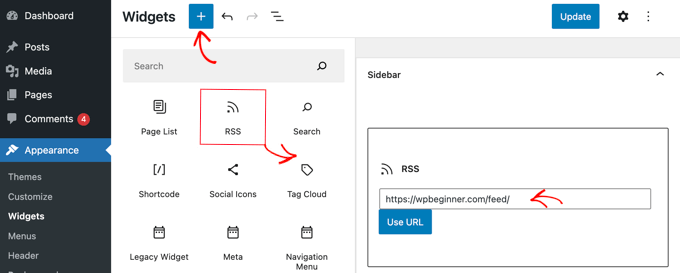
The default RSS URL is easy to find. Just add /feed to the end of your blog’s URL. For example, if your blog is at www.example.com, your RSS URL is www.example.com/feed. This is the standard format for WordPress blogs. It helps readers stay updated with your posts.
Finding the RSS URL in the WordPress dashboard is simple. Log into your dashboard first. Go to the Settings menu. Click on Reading. Here, you will see the RSS feed settings. You can find the exact feed URL here. It’s helpful for sharing with subscribers.
Customizing the RSS URL allows for unique feeds. Use plugins to change the URL easily. Navigate to the Plugins section in the dashboard. Search for an RSS customization plugin. Install and activate it. Follow the instructions to customize your feed URL. This gives more control over your blog’s feed.
Credit: nicepage.com
Using Rss Feeds Effectively
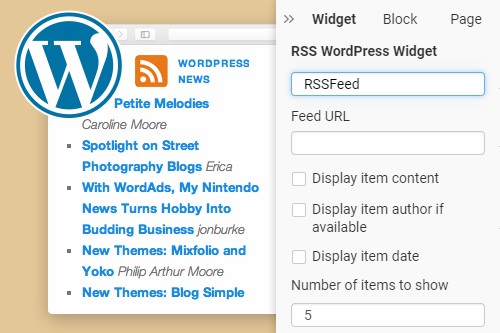
RSS feeds help people get updates from blogs. They collect new posts and show them in one place. Many readers like to use Feed Readers. These tools make it easy to follow many blogs. Just add the RSS URL to the feed reader. It will then show all updates from the blog. This way, readers don’t miss new posts. It’s simple and saves time. Many people like this method.
RSS feeds help your blog get more readers. People can share your blog’s RSS URL. This lets others find your posts. More shares mean more readers. It’s a good way to grow your blog. Readers get your new posts fast. They don’t have to visit your blog each time. This helps keep them engaged and interested.
Measuring your RSS feed’s success is important. Use tools to track how many people follow your feed. Check which posts they like the most. This helps you know what readers enjoy. You can then make more of what they like. Tracking helps improve your blog content. It shows what works best for your audience.
Common Issues And Solutions
Problems with RSS feeds can be frustrating. Many WordPress users face RSS Feed Errors. These errors can block updates. Often, a plugin or theme causes the issue. Check your plugins first. Disable them one by one. See if the feed works after each. Themes can also be the culprit. Switch to a basic theme to test. Another common issue is invalid XML. Use a tool to check the feed’s validity. Fix any errors it finds.
Sometimes, the error is with your hosting. Contact your host for help. They can check server settings. If all else fails, seek expert help. Many developers can solve RSS problems.
Ensuring Rss Feed Compatibility
Compatibility is key for RSS feeds. Ensure your feed works on all devices. Test it on different platforms. Check on phones, tablets, and computers. Update WordPress regularly. This keeps feeds working smoothly. Old versions can cause issues. Always use the latest version. Keep plugins updated too. Outdated plugins can break the feed. Regular checks help keep your feed healthy.
Credit: www.wpbeginner.com
Advanced Tips For WordPress Rss
Discovering your WordPress blog’s RSS URL is simple. Just add ‘/feed/’ to your site’s homepage URL. This URL lets users and applications access your latest posts automatically. Use it to share updates seamlessly.
Enhancing Rss Feeds With Plugins
Plugins can add great features to RSS feeds. They help make feeds more useful. Customizing feeds with plugins is easy. You can add images and summaries. RSS Importer and WP RSS Aggregator are popular choices. They make feeds look good. Some plugins help with feed management. Others improve feed delivery speed. Choose plugins wisely for best results.
Optimizing Rss For Seo
SEO makes feeds easy to find. Use keywords in titles and descriptions. Meta tags help search engines find your content. XML sitemaps are useful tools. They guide search engines to your feed. Ensure your feeds are updated often. This keeps them fresh. Search engines like new content. Alt text for images is important. It helps describe images to search engines.
Frequently Asked Questions
What Is An Rss Url In WordPress?
An RSS URL in WordPress is a web address that delivers blog updates. It allows users to subscribe to your content. RSS feeds provide readers with the latest posts without visiting the site directly. This URL is automatically generated by WordPress for each blog.
How Do I Find My WordPress Rss Url?
To find your WordPress RSS URL, simply add ‘/feed/’ to your blog’s URL. For example, if your blog is ‘www. example. com’, your RSS URL would be ‘www. example. com/feed/’. This URL can be used in RSS readers to receive updates from your blog.
Why Use Rss For WordPress Blogs?
Using RSS for WordPress blogs helps readers stay updated with new posts. RSS feeds automatically deliver content to subscribers. This enhances user engagement and keeps them informed without visiting the website. It’s a convenient way to maintain a connection with your audience.
Can I Customize My WordPress Rss Feed?
Yes, you can customize your WordPress RSS feed using plugins. Plugins like ‘WP RSS Aggregator’ allow customization of your feed’s appearance and content. You can also edit code to modify the feed manually. This ensures the RSS feed meets your specific needs.
Conclusion
RSS URLs are key for sharing blog updates. They help readers stay connected with new content. Easy to set up and use, RSS feeds streamline information delivery. Check your WordPress settings to find your RSS URL. It’s typically straightforward and quick.
By using RSS, your blog stays accessible to subscribers. They get updates effortlessly. For consistent engagement, consider RSS feed integration. It’s a simple tool, yet effective for reaching your audience. Keep your readers informed with fresh content. RSS is a valuable asset for every WordPress blog owner.



