
Have you ever found yourself tangled in the web of WordPress terminology, trying to make sense of what exactly the “root” is? You’re not alone.
Many WordPress users, whether beginners or seasoned pros, often stumble upon this crucial concept and wonder about its significance. Understanding the root in WordPress can unlock new levels of control and customization for your website. Imagine having the power to tweak, optimize, and troubleshoot with ease.
Sounds empowering, right? We’ll break down the concept of the root in WordPress in simple, clear terms. You’ll gain insights into why it’s essential and how it can enhance your WordPress experience. Stick around, and you’ll soon be navigating your WordPress site with newfound confidence and clarity.
What Is The Root Directory?
The root directory is the home folder for your WordPress site. It’s where all the important files live. These files help your site run smoothly. You can find files like wp-config.php and .htaccess here. These files are very important.
The root directory is like a safe. It keeps everything in one place. This makes it easy to find your files. You can make changes to your site from here. But be careful! Changes can affect your whole site. Always make a backup first.
Importance Of The Root Directory
The root directory is the main folder of a website. It holds all important files. These files help the website work well. Without them, the site may break. The root directory is like a base. It keeps everything organized. This makes it easier to find things. Developers use it to store themes and plugins. These make the site look nice. They also add special features. The directory is like a toolbox. It keeps all needed tools in one place. This is very handy for quick fixes.
Accessing The Root Directory
FTP clients help you reach WordPress files. FileZilla is a popular choice. Download and install it. Enter your server details. You need a username and password. Connect to your server. Look for public_html or www folder. These folders hold your WordPress files. Drag and drop files to make changes.
Log into your web hosting account. Find the File Manager tool. It helps access the root directory. Look for folders like public_html. This folder has WordPress files. Click to open and view. You can edit or add files here. Easy to make changes. Ensure to save files after editing.

Credit: themehunk.com
Common Files In The Root Directory
The wp-config.php file is very important. It holds the database settings. Without it, WordPress can’t connect to your database. This file also has security keys. These keys help keep your site safe.
The index.php file is the main file. It helps load WordPress correctly. It tells your server what to do when someone visits your site. If this file is broken, your site may not load.
The .htaccess file is a server file. It controls how the server acts. It can block bad traffic and set redirects. If you make changes, be careful. Wrong settings can break your site.
Modifying The Root Directory Safely
Backing up files is very important. It keeps your website safe. Save copies of files before changing them. You can use plugins to help with backups. They make the job easy and quick. Cloud storage is a good choice for backups. It keeps files safe from computer problems.
Edit files with care. Changing the wrong file can break your site. Always check twice before making changes. Use a test site to try edits first. This helps prevent big mistakes. Follow guides if unsure about changes. They give clear steps for safe editing. Remember, your website’s health depends on careful edits.
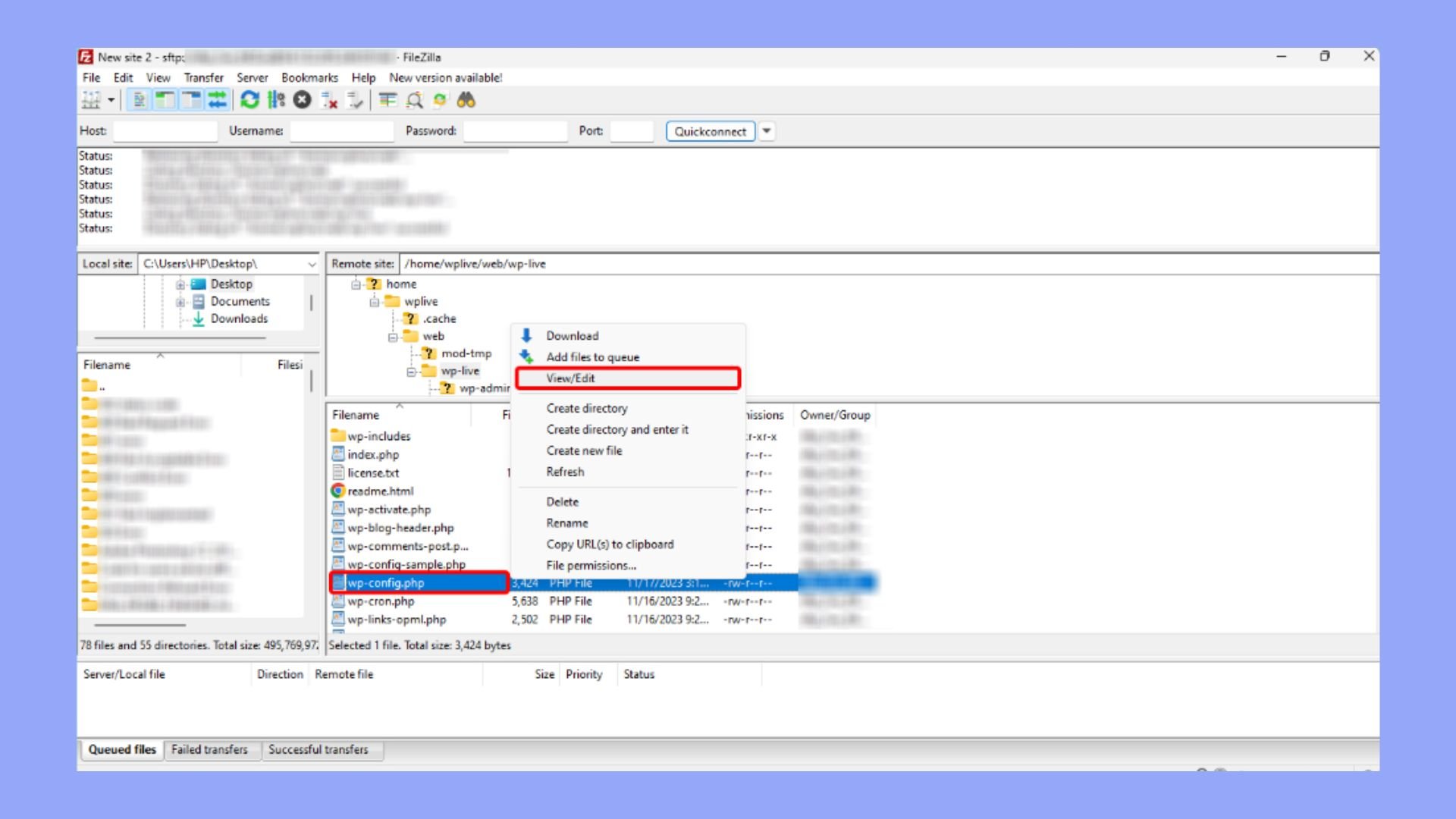
Credit: 10web.io
Troubleshooting Issues
Understanding the root in WordPress helps solve common problems efficiently. The root directory is the main folder storing essential files and settings. Navigating this directory allows users to manage installations and troubleshoot effectively.
Common Errors
Errors in WordPress can be annoying. Database connection failures often arise. These happen due to wrong login details. White screen of death is another issue. It makes your site go blank. Plugins or themes usually cause it. Internal server errors appear as a scary message. This might be due to a corrupted file.
Steps To Resolve
Check your login details for database errors. Correct them if needed. Disable plugins if your screen turns white. Activate them one by one to find the bad one. Check your .htaccess file for server errors. Rename it to see if the issue goes away. Always backup your site before making changes. This keeps your data safe.
Best Practices For Managing The Root Directory
Organize files in the root directory. This helps with finding them quickly. Create folders for themes, plugins, and uploads. Use clear names for easy understanding. This keeps your site tidy. A clean directory improves performance.
Not everyone should access the root directory. Only trusted people should have access. Set strong passwords to protect it. This keeps your site safe from harm.
Always backup your files. Use a reliable backup tool. Save copies outside your server. Backups help if something goes wrong. You can restore your site easily.
Regularly update WordPress and plugins. Updates fix bugs and keep your site secure. Outdated software is risky. Keep everything up-to-date for a smooth website.

Credit: themehunk.com
Frequently Asked Questions
What Does Root Mean In WordPress?
In WordPress, the root refers to the main directory where your site’s files are stored. It’s the central location that contains important files like wp-config. php and index. php. Accessing the root directory is crucial for managing themes, plugins, and site settings effectively.
How Do I Find My WordPress Root Directory?
To find your WordPress root directory, use an FTP client or hosting control panel. Locate the folder containing wp-content, wp-admin, and wp-includes. This is your root directory, where all essential WordPress files are stored.
Why Is WordPress Root Directory Important?
The WordPress root directory is crucial for managing your site’s infrastructure. It houses core files necessary for WordPress operation. Proper access allows you to install plugins, themes, and make configuration changes, ensuring your site runs smoothly.
Can I Modify Files In The WordPress Root?
Yes, you can modify files in the WordPress root directory. However, proceed with caution as changes may affect site functionality. Always back up files before editing, and ensure you understand the purpose of each file to avoid unintended issues.
Conclusion
Understanding the root in WordPress is key for better site management. It helps you locate essential files quickly. This knowledge streamlines troubleshooting and enhances your site’s performance. Beginners often find the root concept challenging. But, with practice, it becomes second nature.
Remember, the root is the foundation of your WordPress site. Learning its importance can simplify your web tasks. Always explore further to deepen your WordPress skills. This empowers you to create a seamless user experience. Keep practicing, and your WordPress expertise will grow.
A solid grasp of the basics boosts confidence.



