
Imagine this: you’re excited to upload a stunning new image or an important file to your WordPress site. You click upload, and instead of success, you’re greeted with an error message: “Request Entity Too Large.”
Frustrating, right? If you’ve ever encountered this stumbling block, you’re not alone. This error can feel like an unexpected roadblock on your journey to creating the perfect website. But don’t worry. Understanding this error is the first step to overcoming it.
In this guide, we’ll unravel what the “Request Entity Too Large” error means in the context of WordPress. You’ll discover why it happens, and more importantly, how you can fix it quickly. So, if you’re ready to tackle this issue head-on and ensure your uploads go smoothly, keep reading. Your WordPress experience is about to get a whole lot better.
Request Entity Too Large Error
This error happens when a file is too large for upload. WordPress cannot process files that exceed a certain size. The server rejects such large files. This is to keep the server safe. Large files can slow down or crash servers. You see an error message when trying to upload big files.
To fix this, reduce the file size. Or, increase the server’s file limit. Check your WordPress settings. Sometimes, the hosting provider sets a low file limit. Contact them if needed. Understanding server limits helps in fixing this error.

Credit: www.youtube.com
Common Causes
Encountering the “Request Entity Too Large” error in WordPress often occurs when a file size exceeds the server’s limit. This can happen during media uploads, causing disruptions in the site’s functionality. Adjusting the server settings or using plugins may resolve this issue effectively.
File Upload Size Limit
WordPress often has a limit on file sizes. This means big files can’t upload. Many users face this problem. Changing settings can help. Adjust the upload size limit in php.ini. This is a common fix. Use it to allow bigger files. Check if the file is too big. This simple step might solve the error. Be careful with file sizes. It is important to know the limits.
Server Configuration Issues
Server settings can also cause errors. Incorrect configurations lead to problems. They stop big files from uploading. Check your server settings. Often, the server has a default limit. You can change it. Access server files like .htaccess. Update settings for larger uploads. Remember, servers need proper configuration. This helps avoid errors.
Plugin Conflicts
Plugins can sometimes conflict. This stops big files from uploading. Check if any plugin is causing issues. Try disabling plugins one by one. This might solve the problem. Plugins sometimes change settings. These changes can cause upload errors. Always ensure plugins are compatible. Avoid conflicting plugins for smooth uploads. Choose plugins wisely. They should work well together.
Identifying The Error
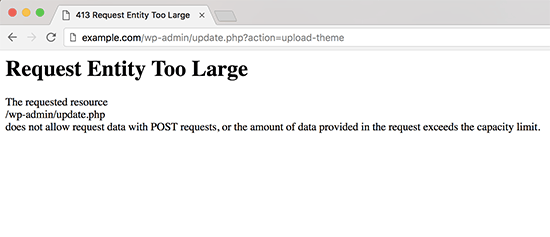
The Request Entity Too Large error shows up when you upload a big file. You might see a message saying, “413 Request Entity Too Large“. This means the file is too big. Your server cannot handle it. Sometimes, the error message might be a bit different. But they all mean the same thing.
Check the server logs for more details. These logs help you find what went wrong. They have a list of errors. Look for errors related to file size. This can help fix the problem. Logs are like a diary for your server. They record everything that happens.

Credit: www.greengeeks.com
Increasing File Upload Size
The .htaccess file is important for WordPress. You can change the file size limit here. First, find the file in your WordPress folder. Then, open it with a text editor. Add the line: php_value upload_max_filesize 64M. This line sets the file size to 64MB. Save and close the file. Check if the error is gone.
Another way is changing the php.ini file. This file controls PHP settings. Look for the line upload_max_filesize. Change its value to a larger number, like 64M. Also, change post_max_size to the same number. Save the changes. Restart your server. This may fix the error.
The wp-config.php file can also help. Find it in the WordPress folder. Add this line: define('WP_MEMORY_LIMIT', '64M');. This line increases memory for uploads. Save the file. Check your site again. The error might be fixed now.
Server Configuration Solutions
Encountering the “Request Entity Too Large” error in WordPress often indicates that uploaded files exceed server limits. Adjusting server configurations can resolve this issue by increasing the allowed file size. Solutions involve modifying settings in the. htaccess file, wp-config. php, or server software like Apache or Nginx.
Adjusting Nginx Configurations
Nginx settings can cause the error if not set correctly. To fix this, change the client_max_body_size in the nginx.conf file. This tells the server the biggest file size it can handle. Make sure it matches the size of the file you want to upload. Restart Nginx after making changes. This helps in applying the new settings.
Tweaking Apache Settings
Apache settings can also lead to the error. Increase the LimitRequestBody value in the apache2.conf file. This controls the maximum size of request bodies. Set it higher to allow bigger files. Check the php.ini file as well. Adjust upload_max_filesize and post_max_size. These control upload limits. Restart Apache to make changes active.
Resolving Plugin Conflicts
Sometimes plugins can cause errors in WordPress. The “Request Entity Too Large” error might be due to a plugin. Deactivate all plugins to check. Then, activate them one by one. This helps find the problematic plugin. Once found, look for an alternative or update it.
Plugins need updates regularly. Outdated plugins may cause errors. Go to the plugins page. Click “update” for each plugin. Check if the error disappears after updating. Always use the latest plugin version. This keeps your WordPress site smooth and error-free.
Testing The Fixes
Try to upload your file once more. Pick a file that caused the error. Ensure the file size is not too big. Watch if the upload works without a problem. If it works, the fix might be successful.
Check if the error pops up again. Upload a different file now. Use a file with a similar size. This helps confirm if the error is fixed. If the error returns, more adjustments may be needed. Repeat the fixes if necessary.
Credit: www.wpbeginner.com
Preventive Measures
Facing a “Request Entity Too Large” error in WordPress means your upload exceeds the server’s size limit. To prevent this, adjust your server settings to allow larger file uploads, or compress files before uploading. This error often occurs with media files or plugins.
Regular Updates
Keeping your WordPress site updated is vital. Regular updates ensure that your plugins and themes are not too large. Outdated components can be bulky, causing errors. Check for updates weekly. Always install them without delay. This helps in reducing file size issues. Updated components are often more efficient. They take less space, preventing the error.
Monitoring File Sizes
Keep an eye on your file sizes. Large files can cause the “Request Entity Too Large” error. Upload only needed files. Avoid heavy images and videos. Use a plugin to compress images. This reduces their size significantly. Always check the size before uploading. If a file is too large, resize it. Smaller files upload faster and with fewer errors.
Seeking Professional Help
Sometimes, fixing the error on your own is hard. If your website is still not working, it might be time to contact support. They can help find the problem. They can also fix it quickly. Your hosting provider may have a support team. They are there to help with issues like this.
Sometimes, support can give tips to prevent errors. This helps your site run smoothly. Don’t wait too long to ask for help. It can save time and trouble.
A WordPress expert knows a lot about WordPress. They can help with big errors. Experts can find the cause of the issue. They can also suggest ways to improve your site. Find an expert with good reviews. They should have experience with similar problems. This ensures they know how to fix the error.
You can search online for WordPress experts. Many have websites showcasing their skills. Choose someone who communicates well. It makes the process easier and faster.
Frequently Asked Questions
What Causes “request Entity Too Large” In WordPress?
This error occurs when a file exceeds the server’s upload limit. The server can’t process large files due to restrictions in PHP settings or web server configurations. Increasing the upload limit in the server’s settings can resolve this issue effectively.
How To Fix “request Entity Too Large” Error?
To fix this error, increase the upload size limit in your WordPress. Modify the `php. ini`, `. htaccess`, or `wp-config. php` files. Alternatively, contact your web host to make these changes. This will allow larger files to be uploaded successfully.
Can Plugins Resolve Large Request Errors?
Yes, plugins can help manage upload limits. Plugins like “Increase Maximum Upload File Size” can simplify this process. They adjust server settings without manual coding, making it easier for non-technical users to overcome file upload limitations.
Is Server Configuration Important For WordPress Uploads?
Yes, server configuration plays a crucial role in file uploads. It dictates the maximum file size WordPress can handle. Proper configuration ensures smooth uploads and prevents errors like “Request Entity Too Large. ” Adjust server settings to optimize upload capabilities.
Conclusion
Solving the “Request Entity Too Large” error enhances your site’s performance. It prevents unwanted interruptions for visitors. Regularly check file sizes before uploads. Adjust server settings if needed. These steps keep your WordPress running smoothly. A smooth site means happier users and better engagement.
Stay proactive. Address errors promptly. Your efforts will ensure a seamless user experience. Remember, a well-maintained website boosts credibility. Keep learning and adapting. Troubleshooting enhances skills. Your website deserves the best care possible. Embrace these practices. Your WordPress journey becomes easier and more rewarding.



