
Ever find yourself tangled in the web of WordPress formatting options, wondering what exactly “Preformatted” means? You’re not alone.
Navigating WordPress can sometimes feel like decoding a secret language, especially when it comes to making your content look exactly the way you want. But understanding the “Preformatted” text option can be a game-changer for your content presentation. Imagine having complete control over how your text appears, preserving spaces and line breaks exactly as you type them.
This can be particularly handy if you want to display code snippets or maintain a specific text structure. By the end of this article, you’ll know exactly how to harness the power of Preformatted text to enhance your WordPress posts and pages. Curious to make your content stand out with just a few clicks? Keep reading to unlock the potential of this often-overlooked tool.
Preformatted Text Basics
Preformatted text is special in WordPress. It keeps the spaces and line breaks. This means the text looks the same on your blog. It is helpful for sharing code or keeping text layout.
You can use the preformatted block in WordPress. It is found in the block editor. Just click and add it to your post. Then, type or paste your text. The text will keep its shape.
Readers will see the text as you wrote it. This is important for showing code or poetry. Preformatted text helps keep important formatting.
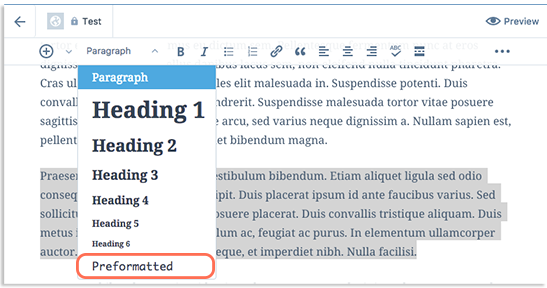
Credit: www.pair.com
Importance Of Preformatted Text
Preformatted text is special. It keeps the exact spacing and layout. This is very important in WordPress. It makes sure your text looks the same everywhere. This is good for code or poems. Text stays neat and tidy. No changes happen without you knowing. You have full control.
It helps your readers. They see exactly what you write. No extra spaces or lines. It makes reading easier. Especially for code snippets. Everyone sees the same thing. This is clear and helpful. It avoids confusion. Your message stays true.
Using preformatted text is simple. You just need to choose the option. Your text stays as you want. It is a handy tool. WordPress makes it easy for you.
How To Use Preformatted Blocks
Preformatted blocks keep text layout intact. Add a block by clicking plus sign in editor. Select “Preformatted” from block options. This block shows text as you type. Spaces and lines stay same. No changes in text format. Use for code or special text.
Change text settings for style. Highlight words or change font size. Adjust colors for better view. Text stays in fixed style. Customize for clarity and focus. Easy steps make it simple. Users see text as intended. Keeps original format. Best for special design needs.
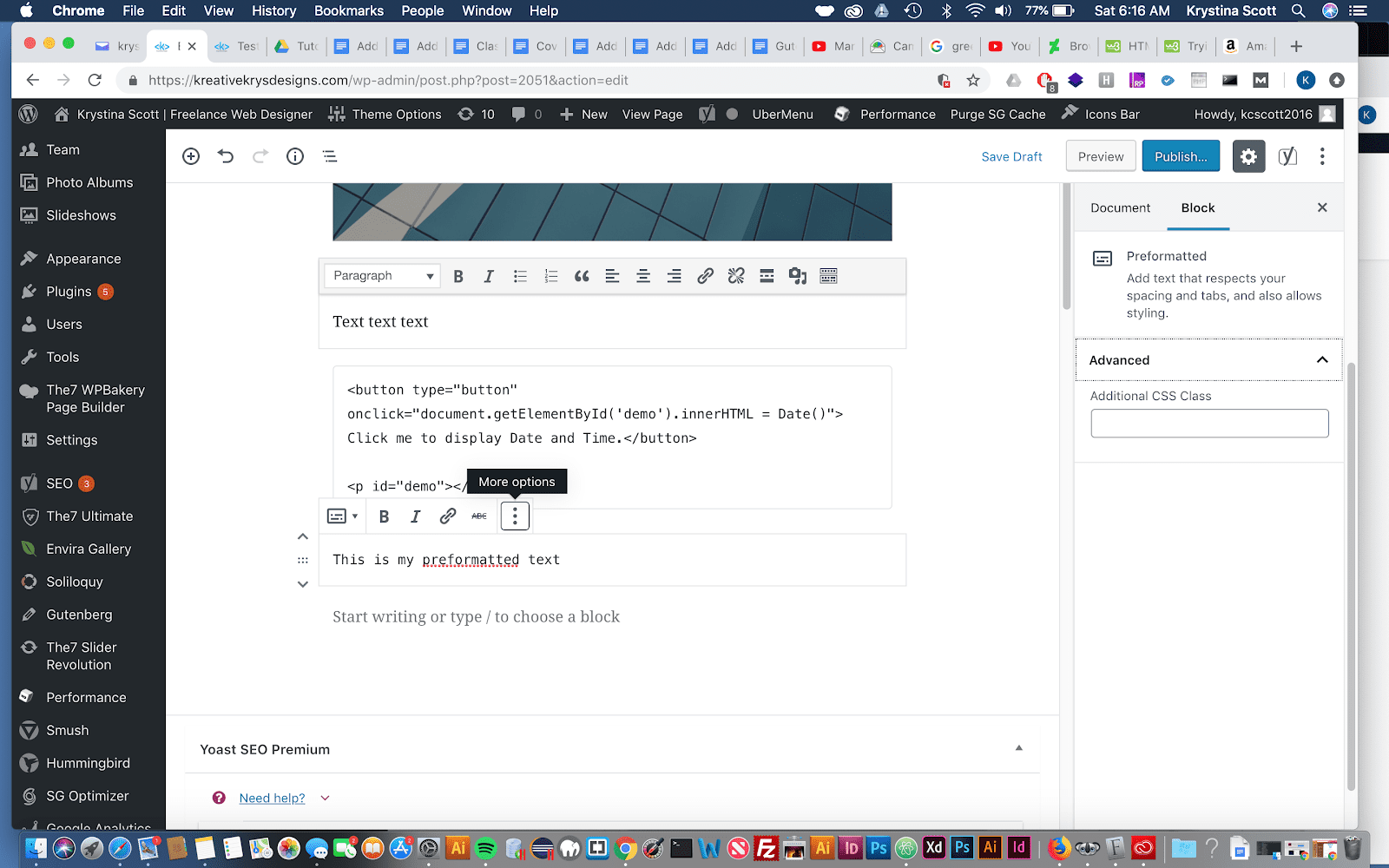
Credit: wp-tutoring.com
Differences Between Preformatted And Code Blocks
In WordPress, preformatted blocks and code blocks might seem similar. They both display text in a fixed-width font. But, they serve different purposes. Preformatted blocks keep the original spacing and line breaks. This makes them great for poems or special text arrangements.
Code blocks are designed for showing code. They highlight syntax, making it easy to read. Preformatted blocks do not highlight syntax. This difference is crucial for developers. Preformatted blocks are simple, while code blocks are more advanced.
Understanding these differences helps in choosing the right block. Using the wrong one can make text look messy. Always pick the block that suits your need. It will keep your content neat and easy to read.
Styling Options For Preformatted Text
Preformatted text lets you control font size and spacing easily. You can set a specific font that fits your theme. This keeps the text neat and clear. Adjusting the spacing between lines makes the text easy to read. It ensures the reader does not struggle.
Line breaks happen as you type. This means the text keeps its original form. Using the right font and spacing improves the look of your text. It makes the content more appealing.
Changing the color and background of preformatted text is simple. You can choose any color for the text. This helps in highlighting important parts. Adding a background color can make text stand out.
A light background with dark text works best. It keeps the text readable. Customizing these elements adds a unique touch to your site. It makes your content attractive.
Common Use Cases
Preformatted text helps show code snippetsprogrammers. They can share code without losing format. WordPress makes this simple. Just use the preformatted block. Paste the code. The format stays the same. No changes. No lost spaces. Code looks clean and clear.
Precise text alignment is needed for designers. Preformatted text keeps spaces and lines. Text stays in the same place. This helps in making neat designs. It’s great for creating tables or lists. Keeps everything straight. No messy shifts. Easy to use in WordPress. Just write and it stays as you want. No surprises. Perfect for neat work.
Best Practices
Preformatted text helps keep the text neat. Each line should be clear. Short lines are better. Long text can be hard to read. Break big paragraphs into small ones. Use simple words. Simple words make text easy to read. They help everyone understand.
Big words confuse readers. So, use small words. Small words keep readers happy. They don’t have to guess the meaning.
Make sure everyone can read the text. Use clear fonts. Fonts should be big enough. Everyone should see them well. Contrast is important. Text and background must be different. This helps people read better.
Some people use screen readers. Screen readers read the text aloud. Make sure text is easy for them.

Credit: wordpress.com
Troubleshooting Issues
Preformatted text in WordPress keeps the exact spacing and line breaks as written. Useful for coding snippets and maintaining text alignment. Ensures content displays precisely as intended without automatic formatting changes.
Resolving Formatting Problems
Text doesn’t look right? It might be a formatting issue. Preformatted text keeps its spaces and lines. If text looks odd, check your settings. Sometimes, different browsers show text differently. Always update your browser. This can fix many problems. Plugins can also cause issues. Disable one by one to find the troublemaker. If that fixes it, update or replace the plugin. Remember to clear your cache. This ensures you see the latest changes.
Addressing Compatibility Concerns
Some themes don’t work well with all plugins. Check theme and plugin versions. They must be up to date. Compatibility is key to a smooth site. Older versions can cause errors. You might need to change your theme. Some themes offer better support. Choose a theme known for good compatibility. Always backup your site before major changes. This keeps your content safe.
Frequently Asked Questions
What Is Preformatted Text In WordPress?
Preformatted text in WordPress preserves spaces, tabs, and line breaks. It’s ideal for displaying code or text with specific formatting. This feature ensures your content appears exactly as you type it. You can use the “Preformatted” block in the WordPress editor to achieve this effect easily.
How To Use Preformatted Text Block?
To use the preformatted text block, open the WordPress editor. Select the “Add Block” button and search for “Preformatted. ” Insert it into your post or page. Type or paste your text directly into the block. This helps maintain your desired formatting without changes.
Why Use Preformatted Text In WordPress?
Preformatted text is useful for displaying code snippets, poetry, or ASCII art. It preserves the original formatting, ensuring accurate representation. Using preformatted text enhances readability for content requiring specific spacing or alignment. It’s an effective way to maintain the integrity of your content’s structure.
Can I Style Preformatted Text In WordPress?
Yes, you can style preformatted text with custom CSS. You can change font size, color, or background. Use the WordPress customizer or a child theme to apply CSS styles. However, be cautious to maintain the integrity of the preformatted content’s original structure.
Conclusion
Preformatted text in WordPress makes code and text neat. It keeps spaces and line breaks. This feature helps display code correctly. Readers can understand formatting easily. Use it to present code snippets clearly. It’s simple yet effective. Preformatted blocks support various content types.
They enhance readability on your site. A valuable tool for developers and bloggers. Perfect for tutorials and guides. Improves the look of technical content. Explore its benefits today. Enhance your WordPress content with preformatted text. Keep your audience engaged and informed.



