
Have you ever stumbled upon the term “Post Format” while navigating WordPress and wondered what it actually means? If so, you’re not alone.
Understanding the intricacies of WordPress can sometimes feel like unraveling a complex puzzle. But fear not—you’re about to discover a simple, clear explanation that will enhance your blogging experience. Imagine having the power to transform your blog posts to better suit your content, all with just a few clicks.
This is what mastering Post Formats can do for you. It’s like having a secret tool that helps your content stand out and engage your audience more effectively. Keep reading, and you’ll uncover how to use Post Formats to your advantage, making your WordPress site not just another blog, but a captivating space that draws your readers in and keeps them coming back for more.

Credit: www.wpbeginner.com
Post Format Basics
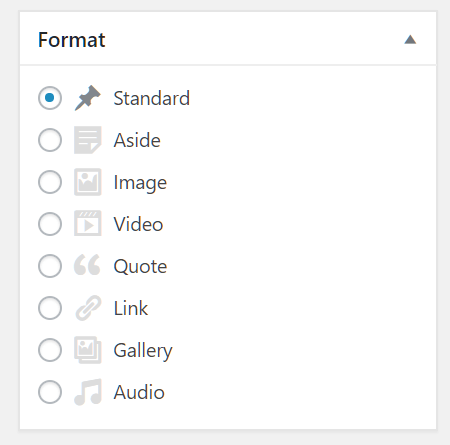
Post formats on WordPress help to style your blog posts. They offer different layout options. Bloggers can choose formats like image, video, or gallery. Each format changes how the post looks. This makes blogs more interesting. It’s like giving a post a special dress.
Image format shows pictures in a big way. Video format is great for clips. Gallery format lets you show many photos. Choose the right format for your content. It helps readers enjoy your blog more. Formats are easy to use. They make blogs fun and lively.
Credit: www.hostpapa.com
Types Of Post Formats
This format is the most common. It includes text and images. It is simple and easy to read. Standard format is used for regular posts.
Gallery format shows many images together. It is perfect for photo collections. Images are usually displayed in a grid.
This format highlights a single image. It is used for visual focus. The image is the main content.
Video format showcases a video. It is great for visual storytelling. Videos are often placed at the top.
Audio format plays sound files. It is ideal for music or podcasts. Audio files are usually easy to access.
This format shares quotes. Quotes are often short and impactful. They stand out in the post.
Link format highlights a web link. It directs readers to other pages. Links are usually bold and easy to spot.
Aside format provides extra notes. These notes are not main content. They are usually short and separate.
Status format shares updates. These updates are brief and informative. Status posts are similar to social media updates.
This format shows conversations. It is used for dialogues. Chat format makes it easy to read talks.
Choosing The Right Format
Picking the right post format is important. It makes your content look good. Text, video, or photo all need different formats. Some posts need more text. Others might need a big picture. Think about your audience too. Do they like videos or reading? This helps you choose better.
Audience engagement is key. The right format can keep them interested. Short videos are fun. Long texts might bore them. Balance is important. Mix different formats. Keep your audience happy and engaged.
Customizing Post Formats
Many themes come with built-in support for post formats. This means you can use them easily. Some themes may not have this feature. In such cases, changing the theme might help. Always check if the theme you choose supports post formats. This ensures a smooth experience. It also makes your posts look nice.
Plugins can help add post formats. They make your site more flexible. Some plugins offer extra features. These features can help customize your posts. Always ensure the plugin is compatible with your theme. This avoids any issues. Keep plugins updated for the best experience.
Post Formats Vs. Post Types
WordPress has post formats and post types. Both are different. Post formats change the look of a post. They give it a special style. Post types change the function. They tell WordPress what kind of content it is. Examples are blog posts, pages, or products.
Post formats include options like audio, video, or gallery. These formats make posts unique. They help readers understand the content quickly. Post types are used for organizing content. Examples are posts, pages, and custom types.
Both formats and types help in content creation. They make WordPress flexible. This flexibility is useful for users. It allows them to manage different content easily. Understanding formats and types is important. It helps in making the best use of WordPress features.
Impact On Seo
Post formats can affect how search engines find your content. Well-organized formats make it easier for bots to crawl. This can boost your visibility in search results. Formats that are clean and clear attract more visitors. More visitors may lead to better ranking. Using different formats can highlight unique content. This helps in drawing attention to special posts.
Choosing the right format is key to a strong strategy. Formats like galleries or quotes can serve different needs. They can make your blog posts more engaging. Engaged readers spend more time on your site. This can improve your site’s SEO performance. Consistent use of varied formats can enhance user experience. Better experience can lead to more frequent visits.
Best Practices
Post formats in WordPress organize and style different types of content. They help in distinguishing between standard posts, galleries, quotes, and more. This feature enhances the presentation and user experience on your WordPress site.
Consistent Use
Post formats should be used consistently. This helps users understand your content better. Each format serves a unique purpose. For example, use video format for videos only. Use gallery format for multiple images. This makes your blog look neat.
Theme Selection
Choosing a theme is crucial. Some themes support different post formats. Others may not. Check before choosing. Pick a theme that fits your style. Your theme should make your content shine. Find one that matches your needs.

Credit: wordpress.com
Frequently Asked Questions
What Are Post Formats In WordPress?
Post formats are predefined styles for your blog posts in WordPress. They allow you to present content in different layouts. Each format gives a unique look, enhancing user engagement. You can use formats like video, quote, gallery, or audio. They help in organizing content and improving website aesthetics.
How Do Post Formats Affect Seo?
Post formats themselves don’t directly impact SEO. However, they enhance user experience, which can indirectly improve SEO. Engaging layouts can reduce bounce rates and increase time on site. This user satisfaction signals search engines to rank your content higher. So, well-optimized formats contribute positively to SEO.
Can I Customize Post Formats?
Yes, you can customize post formats in WordPress. Themes often provide options to modify appearance and layout. Customization enhances branding and user experience. You can adjust styles to match your website’s design. Ensure compatibility with your theme for optimal performance.
Tailoring formats can make your site more appealing.
Which Post Formats Are Most Popular?
Popular WordPress post formats include standard, video, gallery, quote, and audio. Standard format is widely used for general content. Video and gallery formats showcase multimedia effectively. Quote formats highlight key statements, adding emphasis. Audio formats are ideal for podcasts. Choosing the right format depends on your content strategy.
Conclusion
Post formats on WordPress add variety to your content. They help organize posts with ease. Choosing the right format enhances user experience. It keeps your blog engaging and easy to navigate. For bloggers, understanding these formats is crucial. It simplifies content management.
Readers find information faster. This leads to more satisfied visitors. So, explore post formats today. Make your WordPress site more attractive. Your audience will appreciate it. Happy blogging!



