
Have you ever wondered how some WordPress sites seem to effortlessly display stunning images that capture your attention? The secret might lie in a powerful tool known as the PHP Imagick Extension.
Imagine being able to enhance your website’s visual appeal without needing to be a tech wizard. This extension can transform your WordPress experience, offering a seamless way to manipulate and optimize images directly within your site. If you’re looking to elevate your site’s aesthetics or simply want to understand how this mysterious extension works, you’re in the right place.
Dive in and discover how the PHP Imagick Extension could be the game-changer your WordPress site needs.

Credit: www.youtube.com
Php And Its Role In WordPress
PHP is a server-side language. It is used to create web pages. It works on the server. Then it sends data to your browser. This helps your web page work. PHP is easy to learn and use. Many websites use it. It is popular with developers.
WordPress is built using PHP. It uses PHP to create pages and posts. PHP helps WordPress work smoothly. It makes sure every part of WordPress is connected. With PHP, WordPress themes and plugins can work. It is important for WordPress users. PHP and WordPress make a great team.
Introduction To Php Imagick
Imagick is a PHP extension. It helps with image processing. Imagick makes images on websites look better. It uses the ImageMagick library. This library is powerful. It can do many image tasks. Imagick can resize, flip, and rotate images. It can also change image colors. Imagick helps websites look good. It works well with WordPress. Many developers use it.
Using Imagick has many benefits. First, it makes images load faster. This helps web pages open quickly. Second, it saves server resources. It does this by handling images efficiently. Third, it supports many image formats. This means it can work with different types of images. Fourth, it offers high-quality image processing. This results in clear and sharp images. Imagick is easy to use with PHP code. It is a popular choice among developers.
Installation Of Imagick On WordPress
Imagick needs a Linux server with PHP 5.4 or later. The server must support ImageMagick software. This software handles images. Make sure SSH access is available for installation.
First, open the terminal on your server.
Type the command: sudo apt-get install php-imagick.
Press Enter.
Wait for the installation to complete.
Then, restart the Apache server.
Use this command: sudo service apache2 restart.
Check if Imagick is working.
Go to your WordPress admin panel.
Click on Tools and then Site Health.
Look under Info for Imagick.
If listed, the installation is successful.
Features Of Php Imagick Extension
PHP Imagick lets you change pictures in many ways. You can resize and crop images easily. It helps to add special effects like blur or shadow. You can also change colors. This is useful for making photos look better. With Imagick, making collages is simple too. It works with many image formats like JPG, PNG, and GIF. These features help to make your images unique.
The Imagick extension is fast. It uses less memory. This makes websites load quicker. Faster sites are good for users. They keep visitors happy. Imagick uses fewer resources from the server. This means more users can visit at the same time. Your website stays fast even with many images. This helps the website run smoothly.
Common Use Cases
Imagick helps with image processing in WordPress. It can resize images. Crop them too. Rotate or flip them. Change colors or add effects. Imagick can handle many image formats. JPEG, PNG, and GIF are common ones. This makes Imagick very flexible. Users can customize images easily. Dynamic image generation is possible. This means images change based on user input. Imagick helps make WordPress sites look good. Images are important for engaging content. Imagick helps make them better.
Imagick allows dynamic image generation in WordPress. Images can change based on user choices. This is useful for custom products. Users can see changes in real-time. Imagick supports text overlays. Add text to images easily. Change text color or font. Users can personalize their images. This makes WordPress sites interactive. Imagick helps make this happen. It creates a better user experience. Imagick is a powerful tool for developers.
Troubleshooting And Support
The PHP Imagick extension enhances image processing capabilities on WordPress, supporting formats like JPEG and PNG. Users often face issues during installation or configuration. Troubleshooting typically involves checking PHP version compatibility and ensuring the Imagick library is correctly installed on the server.
Common Errors And Solutions
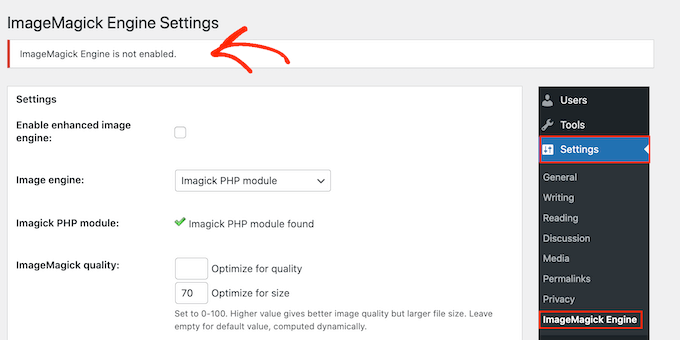
Many users face issues with the Php Imagick extension. One common problem is missing extension errors. Check if Imagick is installed on your server. If not, install it using your server’s package manager. Sometimes, the extension might be installed but not enabled. Ensure it’s enabled in your php.ini file. Another issue is incorrect file permissions. Imagick requires access to certain directories. Adjust permissions to allow access. If images aren’t processing correctly, check for memory limits. Imagick can be resource-intensive. Increase PHP memory limits if needed. Restart your server after making changes.
Resources For Assistance
Many online forums offer help. WordPress forums have many threads on Imagick. Users share tips and solutions. Search for your error message for tailored advice. The official PHP documentation provides detailed guidelines. It explains Imagick functions and settings. For advanced issues, consult your hosting provider. They offer tech support for server configurations. Online tutorials can be helpful. Many websites offer step-by-step guides. YouTube has video tutorials. Watching videos can simplify complex solutions.
Best Practices With Imagick
Imagick extension enhances image processing in WordPress using PHP. It offers tools for image manipulation, resizing, and format conversion. Developers benefit from its efficiency and quality, ensuring media content is displayed optimally on websites.
Optimizing Performance
Imagick can make your images sharp. But, it can also be heavy. Use it wisely. Resize images before uploading. Compress them for speed. Choose the right format. JPEG for photos. PNG for graphics. These steps help your site load fast. Fast sites make users happy. They might stay longer. This boosts your site’s performance.
Security Considerations
Security is important with Imagick. Always keep it updated. Updates fix bugs. Bugs can be risky. Use a strong server. Protect your files. Allow only trusted sources. This keeps your site safe. Be careful with user uploads. Scan files for threats. Security keeps your site healthy. A healthy site is a safe site.

Credit: runcloud.io
Credit: www.wpbeginner.com
Frequently Asked Questions
What Is The Imagick Extension In Php?
The Imagick extension in PHP is a library for image manipulation. It allows developers to create, edit, and convert images. It’s widely used for handling images in web applications and can be integrated into WordPress for enhanced image processing capabilities.
How Does Imagick Benefit WordPress Users?
Imagick benefits WordPress users by providing advanced image editing features. It supports multiple image formats and offers superior compression. This extension enhances image quality and performance, improving the overall user experience on WordPress sites.
Is Imagick Necessary For WordPress Sites?
Imagick isn’t mandatory for WordPress sites but is highly beneficial. It provides advanced image manipulation features. If your site requires detailed image processing, Imagick can significantly enhance functionality and performance.
How To Install Imagick On WordPress?
To install Imagick, access your server’s command line interface. Use the package manager to install it. Ensure PHP configuration files are updated to include Imagick. Verify installation by checking the PHP info page on your WordPress site.
Conclusion
Php Imagick extension enhances WordPress image handling. It offers advanced image manipulation. Users benefit from faster processing and better quality. Installing it is straightforward. Many hosting providers support it. Regular updates ensure security and performance. This tool simplifies complex image tasks.
Beginners find it useful and efficient. It integrates smoothly with existing setups. More control over images without complex coding. Perfect for WordPress enthusiasts. Imagick is a valuable asset for any website. Consider its benefits for your site today.



