
Are you navigating the world of WordPress and stumbled upon the term “Parent Category”? You’re not alone.
Understanding how parent categories work can transform your website’s organization and boost your SEO game. Imagine a library without sections or a grocery store without aisles; it would be chaos, right? That’s what your website could feel like without proper category organization.
By mastering parent categories, you’re not just tidying up your site; you’re inviting more visitors to stay longer and explore deeper. Dive into this article, and let’s unravel the secrets behind parent categories in WordPress together. Your website’s future organization and success depend on it.

Credit: www.youtube.com
Parent Category Basics
Parent Categories help organize your blog. They act like folders. Each folder holds related topics. For example, “Fruit” can be a parent category. Apples and bananas can be under it. This makes your blog neat. It helps readers find content fast. Easy navigation is key in websites. Visitors like simple paths to content.
Parent Categories provide many advantages. They improve site structure. This is good for search engines. More organized sites rank better. It also aids in content management. Bloggers can track their posts easily. Parents keep everything in order. It’s like having a tidy room. Readers appreciate this too. They find what they want quicker. A happy reader stays longer.
Credit: wpdatatables.com
Setting Up Parent Categories
WordPress helps organize posts using categories. Categories are like folders. They group similar posts together. To create a new category, go to the WordPress dashboard. Click on Posts. Then click Categories. Enter the name of your new category. You can also add a description. Click Add New Category to save it. This is how you create a new category in WordPress.
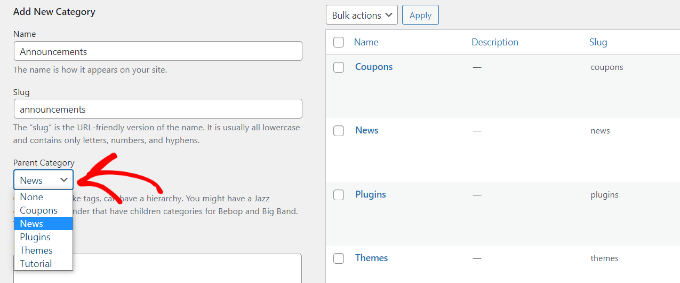
Subcategories help organize posts even more. They are smaller groups within a parent category. To assign subcategories, choose a parent category first. Then create a new category. Use the Parent Category dropdown menu. Select the parent category from the list. This assigns the new category as a subcategory. Subcategories help in organizing posts better. They make finding content easy for readers.
Managing Parent Categories
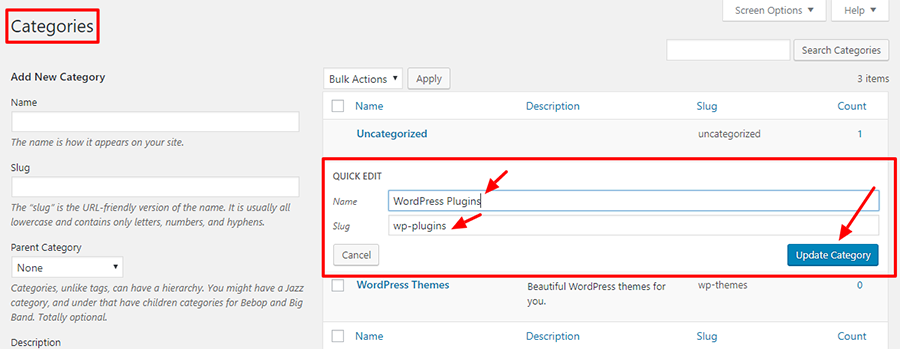
To change a category, go to the WordPress dashboard. Find the Categories section under Posts. Click on the category you want to edit. A new page will show. You can now change the name or slug. A slug is part of a URL. Make sure the slug is simple and clear. This helps people find your posts easily. Click Update when done.
You can change how categories are organized. Go to the same Categories page. To make a category a parent, select it from the dropdown menu when editing another category. This helps group similar posts together. It also helps readers find related posts. You can also remove a parent category. Just choose None from the dropdown.
Seo Advantages
Improved Site Navigation helps users find things faster. A parent category groups similar posts. This means visitors can see related topics easily. They stay longer on your site. This boosts user experience. A clear path on a website makes it friendly.
Enhanced Search Visibility is crucial. Search engines love order. Organizing content boosts your site’s rank. A parent category helps you with this. Search engines find and show your content better. More visits mean more success. Users find what they need quickly.
Common Mistakes
Many users misunderstand the term ‘Parent Category’ in WordPress. They assume it is a required step for creating posts, leading to unnecessary complications. Simplifying category hierarchy can improve site navigation and user experience.
Over-categorization Issues
Too many categories can confuse users. They might feel lost. A category should be broad. It helps in easy navigation. Too many options make it hard to choose. Keep categories simple and clear. Group similar topics together. It helps users find information quickly. A clean structure makes for a better experience.
Ignoring Hierarchical Structure
Categories should have a clear hierarchy. Parent categories should cover broad topics. Child categories should be more specific. This structure helps organize content. It guides users through information smoothly. Without a hierarchy, content feels scattered. Users may leave the site if confused. A good hierarchy keeps everything in place.
Credit: www.wpbeginner.com
Best Practices
Using consistent names for parent categories helps users. It improves navigation and search within the site. Choose clear names that show content purpose. Avoid using complex words or phrases. Simple names are easy to understand. This helps even non-native speakers. Consistent names help with SEO too. Search engines like clear structure. Keep names short and to the point. This makes the site more user-friendly.
Categories need updates. This keeps content fresh and relevant. Check categories often and change them if needed. Remove old or unused categories. Add new ones for fresh topics. It helps in keeping the site organized. Regular updates improve user experience. Users find new content easily. They stay longer on the site. This helps with SEO and traffic. Keep the structure simple and clean. Users enjoy a well-structured site.
Frequently Asked Questions
What Is A Parent Category In WordPress?
A parent category in WordPress is a top-level category under which other categories, called child categories, are organized. It helps structure content, making it easy for users to navigate your site. By organizing posts into parent categories, you improve site hierarchy and enhance user experience.
How Do I Create A Parent Category?
To create a parent category, go to your WordPress dashboard, select “Posts,” then “Categories. ” Enter the category name and leave the “Parent” dropdown as “None. ” This sets your new category as a parent category. Save changes, and you’re done with creating a parent category.
Why Use Parent Categories In WordPress?
Using parent categories in WordPress helps organize content logically. It enhances site navigation and improves SEO by structuring posts. Parent categories provide a clear hierarchy, making it easier for users and search engines to understand the content structure on your website.
Can Parent Categories Improve Seo?
Yes, parent categories can improve SEO by organizing content into a logical structure. This helps search engines index your site more effectively. Proper categorization enhances user experience and increases the chances of higher search rankings, as it makes content easier to find and understand.
Conclusion
Understanding parent categories in WordPress simplifies content organization. It helps you manage posts efficiently. Your site becomes easier to navigate. Visitors find information faster. This structure improves user experience. It also boosts search engine rankings. A well-organized site attracts more visitors.
Keep categories clear and relevant. Review them regularly. Ensure they align with your content goals. An intuitive structure benefits both users and search engines. Simplicity and clarity are key. Implement these strategies today. Enhance your WordPress site’s functionality. Make your content more accessible.
Enjoy the benefits of a well-organized site.



