
Imagine having the power to create custom forms on your WordPress site without any coding skills. Sounds like a dream, right?
But with Ninja Forms, it’s a reality. If you’ve ever felt frustrated by complicated form builders or limited by basic plugins, you’re in for a treat. Ninja Forms is your secret weapon for crafting sleek, professional forms with ease. Whether you need a simple contact form or an intricate multi-page survey, Ninja Forms has got you covered.
Curious about how it works and why it’s the go-to solution for many WordPress users? Stay with us, and discover how Ninja Forms can transform your website’s user experience and boost your engagement effortlessly.
Ninja Forms Basics
Ninja Forms helps you create forms in WordPress. It is a plugin that is easy to use. You can make contact forms, surveys, or any other forms. Just drag and drop to build your form. No coding needed. This makes it simple for everyone. Start with a template or build from scratch.
Ninja Forms offers many features. It supports conditional logic. This means showing or hiding fields based on answers. It also integrates with email services like MailChimp. You can receive form submissions by email. Customize emails for different forms. Export data to a CSV file. This is useful for keeping records.
Installation Process
Setting up Ninja Forms on WordPress is straightforward. Download the plugin, activate it, and follow the setup wizard. Create and customize forms effortlessly through the user-friendly interface.
Downloading The Plugin
First, go to the WordPress dashboard. Then, click on the Plugins option. Choose Add New from the menu. In the search bar, type Ninja Forms. Click on the Install Now button next to the plugin. Wait for the installation to complete. Then, press Activate to enable the plugin. The plugin is now ready for use.
Setting Up On WordPress
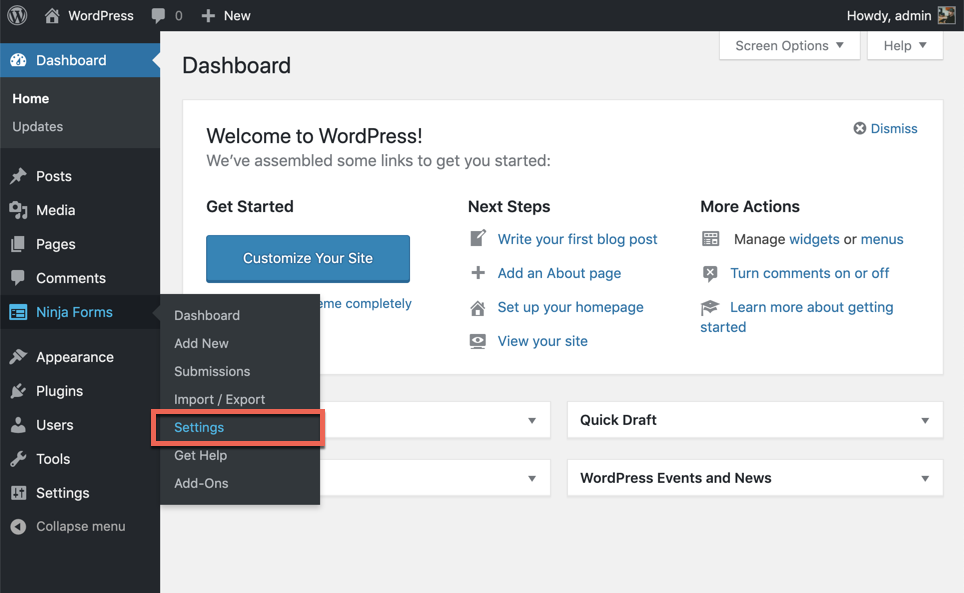
After activation, find the Ninja Forms option in the dashboard. Click on it to open the settings. You can create a new form by selecting Add New. Choose a template or start from scratch. Customize the form fields as needed. Save your form when done. Finally, use shortcodes to add forms to pages. It’s easy and quick!
Creating A Form
Ninja Form lets you build forms easily. The drag-and-drop builder is simple to use. Just pick a field. Then, drag it to your form. It’s fast and fun. You don’t need coding skills. Anyone can do it.
Using The Drag-and-drop Builder
The builder makes form creation easy. You can drag fields into place. Move them around to change the order. Remove them if needed. It’s flexible. You can build forms your way. No coding needed. Create forms that fit your needs.
Customizing Form Fields
Each field can be customized. Change labels to match your form. Set rules for the fields. Make some fields required. Add placeholder text for guidance. Adjust sizes to fit your design. Customizing helps make forms clear and helpful.
Advanced Features
Conditional Logic is a powerful feature in Ninja Forms. It helps tailor forms to user input. You can show or hide fields based on answers. This makes forms smarter and easier to use. Users see only what they need. This keeps forms clean and simple. No extra questions to confuse users. Conditional Logic ensures a smooth user experience. Forms feel personal and direct.
Multi-Part Forms split long forms into smaller sections. This makes forms less tiring to fill out. Users complete one section at a time. It feels manageable and less overwhelming. Each part has its own page. Users can focus better. They understand questions easily. Progress bars show how much is left. This keeps users motivated to finish. Multi-Part Forms are helpful for detailed surveys and registrations.
Integrations
Ninja Forms connects with many apps. This helps to do more things. You can send data to other tools easily. Zapier is one such app. It makes work simple and fast. Another is Salesforce. It helps manage customer data. Google Sheets lets you save form data in spreadsheets. These connections save time. They also help keep data organized.
Ninja Forms works well with email tools. Mailchimp is one example. It helps send newsletters. Constant Contact is another. You can send emails to many people. AWeber helps with email campaigns. These tools help reach more people. They keep your subscribers updated. They are easy to use. They make email marketing simple.
Credit: wordpress.org
Styling And Design
Ninja Form WordPress lets users create stunning forms without coding. It offers drag-and-drop features for easy styling and design. Customize forms to match your website’s aesthetics seamlessly.
Using Themes And Templates
Themes and templates make your forms look nice. Ninja Forms has many options. Choose a theme to match your website. Templates save time. They have pre-made designs. You don’t need to start from scratch. Just pick one and modify it. This makes the process easy and quick.
Custom Css Options
Custom CSS lets you change the look of your forms. You can add your own styles. Make your forms unique. Change colors, fonts, or sizes. It gives you full control. Even small tweaks can make a big difference. Your forms will look just the way you want.
Troubleshooting
Forms not showing? Try refreshing your page. If that doesn’t work, clear your browser cache. Sometimes, this fixes many issues. Check if the plugin is up to date. An outdated plugin can cause problems.
Another common issue is forms not sending emails. Ensure your email settings are correct. Go to the settings page and check. If still not working, contact your web host for help. They can check server issues.
Stuck with a problem? Visit the Ninja Forms support page. They have many helpful articles. You can also join their community forum. Other users might have the same problem. Get help from people who have solved it.
For more detailed help, consider checking their documentation. It explains features and settings in detail. If you need further assistance, contact their support team directly. They are there to help you.
Pricing And Plans
Ninja Forms offers two types of plans. The first is the Free plan. The second is the Premium plan. The free plan gives you basic features. These features include simple form creation. You can add fields like name and email.
The Premium plan has more options. You get tools like file uploads and multi-page forms. It also includes payment collection. This is useful for businesses.
Consider your needs first. The free plan works for small projects. Choose premium if you need advanced tools. Think about your budget too. Premium costs more money. But it offers more value.
Always start with free. Then, upgrade if needed. This way, you can try before spending money.
User Reviews
Ninja Form is easy to use. People like the drag-and-drop feature. It helps build forms fast. The interface is clean and simple. Customizing forms is fun and quick. Users enjoy the wide range of options. It fits many needs. Adding fields is straightforward. The support team is friendly and helpful. They solve problems fast. Many users praise the plugin’s reliability. It works well on most websites. Integrating with other tools is smooth. Performance is impressive. Loading times are quick.
Some users face difficulty with advanced features. They find settings complicated. Beginners may need more guidance. A few experience bugs occasionally. These affect form submissions. More tutorials would help. Expanding support hours is a suggestion. Some request more templates. They wish for additional design choices. Improving mobile responsiveness is important. The pricing model may confuse some users. Clarity on costs is beneficial. Enhancing speed on larger sites is a common wish.
Credit: ninjaforms.com

Credit: ninjaforms.com
Frequently Asked Questions
What Is Ninja Form In WordPress?
Ninja Form is a popular WordPress plugin used to create forms. It offers a user-friendly interface and customizable options. You can build contact forms, surveys, and more without coding. It’s ideal for beginners and professionals seeking a simple solution to gather data on their WordPress websites.
How Do I Install Ninja Form?
To install Ninja Form, go to your WordPress dashboard. Click on ‘Plugins’ and then ‘Add New’. Search for ‘Ninja Form’, and click ‘Install Now’. After installation, activate the plugin. You can start creating forms by navigating to the Ninja Forms section in your dashboard.
Is Ninja Form Free To Use?
Yes, Ninja Form offers a free version with essential features. It allows users to create basic forms without any cost. For advanced functionalities like conditional logic and integrations, premium add-ons are available. Users can choose to upgrade based on their specific needs and requirements.
Can Ninja Form Integrate With Other Platforms?
Ninja Form supports integration with various platforms, including MailChimp, PayPal, and Salesforce. These integrations help streamline workflows and automate processes. Users can easily connect their forms with other services for enhanced functionality and improved data management.
Conclusion
Ninja Forms offers an easy way to create forms on WordPress. Its user-friendly design makes it accessible to everyone. You can customize forms without needing to code. Drag-and-drop features simplify the process. Users can create contact forms, surveys, and more.
It integrates smoothly with various plugins. Plus, it supports third-party services, enhancing functionality. This tool saves time and effort. Perfect for beginners and experienced developers alike. Start building forms today with Ninja Forms. Your WordPress site will benefit from its versatility.
Explore its features and improve user interactions effortlessly.



