
Have you ever wondered how to keep your readers updated with your latest blog posts effortlessly? Or maybe you’re looking to share your content automatically across various platforms?
Understanding your WordPress RSS URL could be the key. Imagine a tool that works tirelessly behind the scenes, broadcasting your content to subscribers without any extra effort. That’s exactly what your WordPress RSS feed does. But where do you find this magical URL?
In this blog post, we’ll uncover the mystery behind your WordPress RSS URL, making it easy for you to connect with your audience and broaden your reach. Stick around to unlock the potential of your content!
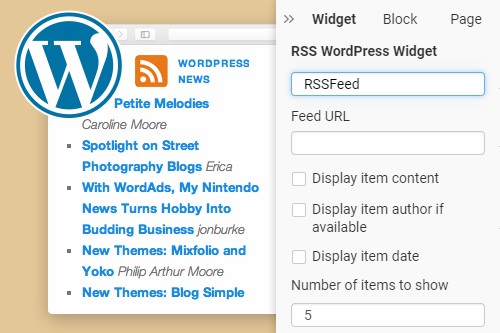
Credit: nicepage.com
Understanding Rss Feeds
RSS stands for Really Simple Syndication. It helps share content from websites. You can use it to read news easily. RSS feeds are like newspaper headlines. They tell you what is new. You do not need to visit each website. It saves time and effort. Many people use it for blogs and news sites. It is a useful tool for staying updated. Reading news is fun and quick with RSS.
RSS started in the late 1990s. It became popular in the early 2000s. Blogs used it to share updates. It was a new way to read blog posts. People loved the simplicity of RSS. Blogs grew fast with RSS. It was a key tool for bloggers. Sharing became easy and quick. RSS feeds are still used today. They are part of the web’s history. They changed how we read and share content.
Importance Of Rss In WordPress
RSS helps share content fast. It sends new posts to readers. This keeps them updated. WordPress makes it easy to use RSS. You don’t need special skills. Just add your RSS feed link.
Enhancing Content Distribution
RSS feeds distribute content widely. They send posts to many places. Readers can see them in apps or websites. This helps reach more people. More readers can find your blog. Content goes further than your site.
Improving Reader Engagement
Engaged readers are happy readers. RSS feeds keep them interested. They see new posts right away. This makes them visit your site often. Regular updates keep them excited. They feel part of your blog community.
Locating Your WordPress Rss Url
WordPress has a simple RSS URL structure. For most sites, it follows a pattern. Your site URL ends with /feed/. This works for posts. Pages might differ. Example: www.yoursite.com/feed/. This is your default RSS URL. Easy, right?
Log into your WordPress dashboard. Go to the Settings menu. Click on Reading. Here, you will find options for RSS feeds. The settings let you control how many items show. No direct URL here, but settings matter. Always make sure these are correct.

Credit: www.youtube.com
Customizing Your Rss Feed
Plugins can help you change your RSS feed. They are easy to use. Plugins add features without coding. Choose a plugin that fits your needs. Some plugins allow you to add images. Others let you change the order of posts. Check reviews before you install any plugin. They help you know if the plugin is good. Remember, too many plugins can slow your site. Keep only the ones you need.
Sometimes, you want to make changes yourself. Manual changes need coding knowledge. You edit files like `functions.php`. This file is in your theme folder. Backup your site before you change any files. Mistakes can break your site. Use a child theme for changes. This keeps your main theme safe. Check your RSS feed after changes. Make sure it works well.
Troubleshooting Common Rss Issues
Feed errors can be frustrating. Sometimes, they happen because of plugins. Plugins can conflict with your RSS feed. Try deactivating plugins one by one. Check your feed after each change. This helps find the problem.
Also, check for typos in your feed URL. A simple mistake can cause errors. Use tools to validate your feed. These tools show if your feed works. Fix any errors they find. This keeps your feed healthy.
Readers need a good feed to read. Make sure your feed is in the right format. RSS feeds must follow standards. Use RSS 2.0 or Atom 1.0 formats. Test your feed in different readers. Popular ones are Feedly and NewsBlur.
Some readers have limits. They might not read long feeds. Keep your feed short and clear. Limit the number of items. This helps readers stay engaged. Always update your feed regularly. This keeps readers coming back.
Alternatives To Rss Feeds
Discovering the My WordPress RSS URL offers a quick way to share updates. For those seeking alternatives, email newsletters and social media platforms provide diverse options to distribute content efficiently.
Using Email Newsletters
Email newsletters are a great way to get updates. They can be sent directly to your inbox. Many websites and blogs offer this option. You just need to sign up with your email. This keeps you informed about new content. It’s very simple and easy to use. You won’t miss any important updates. Plus, you can manage subscriptions easily.
Exploring Social Media Channels
Social media is another option for updates. Platforms like Facebook and Twitter are popular. Many businesses share news on these channels. You can follow them for latest information. It’s a fun way to stay connected. You get updates in real-time. It’s easy to engage with content there. Share, like, and comment as you wish. This keeps you involved and informed.
Credit: 10web.io
Frequently Asked Questions
How Can I Find My WordPress Rss Url?
You can locate your WordPress RSS URL by appending “/feed/” to your site’s URL. For example, if your site is “www. example. com,” your RSS feed URL would be “www. example. com/feed/”. This URL provides subscribers with updates on your blog posts automatically.
What Is The Purpose Of An Rss Feed?
An RSS feed allows readers to subscribe to your website’s updates. It helps in syndicating content and keeps subscribers informed about new posts. RSS feeds are useful for aggregating content in one place, making it easy for users to access and read the latest updates.
Can I Customize My WordPress Rss Feed?
Yes, you can customize your WordPress RSS feed using plugins or by editing your theme’s functions. php file. Customizations can include adding custom post types or categories. This allows you to tailor your feed’s content to better suit your audience’s interests.
Is My WordPress Rss Feed Secure?
WordPress RSS feeds are generally secure but can be made more secure using plugins. You can limit content visibility or add authentication for feed access. Security measures help protect sensitive information and ensure that your feed is shared with the intended audience.
Conclusion
Finding your WordPress RSS URL is simple and vital. It connects your content to readers. Share updates easily. Ensure your audience stays informed. Improve your site’s visibility. Use this RSS tool effectively. Engage readers with fresh content. Maintain their interest and boost traffic.
Remember, a well-managed RSS feed enhances your site’s reach. It brings more visitors. A small step for big results. Keep your feed active and updated. Stay ahead in the digital world. Your readers will appreciate it. And your site will grow stronger.
Happy blogging!



