
Ever wondered what makes your WordPress site tick behind the scenes? Meet Meta_Key, a powerful yet often overlooked feature that could be your secret weapon in managing your website’s data efficiently.
Imagine having the ability to organize and customize your site’s information with ease, giving you more control and flexibility. By understanding how Meta_Key works, you can unlock new potential for your website, making it more user-friendly and tailored to your needs.
Dive into this article, and discover how Meta_Key can transform the way you handle your WordPress content. Your site’s success might just depend on it.

Credit: css-tricks.com
Meta Key Basics
A meta key in WordPress is a special tool. It stores extra information about a post or page. This extra information is called metadata. Metadata can include author details, publish date, or custom data. Using meta keys, you can add unique data to each post. It makes your site more organized and helpful.
WordPress uses meta keys with a value. The value stores the actual data. For example, if the meta key is “color,” the value could be “blue.” This data is not visible on the page but helps in organizing content. It makes searching for specific information easy.
Role In WordPress
Meta_Key plays an important role in WordPress. It helps store extra data. This data is linked to posts, users, or comments. It is often used by developers. They use it to add custom fields. Custom fields provide more information. They make websites unique. Each Meta_Key has a value. The value gives more details. This makes sorting and searching easy. Developers can create powerful features. These features improve user experience.
Meta_Key helps in managing content. It organizes data efficiently. It is simple to use. Even beginners can understand it. For example, it can store author information. It can also keep product details. This makes websites more interactive. Meta_Key is a vital tool in WordPress development. It enhances website functionality. Users can enjoy a better experience.
Creating Meta Keys
Meta keys are useful for storing extra information. Open your WordPress dashboard. Navigate to the Custom Fields section. Click on Add New to create a meta key. Name your meta key carefully. Choose a name that describes its purpose. Enter a value for your meta key. Save your changes. Now your meta key is ready. You can use it in your posts or pages. This helps in organizing content.
Code snippets can create meta keys too. Open your WordPress theme files. Locate the functions.php file. Add your code snippet there. Use add_post_meta function for creating keys. Provide a name and a value. Save the file after editing. This method is more flexible. It requires coding skills. Ensure your code is error-free. Always back up your site before changes. This keeps your site safe.
Meta Key Vs Meta Value
In WordPress, Meta Key and Meta Value are like labels and data. The Meta Key is the label or name. It identifies the type of data. This could be a color or a price. The Meta Value is the data itself. If the Meta Key is “color,” the Meta Value might be “blue.”
Meta Keys help organize information. They make it easy to find data. Meta Values can be numbers, words, or dates. Together, they store extra information about posts. This extra data is known as metadata.
Applications In Custom Fields
Meta keys are important in WordPress. They help store extra information. Custom fields use meta keys to hold data. This data can be about a post or a page. Meta keys make it easy to access this data. Developers use meta keys to create custom features. These features can be unique for each post.
Meta keys can store many types of data. Numbers, text, or dates. They allow users to add extra details to their content. Meta keys help in organizing and retrieving data. They also improve the flexibility of WordPress sites. Users can add custom fields to their posts. These fields are useful for specific purposes.

Credit: stackoverflow.com
Managing Meta Keys
Meta keys hold important data. They help organize content. To edit a meta key, find it in your WordPress dashboard. Click to open it. Make sure changes are correct. Incorrect edits can cause problems. After editing, save your changes. Check if everything works fine.
Unused keys take up space. They can slow down your site. To remove them, go to your dashboard. Search for the unused key. Select it and delete. Always check if the key is truly unused. Backup your data before removing. This keeps your site safe.
Seo Benefits
The Meta_Key in WordPress helps with SEO. It allows you to add keywords. These keywords make your content more visible. More visibility means more visitors. It is easy to use. You just enter the Meta_Key in the right field. Then save your changes.
Using Meta_Key smartly can boost your search rankings. It connects content with search engines. This makes your site more attractive to users. A good Meta_Key is short. It should be relevant to your content. Avoid stuffing too many keywords.
Remember, Meta_Key is just one tool. Combine it with other SEO practices. This can help your website perform better. Always focus on quality content first. Meta_Key will then enhance your reach.
Troubleshooting Common Issues
Meta_Key in WordPress helps store extra data for posts, pages, or custom post types. It assists in organizing and retrieving specific information efficiently. Understanding its function can solve many common WordPress issues.
Duplicate Keys
Duplicate keys can cause confusion in WordPress. They appear when two or more keys share the same name. This can make your website act strange. To fix it, check your database. Look for keys that have the same name. Rename one of the duplicate keys to something new. This helps avoid errors. Always make sure each key is unique. Your site will work better this way.
Missing Meta Data
Missing meta data can be a problem too. It means some important data is not there. This can affect your site’s performance. Check if your meta data is correctly saved. Use plugins to help find missing data. Add the missing information to your meta fields. This ensures your site stays organized and efficient. Keeping meta data complete is key for smooth operation.
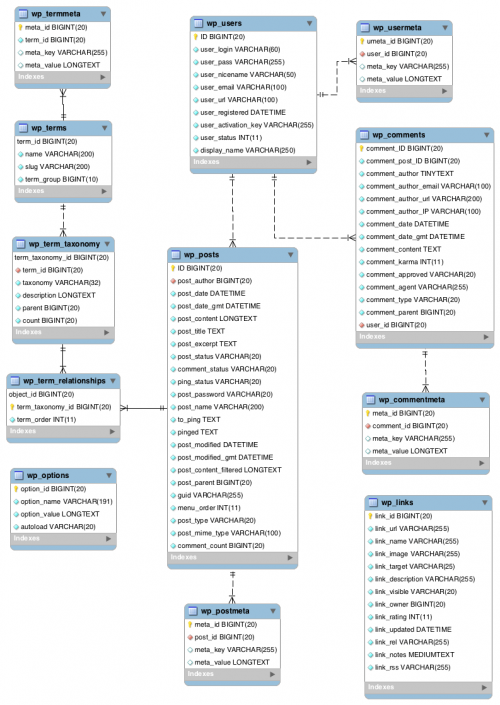
Credit: codex.wordpress.org
Frequently Asked Questions
What Is A Meta_key In WordPress?
A Meta_Key in WordPress is used to store custom fields. It helps in organizing and retrieving metadata associated with posts. Developers use it to enhance functionality by adding extra information to content. It’s a crucial component for customizing WordPress themes and plugins.
How Do You Add A Meta_key?
Adding a Meta_Key involves using the WordPress function `add_post_meta()`. This function allows developers to add custom fields to posts. It’s essential for storing additional data, enhancing WordPress site’s functionality. Ensure the key name is unique for effective data retrieval.
Why Use Meta_key In WordPress?
Meta_Key is used for storing custom metadata. It allows for enhanced content management and personalization. Developers utilize it to add extra details to posts. It’s vital for creating dynamic and customized WordPress experiences.
Can Meta_key Affect Website Performance?
Yes, excessive use of Meta_Key can impact performance. It may slow down database queries if not optimized. Proper management ensures efficient data retrieval. Always use Meta_Key judiciously to maintain website speed and functionality.
Conclusion
Understanding Meta_Key in WordPress empowers you to manage data effectively. It helps in organizing and retrieving information seamlessly. This tool is vital for customizing your website’s functionality. Ensures smooth user experiences. You can enhance your site’s performance with its strategic use.
Meta_Key is fundamental for better data handling. It offers flexibility in managing custom fields. With practice, you will find it straightforward to use. Your WordPress site can become more efficient and user-friendly. Explore its features. Improve your website’s capabilities. Start utilizing Meta_Key today for a more organized website.



