
Have you ever felt frustrated trying to organize your WordPress website’s menu? You’re not alone.
Many website owners struggle to present their content in a logical, user-friendly way. Menu order in WordPress might sound like a small detail, but it plays a crucial role in guiding your visitors seamlessly through your site. Imagine your website as a well-organized store; the right menu order ensures your customers find exactly what they need without hassle.
You’ll discover how mastering the art of menu order can enhance user experience, boost engagement, and potentially increase conversions on your site. Ready to transform your website’s navigation into a powerful tool? Let’s dive in!

Credit: www.templatemonster.com
Menu Order Concept
Menu order in WordPress helps arrange items in a menu. It makes navigation easy for users. Think of it like a list of favorite things. Each item has a place. You can decide which item comes first or last. This order can be changed anytime. So, if you want a page to appear first, you just set its order number lower. For example, a page with order 1 appears before a page with order 2.
Menu order is important for user experience. It helps visitors find what they need. A well-ordered menu is like a neat bookshelf. Everything is in the right place. You can easily find your favorite book. That’s how menu order works in WordPress. It’s simple yet powerful.
Importance Of Menu Order
The menu order in WordPress makes navigation easy. It helps visitors find pages quickly. Organizing your menu boosts user experience. Proper menu arrangement guides users seamlessly. This keeps them on your site longer. A clear menu improves site usability. Users like simple navigation. Clear menus reduce confusion. They make sites feel friendly. Good menu order enhances site appearance. It gives a neat look. It reflects professionalism.
Search engines notice well-structured menus. This helps your site’s ranking. Visitors will find what they need faster. A well-organized menu is important for site success. Keep menus tidy and user-focused. It’s a smart choice for any website owner.
Setting Up Menu Order
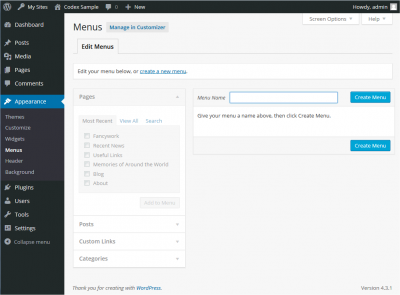
First, find the menu settings in WordPress. Go to the dashboard. Look for Appearance. Click on Menus. This opens the menu settings page. Easy, right?
Drag and drop items to arrange them. Choose the order you like. Make sure your main items are on top. Sub-items should be indented. This makes them appear as drop-downs. Keep it simple for users.
After arranging, save changes. Find the save button at the top. Click it to save your menu order. If you forget, changes won’t stick. So always remember to save.
Credit: codex.wordpress.org
Customizing Menu Order
Moving items in the menu is easy. Use the drag and drop method. Click on a menu item. Hold the mouse button. Drag the item to a new spot. Release the mouse button. The item stays in the new place. This method is very simple. Everyone can do it. You see the changes right away. It’s fun to try different orders. Arrange items as you like. Make your website look just right.
Menu order numbers help arrange items. Each item has a number. Lower numbers show first. Higher numbers show later. Change the number to change the order. Type a new number in the box. Click save. The menu updates. This method is very precise. It gives exact control over order. Arrange items by priority. Important items can be first. Less important ones can come later.
Menu Order Plugins
Menu Order in WordPress helps arrange menu items in the desired sequence. These plugins offer easy drag-and-drop functionality. Users can customize navigation effortlessly, enhancing site usability and visitor experience.
Top Plugin Recommendations
WordPress has many plugins for organizing menus. Some are very popular. Nav Menu Roles lets you show items to certain users. Max Mega Menu helps make big menus easy to use. WP Mega Menu adds more design choices. These plugins make menu management simple.
Installation And Configuration
Installing plugins is easy. Go to the plugins section. Click “Add New.” Search for the plugin name. Click “Install Now.” After installing, click “Activate.” Each plugin has settings. Find them in the WordPress dashboard. Adjust settings to suit your needs. Explore options for customization. Use help guides if needed. Enjoy better menu control.

Credit: kb.oboxthemes.com
Common Menu Order Issues
Menus in WordPress might not show correctly sometimes. This can happen due to various reasons. Menu items might be missing or out of order. It is important to check the theme settings first. Themes can have specific menu settings. Incorrect theme settings can cause display issues. Another common issue is cache. Clear the browser cache to see if it helps. Sometimes old data causes problems. If the issue persists, check for JavaScript errors. These errors can prevent menus from working. Use the browser console to find errors.
Plugins can affect menu order in WordPress. Conflicting plugins might change how menus appear. Deactivate all plugins and activate them one-by-one. This helps find the problematic plugin. Theme and plugin updates can sometimes fix menu issues. Keeping everything updated is important. Also, review plugin settings. Sometimes settings need adjustments. If the problem continues, contact the plugin developer. They might have solutions. Ensure compatibility between the theme and plugins. This reduces conflicts and problems.
Best Practices
A good menu order helps users find information quickly. It should be simple and easy to use. Important items should be at the top. Less important ones can go at the bottom. Use clear words. Avoid confusing terms. Make sure the menu looks nice on all devices. Users should not have to scroll too much. A good menu keeps users happy and engaged.
Menus can help your site’s SEO. Search engines use them to understand your site. A well-organized menu makes this easier. Use keywords in your menu items. This can help your site rank better. Keep the menu consistent on all pages. This helps both users and search engines. A good menu can boost your site’s visibility.
Frequently Asked Questions
How To Change Menu Order In WordPress?
In WordPress, you can change the menu order through the Appearance > Menus section. Drag and drop menu items to rearrange them. Save changes to update the menu order on your website. This allows you to customize navigation according to your preferences or website structure.
Why Is Menu Order Important In WordPress?
Menu order is crucial for user experience and navigation. It helps visitors easily find content on your website. A well-organized menu enhances engagement and reduces bounce rates. It also impacts SEO by improving site structure, helping search engines understand your site’s hierarchy and relevance.
Can Menu Order Affect Seo In WordPress?
Yes, menu order can impact SEO. A logical menu structure enhances site navigation, helping search engines index pages effectively. It improves user experience, encouraging longer visits. Well-organized menus contribute to better crawl efficiency, potentially boosting your site’s ranking in search engine results.
How Do You Customize Menu Order?
To customize menu order, go to Appearance > Menus in WordPress. Drag and drop items to rearrange them. You can also create custom links and categories for better navigation. Save changes to apply the new menu order to your site, tailoring it to your audience’s needs.
Conclusion
Understanding menu order in WordPress helps manage website layout. It ensures visitors find information easily. This boosts user engagement and satisfaction. Start by exploring the menu settings in your dashboard. Customize the order based on your site’s needs. Keep testing different arrangements.
See what works best for your audience. Regular updates improve user experience. Simple changes make a big difference. Take time to organize your content clearly. Prioritize important pages. Make navigation intuitive and efficient. A well-ordered menu guides users smoothly. Enhance your website’s functionality today.
Happy organizing!


