
Have you ever tried uploading a large file to your WordPress site only to be met with an error message? If you have, you’re not alone.
Many WordPress users encounter this issue, and it often boils down to the concept of “Max Post Size. ” Understanding what Max Post Size is can be crucial for managing your website effectively. It’s not just a technical term; it directly impacts your ability to upload media, documents, and other important files.
You’ll discover what Max Post Size in WordPress means, why it matters for your site, and how you can adjust it to suit your needs. Stay with us, and you’ll gain the tools to ensure your website runs smoothly, avoiding those frustrating error messages once and for all.

Credit: www.cloudways.com
Max Post Size In WordPress
The max post size in WordPress is important. It defines how large a post can be. This includes text, images, and other media. Most times, the default limit is 8MB. Sometimes, users need more space. This helps in uploading larger files. You can change this size. It needs some technical steps. It can be done in the php.ini file. Also, in the .htaccess file or wp-config.php file. Larger sizes are good for media-heavy posts. But, very large sizes can slow your site. Always keep a backup before making changes.
Importance Of Max Post Size
Max post size in WordPress controls how much data you can send. It affects uploading images, videos, and large posts. Knowing this limit is crucial. It prevents errors when adding content. Many users face issues without realizing. It’s important for bloggers and website owners. Adjusting the size can solve many problems. Large posts may slow down the site. Optimizing max post size helps in keeping the site fast.
Webmasters should check settings regularly. Some hosts limit size for security. Ensure your host supports larger sizes. Discuss with your provider if unsure. This can improve your workflow. A few tweaks can make a big difference. Regular checks keep your site efficient. Always be aware of these limits.
Default Settings
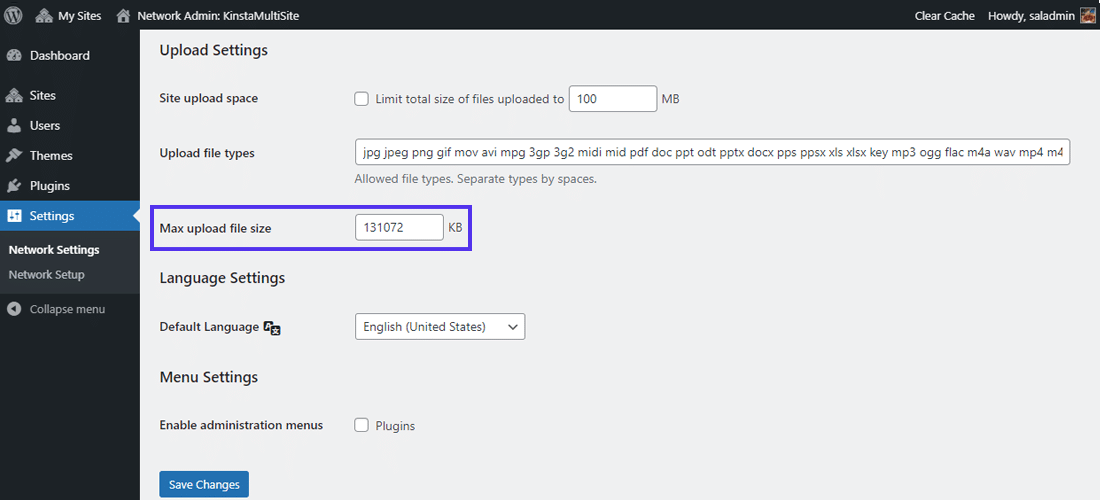
WordPress has a default max post size setting. This controls how much data you can upload at one time. The usual limit is 2MB or 8MB. This can be different on various hosting services. They set their own limits. These limits help keep servers safe. Large uploads can slow down a server.
If you need to upload larger files, you might face problems. You may see an error message. This tells you the file is too big. To fix this, you might need to change the settings. It’s good to know your hosting service’s limits. This helps you plan your uploads better.
Credit: kinsta.com
Impact On Content Management
The max post size in WordPress affects how you manage content. Large posts might not upload properly. This can be a problem for bloggers. Content creators need to know their limits. It ensures smooth uploads. Check your WordPress settings. You can adjust them if needed. Reducing image sizes helps. Use plugins for easy compression. It keeps your site fast. A fast site attracts more visitors.
Having a small max post size can be limiting. It can stop you from uploading important content. This makes it important to know your limits. Always keep an eye on file sizes. Adjust your content accordingly. This helps in managing your site better. Proper management keeps your site efficient.
Checking Current Max Post Size
Many want to know the max post size in WordPress. It’s important for uploading large files. First, log in to your WordPress dashboard. Navigate to the media section. Check the upload size limit there. This limit is the max post size.
Sometimes, you might need to increase it. Check your hosting provider settings. They often allow changes. You can also look at your php.ini file. This file controls server settings. By changing it, you can increase the size. This helps in uploading bigger files.
Ask your hosting provider for help if needed. They can guide you. Always ensure you follow their rules. It ensures smooth uploads.
Adjusting Max Post Size
.htaccess is a file in your web server. It can change settings. To increase the max post size, open this file. Add a line like php_value post_max_size 20M. This means posts can be up to 20 megabytes. Save the file. Check if it works. Sometimes, changes may not show immediately.
php.ini is another file for settings. It controls the server. Find the line post_max_size = 8M. Change 8M to 20M. Save the file. Restart the server. This helps to apply changes. Make sure the server allows this change.
wp-config.php helps in WordPress settings. Open this file. Add define('WP_MEMORY_LIMIT', '256M');. This increases memory for posts. Save the file. Check the site. Ensure the change works. This method is simple. But not always effective.
Troubleshooting Common Issues
Error messages can be confusing. They often mention file size limits. If you try to upload a big file, you may see an error. It can say “file exceeds size limit.” This means the file is too big for the server settings.
Check the settings to fix this. Look for upload_max_filesize and post_max_size. These control how big files can be. You may need to increase these values.
Upload failures happen often. Sometimes, files just won’t upload. This can be due to size limits. If a file is too big, it won’t upload.
To fix, adjust your server settings. Increase upload_max_filesize. Also, check post_max_size. Make sure these numbers are high enough for your files.
Best Practices
It’s crucial to know how to handle max post size in WordPress. Max post size refers to the largest file size you can upload. Larger files might slow down your site. Make sure your hosting provider supports the size you need.
Use tools to compress images. Smaller images load faster. Fast loading keeps visitors happy. Avoid uploading very large images. Resize them before uploading.
Look into your server settings. Sometimes, these settings restrict file size. You might need to contact your hosting provider. They can adjust the settings for you.
Plugins can help manage file sizes. Some plugins compress files automatically. This helps keep your site fast. Choose plugins carefully. Not all plugins are safe.
Tools And Plugins For Management
Managing post size in WordPress can be easy with the right tools. Upload Larger Plugins helps increase the upload limit. It is popular among users. Another tool is WP Maximum Upload File Size. This plugin adjusts the file size limit. It is simple and effective. Increase Max Upload Filesize plugin allows changes without coding. It is user-friendly. These tools make handling post size easier.
File Manager plugins also play a crucial role. They help organize files efficiently. WP File Manager is one such tool. It is easy to use and manage. Advanced File Manager provides more features. It supports various file types. These plugins ensure smooth file management.

Credit: www.cloudways.com
Frequently Asked Questions
What Is The Default Max Post Size In WordPress?
The default max post size in WordPress is typically set by your hosting provider. It is commonly around 2 MB. You can check this limit by looking at your hosting settings or contacting your hosting provider for more detailed information.
How Can I Increase The Max Post Size Limit?
To increase the max post size limit, edit the php. ini file on your server. Locate the `post_max_size` directive and change its value. Alternatively, contact your hosting provider for assistance if you are unsure how to make this change.
Does Max Post Size Affect Website Performance?
Yes, max post size can affect website performance. Larger posts can slow down loading times and increase server load. It’s important to find a balance between necessary data and performance to ensure a smooth user experience.
Why Might I Need To Adjust Max Post Size?
Adjusting max post size is necessary if you plan to upload large files. It can be useful for media-heavy posts or complex forms. Make sure your server resources can handle larger uploads to avoid performance issues.
Conclusion
Understanding the max post size in WordPress is crucial. It affects how much content you can upload. Adjusting these settings can improve your site’s performance. Always consider your hosting provider’s limitations. A larger max post size allows for more media.
This enhances user experience on your site. Keep your audience and content needs in mind. Regularly check and update your settings as needed. Doing so ensures smooth operations. Stay informed and adapt as WordPress evolves. Your site will thank you with better performance and user engagement.



