
Are you looking to create content that’s visually appealing and easy to read on your WordPress site? Understanding how to use the justify text option can be a game-changer.
Imagine your text neatly aligned on both sides, offering a professional and polished look to your blog posts or web pages. But what exactly is justify in WordPress, and how can it transform the readability of your content? We’ll dive deep into the justify feature, showing you how it enhances the layout of your text and keeps your readers engaged.
Stick with us, and you’ll learn how to make your content not only informative but also aesthetically pleasing, keeping your audience coming back for more.
Credit: wordpress.org
Understanding Justify In WordPress
Justify is a tool in WordPress. It makes text align evenly on both left and right sides. This looks neat and clean. Every line ends at the same spot. This is like text in books or newspapers.
Neat appearance makes content look nicer. It can help with reading. Text looks more organized. This is good for long articles or posts.
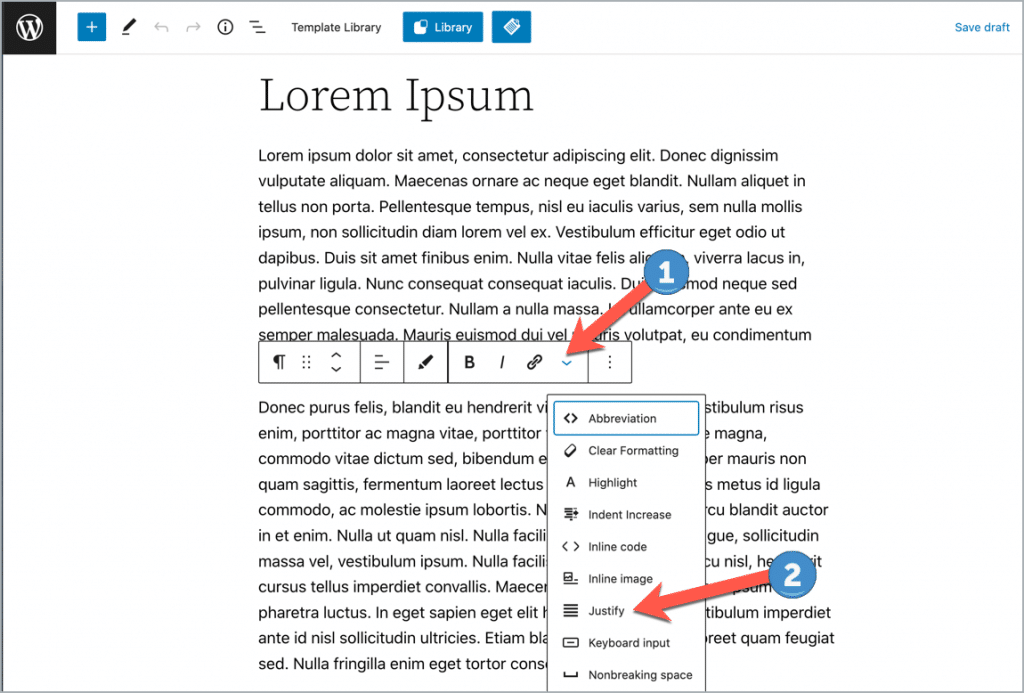
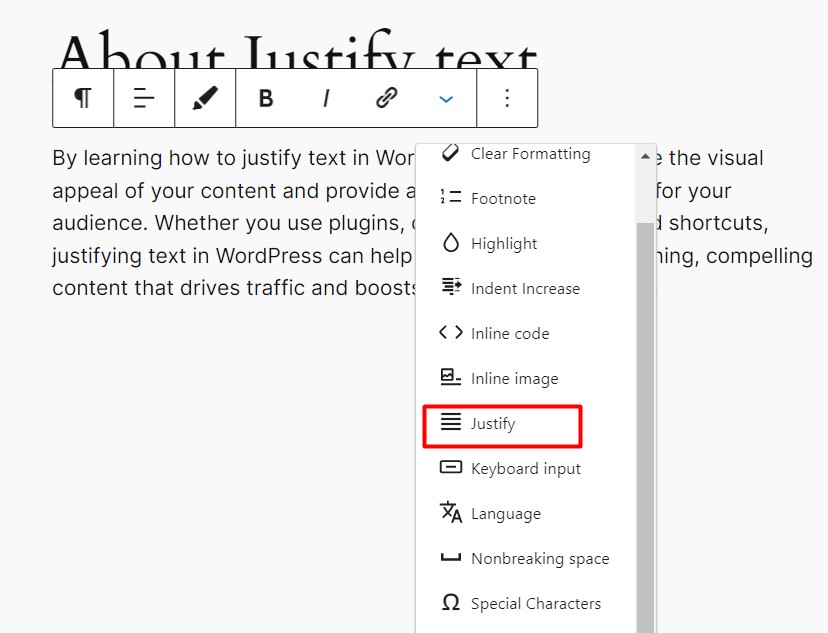
Find the text editor in your WordPress dashboard. Highlight the text you want. Click the “Justify” button. The text will align both sides. It is that simple!

Credit: www.youtube.com
Purpose Of Text Justification
Text justification in WordPress helps with aligning text evenly between margins. This makes paragraphs look neat and organized. It often improves readability for many users. Justified text creates a uniform appearance on pages. Both left and right edges are straight. This is important for formal documents and professional websites. It ensures text does not have a ragged edge. Some people find it easier to read. Others may prefer left-aligned text instead. Choosing the right text alignment is key. It depends on the design and purpose of the content. WordPress offers tools to easily adjust these settings. Make sure the text fits well within its space. Always consider the reader’s comfort and ease when choosing text style.
How To Justify Text
The Classic Editor offers a simple way to justify text. First, select the text you want to justify. Next, look for the toolbar above your text. You will find an icon that looks like four lines of equal length. Click this icon to justify your text. This aligns your text evenly from left to right. It makes your text look neat and tidy. This is helpful for long paragraphs. Remember to save your changes.
Gutenberg Block Editor works with blocks. Choose the block where your text is. Click on the block to select it. In the block settings, find the text alignment option. Click on the justify button. Your text will spread evenly across the page. This makes reading easier. It gives a clean look. Check your formatting before saving. This ensures your text is justified correctly.
Pros And Cons
Justifying text makes the page look neat. It aligns text to both sides. This creates a clean edge. Readers find it easy to follow. It gives a professional feel to the page. Books and newspapers often use it. Justified text can fit more words in a line. This can save space on a page. It can improve the look of wide columns. Readers may enjoy the tidy layout.
Text gaps can appear between words. This can confuse some readers. Lines may look uneven in narrow columns. This can make reading hard. Words can split awkwardly at line ends. The text may look less natural. Some fonts do not justify well. Hyphenation can occur often. This can be distracting. Readers might find it harder to follow along.
Alternatives To Justifying Text
Left alignment makes text easy to read. Words start from the left side. This style is friendly for kids. Text flows naturally. Eyes move smoothly across the page. This is great for long paragraphs. Newspapers use this style a lot. Left alignment is simple and clear.
Right alignment gives a unique look. Words start from the right side. This style is less common. It suits short texts well. Poems often use right alignment. Right-aligned text can be tricky. It’s not ideal for long reading. This style adds flair to designs.
Center alignment is balanced. Text is placed in the middle. This style looks neat. It’s perfect for titles. Invitations often use center alignment. This style is not ideal for long paragraphs. Text can look uneven. Center alignment is good for short messages.
Credit: bdthemes.com
Custom Css For Justification
To add custom CSS, go to your WordPress dashboard. Click on Appearance and then select Customize. In the customize menu, find the Additional CSS section. Click it to open a new box. This is where you will add your custom CSS codes. Type text-align: justify; in the box. Press Publish to save your changes. Now, your text will align evenly on both sides.
Always preview changes before publishing them. This ensures everything looks right. Use simple CSS codes to avoid errors. Keep a backup of your original CSS. This way, you can easily revert changes if needed. Regularly check how your site looks on different devices. Adjust CSS if something looks off on phones or tablets. Experiment with different styles to find what suits your site best.
Impact On Readability
Justify text can affect readability. On large screens, it looks neat. All lines have the same width. But on small screens, it may cause trouble. Words can stretch too much. It creates big gaps. This can confuse readers. So, use justify wisely. Always test on different devices. This helps ensure text looks good everywhere.
Readability is important for everyone. Some people have reading issues. Justify text can be hard for them. It might be tough to follow. Words do not line up straight. This is important for those using screen readers. Text should be clear and easy to understand. Good readability helps everyone read better. It makes the content inclusive.
Best Practices For Text Alignment
Justify in WordPress aligns text evenly between margins, creating a clean look. This alignment gives paragraphs a professional appearance. It balances text, making it visually appealing and easy to read on any device.
Choosing The Right Alignment
Alignment helps readers understand your text better. For small paragraphs, left alignment is best. It feels natural to the eyes. For poems or special texts, try center alignment. It adds a unique touch. Use right alignment for dates or numbers. This makes them stand out. Avoid using justify for narrow columns. It can cause uneven spaces.
Consistency Across Pages
Keeping text alignment consistent is important. It gives your website a clean look. Always use the same alignment for similar sections. For example, all headings can be centered. All body text can be left-aligned. This helps users feel comfortable. They know what to expect. Change the alignment only when needed. This keeps the design simple and clear.
Frequently Asked Questions
How To Justify Text In WordPress?
To justify text in WordPress, use the block editor’s alignment options. Select your text block, then click on the “Align” button. Choose “Justify” from the dropdown menu. This aligns the text evenly along both left and right margins, creating a neat, professional appearance for your content.
Why Use Justify Text In WordPress?
Justifying text creates a polished and organized look, enhancing readability. It is especially useful for formal documents or publications. Balanced margins can improve aesthetics, making your content visually appealing. However, use it carefully, as excessive justification may cause uneven word spacing.
Can I Justify Text Using WordPress Plugins?
Yes, several WordPress plugins can help justify text. Plugins like TinyMCE Advanced provide additional formatting options, including text justification. Install a plugin, activate it, and adjust your text settings. Always check compatibility with your WordPress version for optimal functionality.
Does Justify Text Affect Readability?
Justifying text can impact readability if not used properly. While it creates clean margins, it might lead to irregular spacing between words. This can sometimes hinder readability, especially on smaller screens. Use justified text wisely, balancing aesthetics with readability for your audience.
Conclusion
Justify in WordPress helps align text neatly. It creates clean, organized content. Users can enhance readability with justified text. This feature adds professionalism to your website. It makes your content look tidy. Using justify can improve user experience. Visitors appreciate well-structured text.
It’s easy to apply in WordPress. Simply select and click. Experiment with justify for different sections. Notice the difference in appearance. A small change can make your site look better. Keep exploring WordPress features to improve your site. Your website deserves a polished, professional look.
Enjoy creating with WordPress tools.



