
Are you curious about the mysterious file named “index.html” that often pops up in discussions about WordPress? You’re not alone.
Understanding this fundamental component can unlock a deeper comprehension of how your website operates, potentially saving you time and stress. What if I told you that grasping the role of index. html could enhance your control over your WordPress site, making it more efficient and effective?
Whether you’re a seasoned developer or a newbie, this knowledge could be your secret weapon in crafting a seamless website experience. Read on to discover the pivotal role of index. html in your WordPress journey, and transform the way you manage and optimize your online presence.
Credit: zebratechies.com
Index.html In WordPress
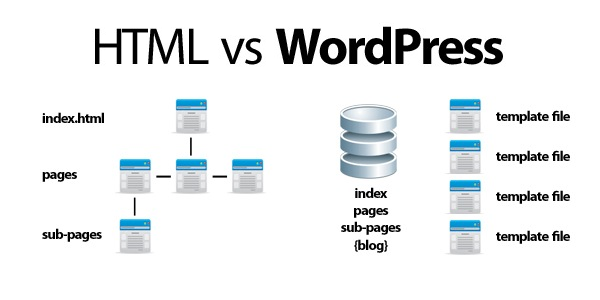
The index.html file is a basic part of the web. It is the main page for websites. In WordPress, it works differently. WordPress uses PHP files instead. These files are dynamic. They change based on content.
WordPress does not need index.html to run. It uses index.php. This file helps display posts and pages. It gets data from the WordPress database. The theme controls how this data looks.
Sometimes, developers add an index.html. This is for custom pages. It can be used for temporary maintenance. Or for a special landing page. But usually, index.html is not needed in WordPress.
Role Of Index.html
The index.html file is like a book’s cover. It is the first page users see. It tells the browser what to show. In WordPress, it may not always be used. WordPress usually uses index.php instead. But, index.html is still important. It acts as a backup file. If index.php is missing, index.html steps in. It ensures your site still has a homepage.
Index.html serves as a fallback mechanism. If the server cannot find index.php, it looks for index.html. It ensures a webpage is shown. This way, your site never shows an error page. It makes sure visitors always find content. This file helps keep your website running smoothly.
Index.html Vs. Index.php
Index.html is a static file. It shows the same content always. Index.php is dynamic. It changes based on user input or data. HTML files are simpler. PHP files can do more things. They run code on the server. HTML files are easy to understand. They don’t need much learning. PHP files need some coding skills. They are complex but powerful.
WordPress mostly uses index.php. It handles requests and shows pages. Index.php connects to the database. It fetches data and displays it. WordPress themes use index.php. They control how the site looks. Index.html is rare in WordPress. It might be used for simple pages. HTML is less flexible. PHP helps WordPress be interactive.
Creating An Index.html
The index.html is the main file of a website. It tells browsers what to show first. This file is like a book’s cover. It gives the first look at your site. The basic structure includes tags like , , and . The holds important info. This includes the page title and links to stylesheets. The is where content lives. Text, images, and links are all here.
Each index.html must have key parts. These parts make the page work well. A tag is also important. It helps with search engine info. Links and scripts go in the . They bring extra styles and functions. The holds the visible page content. This is what users see and interact with.
Customizing Index.html
Adding CSS changes the look of your website. It makes things pretty.
Use JavaScript to make things move or change. It adds fun features.
You need to link these files in the head section.
Write for CSS.
For JavaScript, use .
Make sure to save your changes.
Media makes your page interesting. Use images and videos for this.
To add an image, use 
.
Always check if your media works. It should load correctly on the page.
Common Issues And Fixes
Understanding ‘index. html WordPress’ can be confusing for beginners. Common issues include incorrect file placement and missing themes. Fix these by checking directory structure and ensuring themes are installed properly.
Troubleshooting Not Found Errors
Many users face the 404 Not Found error with WordPress. This often happens when links are broken or pages are missing. First, check the URL for mistakes. Sometimes, a tiny typo can cause big problems. Ensure the page exists by searching in your site’s directory. If the page is missing, restore it from a backup. Permalinks settings can also cause errors. Go to the WordPress dashboard and click on ‘Settings’. Then, select ‘Permalinks’. Click ‘Save Changes’ even if you don’t change anything. This refreshes the settings and fixes many errors. If the error persists, check your .htaccess file. This file controls how URLs are handled. Make sure it isn’t corrupted. You can regenerate it by going to ‘Settings’ and ‘Permalinks’. Save without changes to create a new .htaccess file.
Fixing Display Problems
Display problems can make your website look messy. Often, these issues arise from theme conflicts. Check if your theme is compatible with your WordPress version. Outdated themes can cause display errors. Update your theme regularly. Plugins sometimes cause display errors too. Disable plugins one by one to find the culprit. Once identified, update or replace the plugin. CSS errors can also affect display. Inspect the page using your browser’s developer tools. Look for any CSS code that looks wrong. Correct it to fix the display. If you use custom code, ensure it’s error-free. Backup your code before making changes. This helps if you need to restore it later.
Best Practices For Index.html
Fast websites make people happy. Ensure your index.html is lightweight. Use simple code and avoid long scripts. Compress images to load faster. Minimize CSS and JavaScript. This helps the site run smoothly.
Check file sizes regularly. Small files load quicker. This keeps users engaged. Use caching to store files. It speeds up loading times.
Ensure your index.html works on all devices. Test on different browsers. Check on phones, tablets, and computers. This makes sure everyone can use your site. Use standard HTML tags. They work everywhere.
Avoid using outdated code. Old code might not work. Keep your code updated. This helps with compatibility.

Credit: kinsta.com

Credit: forum.rasa.com
Frequently Asked Questions
What Is Index.html In WordPress?
In WordPress, index. html isn’t typically used. WordPress relies on PHP files like index. php. Index. html might appear if custom HTML pages are integrated. It generally serves static content. For dynamic WordPress sites, PHP files manage content rendering and user interactions more efficiently than HTML files.
How Does Index.html Affect WordPress?
Index. html can affect WordPress if incorrectly placed. It may interfere with PHP-based rendering. WordPress operates predominantly on PHP, not HTML. HTML files are static, lacking dynamic features. Ensure index. html doesn’t conflict with WordPress’s index. php, which manages site functionality.
Can I Use Index.html With WordPress Themes?
Using index. html with WordPress themes is uncommon but possible. It requires careful integration to avoid conflicts. WordPress themes rely on PHP for dynamic content. HTML files can be added for specific static pages. Ensure compatibility with theme structure and PHP files to maintain functionality.
Is Index.html Necessary For WordPress Websites?
Index. html is not necessary for WordPress websites. WordPress uses index. php for dynamic content management. HTML files might be used for static pages. PHP files offer better functionality and user interaction. If needed, HTML can complement PHP but isn’t essential for WordPress operations.
Conclusion
Understanding index. html in WordPress enhances site management skills. It serves as the entry point for web content. This file guides browsers to display your pages correctly. Knowing its role aids in troubleshooting and customization. Beginners find it essential for learning site structure.
Advanced users use it to improve performance. Always ensure backups before editing. Mistakes can lead to site errors. Use reliable hosting and keep plugins updated. This minimizes risks. Engage with community forums for tips. Continuous learning keeps your site running smoothly.
Embrace these basics to build a strong web presence.



