
Are you looking to boost your WordPress website’s user experience and conversion rates? If so, you’ve likely come across the name Hotjar.
But what exactly is Hotjar in WordPress, and how can it transform your online presence? Imagine having a tool that allows you to see exactly how your visitors interact with your site. This means understanding what catches their eye, what they love, and even what frustrates them.
By harnessing the power of Hotjar, you can gain invaluable insights into your audience’s behavior, helping you make data-driven decisions that enhance your website’s performance. Stick around as we dive into how Hotjar can become your secret weapon for optimizing your WordPress site.
Credit: www.hotjar.com
Hotjar Overview
Hotjar is a tool that helps you see how visitors use your website. It shows you what users do on your site. You can watch their actions, like clicks and scrolls. This makes it easier to understand user behavior. The tool creates heatmaps. These maps show popular and ignored areas on your pages. It uses colors to display this data. Red is popular, blue is not.
Another feature is user recordings. You can see recordings of users’ journeys on your site. This helps you spot problems or confusing parts. It also offers surveys and feedback tools. These let users share their thoughts directly. All these features help improve your website.
With Hotjar, you can make your site better for users. It’s a useful addition to any WordPress site.

Credit: www.hotjar.com
Key Features
Heatmaps show where people click on your site. They show which parts are most interesting. Colors show where visitors spend time. Hot areas get red colors. Cool areas get blue colors. You can see what people like. You can see what people ignore. Use this tool to make your site better.
Session recordings let you watch how visitors move on your site. You can see where they click. You can see where they stop. Videos help you understand your users. Learn from their actions. Make changes to help them. This tool is useful for improving user experience.
Feedback polls ask users questions while they browse. Quick answers from users help you understand their needs. You can ask about a new feature. You can ask about design. This tool helps you get direct feedback. Make better decisions with user input.
Surveys ask many questions to users. Longer answers give deep insights. You learn what users think. You learn what they want. Surveys help with planning changes. Collect opinions and improve your site. This tool is great for detailed feedback.
Benefits For WordPress Users
Hotjar helps make websites better for users. It shows how people use a site. This means you can make changes to help them. Happy users stay longer and enjoy more. This is important for any website.
Hotjar helps increase sales. It shows where users click. It tells you where they get stuck. Fixing these spots helps users buy more. A smooth path means more sales.
Hotjar shows what users do on your site. You see which pages they love. You learn which pages they leave. This helps make the website better for everyone.
Installing Hotjar On WordPress
Installing Hotjar via a plugin is easy. First, go to your WordPress dashboard. Find the “Plugins” section and click “Add New”. In the search bar, type “Hotjar“. Once you find it, click “Install Now”. After the installation, click “Activate”. You will see Hotjar in your dashboard. Follow the steps to connect it with your Hotjar account. This method is simple and quick.
You can also add Hotjar manually. First, copy the Hotjar tracking code from your account. Then, go to your WordPress dashboard. Find “Appearance” and click “Theme Editor”. Look for the “header.php” file. Paste the code before the closing tag. Save the changes. This method gives you direct control. Be careful not to break your site.
Setting Up Hotjar
Start by visiting the Hotjar website. Click on the “Sign Up” button. Follow the steps. Enter your email. Create a password. It’s simple. You will receive an email. Open it. Click the confirmation link. Your account is now created. Easy and quick.
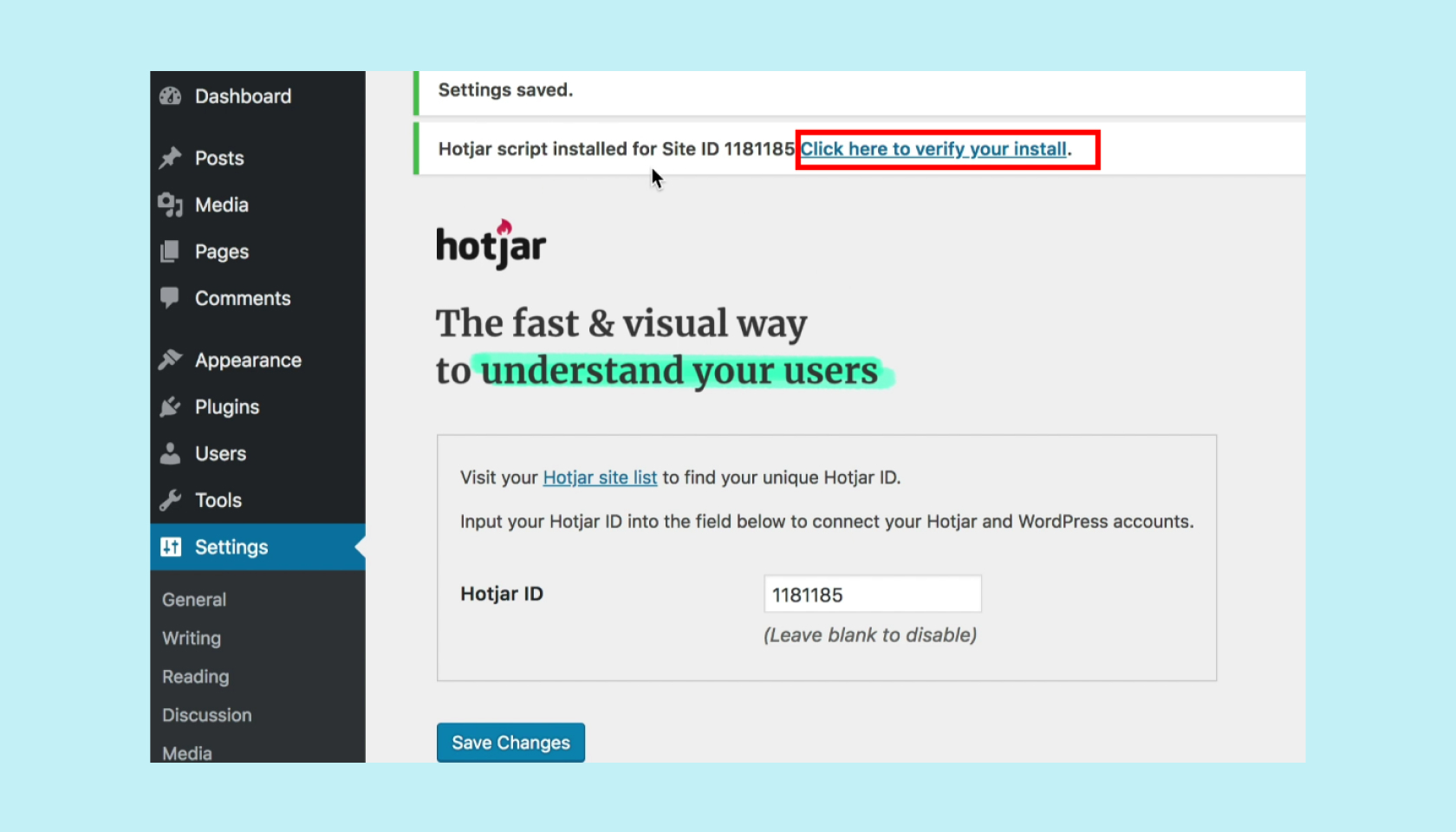
First, log into your WordPress dashboard. Find the “Plugins” section. Click “Add New.” Type “Hotjar” in the search box. Install the plugin. Activate it. Now, go to the plugin settings. Enter your Hotjar Site ID. It’s found in your Hotjar account. Save changes. Hotjar is connected to WordPress. You can now see user behavior.

Credit: help.hotjar.com
Using Hotjar Effectively
Heatmaps show where users click and scroll. They highlight popular areas on your site. Spot cold zones that need improvement. Understand what grabs attention. Improve layout based on data. Make important parts more visible. Boost user experience with insights.
Session recordings capture user actions. Watch how visitors interact. See mouse movements and clicks. Notice where users get stuck. Identify navigation issues quickly. Improve site flow with recordings. Learn what users like and dislike. Make changes for better engagement.
Feedback tools collect user opinions. Ask visitors about their experience. Learn what users want. Use surveys and polls for insights. Understand user needs better. Improve site based on feedback. Valuable feedback helps enhance usability. Create a user-focused website.
Common Challenges
Integrating Hotjar with WordPress often presents challenges like plugin conflicts and data privacy concerns. Users might face difficulties in setting up tracking and analyzing visitor behavior effectively. Ensuring compatibility and maintaining site speed can be tricky while leveraging Hotjar’s insights.
Data Privacy Concerns
Ensuring data privacy is vital. Users need to know their data is safe. Hotjar collects user behavior data. This can worry some website owners. They fear it might breach user privacy. Always inform users about data collection. Use clear and simple language. Get their consent before tracking. This builds trust. It keeps your website compliant with laws. Data protection laws vary by region. Know your local rules. Hotjar has tools to help. They offer settings to protect user data. Use them wisely to maintain trust.
Interpreting Data Correctly
Understanding the data from Hotjar is essential. It provides heatmaps and session recordings. These tools show how users interact with your site. But, data can be confusing. Wrong interpretations can mislead decisions. Focus on what the data truly says. Look for clear patterns in user behavior. Compare them over time. This helps to identify trends. Be cautious with small data samples. They might not represent all users. Analyze data with a critical eye. It ensures better site improvements.
Best Practices
Analyzing data regularly helps you understand user behavior. This can show how people use your site. Check heatmaps and recordings. These tools show where users click. They also show how users move on the page. Look at form analysis to see if users have trouble. This can help improve your forms. Use surveys to ask users what they think. This gives direct feedback. Regular checks can make your site better.
Hotjar works well with other tools. You can connect it to Google Analytics. This adds depth to data insights. Link with WordPress plugins for better site management. E-commerce sites can connect Hotjar with their platforms. This helps understand customer needs. Integration with Slack can send alerts. You get updates in real-time. These connections make your tools more powerful.
Frequently Asked Questions
How Does Hotjar Work In WordPress?
Hotjar works by integrating with WordPress to gather user behavior data. It collects insights through heatmaps, session recordings, and surveys. This helps you understand how visitors interact with your site. By analyzing this data, you can make informed decisions to improve user experience and website performance.
Is Hotjar Easy To Install On WordPress?
Yes, Hotjar is easy to install on WordPress. You simply need to add the Hotjar tracking code to your site. This is done either manually or by using a plugin. Once installed, Hotjar begins collecting data instantly, allowing you to start analyzing user behavior.
Can Hotjar Improve Website Performance?
Yes, Hotjar can improve website performance. By analyzing user behavior, it identifies areas needing improvement. You can pinpoint which pages need optimization or redesign. This leads to enhanced user experience, increased engagement, and potentially higher conversion rates. Hotjar’s insights are crucial for informed decision-making.
What Features Does Hotjar Offer In WordPress?
Hotjar offers heatmaps, session recordings, and surveys in WordPress. Heatmaps show where users click and scroll. Session recordings let you watch user interactions. Surveys gather direct user feedback. These features provide comprehensive insights into user behavior, helping you optimize your site effectively.
Conclusion
Hotjar offers valuable insights for WordPress users. It helps understand visitor behavior. This tool improves website performance and user experience. You can make informed decisions with its data. It’s easy to integrate and use. Perfect for beginners and experts alike.
Hotjar enhances your site’s effectiveness. Better engagement and conversions can follow. Start using it on your WordPress site today. See the difference in your website’s performance. Embrace the power of understanding your audience.



