
Have you ever wondered what makes your email address unique and how it actually works? Understanding the terms “Host Name” and “Domain Name” in email can clear up a lot of confusion.
These two simple components play a big role in sending and receiving your messages smoothly. If you want to know what they really mean and why they matter to you, keep reading. By the end of this article, you’ll see your email in a whole new light—and it might just make managing your online communication easier than ever.

Credit: support.knowbe4.com
Host Name Basics
Understanding the basics of a host name helps clarify how email works. A host name is a key part of internet communication. It identifies a specific computer or server in a network. This simple concept supports complex email systems and other online services.
Definition And Purpose
A host name is a label assigned to a device on a network. It makes it easier to find and connect to that device. Instead of remembering numbers, people use names to reach computers. Host names help organize networks and simplify access.
Role In Email Communication
In email, host names point to the servers that send and receive messages. They guide emails to the right destination. Each email server has a unique host name. This ensures messages go to the correct place without error.
Examples Of Host Names
Examples include mail.google.com and smtp.example.com. These host names represent email servers. They tell your email client where to send or get emails. Recognizing host names helps users understand how email moves through the internet.
Domain Name Essentials
A domain name is a key part of the internet. It helps identify websites and email addresses. Understanding domain names makes email easier to use and trust.
Emails use domain names to show where they come from. This helps send messages to the right place. Knowing how domain names work can improve your email experience.
What Is A Domain Name
A domain name is a web address. It is the name people type to visit websites. It also appears in email addresses after the “@” symbol. Domains link to specific computers on the internet.
Domain Name Structure
Domain names have parts separated by dots. The right side is the top-level domain (TLD) like .com or .org. The left side is the second-level domain, usually the site name.
For example, in “example.com,” “com” is the TLD, and “example” is the second-level domain. This structure helps organize the internet clearly.
Importance In Email Addresses
In emails, the domain name follows the “@” sign. It shows the mail server that handles the email. This lets messages reach the right inbox quickly and safely.
A clear domain name builds trust. People recognize familiar names and feel safe opening emails. This reduces spam and phishing risks.
How Host Names And Domain Names Work Together
Host names and domain names work closely to make email communication possible. They help computers find each other on the internet. Without them, sending and receiving emails would be confusing and slow. These names act as addresses, guiding emails to the right place quickly and safely.
Linking Host Names To Domain Names
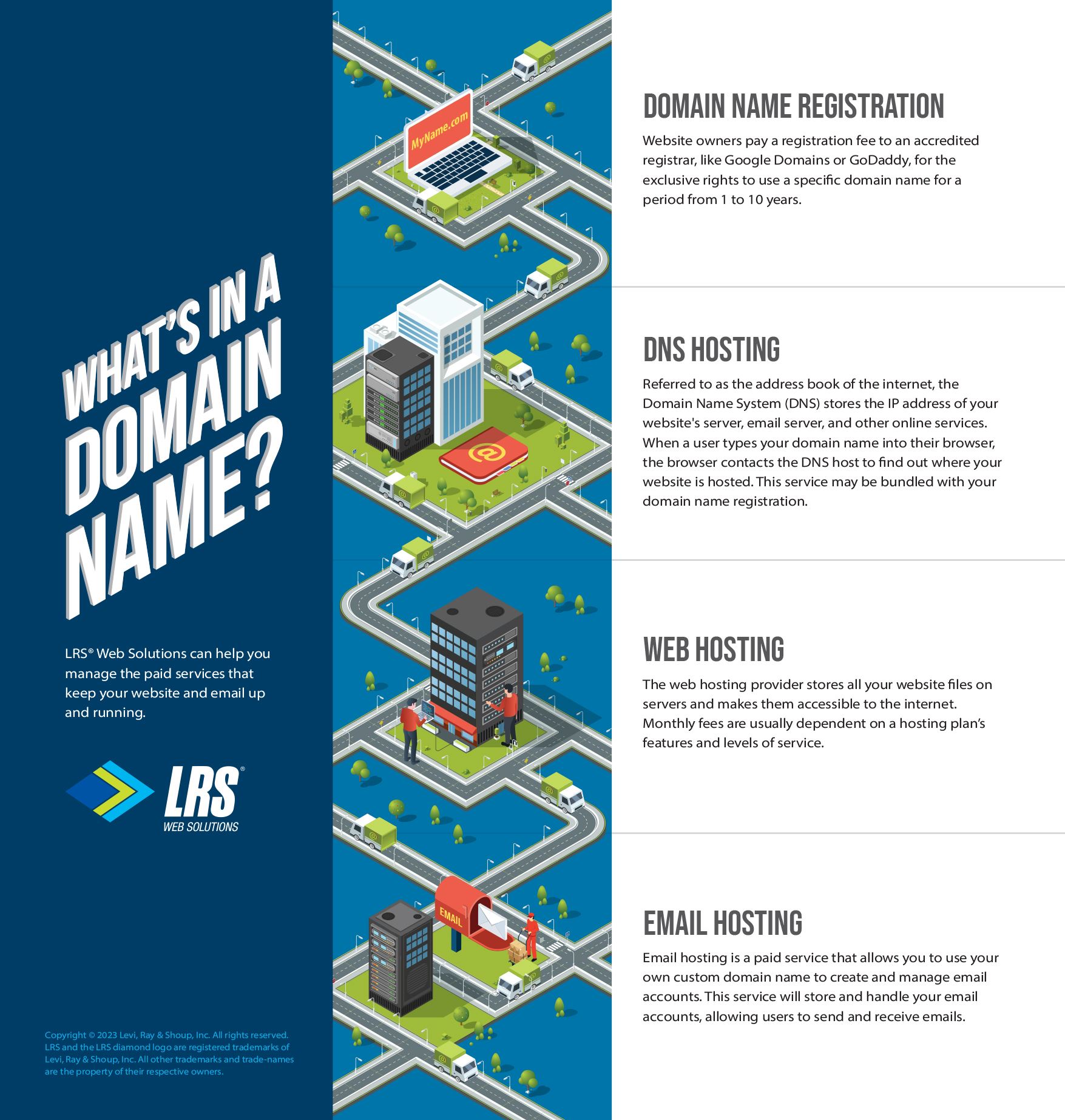
Host names specify the exact server within a domain. A domain name covers a broader area, like a website or email service. The host name points to a specific machine or service inside that domain. Together, they create a full address for email servers. This full address is essential to locate the email server correctly.
Impact On Email Delivery
Correct host and domain names improve email delivery speed. They reduce errors like lost or delayed emails. If either name is wrong, emails may bounce back or get lost. Email providers check these names to confirm the sender and receiver. Clear names build trust and ensure smooth email flow.
Dns And Email Routing
The Domain Name System (DNS) translates host names and domain names into IP addresses. This translation helps computers find each other on the internet. DNS records guide emails through the right path to reach the recipient’s server. Proper DNS setup is crucial for reliable email routing. It keeps emails moving efficiently across networks.
Common Host Names In Email Systems
Common host names in email systems help computers find the right servers. These servers manage sending and receiving emails. Host names act like addresses for email services.
Understanding common host names helps users set up email accounts correctly. It also helps troubleshoot connection issues. Email systems mainly use SMTP, IMAP, and POP3 servers.
Smtp Server Names
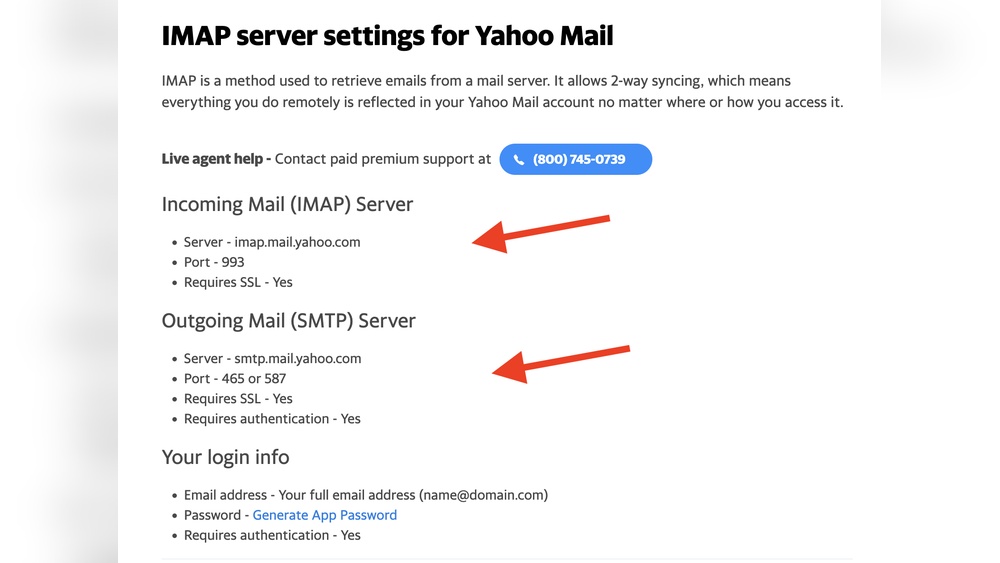
SMTP stands for Simple Mail Transfer Protocol. It is the server used to send emails. SMTP host names often start with “smtp.” For example, smtp.example.com.
These servers handle outgoing mail. They ensure your email reaches the recipient’s server. Without the right SMTP host name, sending emails fails.
Imap And Pop3 Host Names
IMAP and POP3 servers receive emails. IMAP allows syncing emails on multiple devices. POP3 downloads emails to one device and removes them from the server.
IMAP host names usually start with “imap.” POP3 host names often start with “pop.” Examples are imap.example.com and pop.example.com.
Choosing the correct host name depends on your email client and preference.
Examples From Popular Email Providers
Gmail uses smtp.gmail.com for SMTP, imap.gmail.com for IMAP, and pop.gmail.com for POP3.
Outlook uses smtp-mail.outlook.com for SMTP and imap-mail.outlook.com for IMAP.
Yahoo Mail uses smtp.mail.yahoo.com, imap.mail.yahoo.com, and pop.mail.yahoo.com.
Knowing these host names makes email setup easier on any device.
Choosing The Right Domain Name For Email
Choosing the right domain name for email is very important. It affects how people see your messages. A clear domain name builds trust. It also helps your brand stand out. Picking a good domain name can make your email look professional and reliable. Here are some tips to guide you.
Tips For Selecting Domain Names
Keep the domain name short and easy to remember. Use simple words that are easy to spell. Avoid numbers and special characters. Choose a name that matches your business or personal brand. Make sure it is unique to avoid confusion. Check if the domain name is available before deciding.
Branding And Professionalism
Your domain name is part of your brand identity. It should reflect your business or purpose clearly. A good domain name adds professionalism to your email. It shows you take communication seriously. Using your own domain looks more trustworthy than free email services. This helps build a strong connection with your audience.
Avoiding Common Mistakes
Do not pick names that are too long or hard to spell. Avoid using slang or unusual words. Stay away from names that sound like spam. Avoid domains that are too similar to others. This can cause lost emails or confusion. Always double-check for typos before finalizing your choice.
Troubleshooting Email Issues Related To Host And Domain Names
Troubleshooting email problems linked to host and domain names is key for smooth communication. Issues with these names can stop emails from sending or receiving properly. Understanding where the problem lies helps fix it faster. This section explains common errors and how to diagnose them.
Common Errors And Their Causes
Email errors often come from wrong host or domain settings. A common issue is a misspelled domain name. It causes emails to bounce back or not send at all. Another problem is an incorrect host name, which can block email servers from connecting. Expired domain registrations or DNS misconfigurations also lead to email failures.
Checking Dns Settings
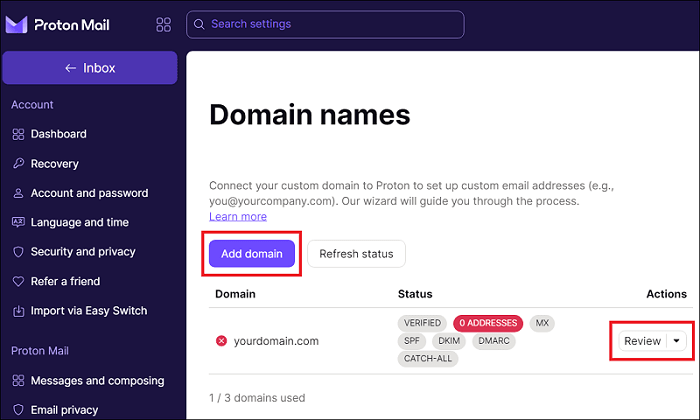
DNS settings control how your domain directs email traffic. Start by verifying the MX records. These records tell email servers where to deliver messages. Incorrect MX entries cause delivery delays or failures. Also check SPF, DKIM, and DMARC records. These protect your domain from spoofing and help pass spam filters.
Tools For Diagnosis
Online tools simplify email issue diagnosis. Use DNS lookup tools to check MX and other DNS records. Email testing services can simulate sending and receiving emails. These tools show if your domain and host names are set correctly. They reveal blocked ports or misconfigured security settings.
Security Considerations
Email security starts with understanding host names and domain names. These elements identify where emails come from. Protecting them helps keep your email safe. Without proper care, hackers can misuse your domain or host name. This can lead to phishing, spam, or worse.
Strong security measures reduce risks. They build trust with recipients. Focus on key steps to protect your domain and host name. Also, learn how to stop email spoofing. These actions keep your email communication secure.
Protecting Domain Names
Register your domain with a trusted provider. Use strong passwords for your domain account. Enable two-factor authentication for extra security. Regularly check your domain’s status. Watch for unauthorized changes or transfers. Keep your contact information up to date. This helps recover your domain if needed.
Secure Host Name Practices
Choose reliable hosting services with good security. Use SSL certificates to encrypt data. Keep server software updated. Disable unused services to reduce risks. Monitor server logs for suspicious activity. Limit access to your host name settings. Only trusted users should manage these details.
Preventing Email Spoofing
Set up SPF records to specify allowed email servers. Use DKIM to add a digital signature to emails. Implement DMARC to instruct how to handle fake emails. These protocols help verify your email’s origin. They reduce chances of your domain being spoofed. Test your email setup regularly for errors.
Credit: www.lrswebsolutions.com
Credit: proton.me
Frequently Asked Questions
What Is A Host Name In An Email Address?
A host name identifies the server hosting your email service. It directs email traffic to the correct mail server for delivery and retrieval. It is part of the domain name system (DNS) that ensures emails reach their intended destination securely and efficiently.
How Does A Domain Name Work In Email?
A domain name represents the email provider’s website or server location. It follows the “@” symbol in an email address and helps route emails to the correct organization or individual. It is essential for email authentication and branding purposes.
Why Are Host Name And Domain Name Important In Email?
Host name and domain name ensure accurate email delivery and security. They help mail servers identify and communicate with each other, preventing spam and phishing attacks. Proper configuration improves email reliability and user trust in digital communication.
Can I Use Any Domain Name For My Email?
You must register a unique domain name to use it for email. The domain should be properly configured with DNS records for email services. Using a recognizable domain name enhances professionalism and trustworthiness in communications.
Conclusion
Understanding host names and domain names helps you use email better. The host name shows the specific server handling your email. The domain name tells where your email belongs on the internet. Together, they make email communication clear and organized.
Knowing these terms makes setting up and managing email easier. Keep these basics in mind for smoother email use every day. Simple ideas, big help.


