
Are you diving into the world of WordPress and stumbling upon terms like “header.php”? If you’re eager to understand what it is and why it matters, you’re in the right place.
The header. php file might sound technical, but it’s a vital part of your WordPress theme that can transform your website’s look and functionality. Imagine being able to customize the very first impression your visitors get when they land on your site.
That’s the power of header. php. We’ll break down everything you need to know about header. php in WordPress, demystifying its role and showing you how to use it to your advantage. Get ready to unlock the secrets of this essential file and take control of your site’s design and performance. Keep reading to discover how you can enhance your WordPress experience with just a few tweaks.
Header.php File Purpose
The header.php file in WordPress is very important. It holds the top part of your website. This part is the same on all pages. It usually has the site’s logo, title, and menu.
This file helps your website look the same everywhere. It makes sure everything is in the right spot. It also includes links to stylesheets and scripts. These links help your site look nice and work well.
Developers use header.php to add custom code. This makes websites unique and special. Making changes here can affect the whole site. So, it’s important to be careful with it.
Credit: crocoblock.com
Structure Of Header.php
The header.php file is important in WordPress themes. It helps to create the top part of a website. This section usually contains the site logo, navigation menu, and other key elements. The file begins with a DOCTYPE declaration. This tells browsers the type of document. Next, it includes the HTML opening tag. Within the head section, you find meta tags and link tags. These are used for setting up styles and scripts. The wp_head() function is essential. It allows plugins to add their scripts or styles. Lastly, the body section follows. This is where the main content begins. The structure is simple but very powerful. It helps to shape the look of your site. These parts together make the header.php file very important.
Key Elements In Header.php
Meta tags are very important. They give information about the page. These tags help search engines understand the page. They include keywords and descriptions. This helps in ranking better. Meta tags are placed in the head section.
Link tags are used for adding styles. They connect to CSS files. These tags make the page look nice. You can change the colors and fonts. This makes your site unique. Link tags are also in the head section.
Script tags are for adding JavaScript. They help in making the page interactive. You can create menus and slideshows. This makes the site fun. Script tags are usually at the end of the head section.
Credit: kinsta.com
Customizing Header.php
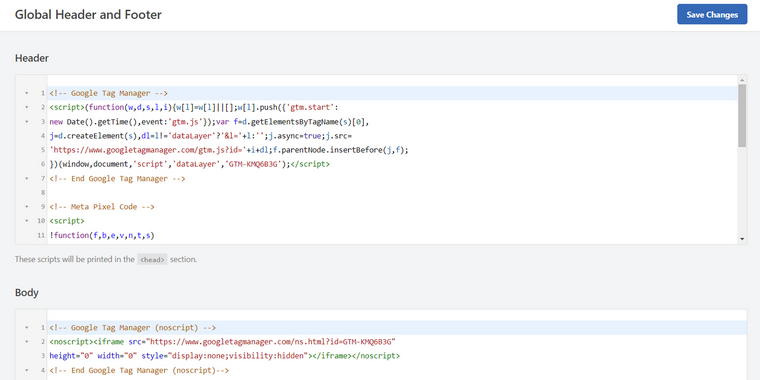
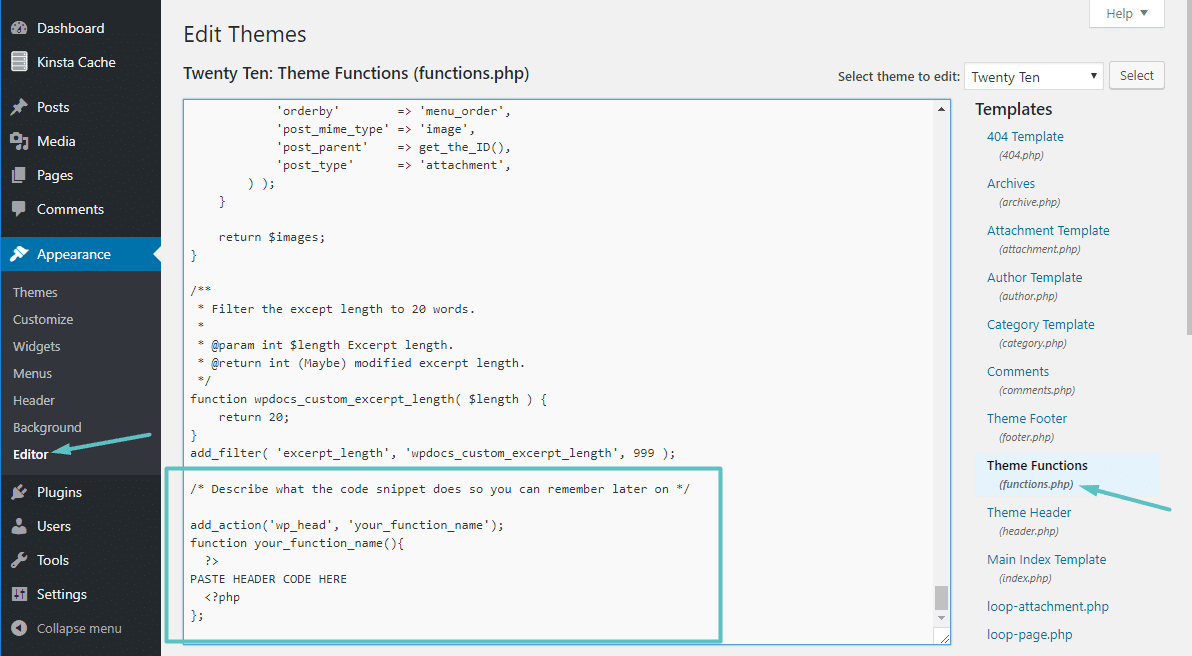
The header.php file in WordPress can be customized. You can add your own code. This helps change how your site looks. Insert custom scripts or styles. This is useful for adding tracking codes. Or maybe a special logo. Make sure to save your changes. This way, your site will look unique.
You can change the existing code in header.php. This helps modify the site’s header design. You might want to change the background color. Or maybe adjust the font size. Remember, small changes can make a big difference. Always backup your original file first. This keeps your site safe from errors.
Common Issues With Header.php
Syntax errors are common in header.php. A missing semicolon can break your site. Always check your code for mistakes. Look for misplaced commas and brackets. Proper formatting helps avoid errors. PHP code needs to be clean and precise. Test your changes often to catch errors early.
Missing elements can cause problems in header.php. If a title tag is missing, search engines can’t find your page. A missing meta tag affects SEO. Always ensure all important tags are present. Check the code for missing elements regularly. Proper structure is key for a functioning site.
Best Practices
Explore the essential ‘Header. php’ file in WordPress. It controls the top section of your site, including scripts and metadata. Proper use ensures a well-structured and SEO-friendly website.
Backup Before Editing
Always create a backup of your website before making changes. Backups save your work. Mistakes happen. A backup will help fix them. Use a plugin for backups. Many plugins are free. Some plugins offer easy backup options. Use them wisely. Keep your website safe.
Use Child Themes
Using child themes is smart. Child themes keep your changes safe. WordPress updates won’t break them. Create a child theme first. It copies the main theme. Then make changes to the child. This way, updates don’t erase your work. Child themes are easy to use. Many tutorials can help. Protect your customizations.
Tools For Editing Header.php
Code editors make editing files easy. They highlight code and help find errors. Popular choices include Visual Studio Code and Sublime Text. These editors are user-friendly and free. They support many programming languages. Plugins add extra features. This helps in coding faster and smarter. Each editor has unique benefits. Choose one based on your needs. Some like Notepad++ are lightweight. Others, like Atom, are customizable. Code editors are essential for developers.
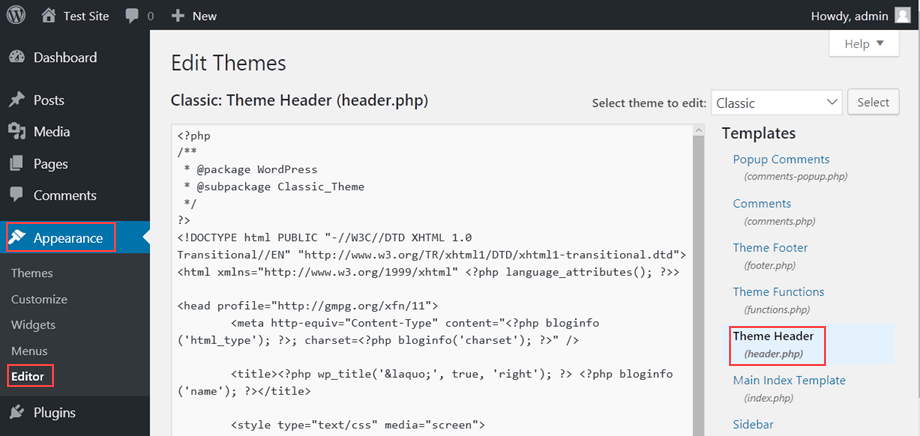
The WordPress Dashboard is another tool for editing header.php. Access it through the admin panel. Navigate to “Appearance” and then “Theme Editor”. Find header.php in the list of files. Make changes directly in the dashboard. Be careful. Mistakes can break your site. Always back up files before editing. This ensures safety. Use the dashboard for quick edits. It’s convenient and part of WordPress. Some prefer it for simplicity. Others use it for minor tweaks.
Credit: www.hostpapa.com
Frequently Asked Questions
What Is Header.php Used For In WordPress?
Header. php is a crucial file in WordPress themes. It contains code for the site’s header section, including metadata, links to stylesheets, and scripts. It establishes the visual and functional elements at the top of your website, ensuring consistency across pages and enhancing user experience and SEO.
How Do I Edit Header.php In WordPress?
You can edit header. php via the WordPress dashboard. Navigate to Appearance > Theme Editor, then select header. php from the list of theme files. Make necessary changes carefully to avoid errors. It’s advisable to use a child theme to preserve edits during theme updates.
Can Header.php Affect My Site’s Seo?
Yes, header. php can impact SEO. It includes metadata, which search engines use to understand your site’s content. Properly structured metadata can improve your site’s visibility. Additionally, header. php houses links to CSS and JavaScript files, affecting page load speed, a crucial SEO factor.
Is It Safe To Modify Header.php?
Modifying header. php is safe if done correctly. Use a child theme to prevent losing changes during updates. Always back up your site before editing. Incorrect modifications can lead to display issues or broken functionality, so ensure you understand the code before making changes.
Conclusion
Understanding header. php is vital for WordPress customization. It controls the top section of your site. This file manages important elements like logos and navigation. By editing it, you can change your website’s look and feel. Remember, always back up your files first.
Experimenting with header. php can enhance user experience. It’s a simple way to personalize your site. Start small and see the impact. Enjoy creating a unique website with this tool. Learning its basics can make your WordPress journey smoother and more enjoyable.
Dive in and explore the possibilities today!



