
Ever scrolled to the bottom of a website and noticed that small section filled with links and information? That’s what we call the footer.
If you’re using WordPress, understanding footer text can be a game-changer for your site. Imagine turning those few lines at the bottom into a powerhouse of information that boosts your website’s credibility and keeps visitors engaged. Curious about how this small section can have such a big impact?
You’re in the right place. By mastering the art of footer text in WordPress, you can enhance user experience, improve navigation, and even strengthen your SEO efforts. Ready to unlock the potential of your website’s footer? Let’s dive into the details that could transform your WordPress site from good to great.
Credit: www.wpbeginner.com
Understanding Footer Text
Footer text is the text at the bottom of a webpage. This area can show important information. Examples include contact details, copyright notices, and links to other pages. Many websites use footer text to offer quick access to vital sections.
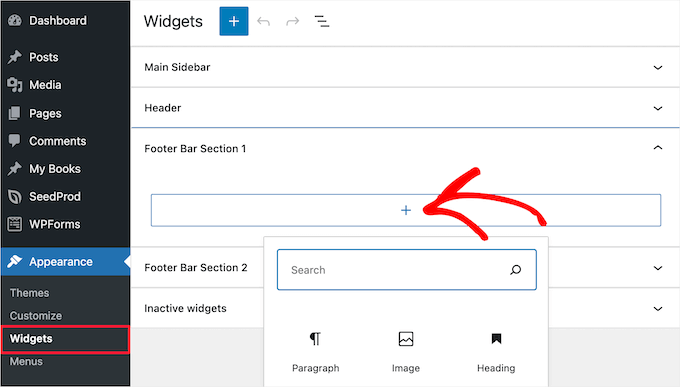
In WordPress, footer text is usually managed from the theme settings. Some themes offer an easy way to change it. Users can also add custom text or widgets in the footer area. This helps make the website more personalized and user-friendly.
Credit: www.crazyegg.com
Importance Of Footer Text
Footer text can make a website feel complete. It gives extra information to the visitors. You can add contact details, links, and social media icons here. This helps users find what they need. Clear footer text makes the site easy to use. It can guide visitors to important pages. When users know where to go, they feel happy. Happy users stay longer and explore more.
Footer text is good for SEO. It can have important keywords. Search engines notice these keywords. This helps the site show up in search results. You can link to other pages from the footer. This creates a strong link structure. A strong link structure is important for SEO. Search engines like well-organized sites. So, smart footer text can help your site rank better.
Default Footer Text
The default footer text in WordPress usually has several parts. Copyright information is often there. It shows who owns the website. Sometimes, there are links to privacy policies. These links help users understand their rights. Contact information can also be in the footer. This helps users get in touch with the site owner.
WordPress allows changes to the footer text. Many themes have settings for this. You can add custom text or links. Some people add social media icons. This makes it easy to share the site. Plugins can help with changes too. They offer more options for the footer.
Customizing Footer Text
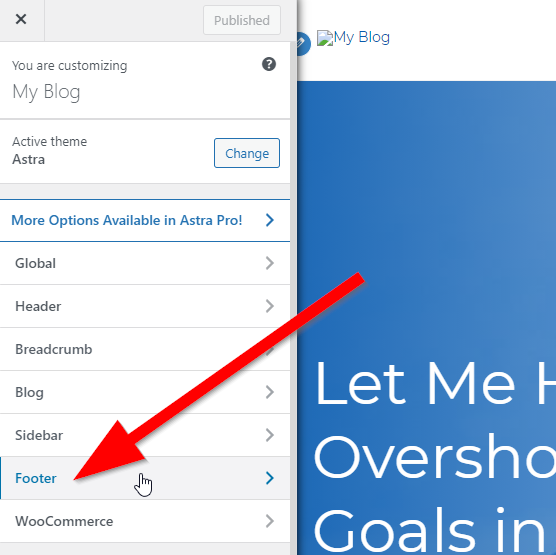
The WordPress Customizer is a simple tool. It helps change the footer text easily. Open your dashboard. Click on Appearance. Then choose Customize. Look for Footer settings. You can type your new text there. It’s quick and easy. Changes appear instantly.
Theme files hold important codes. Find them in the WordPress dashboard. Click on Appearance and then Theme Editor. Look for the footer.php file. Be careful while editing. Wrong changes can break your site. Backup your theme before making edits. Replace old text with new text. Save changes and view your site.
Plugins add extra features. They make changing footer text easy. Search for footer plugins. Install and activate the plugin. Follow the plugin instructions. Add your new footer text. Plugins offer more choices. They are safe and user-friendly. Change your footer without coding. Always update plugins for best results.
Best Practices
Footer text in WordPress appears at the bottom of your website pages. It often contains copyright information, contact details, or links to privacy policies. This section enhances user experience and site navigation.
Keeping It Simple
Footer text should be easy to read. Long sentences confuse readers. Use short, clear sentences. Avoid fancy words. Simple words are best. Keep it neat. A messy footer looks bad. Clean design is key.
Including Essential Information
Important details must be in the footer. Add contact info. Include social media links. Put copyright notice there. Privacy policy is good to add. Terms of service are important too. Don’t forget about accessibility options. Make sure links work.
Common Issues
Sometimes footer text does not show up. This can be very frustrating. Often, display problems come from theme settings. Some themes hide the footer by default. Check the theme settings first. Make sure the footer is enabled. Another reason can be custom CSS. Check if custom styles hide the footer. Remove or edit the styles if needed. Also, check if the footer widget is empty. Add content to ensure it displays.
Plugins can cause conflicts with footer text. Some plugins change how the footer works. Disable plugins one by one. This helps find the conflicting plugin. Update all plugins to the latest version. Sometimes, an update fixes the issue. Check plugin settings for options affecting the footer. Adjust these settings if necessary. Lastly, contact plugin support for help. They can provide solutions for specific problems.
Case Studies
Footer text in WordPress refers to the content displayed at the bottom of a website. It often includes copyright information, links to privacy policies, or contact details. Customizing footer text enhances site branding and provides essential navigation.
Successful Footer Text Examples
Footer text helps users find important links. Amazon uses simple links like “Contact Us” and “Help.” These links guide users easily. Facebook includes links to privacy and terms pages. This builds trust. Google uses footer text to offer quick access to apps. Simple and clear links help users find what they need fast.
Learning From Mistakes
Messy footer text confuses visitors. Too many links can overwhelm users. Avoid small or hard-to-read fonts. Users might miss important links. Avoid long sentences in footers. Keep it simple. Use clear and short words. Group similar links together. This makes navigation easy and fast. Avoid too much information. It can distract users from main content. Learn from others’ mistakes to make better footers.

Credit: www.interserver.net
Frequently Asked Questions
What Is Footer Text In WordPress?
Footer text in WordPress refers to the content displayed at the bottom of a website. It often includes copyright information, links to privacy policy or terms of service, and sometimes branding or contact details. This section can be customized to enhance user experience and improve site navigation.
How Can I Edit Footer Text In WordPress?
To edit footer text, navigate to the Appearance section in your WordPress dashboard. Then click on Customize. Depending on your theme, you can modify footer content through widgets or directly in the footer. php file. Always ensure you save changes to reflect updates on your site.
Why Is Footer Text Important In WordPress?
Footer text is crucial for providing essential information to users. It can include legal disclaimers, important links, and branding details. Additionally, a well-crafted footer can aid in SEO by improving site navigation and offering relevant links to visitors.
Can I Add Links To WordPress Footer Text?
Yes, you can add links to WordPress footer text. This is usually done through widgets or editing the footer. php file. Including links to important pages like contact or privacy policy can enhance user experience and help with SEO by guiding users to relevant content.
Conclusion
Footer text in WordPress holds significant value. It enhances site navigation. It also boosts user engagement. Customizing footer text is simple and effective. You can add contact details, copyright info, or links. This keeps your visitors informed and engaged. Remember to keep it clear and concise.
A well-designed footer can improve your site’s appearance. It can also strengthen your brand’s identity. So, take some time to craft your WordPress footer. A small effort can make a big difference. Happy customizing!



