
Have you ever wondered how some businesses seem to know exactly what you want before you even do? It’s not magic; it’s the power of Facebook Pixel on WordPress.
If you’re running a website and want to tap into this secret weapon, you’re in the right place. Imagine being able to track your visitors’ actions, understand their behavior, and tailor your marketing strategies to meet their needs. Sounds like a game-changer, doesn’t it?
We’ll uncover the mysteries of Facebook Pixel and show you how integrating it with your WordPress site can transform your online presence. Don’t miss out on this opportunity to take your digital marketing to the next level. Keep reading to find out how you can leverage Facebook Pixel to boost your website’s performance and connect with your audience like never before.

Credit: kinsta.com
Facebook Pixel Basics
Facebook Pixel is a helpful tool for businesses. It helps track user actions on a website. This data is important for making smart decisions. Benefits include better ads and understanding customer behavior. It also helps in targeting the right audience. With Pixel, businesses can see what works and what doesn’t. This leads to smarter marketing strategies. Better targeting means using ads wisely. It also saves money. Businesses can improve their sales. Customer insights are essential for growth. Facebook Pixel provides these insights easily.
The Pixel works by placing a small code on a website. This code tracks user activities. Actions like buying or signing up. When someone visits a site, the Pixel records it. The data is sent to Facebook. This helps in creating better ads. Businesses see which ads get more attention. They can change ads based on this data. The Pixel is simple to use. It connects directly with Facebook ads. Tracking is important. It tells businesses what users like. This helps in building strong marketing plans.
Setting Up Facebook Pixel
Facebook Pixel for WordPress tracks user interactions on your site. It helps optimize ad campaigns effectively. Install it easily by adding code to your WordPress theme or using a plugin.
Creating A Facebook Pixel
To start, visit the Facebook Ads Manager. Look for the Create Pixel button. Click it. Name your pixel. Choose a simple name. This helps you remember it. Follow the instructions. They are easy to understand. You only need a few minutes. Then, your pixel is ready. Now, copy the pixel code. You will need this code soon.
Installing On WordPress
Log into your WordPress site. Find the header.php file. Go to Appearance. Then, click on Theme Editor. Paste the pixel code. Put it before the closing tag. Save the changes. Your pixel is now active. Another way to add the pixel is using plugins. Popular plugins make it easy. Search for Facebook Pixel plugins. Install one you like. Follow the plugin steps. It is simple. Your pixel starts working.
Integrating With WordPress
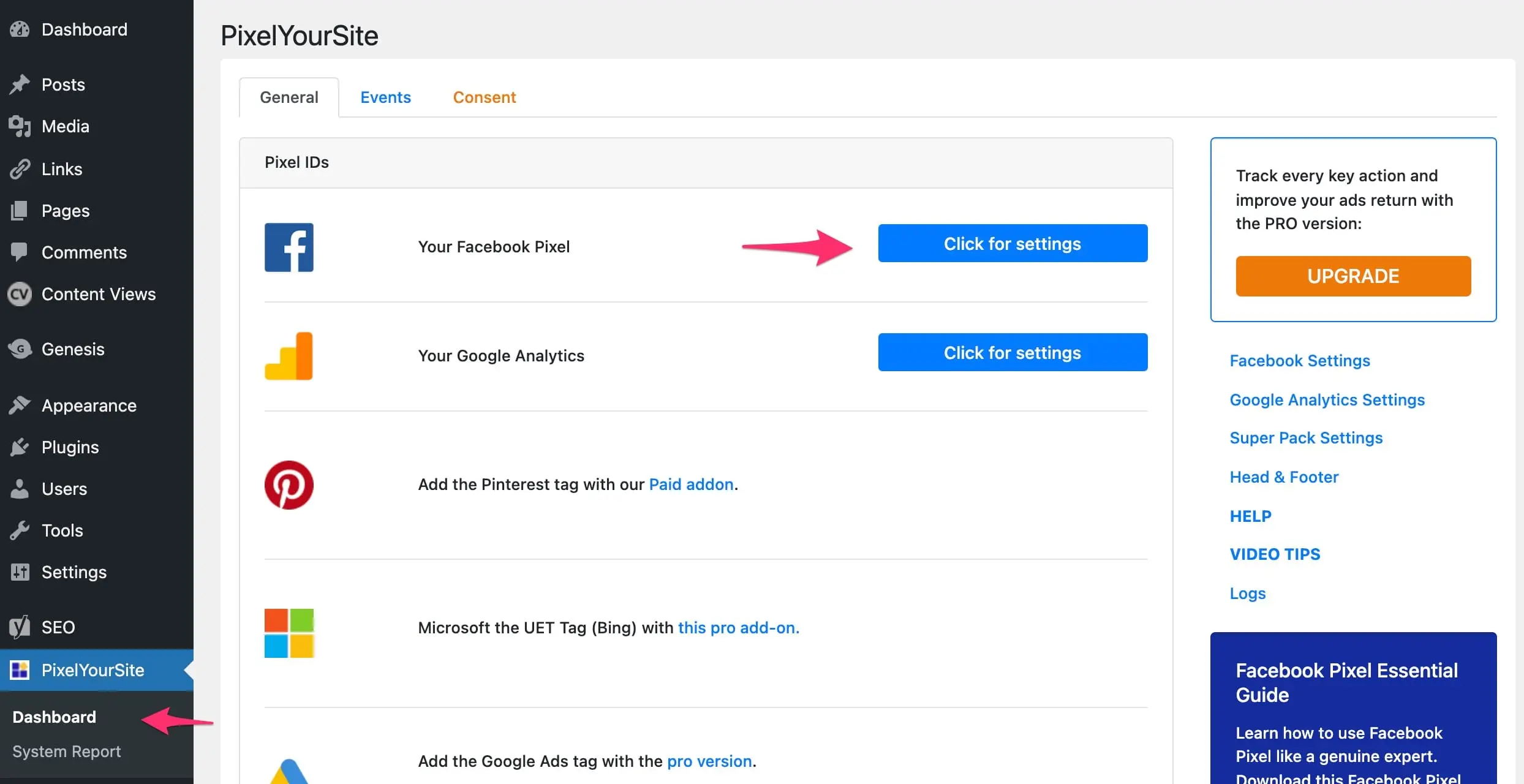
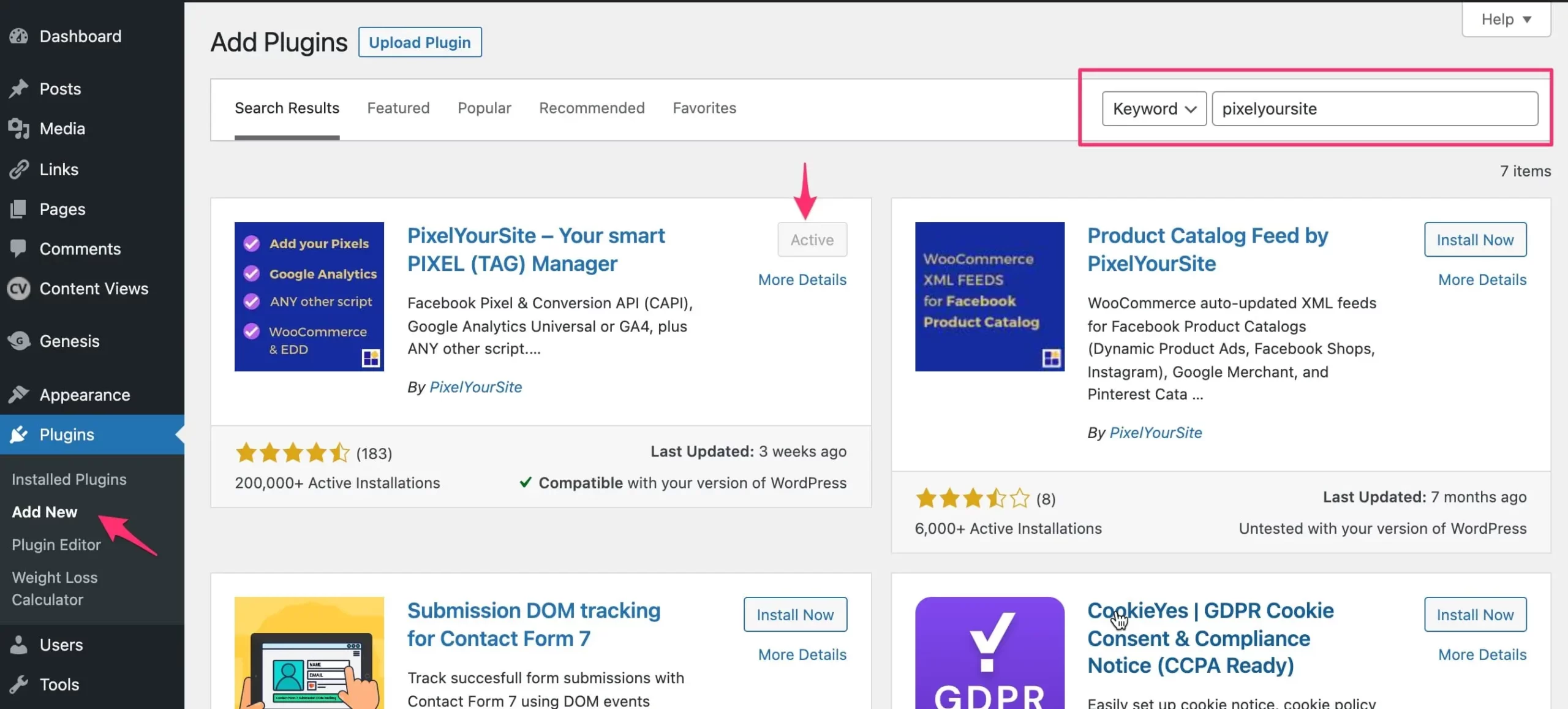
Plugins make adding Facebook Pixel easy. They do the hard work for you. Popular plugins like PixelYourSite can help. First, install the plugin. Then, activate it in WordPress. After that, enter your Pixel ID. The plugin will handle the rest. Now, your site tracks visitors. You can see what they like. It helps improve your business.
Manual setup is another way. Start by getting your Facebook Pixel code. Find this in your Facebook Ads Manager. Copy the code. Next, go to your WordPress site. Open the theme editor. Paste the code in the header section. Save your changes. Your Pixel is now active. This method requires care. Make sure to follow the steps. If done right, it works well.
Tracking And Analytics
Facebook Pixel helps in tracking website actions. It tells what users do. This tool is important for understanding site visits. The performance of ads can be seen. It shows if people take action. Like clicking or buying. It gives a clear picture of user activities.
Data analysis is made easy with Facebook Pixel. It collects useful information. This data shows how ads are working. You can see what works best. It helps in making better ads. Better ads mean better results. Understand your audience well. This leads to smarter decisions.
Optimizing Campaigns
Facebook Pixel for WordPress collects visitor data, helping marketers understand user behavior. This tool enhances ad targeting, making campaigns more effective. Integrating Facebook Pixel with WordPress is easy, optimizing audience engagement seamlessly.
Custom Audiences
Facebook Pixel helps in creating custom audiences. It tracks people visiting your site. This data helps in showing ads to the right users. Ads become more effective with this method. You can focus on people who showed interest before. More chances to engage them again.
Conversion Tracking
Tracking conversions is important for campaigns. Facebook Pixel tracks actions people take. You know when users buy or sign up. This helps in measuring ad success. You can make better decisions on ad spending. More success in reaching goals.
Troubleshooting Common Issues
Facebook Pixel helps track website visitor actions and measure ad effectiveness. Installing it on WordPress can be tricky. Common issues include incorrect code placement, plugin conflicts, or misconfigured settings.
Debugging Errors
Errors can confuse users. Check if your Facebook Pixel is installed correctly. You can use the Facebook Pixel Helper tool. This tool shows if the pixel is active. If errors appear, note them down. Then, visit the Facebook Help Center for solutions. They often have answers to common pixel problems.
Ensuring Accurate Data
Accurate data is key. Double-check your settings. Make sure the pixel ID is correct. Wrong IDs lead to data mismatches. Test events regularly. This helps ensure data is tracked properly. Use the Event Manager in Facebook Ads. It lets you see what events are firing. Adjust settings if data seems off. Regular checks prevent long-term data issues.
Best Practices
Using Facebook Pixel on WordPress requires attention to privacy considerations. It is important to tell users about data tracking. A clear privacy policy helps build trust. Ask for user consent before tracking data. This respects their privacy rights. Secure user data with strong encryption methods. Regular updates to your privacy policy keep it relevant.
Proper setup of Facebook Pixel can improve its effectiveness. Ensure that the Pixel code is installed on every page. This allows for better tracking of user actions. Use events to track specific actions like purchases. These events give more detailed insights. Regularly review Pixel data to understand user behavior. This helps in adjusting marketing strategies for better results.
Credit: www.reliablesoft.net
Credit: www.reliablesoft.net
Frequently Asked Questions
How Does Facebook Pixel Work With WordPress?
Facebook Pixel integrates with WordPress to track user interactions on your site. It helps you understand visitor behavior and measure ad effectiveness. By collecting data, it allows you to create targeted ads and optimize marketing strategies. Installing it on WordPress is simple using plugins or manual code insertion.
Why Use Facebook Pixel On WordPress?
Using Facebook Pixel on WordPress boosts your marketing efforts by tracking visitor actions. It provides valuable insights into user behavior, enabling better ad targeting. This can lead to increased conversions and improved ROI for your campaigns. It also helps in retargeting visitors who didn’t convert initially.
How To Install Facebook Pixel On WordPress?
Installing Facebook Pixel on WordPress is easy with plugins like Pixel Caffeine or Insert Headers and Footers. Alternatively, you can add the pixel code manually to your theme’s header file. Ensure you verify the installation using Facebook’s Pixel Helper extension for accuracy and functionality.
Can Facebook Pixel Improve Ad Targeting?
Yes, Facebook Pixel significantly enhances ad targeting by providing detailed user data. It helps you understand your audience’s preferences and behaviors. This allows you to tailor your ads to specific segments, improving relevance and engagement. Better targeting results in higher conversion rates and more efficient ad spend.
Conclusion
Understanding Facebook Pixel in WordPress helps optimize your marketing efforts. It tracks user actions on your site, giving valuable insights. Installing it boosts targeted advertising, increasing potential customer engagement. Remember to check and update your Pixel settings regularly. This ensures accurate data collection and better ad performance.
By integrating Facebook Pixel, you gain a competitive edge in digital marketing. It’s a simple yet effective tool for growing your business online. Start using Facebook Pixel today for improved results. Enhance your WordPress site’s capabilities with this essential feature.
Make data-driven decisions effortlessly.



