
Imagine having a powerful tool that could transform your website into a vibrant hub of information, attracting visitors and keeping them engaged. That’s exactly what Directory WordPress can do for you.
Are you curious about how it can enhance your website’s functionality? Picture this: a seamless platform where you can list businesses, services, and locations, making it easier for your audience to find exactly what they’re looking for. Whether you’re a blogger, a small business owner, or someone looking to create a community-driven site, understanding Directory WordPress could be your key to success.
Dive into this article to uncover how this tool can elevate your online presence and captivate your audience like never before.
Directory WordPress Themes
Many people like Listify for its easy use. It looks nice and works well. Another choice is MyListing. This theme helps make listings fast. It is also very flexible.
DirectoryPro is great for business sites. It has many useful tools. ListingPro is another top pick. It offers a smooth user experience. Each theme serves different needs. Choose based on your site’s goal.
These themes help make sites quickly. They are easy for beginners. Many themes come with drag-and-drop builders. This makes creating pages simple. Users do not need to know coding.
They also offer customization options. You can change colors and fonts. Many themes are mobile-friendly. This means they look good on phones and tablets. These features help make a website stand out.
Setting Up A Directory Site
First, download the WordPress software from the official site. Follow simple steps to install it on your server. Use a database to store your site’s data. WordPress will ask for database details. Provide them carefully. After installation, log into WordPress dashboard. Your site is now ready for setup. Choose a directory theme that suits your needs. Install the theme from the theme options. Activate the theme to use it. Add necessary plugins for extra features. Plugins make your site powerful. Use them wisely. Follow instructions to set up each plugin. Your site is now ready for customization.
Change the color scheme to match your brand. Choose colors that are easy to see. Edit the logo and header to make your site unique. Add your site’s name and tagline. Customize the navigation menu for easy browsing. Add categories and links to menu. Use widgets to add features to sidebar. Widgets can show recent posts or comments. Create custom pages for your directory. Include an About page and Contact page. Ensure every page has useful content.
Essential Plugins
Plugins make your WordPress directory better. They add many features. Yoast SEO helps your site rank higher. It is very popular. Contact Form 7 lets users talk to you. It’s easy to use. WooCommerce is great for selling things. You can set up a shop quickly. Jetpack gives you site stats and security. It is a trusted choice. Elementor helps design pages. It is simple and fun.
Plugins make your site work better. They add useful tools. BackupBuddy keeps your site safe. It saves your data. WP Super Cache speeds up your site. Your pages load fast. WordFence Security keeps bad people out. It protects your site. Akismet stops spam comments. Your site stays clean. Google Analytics tracks visitors. You see who visits your site.
Monetization Strategies
Membership models help make money from your directory. Offer different levels. Start with a free tier to attract users. Then, introduce paid levels with extra features. Users like exclusive content and ad-free experiences. Make it simple to upgrade. Clear benefits encourage members to pay.
Create a community feeling. People like to feel they belong. Engage with members. Answer their questions. This helps build trust. Happy members will tell others. This grows your directory.
Ads provide a good way to earn. Place them wisely. Do not block important content. Ads should not annoy users. Use banner ads at the top or side. These areas catch the eye. Text ads can blend in with content.
Limit the number of ads. Too many can drive users away. Use relevant ads to keep users interested. Test different placements. See which ones work best. Adjust as needed. Keep user experience in mind. Happy users stay longer.
Seo Best Practices
Keywords are important for SEO. Use them naturally in your content. They help search engines understand your topic. Keep sentences short and clear. This makes reading easy. Readers stay longer on your page.
Images should have alt text. This tells what the image is about. Alt text helps search engines too. It makes your page more accessible.
Meta tags are like summaries. They tell search engines about your page. Use them to describe your content. Make sure they are clear and concise.
Internal links connect pages on your site. They guide readers to more content. This keeps readers on your site longer. Search engines see this as a good sign.
Credit: www.wpdownloadmanager.com
Managing User Submissions
User submissions need careful review before approval. This ensures quality and relevance. First, check for accuracy and completeness. Ensure all required fields are filled correctly. Avoid errors. Next, evaluate the content’s relevance to your directory. Does it fit the theme? Is it helpful? After these checks, decide on approval. Reject submissions that do not meet standards. Give feedback if necessary. Make the process clear and transparent. Users appreciate knowing why submissions are accepted or rejected.
Engaging users keeps them active on your platform. Encourage interactions with comments and ratings. Let users share their views. Organize contests or challenges to spark interest. Offer rewards for active participation. Users love incentives. Use newsletters to inform users about updates. Highlight new submissions or popular content. Keep communication consistent. Users appreciate regular updates. Foster a community feeling. Let users connect with each other. Strong communities grow user loyalty.
Troubleshooting Common Issues
Directory WordPress is a tool for creating business listings. It helps manage contacts and organize information efficiently. Troubleshoot common issues by checking plugin compatibility and ensuring proper installation.
Technical Glitches
Technical glitches can bother users. They slow down website loading. Plugins often cause issues. Conflicting plugins may disrupt site operations. Updating plugins regularly reduces problems. Themes also create conflicts. Choose themes carefully. Ensure they are compatible. Broken links frustrate users. Fix them quickly. Check site links regularly. Security issues are dangerous. Keep software updated. Use strong passwords. Secure sites prevent hacking.
User Experience Problems
Poor user experience drives visitors away. Slow websites annoy users. Optimize images and files for speed. Mobile compatibility is crucial. Most users browse on phones. Ensure your site works well on mobile. Navigation should be simple. Users must find information easily. Clear menus and links help. Cluttered pages confuse visitors. Keep design clean and simple. Focus on essential content. User feedback is valuable. Listen to visitors. Improve based on their suggestions.
Credit: barn2.com
Credit: www.wpbeginner.com
Frequently Asked Questions
What Is Directory WordPress Used For?
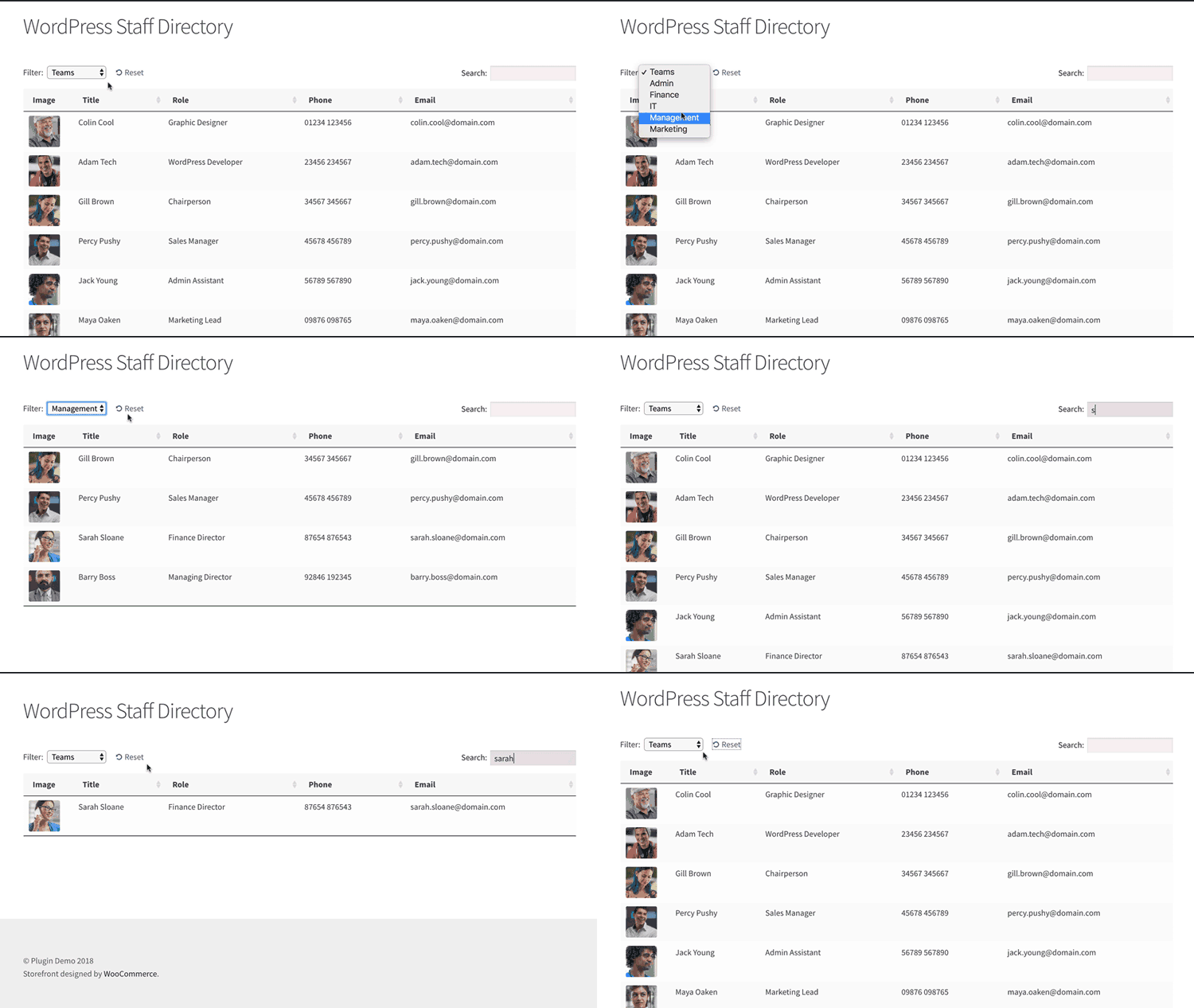
Directory WordPress is used for creating directory websites. These sites list businesses, services, or locations with detailed information. Directory themes and plugins help organize listings efficiently. They can include maps, reviews, and contact forms. Directory WordPress is ideal for business directories, real estate listings, and local guides.
How Does Directory WordPress Work?
Directory WordPress works by integrating themes and plugins for listing management. Users can add, edit, and manage listings easily. It supports custom fields for detailed entries. Maps, ratings, and reviews enhance user experience. Directory WordPress allows monetization through paid listings or advertisements, making it versatile for various industries.
Can I Monetize A Directory WordPress Site?
Yes, you can monetize a Directory WordPress site. Charge users for listing submissions or premium features. Use advertising spaces or affiliate links for extra income. Membership plans can offer exclusive access. Directory plugins provide tools to manage payments. Monetization options are flexible, fitting different business models.
Is Directory WordPress Easy To Set Up?
Yes, Directory WordPress is relatively easy to set up. Many themes offer one-click installation. Intuitive interfaces simplify customization. Plugins enhance functionality without complex coding. Beginners can quickly build directory sites. Online tutorials and community support assist with setup. Even those new to WordPress can efficiently launch a directory site.
Conclusion
Directory WordPress themes simplify online directory creation. They are user-friendly and customizable. Perfect for listing businesses, events, or locations. These themes offer tools to manage listings. Easy navigation attracts more visitors. You can organize content efficiently. Ideal for directory websites.
Choose a theme that suits your needs. Enhance your site’s functionality with plugins. Keep the design clean and responsive. Users appreciate a seamless browsing experience. Regular updates ensure security and performance. Directory WordPress themes are a practical choice. Building a directory site becomes straightforward.
Explore various options and start your project today.



