
Are you diving into the world of WordPress and feeling a bit puzzled by the terms “pages” and “posts”? You’re not alone.
Understanding the difference between these two can be a game-changer for how you present your content and engage with your audience. Imagine having the power to organize your website in a way that not only enhances user experience but also boosts your SEO efforts.
It’s crucial to know when to use a page and when a post is more suitable. This knowledge could be the key to unlocking your site’s potential and making your WordPress site a standout in the digital landscape. Ready to discover how to use these tools effectively? Let’s explore the distinct roles of pages and posts and how they can work together to make your website more dynamic and user-friendly.
Basic Characteristics
Pages are for static content. They don’t change often. Think of them like chapters in a book. Use pages for important information like “About Us” or “Contact”. They don’t show a date or time. Pages are not listed by date. They are outside the normal blog timeline. You can organize pages in a hierarchy. One page can be a parent of another.
Posts are for dynamic content. They appear in reverse order. New posts show first. People use posts for news or updates. They show the date and time of publishing. Posts are part of the blog timeline. You can categorize and tag posts. This makes it easy to find them. Posts encourage user interaction. Readers can comment on posts.
Purpose And Usage
Pages hold static content. They are good for timeless info. Use pages for things like “About Us” and “Contact” details. Pages do not change often. They do not have dates.
Posts are great for news and updates. Posts are for blog entries. They have dates and authors. Posts can be shared and commented on. Use posts to engage with readers.
Pages are ideal for main sections of your site. They show important info. Pages help organize your site. They are easy to find. Use them for key content like services and FAQs.
Posts are ideal for sharing ideas. Write posts for news and stories. Posts keep your site fresh. They build connections with readers. Use them to engage and inform. Posts can be shared easily.
Content Structure
WordPress Pages have a special place. They can be organized in a hierarchical way. This means you can make a Page a parent or a child. A parent page can have many child pages. This helps in creating a neat structure. For example, a school website can have a parent page called “Classes.” Under it, child pages like “Math” or “Science” can exist. This makes navigation easy. Users can find information quickly.
WordPress Posts work differently. They are shown in chronological order. The newest post appears first. This is great for blogs and news sites. People can see the latest updates at the top. Old posts move down the list. This keeps content fresh and up-to-date. It’s useful for sharing timely information. Readers enjoy seeing new content often.
Seo Considerations
Pages on WordPress serve as static content, ideal for timeless information like “About Us. ” Posts are dynamic, used for frequent updates such as blogs. Understanding the difference enhances site structure and improves SEO.
Impact On Search Rankings
Posts can boost your search rankings. They have fresh content. Search engines love fresh content. Pages are static. They don’t change often. Posts are more dynamic. They update regularly. This keeps your site active. Activity helps in search rankings.
Both pages and posts need keywords. Use them wisely. Keywords in titles help a lot. Make sure they fit naturally. Don’t just stuff them in. Keywords in content matter too. This improves visibility. Better visibility means better ranking.
Keyword Optimization
Keywords should match what people search. Simple words work best. Use them in headlines and body. Spread them naturally. Repeating a keyword too much can hurt. Use related terms. They enrich the content. This makes it more relevant.
Keywords should be easy to read. Long words can confuse. Short words are clear. Keep sentences short. This makes the text easy to read. SEO loves clear content. Clear content ranks better.
Customization Options
Pages have more design options than posts. They can use different page templates. Templates change the layout and style of the page. This lets you have a unique look for each page. Pages can be made to look like a portfolio or a contact page. This helps make your website more versatile and professional.
Posts can use formats to change how they look. Formats include standard, audio, video, and gallery. Each format is for a different type of content. A video post will highlight the video. An audio post will focus on sound. Formats help posts stand out and fit their content type.

Credit: amandaschoedel.com
User Interaction
WordPress offers two key content types: pages and posts. Pages provide static content, ideal for timeless information like ‘About Us’. Posts are dynamic entries, perfect for blogs and news updates, appearing in reverse chronological order. Understanding their differences enhances user interaction and content organization on your site.
Comments On Posts
Posts allow users to leave comments. This makes them interactive. Readers can ask questions. They can share thoughts. This builds a community around the post. Posts are great for engagement.
Static Nature Of Pages
Pages are static. They do not have comments. Pages provide information that does not change often. Pages are good for contact details. They suit About Us sections. Pages are not interactive. They stay unchanged over time.
Visibility And Accessibility
Navigation Menus are key for finding pages easily. Pages often appear in menus. They help users find important information. Posts are not in menus usually. Posts are part of the blog roll. Posts are visible on the blog page. Pages stay in fixed places. They are easy to access. Menus help users navigate through pages. Posts are accessed by date or category.
Tagging and Categories help organize posts. Tags group similar posts together. Categories help users find posts by topic. Pages do not use tags. They are not part of categories. Pages are standalone. They hold permanent information. Posts are updated often. Tags and categories make finding posts easy. They create order in content.

Credit: media-studies.com
Content Management
Organizing content is important in WordPress. Pages and posts help with this. Pages are for static content. Like an “About Us” page. They don’t change much. Posts are different. They are for regular updates. Like blog posts or news. This keeps your site fresh.
For updating information, posts are the best. They allow easy updates. You can add new content often. This way, readers get new information. Pages, on the other hand, are not for updates. They are more like a book. Posts are like a newspaper. Both are useful. But they serve different purposes.
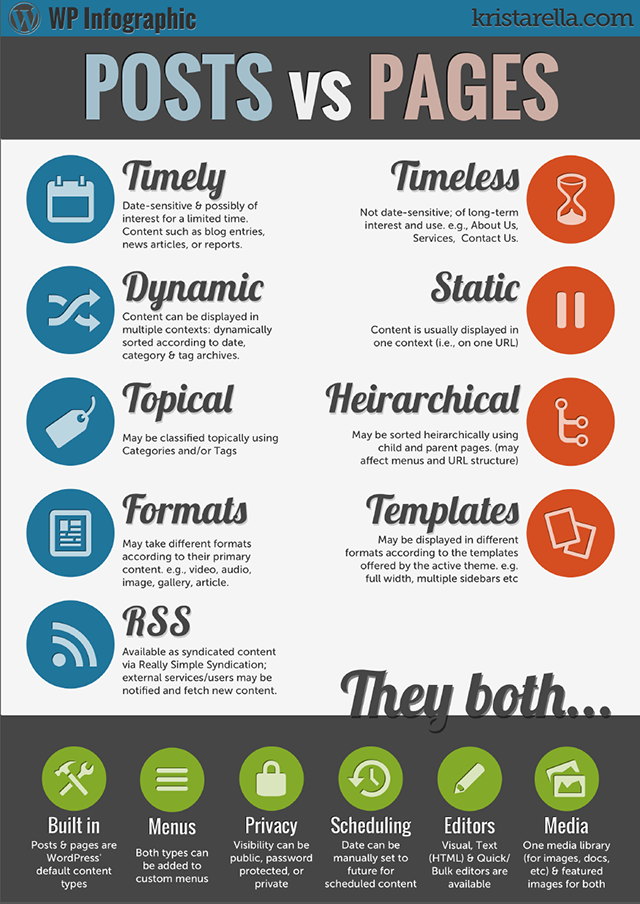
Credit: sites.muscogee.k12.ga.us
Frequently Asked Questions
What Are WordPress Pages Used For?
WordPress pages are used for static content that doesn’t change often. Examples include the About Us, Contact, and Privacy Policy pages. Pages don’t belong to categories or tags, making them ideal for timeless information. They help organize website structure and provide essential information to visitors.
How Are Posts Different From Pages?
Posts are dynamic content that updates frequently, such as blog entries or news articles. They appear in reverse chronological order on the site. Posts can be categorized and tagged, enhancing SEO and helping visitors find related content. Pages, in contrast, are static and hierarchical.
Can Pages Have Categories Like Posts?
No, pages cannot have categories like posts. They are hierarchical and standalone, designed for static content. While posts use categories and tags for organization, pages rely on parent-child relationships. This distinction helps in structuring content and differentiating between blog and permanent site elements.
Should I Use Pages Or Posts For My Blog?
For your blog, use posts. Posts are ideal for regularly updated content and can be categorized and tagged. This improves SEO and helps readers find related articles. Pages are better suited for static content that provides essential information and doesn’t require frequent updates.
Conclusion
Understanding the difference between pages and posts is crucial. Pages are static. They hold timeless content. Think “About Us” or “Contact. ” Posts are dynamic. They update regularly. Perfect for blogs and news. Both have unique roles on WordPress sites.
Use pages for essential, unchanging information. Choose posts for fresh updates and engagement. This balance improves site organization and user experience. Mastering this distinction can enhance your site’s effectiveness. Always plan your content structure thoughtfully. Make sure your website serves its purpose.
Happy blogging!



