
Are you ready to unlock the full potential of your WordPress website? If you’re looking to enhance user experience and give your site a personal touch, understanding custom menus is essential.
Imagine being able to guide your visitors seamlessly through your content, offering them a navigation experience tailored just for them. Custom menus in WordPress allow you to do just that. Whether you’re a blogger, a business owner, or a creative professional, mastering custom menus can make your site more intuitive and engaging.
You’ll discover what custom menus are, how they can benefit you, and how to create them effortlessly. Stick around, and by the end, you’ll be ready to take control of your site’s navigation like never before.
Credit: www.wpbeginner.com
Custom Menu Basics
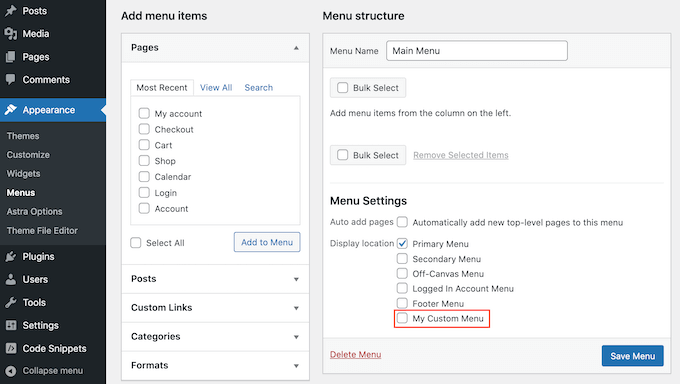
A custom menu helps organize a website. It shows links to important pages. Users can easily find what they need. This menu can include links to pages, posts, or categories. Creating a custom menu is simple. Visit the WordPress dashboard. Click on “Appearance” and then “Menus”. Here, you can add or remove menu items. Use drag and drop to arrange them. This makes your site user-friendly.
Custom menus enhance website navigation. They improve the user experience. Visitors find information quickly. This keeps them on your site longer. An organized menu can also help with SEO. Search engines understand your site better. Custom menus are a great tool for any WordPress site.
Benefits Of Custom Menus
Custom menus make websites easy to navigate. Visitors find pages quickly. They improve user experience. Custom menus help organize website content. They make it simple to add new links. Website owners can control their site’s structure. Menus can be changed anytime. This flexibility is helpful. Custom menus are useful for SEO. They allow you to add important links. These links can lead to better search rankings. Custom menus support branding. You can use colors and styles that match your brand. This helps your site look unique. Custom menus are an essential tool for WordPress users.
Creating A Custom Menu
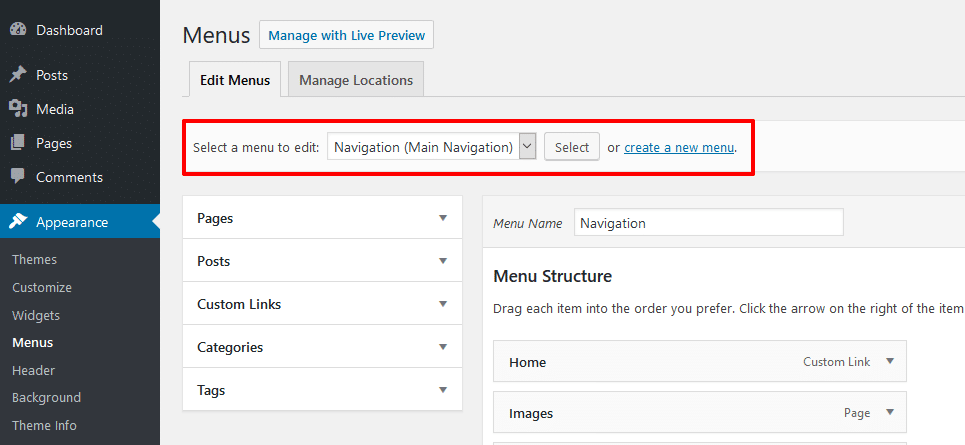
First, go to the WordPress dashboard. Find the Appearance section on the left. Click on it. Then, click on Menus. This is where you create a menu.
Look for the Pages section on the left side. Choose the pages you want to add. Click Add to Menu. They will appear on the right.
To change the order, drag and drop the items. Click and hold the item. Move it up or down. Release it in the new spot. This way you can organize your menu easily.

Credit: stackoverflow.com
Customizing Menu Appearance
Themes can change how your menu looks. Many themes offer options to adjust menu colors and fonts. Some themes even let you add icons next to menu items. Themes are a great way to make your menu unique.
Plugins add special features to your menu. Some plugins allow drop-down menus. Others offer mega menus with many links. Plugins make it easier to create a menu that fits your site.
CSS can change your menu’s style. You can adjust the size, color, and spacing of menu items. CSS allows you to create a menu that matches your website design. You can even add hover effects to highlight menu items. With CSS, your menu can look professional and neat.
Managing Menu Locations
Menus help people find their way around your site. Custom menus in WordPress let you create your own menu. This way, you can pick which pages or links to show. It’s easy to add or remove items from a menu. You can also change their order. This makes your site easier to use.
Each theme in WordPress has its own menu spots. These spots are where menus can go. Some themes have more spots than others. It’s important to put menus in the right spot. This helps visitors find what they need fast. Changing menu locations is simple. Just drag and drop them where you want. This keeps your site looking good and organized.
Credit: themezee.com
Troubleshooting Common Issues
Custom menus in WordPress allow you to organize and display your site’s navigation. Users can easily create and manage links to pages, categories, and other content. This feature helps improve website navigation, enhancing user experience.
Missing Menu Items
Sometimes, you might not see all your menu items. This can be confusing. Check if your menu is saved after you make changes. Visit the WordPress dashboard and look under Appearance, then Menus. Ensure that all items are added and saved. If items are still missing, check if they are set to be visible for all users. Custom user roles can hide menu items from some users. Adjust the settings and refresh your page.
Menu Display Errors
Menus might not show up correctly. This can happen due to theme conflicts. Switch to a default theme like Twenty Twenty-One to test this. Sometimes plugins cause issues too. Disable plugins one by one to find the culprit. Remember to clear your browser cache after changes. This ensures you see the latest version of your menu.
Advanced Custom Menu Features
Custom menus in WordPress let users personalize their site navigation. They offer flexibility to arrange pages, posts, and links. Advanced features enhance user experience, allowing easy updates and management.
Mega Menus
Mega menus show a lot of information in a big dropdown. They help users find content quickly. This feature is great for websites with many pages. Mega menus can include links, images, or even videos. They make navigation easy and user-friendly. Many popular websites use them. They look neat and organized. Users can see everything at a glance.
Dropdown Menus
Dropdown menus save space on a website. They keep the page clean and tidy. Hover over a menu, and more options appear. It’s a simple way to organize content. Users get to their destination faster. Dropdowns can include many levels. They are easy to create in WordPress. Just drag and drop items in the menu editor.
Tips For Effective Menu Design
Menus help users find what they need. They should be easy to read and use. Keep the layout simple. Too many items can confuse users. Group similar items together. Use clear labels for each item. Avoid using long words or complex terms.
Make sure the menu is responsive. It should work on all devices. Try using drop-down menus. They save space and organize content. Choose colors that contrast well. This makes text easy to see. Bold important menu items for emphasis.
Use a consistent style throughout the website. This helps users feel at home. Keep the menu in the same spot on every page. It makes navigation easier. Check your menu often. Ensure all links work properly. A good menu improves the user experience.
Frequently Asked Questions
How Do I Create A Custom Menu In WordPress?
To create a custom menu, navigate to Appearance > Menus. Click ‘Create New Menu,’ name your menu, and add items. Drag and drop items to arrange them. Save your changes to implement the custom menu on your site.
Can I Customize Menu Styles In WordPress?
Yes, you can customize menu styles using CSS. Access the WordPress Customizer under Appearance. Use Additional CSS to add custom styles. This allows you to change colors, fonts, and layout to match your site’s design.
What Is The Purpose Of A Custom Menu?
A custom menu helps organize navigation links. It improves user experience by providing easy access to important pages. Custom menus allow you to highlight specific content, making your website more user-friendly and engaging.
How Do I Add Pages To A Custom Menu?
To add pages, go to Appearance > Menus. Select the menu and choose pages from the list. Click ‘Add to Menu’ and arrange them as desired. Save the changes to update your menu with new pages.
Conclusion
Custom menus in WordPress enhance website navigation. They offer flexibility. Users can organize their content efficiently. This feature supports a better user experience. Simple setup makes it accessible for beginners. Custom menus help tailor site structure. This improves visitor engagement.
Clear menus guide users to important pages. They streamline access to essential information. Website owners can easily adapt menus. This ensures content remains relevant. A well-organized menu boosts site usability. Visitors find what they need quickly. Custom menus are a valuable tool for any WordPress site.
Explore their potential today.



