
Imagine having the power to customize your WordPress site with precision, making every element stand out just the way you want it. If you’ve ever wondered how some websites achieve that seamless, unique look, the answer often lies in the magical world of CSS IDs.
You might be asking yourself, “What exactly is a CSS ID in WordPress? ” And how can it transform your site from ordinary to extraordinary? By understanding CSS IDs, you can unlock new design possibilities and make your website truly your own.
This introduction sets the stage for a deeper dive into how CSS IDs can be your secret weapon for personalization and style. Stick around to learn how to harness this tool and elevate your WordPress experience.
Css Id Basics
CSS IDs are unique identifiers for HTML elements. Each element can have one ID. It’s used for specific styling in WordPress. IDs start with a # symbol.
IDs are different from classes. Classes can be reused. IDs should be unique on a page. This makes IDs powerful for targeting. Using an ID, you can change an element’s look. You can make it bold or change color. IDs are case-sensitive, so be careful.
Always use unique names for IDs. Keep them simple. Avoid spaces and special symbols. This helps in easy identification. IDs enhance the customization of your site. They make it more personal.
Role In WordPress
A CSS ID is a special label in WordPress. It helps to style one element. Each ID must be unique. Using IDs makes changing styles easy. It targets a specific part of a webpage. This gives more control over design. The ID starts with a hash (#) symbol. For example, #header or #footer.
IDs work well with CSS and JavaScript. They help modify looks and functions. You can adjust color, size, and more. This keeps the site looking neat. WordPress themes often use IDs. They make themes flexible. Each theme can have different IDs. This makes customization simple.
Differences Between Id And Class
ID and Class are both used in CSS for styling. An ID is unique. Each ID is for one element only. It helps in giving specific styles. A Class can be used many times. Many elements can share a class. IDs start with a hash (#) sign. Classes start with a period (.) sign.
IDs have more importance than classes. If both are used, ID styles will show. Classes are useful for repeating styles. Use them for multiple elements that look the same. Choose carefully between them. It makes code clean and easy.
How To Identify Css Ids
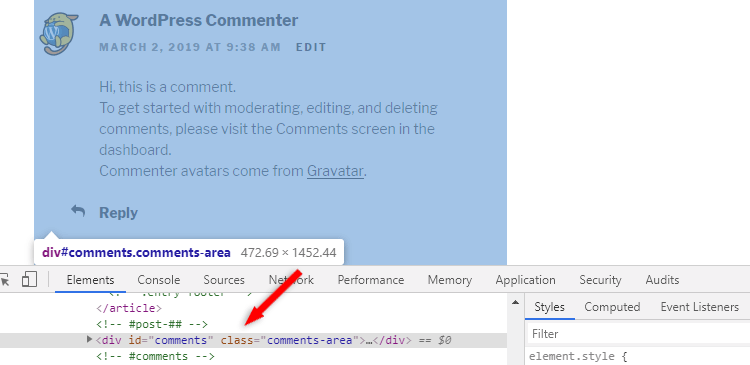
CSS IDs are special names for elements on a webpage. Each ID is unique. You can find them using a web browser. Right-click on the webpage. Choose “Inspect” or “Inspect Element.” A new box will pop up. Look for the “Elements” tab. Here, you can see the HTML code. IDs usually start with a hash symbol (#). For example, #header or #footer.
IDs help style specific parts of a page. They are like labels. Remember, use each ID only once per page. This keeps your website neat. It also helps your CSS work correctly. Try finding IDs on your favorite sites. It’s a fun way to learn. Happy exploring!
Using Css Id In WordPress Themes
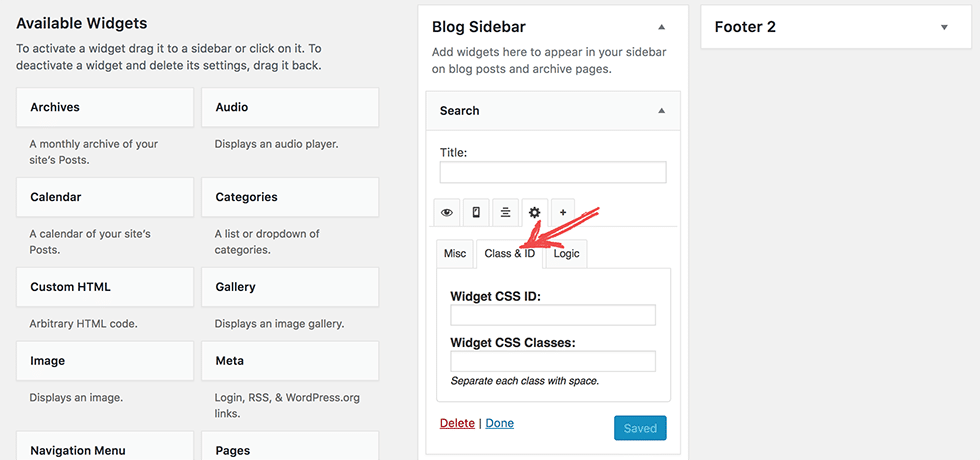
Finding theme files is easy in WordPress. Go to your dashboard. Click on “Appearance”. Then choose “Theme Editor”. Theme files are inside. Look for the “style.css” file. It holds the CSS code. This file helps you edit styles. You might see other files. They have different names. But “style.css” is the main file for styles.
Editing CSS changes how your site looks. You can use CSS ID to style elements. IDs are unique. They start with a “#” symbol. IDs can change colors, fonts, and sizes. Use simple code for changes. Always save your work. Check the site after editing. Make sure everything looks good. You can use a child theme. It keeps your changes safe. This way, updates won’t erase your edits.
Credit: widget-options.com
Customizing WordPress With Css Id
CSS IDs help make your website look unique. They are like name tags for elements. Use them to target specific parts of your page. Make things stand out. Change colors, sizes, and fonts easily. It’s a simple way to give your site a fresh look. No need for coding skills. Just a few changes can make a big difference. Your site will look great in no time.
CSS IDs can improve how visitors use your site. They create a smoother experience. Users find information quickly. Navigation becomes easier. Buttons and links are more visible. It’s all about making things simple. Visitors feel welcome and stay longer. Happy users mean a successful website. Keep them engaged with smart design choices.
Common Mistakes To Avoid
Many people confuse CSS IDs with classes. An ID is unique. Only one element should use it. Classes can be reused. IDs cannot. This is a common mistake. It can cause problems in styling.
Another mistake is using numbers at the start of an ID. This is not allowed in CSS. The ID name must begin with a letter or underscore.
Some forget to check for duplicate IDs. Duplicate IDs break the page style. Always double-check your work. Look for repeats. Fix them as soon as possible. It keeps your design clean and neat.
Remember, IDs should be descriptive. Use clear names. It helps you remember what each ID does. It also helps others understand your code.
Credit: themeskills.com
Tools For Managing Css Ids
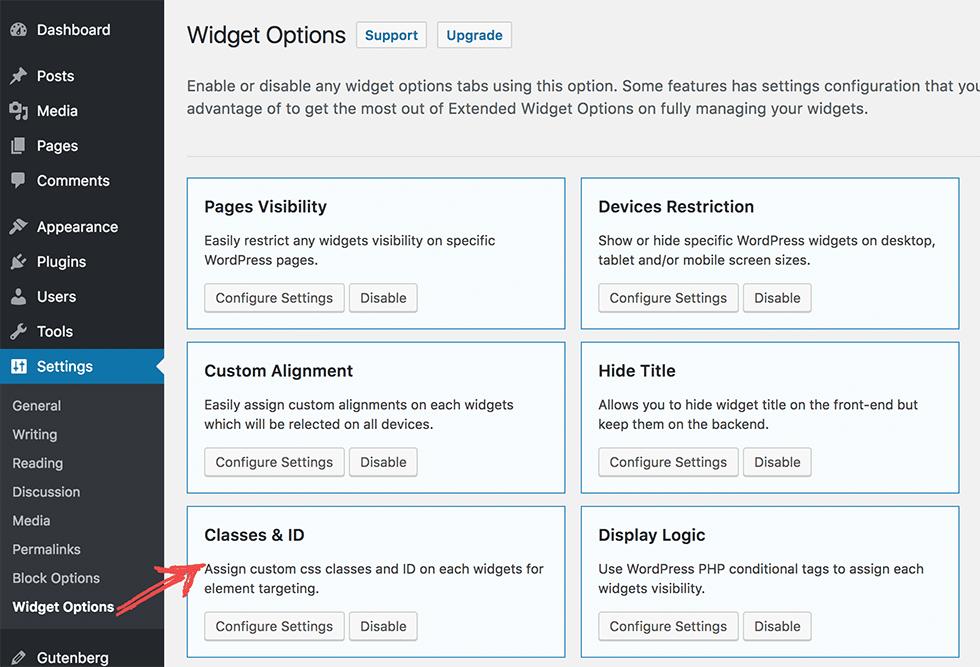
WordPress plugins are helpful for managing CSS IDs. Many plugins offer easy ways to customize styles. They help you change how your site looks without coding. Plugins like Simple Custom CSS allow direct CSS editing. You can add your own CSS IDs here. These tools make styling easier and faster.
Theme editors let you tweak your site’s appearance. Most WordPress themes have built-in editors. These editors help you add CSS IDs. You can access them from the WordPress dashboard. Use the editor to change the CSS ID style. This makes your site unique.
Online CSS generators can be a great help. These tools create CSS code for you. You just select options, and they generate code. Then, copy the code into your WordPress site. This saves time and effort.
Best Practices For Css Id Usage
Always use a unique name for your CSS ID. It helps avoid conflicts. Use names that describe the element’s purpose. This makes your code easy to read. For example, use #header-logo instead of #logo1.
Each ID should be used only once. IDs must be unique. This keeps your CSS and HTML clean. It also helps prevent unexpected behavior. Reusing IDs can lead to styling issues.
IDs are best for specific styling. They override classes. Use them for elements needing unique styles. This ensures clear and effective design changes.
Credit: widget-options.com
Frequently Asked Questions
What Is A Css Id In WordPress?
A CSS ID in WordPress is a unique identifier for styling specific elements. It is used in CSS to apply styles to one particular element. IDs start with a hash (#) symbol followed by the ID name.
How Do You Add A Css Id In WordPress?
To add a CSS ID, go to the WordPress editor. Select the element you wish to style. In the Advanced settings, enter your desired ID name. Save changes to apply the ID.
Why Use Css Ids Over Classes In WordPress?
CSS IDs are more specific than classes and apply to a single element. This specificity is useful for unique styling. Use IDs when you need to target only one element on a page.
Can Multiple Elements Have The Same Css Id?
No, multiple elements should not have the same CSS ID. IDs are meant to be unique for each element. Using duplicate IDs can lead to unexpected styling behavior.
Conclusion
Understanding CSS IDs in WordPress can enhance your site’s design. They help you style specific elements effectively. You can create unique looks for your site sections. CSS IDs offer precision in customization. They’re simple to use once you get the hang of it.
Experiment and see what works best for your needs. Remember, practice makes perfect. With time, using CSS IDs will become second nature. Keep exploring and learning. Your WordPress skills will grow steadily. Happy designing!



