
Are you looking to supercharge your WordPress website without the hassle? Imagine having a tool that streamlines your site-building process, offering powerful features right at your fingertips.
Crocoblock might just be the game-changer you need. It promises to transform your WordPress experience, making it easier and more efficient to create a website that stands out. But what exactly is Crocoblock? And why should you consider using it for your next project?
Dive into this article to uncover the secrets behind Crocoblock’s innovative offerings and see how it can elevate your digital presence. Your journey to a more dynamic website starts here—don’t miss out!
Crocoblock Overview
Crocoblock is a tool for WordPress users. It helps build websites fast. It offers many plugins and widgets. Users can make pages easily with drag-and-drop. No coding needed. This makes website building simple. Many people use it for business sites. It works well for blogs too.
It has a JetPlugins set. These plugins add functions to sites. They make sites more fun to visit. Users can add forms, pop-ups, and sliders. This makes the site look cool. Crocoblock also helps with design. Users can choose from many templates. These templates save time. They look nice and are easy to use.
Crocoblock supports Elementor and Gutenberg. These are popular builders. They make editing simple. Users can change text, pictures, and colors. This makes sites unique. Crocoblock is a helpful tool for making sites better.
Credit: 10web.io
Key Features
JetPlugins Suite has many tools for WordPress sites. Builders use them to make sites better. They help with design and functions. JetPlugins offers many options for customization. Each plugin has a special job. Some focus on forms, others on animations. This makes site building simple and fun.
Design Customization is easy with Crocoblock. You can change how your site looks. Use different colors and layouts. Drag-and-drop tools make it quick. No need for coding skills. This helps you build a unique site. One that stands out and matches your style.
Dynamic Content makes sites interactive. It helps show new content easily. Use it for blogs, stores, or portfolios. Dynamic widgets update content fast. This keeps your site fresh and interesting. Visitors enjoy a lively experience. They stay longer and come back often.
Jetplugins Breakdown
JetElements is a powerful plugin for your WordPress site. It adds many creative widgets. You can use these to build a beautiful website. There are widgets for sliders, banners, and more. Customizing them is easy. You don’t need coding skills. You simply drag and drop. It’s a fun way to make your site look great.
JetEngine helps create dynamic content. You can build custom post types and taxonomies. Use it to show listings, maps, and grids. It makes your website more interactive. It’s perfect for complex sites. No need for coding knowledge. Everything is visual. It’s user-friendly and flexible.
JetSmartFilters lets users find what they want quickly. It provides advanced filtering options. Users can filter by price, category, or tags. This is helpful for online shops. It makes shopping easier and faster. The filters are fast and easy to set up. They work smoothly on all devices.
Installation Process
Crocoblock needs a few things to work well. First, a WordPress version of 5.0 or higher is necessary. Second, PHP should be 7.0 or above. Also, make sure your MySQL version is 5.6 or newer. Your server must support HTTPS. These are the basic needs for running Crocoblock smoothly.
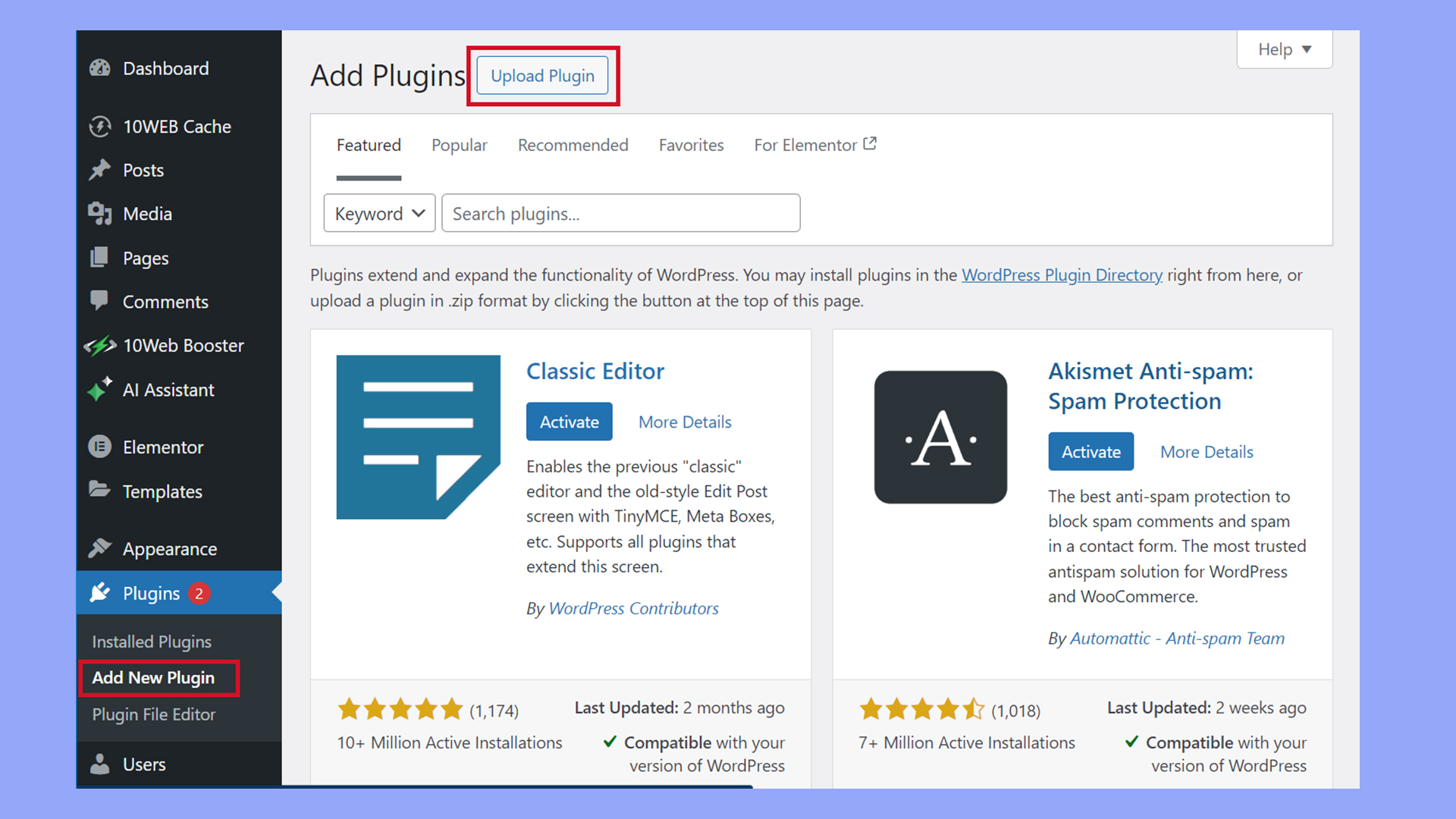
Start by logging into your WordPress dashboard. Click on “Plugins” and choose “Add New.” Then, upload the Crocoblock plugin zip file. Click “Install Now” and wait. Once installed, click “Activate” to turn it on. Follow any on-screen steps to finish setup. Your Crocoblock is now ready!
Customization Options
Crocoblock offers easy integration with various themes. Users can choose from a wide range of options. This allows for seamless design matching. No need to worry about compatibility issues. Every tool works well together.
The styling flexibility is impressive. Users can adjust colors, fonts, and layouts. These features help make each website unique. It’s all about creating a personalized experience. You can make changes without coding skills. This makes it accessible for everyone.
Use Cases
Crocoblock WordPress plugins are ideal for creating dynamic websites with ease. They offer tools for building custom layouts, adding interactive elements, and enhancing e-commerce functionality. Crocoblock simplifies the process of designing feature-rich WordPress sites without coding skills.
E-commerce Sites
Crocoblock offers tools for building online stores. It helps create product pages easily. You can use it to manage inventory and sales. It also assists in designing user-friendly checkout processes. Your store will look professional with its templates. These tools help in making your store run smoothly. You can focus more on your products.
Portfolio Websites
Artists and designers can showcase their work with Crocoblock. It provides templates for a clean and modern portfolio. You can customize the look to fit your style. The drag-and-drop feature makes it easy to use. You can highlight your best work quickly. This helps impress potential clients.
Blog Platforms
Starting a blog is simple with Crocoblock. It offers tools to design engaging blogs. You can write and post content with ease. The layout is clean and attracts readers. You can also manage comments and interactions. This helps you build a community around your blog.
Benefits Of Using Crocoblock
Crocoblock makes your website look nice. It gives many design options. You can change colors and styles easily. Users will find your site easy to use. They will enjoy browsing. This means more happy visitors. They might stay longer on your site.
Crocoblock helps your site load fast. A quick site keeps users happy. Slow sites make people leave. You do not want that. With Crocoblock, everything works better. Webpages load faster. This is good for your site. People will visit more often.

Credit: crocoblock.com
Pricing And Plans
The Single Site License is perfect for small projects. It offers all essential features. You can use it on one website. This plan is great for beginners. Simple and easy to manage. It is budget-friendly.
Unlimited Sites Package allows you to use it on many websites. It suits agencies and developers. Perfect for those with multiple projects. You get more value with this plan. Easy to handle many sites at once. All tools are included.
Customer Support
The Help Center is a big part of Crocoblock’s support. It has many articles and guides. These help you fix problems. Learn new things too. Information is clear and easy to read. You can find answers quickly. Many users like this feature. It saves time. It helps solve issues fast. The Help Center is updated often. This makes it very useful. People appreciate the help it gives. Users feel supported when they use it.
The Community Forum is a place to talk with others. Ask questions and get advice. Share tips and tricks too. Many people join the forum. They like to help each other. It is a friendly place. You can learn a lot here. The forum is active and lively. People post new topics often. You can read and join in. Meet other users here. Make new friends. Help and be helped. It’s a great resource for everyone.
Alternatives To Crocoblock
Elementor Pro helps to create beautiful websites. It offers a drag-and-drop feature. This makes building easy and fun. Users can design pages without coding. Elementor Pro has many widgets. You can add forms, buttons, and galleries. It works smoothly with many themes. Users love its speed and flexibility. The live editing feature is a highlight. You see changes as you make them. This saves time and effort. Elementor Pro is popular among beginners and experts. It is a great tool for WordPress users.
Beaver Builder is another great choice for WordPress. It is easy to use and very reliable. Users can create custom designs with ease. Beaver Builder offers a front-end editor. You can see your changes instantly. This makes designing websites quick. It has many modules like sliders and contact forms. Users can build responsive sites fast. Beaver Builder supports many plugins. It is perfect for those who want simple yet powerful tools. Many users trust it for professional website building.

Credit: crocoblock.com
Frequently Asked Questions
What Is Crocoblock Used For?
Crocoblock is a suite of powerful plugins for WordPress. It enhances website functionality, design, and user experience. It’s ideal for creating dynamic content, custom layouts, and interactive elements. With Crocoblock, users can build professional websites without extensive coding skills.
How Does Crocoblock Enhance WordPress?
Crocoblock enhances WordPress by offering advanced features and tools. It provides dynamic templates, custom widgets, and seamless integration. Users can easily create visually stunning and functional websites. Crocoblock’s intuitive interface simplifies complex tasks, saving time and effort.
Can Beginners Use Crocoblock Effectively?
Yes, beginners can effectively use Crocoblock. It’s designed with user-friendly interfaces and intuitive tools. With detailed documentation and support, newcomers can easily navigate and implement features. Crocoblock simplifies complex processes, making it accessible for all skill levels.
Is Crocoblock Compatible With Elementor?
Yes, Crocoblock is fully compatible with Elementor. It integrates seamlessly to enhance Elementor’s capabilities. Users can access additional widgets, templates, and features. This compatibility allows for more creative freedom and customization.
Conclusion
Crocoblock offers tools that enhance your WordPress experience. It simplifies website building with its user-friendly features. Widgets and templates make customization quick and easy. Beginners find it approachable, and experts appreciate its versatility. Regular updates keep your site current. Support options are available for any questions.
Crocoblock’s flexibility suits diverse project needs. It integrates well with other plugins, ensuring smooth functionality. Explore its offerings to see how it fits your website goals. Crocoblock helps create professional sites without the hassle. Try it to see the potential of your WordPress site.



