
Have you ever found yourself staring at your screen, waiting for your WordPress backend to load? It can be frustrating when your site seems to crawl at a snail’s pace.
You’re not alone in this struggle. Many users experience slowdowns, and there are several factors that might be causing these delays. Imagine the relief you’ll feel when you identify and fix the issues. Your productivity will soar, and you’ll have more time to focus on what truly matters: creating great content and engaging with your audience.
This article will guide you through the common culprits behind a sluggish WordPress backend, offering you actionable insights to speed things up. Let’s dive in and discover how you can transform your WordPress experience from frustrating to smooth sailing!
Credit: www.codeable.io
Common Reasons For Slow Backend
Plugins can slow down your site. Some plugins use too many resources. Heavy plugins make your backend slow. They need more memory and processing. Choose plugins that are light and efficient. Fewer plugins mean faster speed.
Old themes can cause problems. They may not work well with new WordPress versions. Update themes regularly. Updated themes run faster. Check for updates often. Keep your theme fresh and optimized.
A large database can slow things down. Too much data takes time to load. Clean up your database. Remove old or unused data. Smaller databases run faster. Regular cleanup helps maintain speed.
Credit: wp-rocket.me
Server And Hosting Issues
Shared hosting can make your website slow. Many websites use the same server. This means they share resources like memory and CPU. If one website uses too much, others get less. Your site might load slowly because of this.
Servers need enough power to run websites well. Limited resources on a server can slow down your site. This includes not enough RAM or processing power. Your site needs these to function smoothly.
The server location matters. If it’s far, your site loads slower. Data travels long distances. Choose a server close to your users. This helps in faster loading times.
Performance Issues With Plugins
Many plugins can fight with each other. This can cause your site to slow down. Always check if plugins work well together. Use a few plugins to avoid issues.
Some plugins add scripts you don’t need. These scripts use extra resources. Remove any plugins that add these scripts. Your site will run faster.
Plugins need regular updates. Delays in updating can cause security risks. They can also make your site slow. Always update plugins on time.
Theme-related Problems
Some themes have bad code. This makes your site slow. They use too many scripts and styles. Your server works harder. This takes more time to load pages. Look for themes with clean code. It will help speed up your site.
Large images slow down your site. They take a long time to load. Use optimized images to fix this. They are smaller in size. They load faster. This makes your site quicker.
Themes need updates. New updates fix bugs and improve speed. Without updates, themes may run slow. They miss out on new features. Always keep your themes updated. It helps keep your site fast.
Database Optimization
Large amounts of data can slow down your site. Old revisions, drafts, and trash items pile up. This data takes up space and resources. Your site will run slower with too much data.
Not cleaning up regularly is a common issue. Old logs, transient data, and unused plugins stay in the database. These unneeded items make your database messy. A messy database affects speed.
Unused tables are a hidden problem. Old plugins leave tables behind. These tables remain even after uninstalling plugins. Keeping them slows the database down. Removing them helps speed up the site.
Impact Of External Scripts
Third-party script delays can slow down your WordPress backend. Many sites use these scripts for ads or analytics. They help track users and show ads. But, they can cause delays. When your site calls these scripts, it waits for a reply. This waiting slows everything.
External API calls are another reason for slow loading. WordPress might call APIs to get data. Each call can take time. If an API is slow, it affects your site. More calls mean more waiting.
Embedded media load can also impact speed. Videos and images from other sites need time to load. Your WordPress waits for these to appear. Large files take more time. This delay can frustrate users. Keeping media files small helps speed things up.
Network And Connectivity Factors
High latency can slow down your WordPress backend. It means data takes longer to travel. Pages take longer to load. This can frustrate users. Check your network speed. Ensure it’s fast and stable.
DNS resolution is how your browser finds websites. Slow DNS resolution delays loading times. Use a reliable DNS service. This can help speed up the process. Ensure your DNS settings are correct.
Bandwidth is the amount of data you can send and receive. Limited bandwidth causes slow loading. This affects your WordPress backend. Upgrade your internet plan if needed. This can improve your site’s speed.
Strategies For Speed Improvement
Outdated plugins can slow down your site. Some themes are heavy and slow. Remove unused plugins to speed up your site. Update your themes to the latest version. Check if a plugin or theme is needed. Always use lightweight themes.
A messy database can cause slow speeds. Use tools that clean databases. Optimize tables to reduce size. Clean old data often. Remove old drafts and spam comments. This keeps your site fast.
CDNs store your site files on many servers. This helps users load pages fast. Files like images are loaded from the nearest server. Choose a reliable CDN for better speed. They help your site handle more visitors.

Credit: www.wpspeedfix.com
Frequently Asked Questions
Why Is My WordPress Admin Area Slow?
Your WordPress admin area might be slow due to heavy plugins, outdated themes, or insufficient server resources. Optimizing images, minimizing database bloat, and disabling unused plugins can help. Consider upgrading your hosting plan or using a Content Delivery Network (CDN) to enhance speed.
Regular maintenance is key to keeping your backend efficient.
How Do Plugins Affect WordPress Speed?
Plugins can significantly impact WordPress speed by consuming server resources. Unnecessary or poorly coded plugins may slow down your site. Regularly audit and deactivate unused plugins. Ensure essential plugins are updated. Prioritize lightweight, well-maintained options for better performance. Always check plugin reviews and ratings before installation to avoid potential issues.
Can Themes Slow Down WordPress Backend?
Yes, themes can slow down your WordPress backend if they’re poorly coded or outdated. Opt for lightweight themes optimized for performance. Regular updates and minimal use of unnecessary features help maintain speed. Avoid bloated themes with excessive features that you don’t need.
Always test theme performance before making it live.
How Does Hosting Affect WordPress Speed?
Your hosting provider plays a critical role in WordPress speed. Shared hosting may limit resources, causing slow performance. Consider upgrading to VPS or dedicated hosting for better speed. Look for hosting providers with optimized WordPress environments. Ensure server location is close to your primary audience for quicker load times.
Conclusion
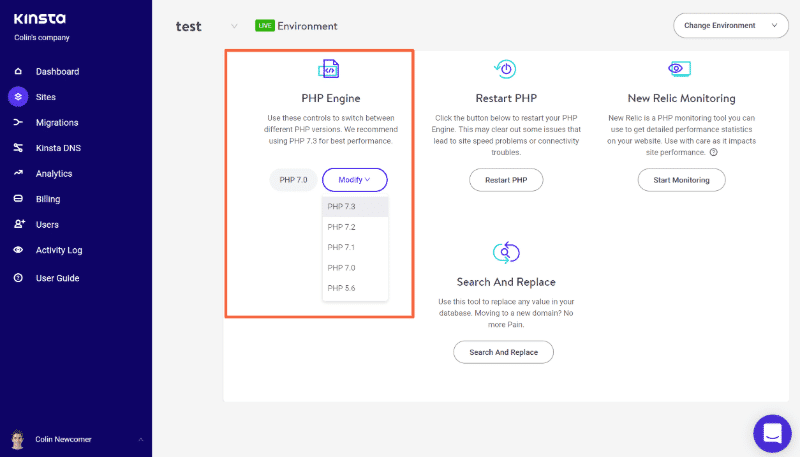
A slow WordPress backend can frustrate users and impact productivity. Common causes include outdated plugins, themes, or PHP versions. Hosting issues also play a big role. Consider upgrading your hosting plan. Optimize your database regularly. Compress images to reduce load times.
Minimize the use of heavy plugins. These steps can significantly improve speed. Always keep your WordPress updated. Fast backend means happier users. And better site performance. Remember, a smooth-running site benefits everyone. With these tweaks, your WordPress experience will improve.
Keep it efficient. Keep it fast.



