
Have you ever wondered why your website might not be performing as well as you’d hoped, despite your best efforts? One crucial aspect you might be overlooking is canonicalization in WordPress.
Understanding canonicalization can significantly improve your site’s SEO and visibility, ensuring that search engines recognize the most relevant content on your site. Imagine this: you’ve poured hours into creating engaging content, but duplicate URLs are confusing search engines. This can dilute your site’s ranking potential and leave your pages hidden in the depths of search results.
By mastering canonicalization, you can guide search engines to the content you want them to prioritize, boosting your site’s performance. We’ll explore what canonicalization means in the context of WordPress, why it’s essential for your site’s success, and how you can implement it effectively. You’ll discover simple strategies to enhance your site’s SEO, ensuring your hard work gains the visibility it deserves. Stick around, and learn how to make your website shine in the crowded digital landscape.
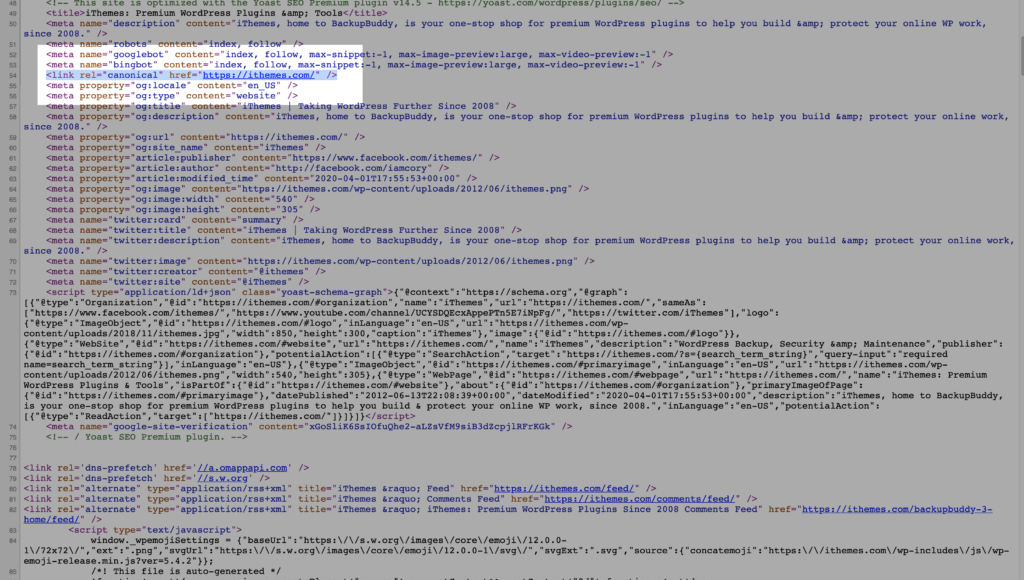
Credit: solidwp.com
Canonicalization Basics
Canonicalization means choosing the right web page version. Search engines use this to know which page is the main one. It helps avoid duplicate content problems. This keeps your site organized. It improves your site’s SEO. If you have two pages with the same content, search engines get confused. Canonical tags tell them which page to rank. This is important for your site’s visibility.
Some think canonical tags fix all SEO issues. This isn’t true. They only help with duplicate pages. Others believe canonical tags are hard to use. In WordPress, they are simple to add. Many plugins can help with this. Some users ignore canonical tags. This can harm your site’s ranking. It’s crucial to use them correctly.

Credit: aioseo.com
How Canonicalization Works In WordPress
WordPress tries to handle duplicate content. It uses canonical tags. These tags help search engines. They know the main page of many similar pages.
Without these tags, search engines get confused. They may not know which page to show. This can affect your site ranking. So, WordPress helps by adding these tags.
Permalinks are the web addresses for your pages. They help users and search engines. They should be clear and descriptive. This way, everyone knows what the page is about.
WordPress lets you change permalinks. This can improve SEO. Use meaningful words in your permalinks. Avoid random numbers or letters. Make sure they are easy to read.
Common Canonicalization Issues
Duplicate content can confuse search engines. They might not know which page to show. This can hurt your website ranking. Having the same content on different URLs is a big problem. It splits the page authority. Make sure each page has unique content. This helps search engines find the right page.
Different URLs can show the same page. This is confusing for search engines. Sometimes URLs have extra details. Like session IDs or tracking codes. These make each URL look different. But the content is the same. Use a canonical tag. It tells search engines which URL is the main one. This keeps your content organized and easy to find.
Implementing Canonicalization Techniques
Canonicalization in WordPress helps manage duplicate content by directing search engines to a preferred URL. This technique improves SEO by ensuring content consistency, thus enhancing search engine rankings. Implementing canonical tags in WordPress can streamline content management and improve website performance.
Using Plugins For Canonical Tags
Plugins make canonicalization easy in WordPress. They help avoid duplicate content issues. Yoast SEO and All in One SEO Pack are popular plugins. These plugins add canonical tags to your pages. This tells search engines the preferred version of a page. Installation is simple. Go to your WordPress dashboard and search for these plugins. After installing, activate them. Then, navigate to the plugin settings. Here, enable canonical tags.
Manual Code Adjustments
Manual adjustments need some coding knowledge. Open your WordPress theme files. Look for the header.php file. You can add canonical tags here. Use the tag. Replace “URL” with your page’s address. Save changes to update your site. This way, you control which page is preferred.
Best Practices For WordPress Canonicalization
Using the same URL structure is important for SEO. Ensure URLs are clean and clear. Avoid using long or confusing URLs. Use hyphens to separate words in URLs. This helps search engines understand the page. Avoid underscores as they can confuse search engines. Always use lowercase letters in URLs. This helps maintain consistency across the site.
Check your site regularly for URL issues. Use tools to find broken links. Fix them quickly to avoid problems. Monitor changes in URL structures. This helps keep the site running smoothly. Regular audits ensure everything is in order. They help you find and solve issues early. Keep track of updates and changes on the site. This will help improve SEO over time.
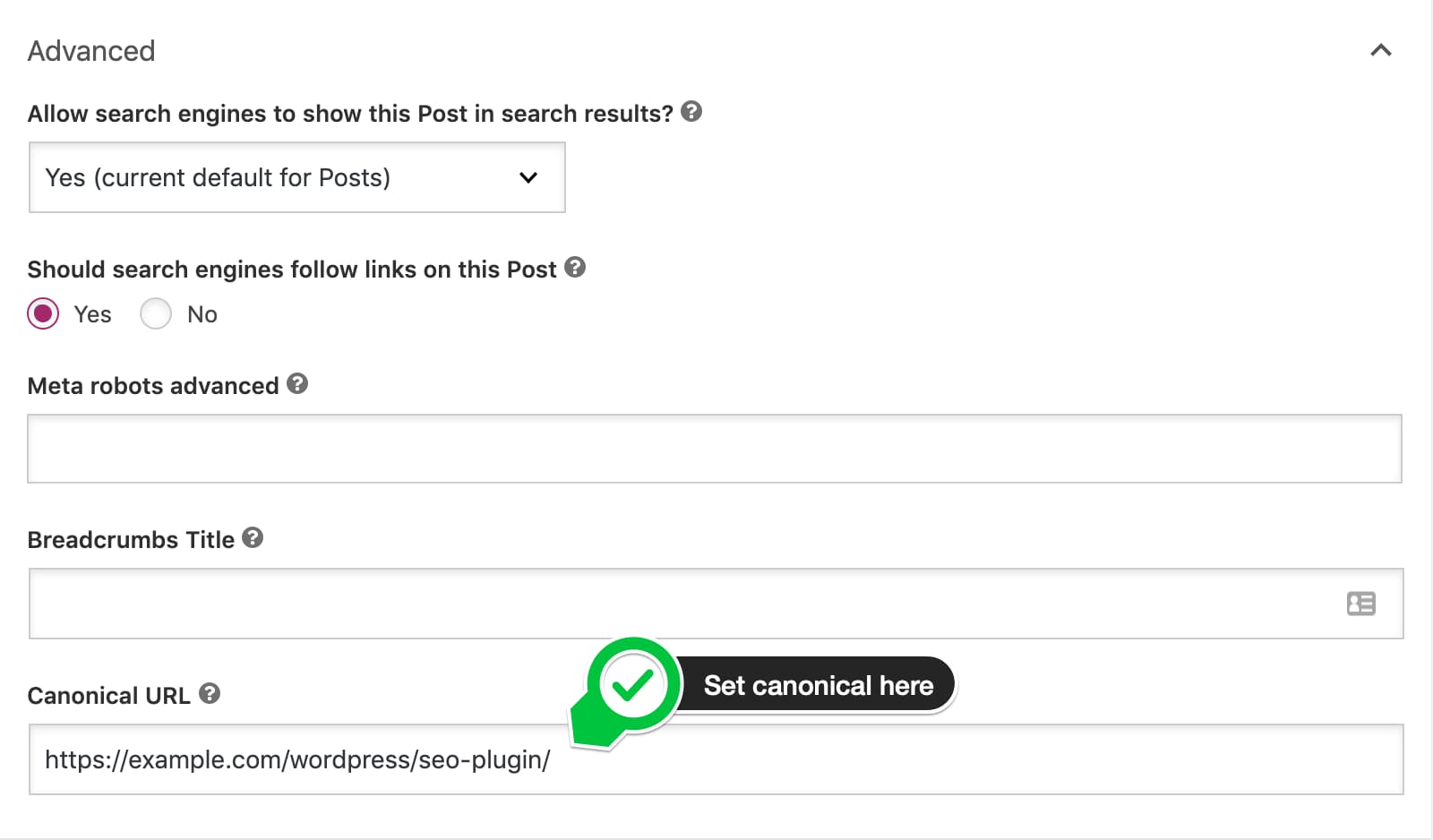
Credit: yoast.com
Tools For Canonicalization Management
SEO plugins help with canonicalization in WordPress. They make it easy to add canonical tags. Plugins like Yoast SEO and All in One SEO are popular. They guide users step by step. This helps avoid duplicate content issues. Users can easily set preferred URLs. This ensures search engines know the right page to index. Using plugins saves time. It also improves website performance.
Webmaster tools are essential for website health. Google Search Console is a popular choice. It helps monitor canonicalization issues. Users can see how Google sees their site. Fixing errors becomes easy with these tools. Bing Webmaster Tools also offers similar features. Both platforms provide reports and insights. They help improve website visibility. Proper use of these tools boosts SEO efforts.
Frequently Asked Questions
What Is Canonicalization In WordPress?
Canonicalization in WordPress refers to the process of selecting the preferred URL for content. It helps to prevent duplicate content issues. By using canonical tags, search engines know which URL to index. This ensures better SEO performance and consistency in search results.
Why Is Canonicalization Important For Seo?
Canonicalization is crucial for SEO because it prevents duplicate content issues. Duplicate content can confuse search engines and dilute page ranking. By specifying a canonical URL, you ensure that search engines index the right page. This improves your website’s search engine visibility and ranking.
How To Set Canonical Urls In WordPress?
To set canonical URLs in WordPress, use SEO plugins like Yoast or All in One SEO. These plugins offer easy options to define canonical URLs. Simply navigate to the post or page settings and specify the preferred URL. This ensures search engines recognize the correct URL for indexing.
Can Canonical Tags Affect Site Ranking?
Yes, canonical tags can significantly affect site ranking. They help consolidate link equity to a single URL. By directing search engines to the preferred version, you avoid splitting ranking signals. This can lead to improved search visibility and better ranking for your content.
Conclusion
Canonicalization in WordPress helps improve website SEO. It ensures search engines see the right version of a page. This prevents duplicate content issues. Users find your content more easily. Implementing canonical tags is straightforward. It requires a little setup. But brings great benefits.
Your site becomes more organized. Search engines rank it better. Visitors enjoy a seamless experience. Remember to keep your links consistent. This helps in effective canonicalization. Regularly check your settings. Make adjustments as needed. This keeps your site optimized. Canonicalization is vital for successful WordPress management.



