
Have you ever worried about losing your hard work on your WordPress site? Imagine spending hours crafting the perfect blog post, only to have it vanish due to a technical glitch or a security breach.
That’s where BlogVault comes in. As a WordPress user, your website’s safety and security are paramount, and BlogVault offers a robust solution to protect your content and data. Whether you’re new to WordPress or a seasoned blogger, understanding how BlogVault works can be a game-changer for your site’s maintenance and peace of mind.
You’ll discover how BlogVault can safeguard your site, streamline backups, and even enhance your site’s performance. Let’s dive in to ensure your hard work is always secure.

Credit: blogvault.net
Blogvault Overview
BlogVault is a WordPress backup plugin. It helps you keep your site safe. It makes copies of your site. These copies are called backups. If something goes wrong, you can use a backup. Your site will be like it was before. BlogVault saves these backups on its own servers. This means your site is safe even if your computer crashes.
BlogVault also helps with site migration. You can move your site from one place to another easily. It checks your site for problems too. BlogVault can fix these issues. This helps your site run smoothly. It is like a toolbox for your WordPress site.
Key Features
Blog Vault makes sure your site is safe. It takes automatic backups daily. You can relax knowing your data is safe. No need to remember to do it yourself. If something breaks, you can get your site back easily.
Fixing your site is easy with Blog Vault. Just one click and your site is back. This saves you time and stress. No need to be a tech expert. Anyone can do it.
Moving your site is simple with Blog Vault. Their tools make it easy to change hosts. You don’t need special skills. Just follow the steps and your site will move safely.
Blog Vault keeps your site safe. It has tools to stop bad things. Your site is scanned for problems. You get alerts if something is wrong. This helps keep your site secure.
Installation Process
First, go to the WordPress dashboard. Find the Plugins section. Click on Add New. Search for Blog Vault. Click Install Now. Wait for it to install. Click Activate. Now, Blog Vault is ready.
Open Blog Vault. Enter your site URL. Click Connect. Follow the steps. It will ask for login details. Enter them. Your site will connect. Blog Vault will start working. It backs up your site. Keeps it safe. You can see all backups. Manage them easily.
User Interface
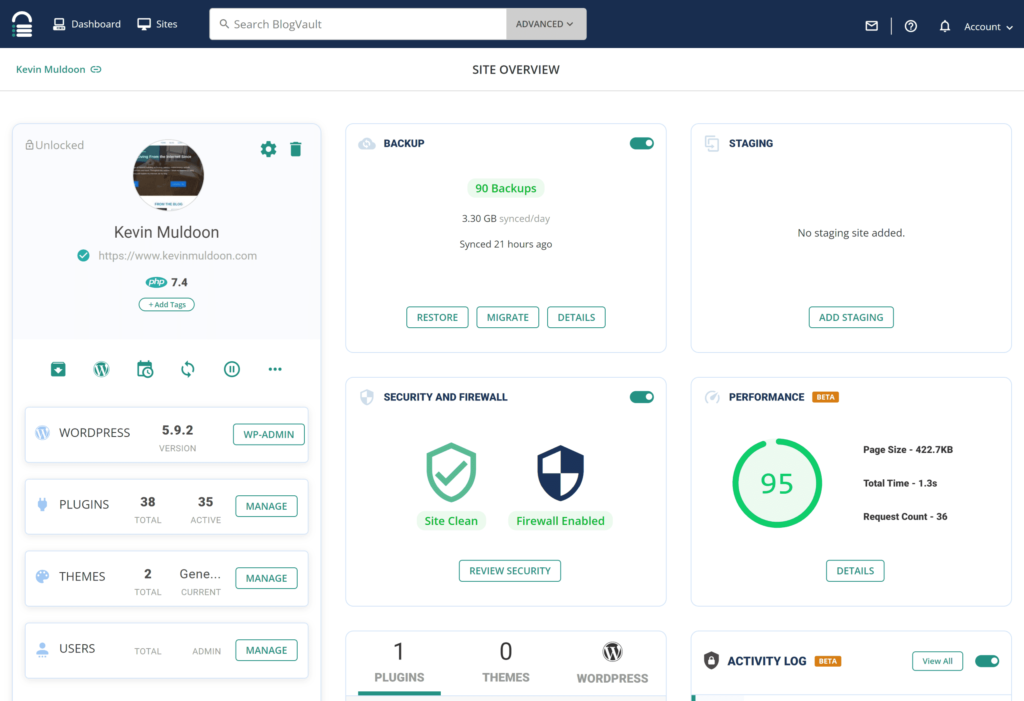
The dashboard is easy to use. It shows all important details. You can see your site’s status at a glance. Important numbers and alerts are visible. This helps to keep track of your site. The design is simple and clean. Anyone can understand it.
Finding features is simple. Menu options are clear and well-organized. You can access backups and security tools quickly. Each feature has a short description. This helps in knowing what each tool does. The interface ensures a smooth experience. You won’t feel lost while using it.
Backup And Restore
Blog Vault makes scheduling backups simple. You choose how often to back up. Daily, weekly, or monthly options are available. It saves you from doing manual backups. Automated backups ensure your data is safe. You can relax knowing your site is protected. Backups happen even if you forget. This feature is like a safety net. Trust in your site’s security is essential.
Restoring content with Blog Vault is easy. Click a button to start. Your site returns to a previous state. Mistakes are undone in minutes. Lost content is back quickly. No technical skills are needed. It’s user-friendly and fast. Your site’s history is safe. Feel secure about your website’s data. Recovery is simple with Blog Vault.
Website Security
Blog Vault helps keep your website safe. It scans for malware every day. This means it checks for bad software. Malware can harm your website. So, scanning is important. It finds and removes any threats. This makes your site secure.
Keeping your site clean helps it work well. Visitors feel safe on a clean site. This is good for your site’s reputation. Regular scans help prevent problems. They make sure your site stays healthy.
Firewall protection is like a shield. It keeps your site safe from bad traffic. Bad traffic can harm your website. Blog Vault blocks this traffic. It only lets good visitors in. This protection keeps your site running smoothly.
A strong firewall is key for safety. It stops hackers from getting in. Hackers can steal data. So, firewall protection is very important. It helps protect your site’s data and visitors.
Migration Process
First, backup your WordPress site. This is very important. Then, check your website’s database size. Ensure it is not too large. Next, choose a new host for your site. Make sure it is reliable. Gather all necessary login credentials. This includes FTP and WordPress admin. Write them down to avoid mistakes.
Start by installing Blog Vault plugin on your site. Then, connect it with your new host. Follow the step-by-step guide provided by Blog Vault. It is easy and clear. Ensure all files and data are transferred. Double-check everything. Finally, verify your new site is working well. Test links and pages. Ensure everything looks right.
Credit: wedevs.com
Pricing And Plans
Blog Vault offers both free and premium plans. The free plan gives basic features. It’s great for beginners. The premium plan has more tools. It’s for users who need more. This plan keeps your site safe. It also helps with backups.
Think about what you need. Do you want basic tools? Or do you need more features? Premium plans cost more. But they offer better protection. They also provide more support. Choose what fits your needs best. Remember to check your budget too.
Customer Support
Blog Vault offers several support channels for users. You can reach them via email. Email is often the best way to get detailed help. They also have a chat option on their website. This is great for quick questions. Both channels are available on weekdays. They aim to reply fast and solve problems quickly.
Support Channels
Another helpful resource is their community resources. The community includes many users. They share tips and tricks. You can find answers to common questions. This is useful if you prefer learning from others. People in the community are friendly and helpful. They want to see others succeed with Blog Vault.
Benefits And Drawbacks
Blog Vault offers strong backup solutions for your WordPress site. It keeps your data safe and secure. You can restore your site easily if needed. This tool is easy to use, even for beginners. It provides a simple interface to manage tasks.
It supports automatic backups. You don’t have to worry about forgetting. Blog Vault also offers migration services. This helps when moving your site to a new host. It saves time and reduces errors.
Some users find Blog Vault expensive. It may not fit every budget. There are free options available. These might not offer the same features. Blog Vault can have limited support. This can be frustrating when issues arise.
Sometimes, the backup process can be slow. This might delay other tasks. It requires reliable internet for smooth operations. Without it, problems can occur.
Credit: blogvault.net
Frequently Asked Questions
What Is Blog Vault On WordPress?
Blog Vault is a WordPress backup service. It offers secure, real-time backups for your site. It ensures data safety and quick recovery. Blog Vault also provides features like migration and staging.
How Does Blog Vault Work?
Blog Vault works by creating automatic backups. It stores them securely on cloud servers. You can restore your site with a single click. The service ensures data integrity and reliability.
Is Blog Vault Easy To Use?
Yes, Blog Vault is user-friendly. It features a simple interface for easy navigation. Even beginners can set it up without hassle. Its intuitive design helps users manage backups efficiently.
Why Choose Blog Vault For WordPress Backups?
Blog Vault offers reliable and secure backups. It provides real-time syncing and quick restoration. Its features include staging and site migration. It supports seamless integration with WordPress sites.
Conclusion
Blog Vault on WordPress is a helpful tool for website security. It protects your data with regular backups. Easy to set up. Simple to use. Keeps your site safe from hackers. Restores your site quickly if problems occur. Offers peace of mind for website owners.
No more worries about lost content. A good choice for anyone running a WordPress site. Ensures your site stays online and secure. Perfect for beginners. Ideal for experts too. Trust Blog Vault for your WordPress needs. Keep your site protected and running smoothly every day.



