
Are you tired of dealing with spam comments on your WordPress site? You’re not alone.
Managing unwanted spam can be a daunting task, but there’s a powerful tool designed to help you combat this issue: the Akismet Plugin. Imagine having a trustworthy guard that tirelessly stands watch over your website, ensuring that only genuine comments make it through.
This is exactly what Akismet does for you. We’ll explore how the Akismet Plugin works, why it’s essential for your WordPress site, and how it can save you time and effort. By the end, you’ll understand why Akismet is a must-have for every WordPress user. Dive in to discover how you can maintain the integrity of your site’s content and engage with your audience without the headache of spam interference.
Credit: www.hostinger.com
Akismet Plugin Overview
The Akismet plugin helps keep your website clean. It stops spam comments from showing up. These unwanted comments can slow down your site. They can also make your site look messy. Akismet checks every comment for spam. It uses smart technology to find bad comments. This saves you a lot of time. You don’t need to check every comment yourself.
Using Akismet is easy. First, you install it on your WordPress site. Next, you activate it with an API key. This key is like a password. It helps Akismet do its job. Once set up, Akismet works quietly in the background. It keeps your site free of spam without much effort.
Features Of Akismet
Akismet checks comments for spam. It works automatically. You don’t need to check each comment. It saves time and effort. Spam gets filtered out. Your site stays clean.
Akismet helps with comment moderation. It highlights suspicious comments. You can review them. Approve or delete them easily. No need to worry about spam cluttering your site. It keeps comments relevant.
Akismet provides spam statistics. You can see how much spam it blocks. It helps you understand your site’s spam activity. Numbers show how effective Akismet is. You get a clear picture.
How Akismet Works
Akismet is a popular plugin in WordPress. It helps stop spam comments. It integrates easily with WordPress websites. Users can install it with just a few clicks. Once installed, it starts working right away. It is part of the WordPress dashboard. This makes managing it simple.
Akismet uses smart filters to find spam. It checks each comment for spammy patterns. These filters are updated often. This keeps the website safe from new spam tactics. Spam comments are automatically moved to a spam folder. This saves time for site owners. No need to check each comment manually.
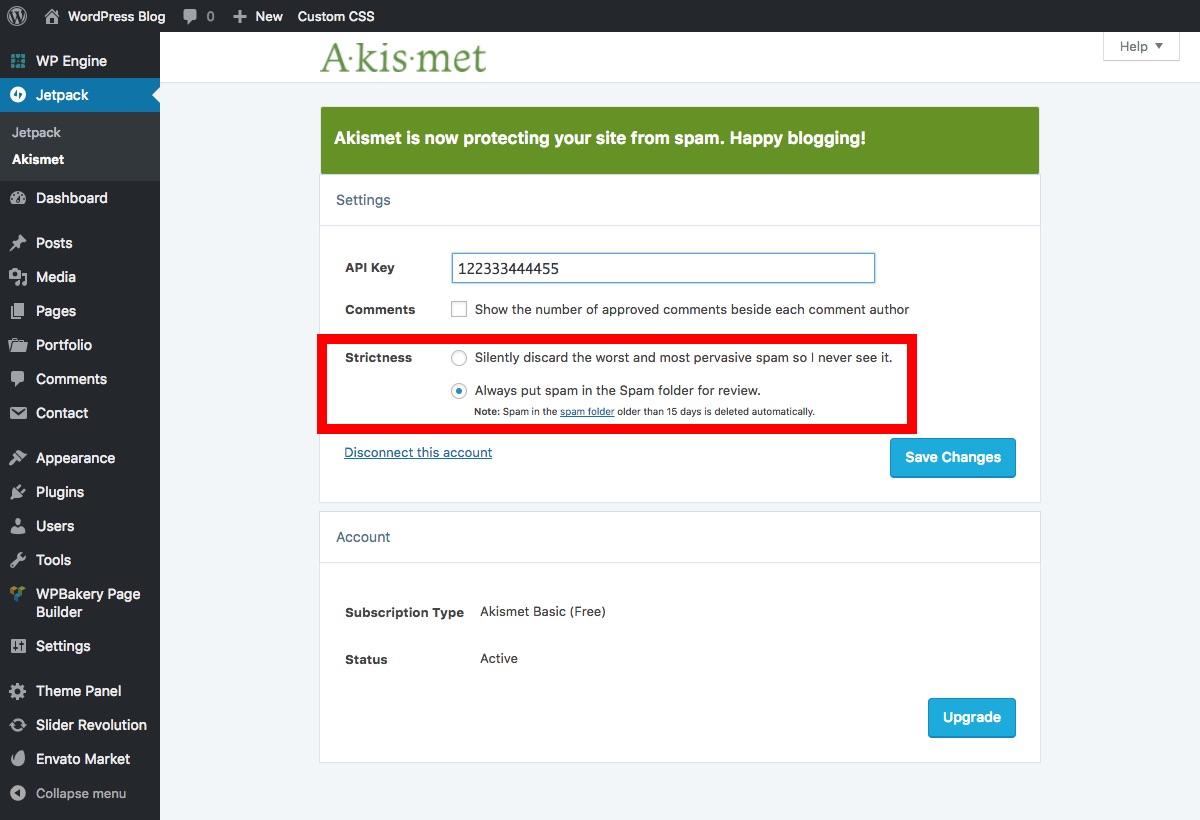
API keys are important for Akismet. They allow the plugin to connect to its servers. Users get an API key when they sign up. This key must be entered in the plugin settings. It ensures only real users can use Akismet. This keeps the service secure and reliable.
Credit: www.wpexplorer.com
Setting Up Akismet
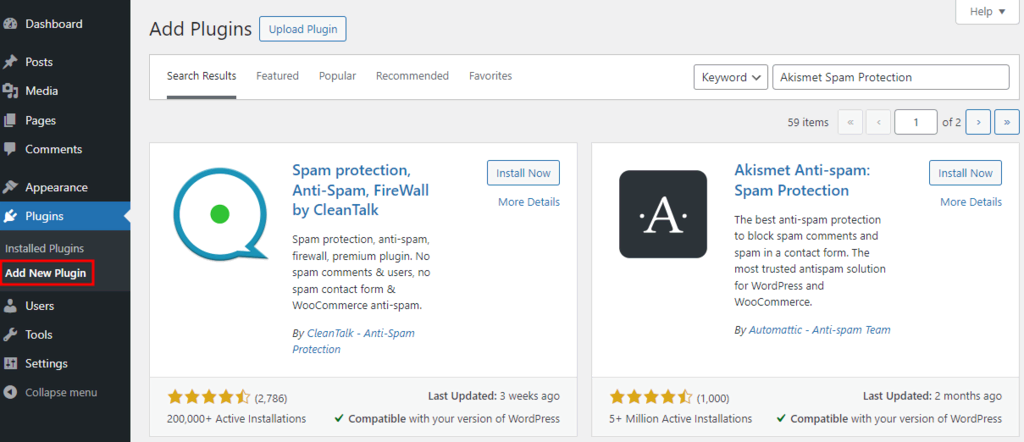
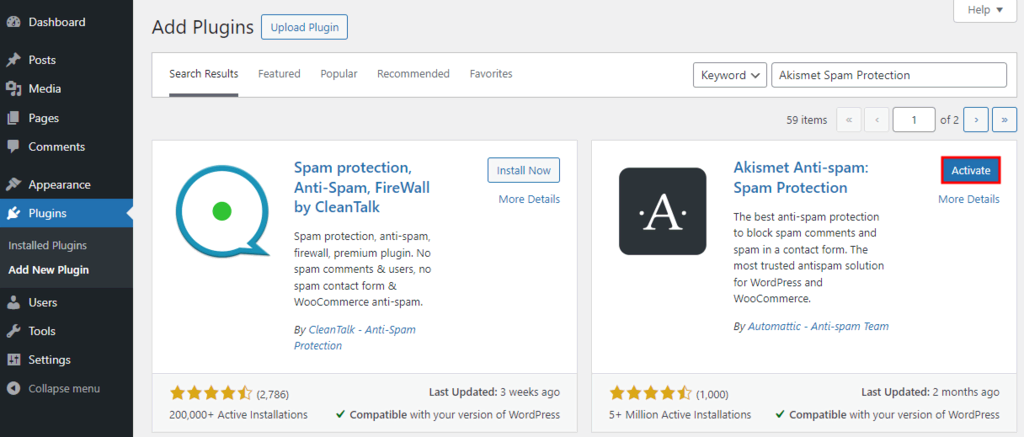
Start by opening the WordPress dashboard. Click on Plugins on the left menu. Select Add New. Type Akismet in the search bar. Find the Akismet plugin in the results. Click on Install Now. Wait for it to install. Then click on Activate.
Once activated, go to the Akismet Settings page. Enter your email address. Choose your preferred subscription plan. Click on Continue. Adjust the spam filtering options. Save your settings to finish.
After configuring, you need an API Key. Go to the Akismet website. Sign up for an account. Copy the API Key from your email. Return to the WordPress dashboard. Paste the key in the Akismet settings. Click Connect to activate.
Benefits Of Using Akismet
Akismet keeps your site safe. It blocks bad comments. These comments can hurt your site. Akismet checks every comment. It finds spam. It removes spam. Your site stays clean and safe.
Akismet saves your time. You do not have to check comments. Akismet does it for you. It is fast and easy. You can focus on your work. Akismet handles spam for you.
Users like clean sites. Akismet helps keep your site clean. Spam-free sites are easy to use. Users enjoy visiting. They find what they need quickly. Akismet makes your site better.
Alternatives To Akismet
Spam can be a big problem for websites. Many plugins help fight spam. Some popular ones are Wordfence, SpamShield, and Cerber Security. They stop unwanted messages and protect user data. Each plugin has unique features. Some focus on stopping bots. Others focus on blocking suspicious IP addresses. Choosing the right plugin depends on user needs.
| Plugin Name | Key Feature |
|---|---|
| Wordfence | Firewall protection |
| SpamShield | Email spam blocking |
| Cerber Security | Login protection |
- Wordfence: Pros – Strong firewall; Cons – May slow site.
- SpamShield: Pros – Blocks email spam; Cons – Limited bot protection.
- Cerber Security: Pros – Protects login; Cons – Complex setup.
Troubleshooting Akismet
Akismet is a WordPress plugin that filters spam comments on your website. It automatically checks comments against its database and removes unwanted spam. Troubleshooting Akismet involves ensuring it is updated and correctly configured for optimal performance.
Common Issues
Users often face spam comments slipping through. Sometimes, genuine comments get marked as spam. This can be frustrating. Slow website speed is another issue. It may happen due to plugin conflicts. Ensure Akismet is updated regularly. This can solve many problems.
Fixing Configuration Problems
Check if Akismet is activated. Ensure the API key is correct. A wrong key means Akismet won’t work. Look at your other plugins. Some may cause conflicts. Deactivate and test them one by one. This helps find the problem. Reinstall Akismet if issues persist.
Support Resources
Visit the Akismet support page for help. They offer guides and FAQs. Use the WordPress forums. Many users share solutions. Akismet has a support team. They answer questions and provide help. Always use these resources when you need help.
Credit: www.hostinger.com
Frequently Asked Questions
What Does The Akismet Plugin Do?
Akismet is a WordPress plugin designed to filter spam comments. It automatically checks comments and contact form submissions. The plugin prevents malicious content from appearing on your site. By using advanced algorithms, it enhances site security and user experience.
How Does Akismet Protect Websites?
Akismet protects websites by analyzing comments for spam characteristics. It uses a global database to identify spam patterns. The plugin automatically filters out spam comments. This ensures your website remains free from unwanted content and potential security threats.
Is Akismet Free To Use On WordPress?
Akismet offers a free plan for personal blogs. For commercial sites, it provides affordable premium plans. The premium plans come with advanced features and support. This ensures both small and large websites can benefit from its spam protection.
How Do I Install Akismet On WordPress?
To install Akismet, navigate to the WordPress plugins section. Search for “Akismet” and click “Install Now. ” After installation, activate the plugin. You’ll need an API key to use it. Register on the Akismet website to obtain your key.
Conclusion
Akismet simplifies spam management for WordPress users. Its automated system filters unwanted comments. Bloggers can focus on content, not spam. Easy setup makes it accessible for beginners. No need for coding skills. Akismet saves time and effort. It enhances site security and boosts user experience.
Regular updates keep it reliable and efficient. Bloggers appreciate its seamless integration. Akismet proves essential for maintaining clean comments. Its effectiveness is evident in its widespread use. Users find peace of mind with spam under control. Akismet remains a trusted tool in the WordPress community.
A smart choice for every blogger.



