
Have you ever wondered how to make your WordPress site more dynamic and functional? Imagine having the power to extend your site’s capabilities without touching a single line of code.
That’s where “Add Action” in WordPress comes into play. It’s a game-changer for anyone looking to enhance their website’s functionality and user experience. By understanding and utilizing “Add Action,” you can customize your site to meet your unique needs and preferences.
Curious to know how this can transform your WordPress experience? Keep reading to discover the magic behind “Add Action” and how it can elevate your website to new heights.
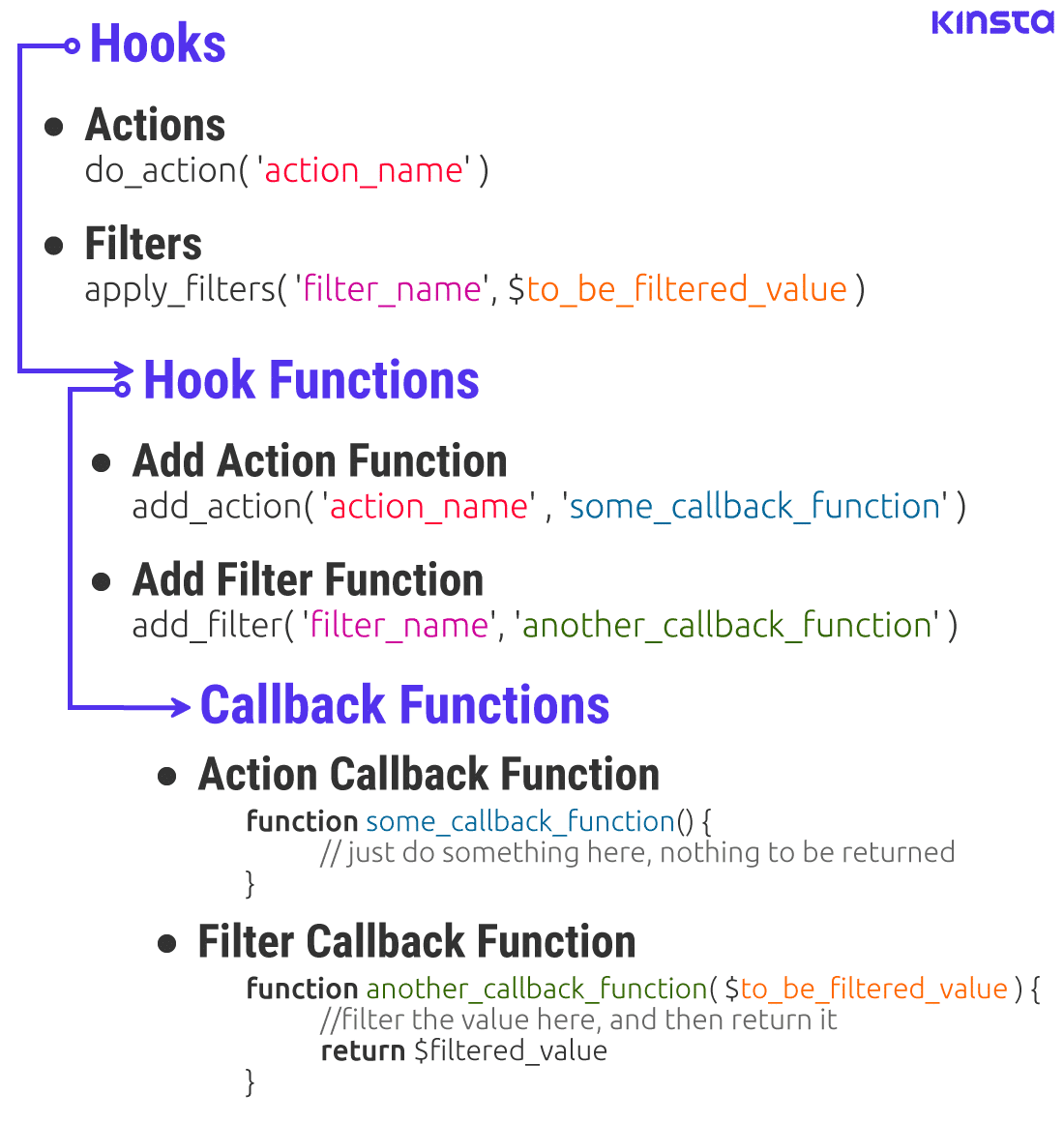
Credit: kinsta.com
Add Action Basics
WordPress hooks are special codes. They let you add or change features. Add Action is a type of hook. It helps you run your code at the right time. You can add new features without changing the main code. This keeps your site safe and organized.
It is like a magic door. You can open it to add new things. Your site will work better. You can change things as you like. This makes WordPress flexible and fun to use. Add Action helps keep your site unique.

Credit: rudrastyh.com
How Add Action Works
The add_action function is used in WordPress. It helps to hook a function. This means it attaches a function to a specific action. The syntax is simple. It looks like this: add_action('hook_name', 'your_function_name');
Let’s break it down. The first parameter is ‘hook_name’. It is the name of the action. You want your function to run here. The second parameter is ‘your_function_name’. It is the name of the function you create. This function will run when the action happens.
Sometimes, there are more parameters. These are for priority and arguments. The priority is a number. It decides when your function runs. The smaller the number, the sooner it runs. The default is 10. You can change it if needed.
Common Use Cases
Add Action is very useful for customizing WordPress themes. It allows you to change how your site looks. You can add or change features. This helps make your site unique. With Add Action, you can modify the header or footer. You can also tweak the sidebar. This is easy and makes your site special.
Add Action helps you extend WordPress plugins. You can add new features to existing plugins. This makes plugins more powerful. Add Action lets you connect your code to plugin events. This way, you can improve how plugins work. Your site gets better with new abilities.
Site performance can improve using Add Action. You can make your site faster. It helps to reduce loading times. Add Action can help manage scripts and styles. This keeps your site running smoothly. Fast sites are good for users. They also help with search engine rankings.
Troubleshooting Add Action
Add Action in WordPress allows developers to add custom code to run at specific points. It helps in customizing themes and plugins without altering core files. Troubleshooting involves checking for conflicts or errors in these custom codes that might disrupt site functionality.
Common Errors
Errors can happen with add_action in WordPress. Some mistakes are easy to fix. Incorrect hook name is a common error. Misspelling the function name is another. Missing parameters can cause problems. Make sure you use the right priority number. This number tells WordPress when to run the action. Check plugin conflicts. Sometimes plugins don’t work well together. Review your code for any missing semicolons. These are important. Errors are common but easy to fix.
Debugging Techniques
Debugging helps find errors quickly. Start by turning on WordPress debugging mode. This shows what went wrong. Check the error log for clues. Use var_dump() to see values of variables. This helps understand what’s happening. Try disabling plugins one by one. This finds conflicts between plugins. Check your theme. Sometimes themes cause issues. Use online forums to get help from experts. Debugging is like solving a puzzle.
Best Practices
Organizing code is crucial for easy understanding. Group similar functions together. Use clear, descriptive names for actions. This helps others read your work easily. Keep your code clean and tidy. Avoid mixing logic and presentation. Use comments to explain complex parts. This makes it easier for future edits. Stick to a consistent style for clarity. Consistency is key in coding.
Security considerations are vital in WordPress. Always sanitize user inputs. This prevents harmful data entry. Validate data to ensure it’s correct. Protect your site from attacks. Use nonces to verify actions. They help in avoiding unwanted requests. Regularly update your plugins and themes. Updates fix security issues. Strong passwords are essential. They protect your site from intruders. Always keep backups of your site. Backups save you from data loss.
Credit: www.fixrunner.com
Frequently Asked Questions
What Is The Purpose Of Add_action In WordPress?
The add_action function in WordPress allows developers to hook custom functions into specific points in the WordPress execution process. This enables customization and extension of WordPress functionalities without altering core files. It’s essential for creating plugins and themes that integrate seamlessly with WordPress.
How Does Add_action Work In WordPress?
Add_action works by attaching a custom function to a specific WordPress hook. When WordPress reaches that hook during execution, it runs the attached function. This allows developers to modify or add functionalities at various points in the WordPress lifecycle.
Can Add_action Modify WordPress Default Behavior?
Yes, add_action can modify default behavior by hooking custom functions into WordPress processes. This allows developers to change how certain features work, add new features, or even remove existing ones. It’s a powerful tool for WordPress customization and extension.
Is Add_action Necessary For WordPress Plugins?
Yes, add_action is crucial for WordPress plugins. It allows developers to execute custom code at specific points in the WordPress lifecycle. This ensures that plugins integrate smoothly and function correctly with WordPress, enhancing or altering its capabilities.
Conclusion
Understanding “Add Action” in WordPress empowers users. This function allows customization. It enhances functionality without altering core code. Users can easily tailor their websites. This makes WordPress more flexible and powerful. A deeper grasp of this feature can improve your site’s performance.
It simplifies tasks and boosts site engagement. By using “Add Action,” you gain more control. This knowledge is essential for WordPress success. Explore its potential, and make your site stand out. Remember, small changes can make a big difference. So, continue learning and experimenting with WordPress.
Your site will benefit greatly.



