
Have you ever wondered what exactly a WordPress Subscriber User is? If you’ve been managing a WordPress site, you might have stumbled upon this term.
Understanding the various user roles on your website is crucial, especially if you want to maximize your site’s potential and ensure a smooth experience for your audience. By the end of this article, you’ll know what a Subscriber User can do and how they fit into the larger ecosystem of your WordPress site.
This knowledge will empower you to effectively manage user access, enhance engagement, and streamline your workflow. So, let’s dive right into the world of WordPress Subscriber Users and uncover their unique role and benefits.
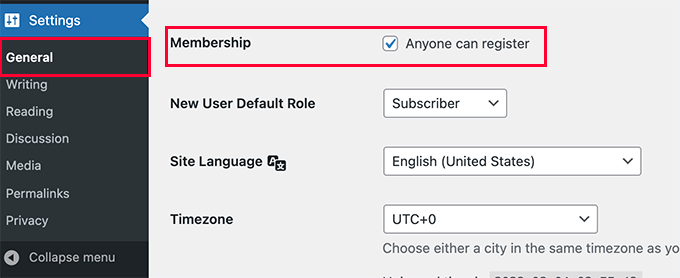
Credit: www.wpbeginner.com
WordPress User Roles
A WordPress Subscriber User can view content and manage their own profile. This role has limited access, making it ideal for general site visitors. Subscribers can’t edit or publish posts.
Overview Of User Roles
WordPress has different user roles. Each role has specific permissions. Admins can change site settings. Editors can manage content. Authors write and publish their own posts. Contributors write but can’t publish. Subscribers can read content and comment. These roles help keep the site organized.
Importance Of User Roles
User roles are crucial for site security. They ensure everyone has the right access. Admins have the most control. Subscribers have the least control. This prevents accidental changes. It also protects against unauthorized access. Roles help manage large sites smoothly. They keep everything running well.
Subscriber Role Basics
A WordPress Subscriber is a user with limited permissions. They can read posts and leave comments. Subscribers can’t write or edit posts. They can’t change site settings. This role is good for regular visitors.
Subscribers have a few default capabilities. They can update their own profile. This includes changing the password and email. Subscribers can see the dashboard but can’t make changes. They have a very basic role on the site.
Subscriber Permissions
A WordPress subscriber can view all public content on the site. They can read posts and pages like any visitor. Subscribers do not have access to edit or delete content. Their access is limited to viewing only. This ensures content remains safe from unwanted changes.
Subscribers can manage their own profile settings. They can change their password and email. This helps keep their account secure. Subscribers can also add a display name. This name shows when they comment on posts. Profile changes do not affect the site’s content.
Subscriber Role Benefits
A WordPress Subscriber User has limited access, mainly for viewing content. Subscribers can comment on posts and receive updates. This role is perfect for users who need a basic account without editing privileges.
Security Advantages
Subscriber roles keep your website safe. They have very few permissions. This means less risk of mistakes. Subscribers cannot change settings or delete content. They can only read and comment. This limits their access. It protects your site from unwanted changes. Subscribers also do not have access to sensitive information. This helps to keep personal data secure.
Streamlined User Management
Managing subscribers is easy. You don’t need to worry about complex tasks. Subscribers only need an account to read and comment. They cannot change the website’s look. They cannot add new posts. This makes the admin’s job simple. You can focus on other important tasks. Subscriber management saves you time. It reduces the chance of errors.
Customizing Subscriber Roles
WordPress allows you to adjust subscriber abilities. This makes the site more flexible. Subscribers can read and comment on posts. But you can change these roles. Use code snippets to modify what they can do. Always be careful with changes. Wrong changes can hurt the site. Check your changes often. This ensures everything works well.
Plugins make role changes easy. They help without needing code. Some plugins are free. Others might cost money. Choose a plugin with good reviews. Test it on a small site first. This avoids big mistakes. Update plugins regularly. This keeps your site secure and working.

Credit: www.youtube.com
Common Use Cases
WordPress Subscriber Users are key for membership sites. They can access exclusive content. This helps keep certain posts private. Only members can view them. Subscriber Users can also leave comments. Their feedback is valuable. It makes your site more engaging. Subscriber Users can connect with others. This builds a community. Membership sites often offer special perks. Subscribers enjoy these benefits. This keeps them coming back.
Subscriber Users help manage email subscriptions. They receive newsletters and updates. This keeps them informed. Email lists grow with Subscriber Users. More users mean more reach. Subscriber Users can choose how often they get emails. This gives them control. Email subscriptions are valuable for marketing. They spread the word about new posts. Subscriber Users play a big role here. Their interest boosts your site’s popularity.
Troubleshooting Subscriber Issues
A WordPress subscriber user can read content and leave comments but cannot modify or publish posts. Troubleshooting subscriber issues involves addressing login problems and permissions to ensure smooth access and interaction. Clear guidance helps users navigate their role effectively.
Common Problems
Many users face login issues. They might forget their passwords. A simple reset can help. Emails not received is another problem. Check the spam folder first. Sometimes, there are access restrictions. Make sure permissions are set right.
Solutions And Tips
Use strong passwords. This keeps accounts safe. Always check spam for missed emails. Update settings to ensure access. Regular updates fix many glitches. If stuck, contact support.
Credit: escapecreative.io
Frequently Asked Questions
What Is A WordPress Subscriber Role?
A WordPress Subscriber role allows users to log in and manage their profiles. They have no editing privileges for site content. This role is suitable for sites where users need to interact, like commenting, but not alter the site’s content.
Can Subscribers Comment On WordPress Posts?
Yes, Subscribers can comment on WordPress posts. They have the ability to engage with content through comments. This interaction helps build community and encourages feedback, making it a valuable feature for blog owners.
How To Add A Subscriber In WordPress?
To add a Subscriber, go to the WordPress dashboard. Navigate to ‘Users’ and click ‘Add New’. Fill in the necessary details and select ‘Subscriber’ as the role. This simple process allows new users to register easily.
Can Subscribers Access The WordPress Dashboard?
Subscribers have very limited access to the WordPress dashboard. They can only update their profile and personal settings. They cannot edit or publish posts, maintaining the security and integrity of the site’s content.
Conclusion
WordPress Subscriber Users are essential for managing website access. They enjoy reading and engaging with your content. Subscriber users have limited permissions. This helps keep your site secure and organized. You can easily manage them through your WordPress dashboard. This role is perfect for those who just need to read.
Not for editing or publishing. Consider how subscribers fit into your site’s strategy. They are an important part of your audience. Understanding their role helps improve your site’s experience. Keep nurturing your subscribers. They can become loyal followers over time.



