
Ever wondered how some websites manage to say it all on just one page? That’s the magic of a WordPress Single Page.
Imagine a website where everything you need is right there, without clicking through endless tabs. You scroll, you see, you understand. It’s simple, elegant, and incredibly efficient. Whether you’re a business owner looking to streamline your site or a blogger eager to engage your readers, mastering the art of a single page could be your secret weapon.
Dive into this article to discover how this approach can transform your online presence and make your life easier. Get ready to explore the power of simplicity and see how it can work wonders for you.
Understanding Single Page Websites
Single Page Websites use one long page. All information fits here. The design is simple. Users scroll up and down. No clicking on links. Everything is on one page. The design is easy to navigate. Loading time is fast. Content is organized well. Users enjoy a smooth experience. This style suits small websites. Perfect for portfolios or personal sites.
Single page sites load quickly. They need less server space. Users find information fast. They are mobile-friendly. Good for small screens. But they can be hard for SEO. Limited keywords can be used. They might not suit big sites. Managing lots of content is tough. Some users prefer multiple pages. They want detailed information.

Credit: wordpress.org
WordPress As A Platform
WordPress is a popular platform for websites. Many people use it to build sites. It is easy to use and offers many customization options. You can make your site look different with themes. Themes change the design of your site. You can also use plugins. Plugins add extra features to your site. These might be contact forms or image sliders.
WordPress sites can be simple or complex. Some sites have just one page. Others have many pages. You choose what fits your needs best. You can change things later if you want. This flexibility helps users create the site they imagine. Many businesses like this feature.
Creating A Single Page In WordPress
Picking a good theme is very important. Some themes are easy to use. They make your page look nice. Responsive themes are a good choice. They work well on phones and tablets. Check if the theme offers customization options. This lets you change colors and fonts. Look for themes with good reviews. This means users like them. You can find many themes for free. Some themes cost money but offer more features. Choose one that fits your needs.
Plugins help your page work better. SEO plugins make your page easy to find. They help with search engines. Security plugins keep your page safe. They protect from bad people. Cache plugins make your page load fast. This helps users stay on your page. Contact form plugins are useful. They let people reach you. Always keep plugins updated. This avoids problems. Choose plugins that have good ratings. It means they work well.
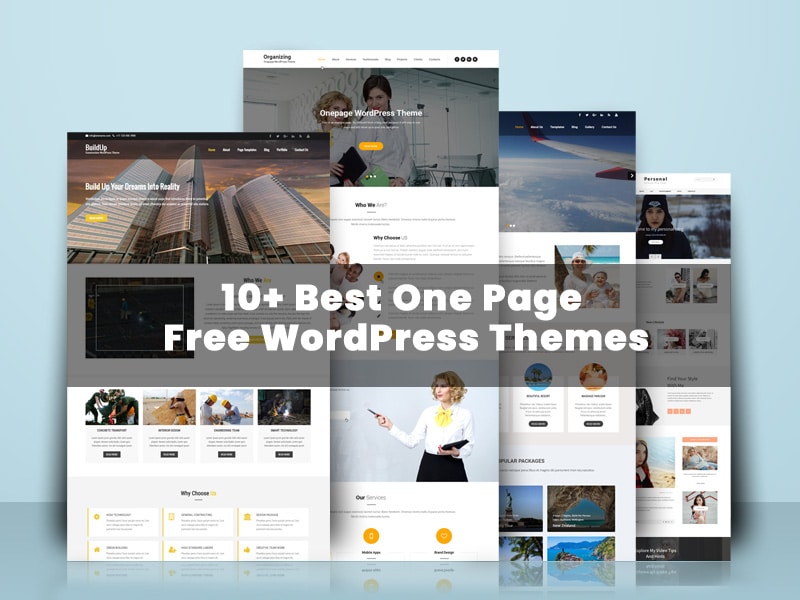
Credit: gracethemes.com
Designing A Single Page Layout
Single page design helps users find information quickly. Users scroll through the page without clicking many links. This design is simple and clean. It keeps users engaged. Navigation should be easy and intuitive. Users need to know where they are on the page. Loading time should be fast. A slow page can make users leave. Responsive design is important. The page should look good on phones and tablets. Clear content is key. Words should be easy to read and understand.
Visual elements make the page look nice. Colors should be pleasing to the eye. Images need to be clear and relevant. They should support the content. Fonts must be easy to read. Consistent styling is important. It gives the page a professional look. White space helps in making the page less crowded. It makes reading easier and more enjoyable.
Optimizing For Performance
A WordPress single page is a website with all content on one page. This design improves loading speed and user experience. With fewer clicks, visitors find information faster. This streamlined approach is excellent for mobile users, ensuring quick access to essential details.
Load Time Reduction
Fast websites make users happy. Slow sites can be frustrating. Reduce load time to improve user experience. Compress images to make them smaller. Use caching to store website data. Minimize HTTP requests for faster loading. Simplify code by removing unnecessary parts.
Choose lightweight themes and plugins. They help speed up your site. Check for updates regularly. Updated tools often perform better. A faster site boosts SEO and user satisfaction.
Mobile Responsiveness
Mobile users need easy-to-use sites. Responsive design adapts to different screens. Ensure your site works on phones and tablets. Text should be readable without zooming. Buttons must be easy to click. Test your site on various devices. Responsive sites rank better on search engines. Users stay longer when sites are easy to use.
Design with mobile-first approach. It prioritizes mobile users. Use flexible layouts that adjust to screen sizes. Mobile-friendly sites attract more visitors.
Seo For Single Page WordPress Sites
Choosing the right keywords is very important. Use simple words that everyone knows. Focus on one or two main keywords. Place these keywords in your titles and headers. Also, use them in the text but do not overuse them. Use related words too. This helps search engines understand your content better.
Organize content in a clear way. Use short paragraphs and simple words. This makes the page easy to read. Use lists or tables to show information. This helps people find what they need fast. Make sure each section has a clear purpose. Keep the layout clean and simple.
Case Studies Of Successful Single Page Sites
Some websites use a single page. This makes browsing easy. An example is Airbnb’s story page. It tells their journey on one page. Tesla’s Model X page is another. It shows the car’s features. All on one page. Apple’s Mac Pro page does the same. It uses a single page to show details. This keeps the user focused. No need to click many links.
Single page sites keep things simple. Users get information fast. They don’t get lost. Clear design is key. Use images and text wisely. Short sentences help. They make reading easy. Highlight important info. This guides the reader. Single pages must load fast. Slow pages make users leave.
Credit: www.greengeeks.com
Future Of Single Page WordPress Sites
Single page WordPress sites are becoming popular. People like their speed. These sites load fast and look neat. Users find them easy to use. They are great for mobile users. This trend will grow. More sites will become single page.
Designs are getting smarter. They use simple layouts. This helps users. They find what they need quickly. It’s easy for businesses to showcase products. People love clear and clean designs.
New technologies are helping these sites. Developers use powerful tools. These tools make sites load faster. They make sites work smoothly. People enjoy using these sites. They do not have to wait. Speed matters a lot.
Technology is always changing. Developers keep learning. They use new ideas. They make sites better and faster. Better technology helps users. It makes browsing fun and easy.
Frequently Asked Questions
What Is A WordPress Single Page?
A WordPress single page is a streamlined website designed to display all content on one page. It’s ideal for portfolios, events, or landing pages. The format enhances user experience by minimizing navigation and showcasing information efficiently, ensuring that visitors access all necessary details quickly and easily.
How To Create A Single Page In WordPress?
Creating a single page in WordPress involves selecting a one-page theme and customizing it. Use page builders like Elementor or Gutenberg to add sections. Configure menu links to scroll to different sections. This setup allows seamless navigation and a visually appealing layout for showcasing content.
Why Choose A Single Page Design?
A single page design offers several benefits, including improved user experience and faster load times. It’s perfect for concise presentations and storytelling. This design enhances engagement by reducing navigation complexity and directing focus. It’s ideal for businesses aiming to deliver information efficiently.
Can Single Page Sites Rank On Google?
Yes, single page sites can rank on Google if optimized properly. Focus on SEO best practices like keyword integration, fast loading times, and mobile responsiveness. Quality content and backlinks are crucial. Structured data helps search engines understand the site’s context, enhancing visibility in search results.
Conclusion
Exploring WordPress single pages is fascinating. They simplify web browsing. Users find everything without clicking around. Businesses benefit too. Single pages improve user experience and engagement. They load quickly and look great on mobile devices. Designing them is straightforward with WordPress.
You only need basic skills. A single page suits many needs. Portfolio, product showcase, or simple blog. Consider this option if you want simplicity. It might be the right fit for your project. Try it and see how it works for you.
Your audience might love the streamlined experience.



