
Imagine being able to customize your website with just a few clicks, turning it into a powerful tool tailored precisely to your needs. This is the magic of WordPress plug-ins.
But what exactly is a WordPress plug-in, and why should you care? If you’re eager to enhance your website without diving deep into complex coding, you’re in the right place. Plug-ins open up a world of possibilities, offering features that can transform the way your site functions and engages with visitors.
By the end of this article, you’ll discover how these handy tools can save you time, boost your site’s performance, and ultimately make your online presence shine. Ready to unlock the full potential of your WordPress site? Let’s dive in!
Credit: www.hostinger.com
Basics Of WordPress Plug-ins
WordPress plug-ins are tools that add extra features to a website. They are small pieces of software. Plug-ins help make sites look better and work smarter. Many plug-ins are free. Some plug-ins cost money.
Developers create plug-ins for different tasks. Some plug-ins help with design. Others help with security. There are plug-ins for e-commerce. Some are for SEO optimization. Users can install plug-ins easily.
The WordPress dashboard has a section for plug-ins. Users can search and find many options. They can also update plug-ins from the dashboard. It’s important to keep them up-to-date. This keeps the website running well.
How Plug-ins Work
Plug-ins are like small apps for your website. They add extra features. Easy integration makes them special. You can add them without changing the main site. They fit in like puzzle pieces. This keeps your website running smoothly. Each plug-in works with WordPress’s core. No coding needed. Just find the plug-in you want. Then click install. Your website gets new powers. Like magic!
Activating a plug-in is simple. One click and it’s on. Your site gets new features right away. Need to turn it off? Deactivation is just as easy. Click again. The plug-in stops. It stays on your site. But it won’t run until you activate it. This gives you control. Test plug-ins safely. Decide what works best. No harm to your site. Everything stays the same.
Types Of WordPress Plug-ins
WordPress plug-ins can be free or paid. Free plug-ins are no cost. They can be found in the WordPress library. Paid plug-ins cost money. They often have more features. Free plug-ins are great for beginners. Paid ones offer more advanced options. Choose based on your needs.
Some plug-ins help with SEO. They improve your site’s search ranking. Others focus on security. They keep your site safe from hackers. Many plug-ins help with design. They change the look of your site. Some are for e-commerce. They help you sell products online. Choose plug-ins to match your site’s goals.
Benefits Of Using Plug-ins
WordPress plug-ins add more features to your website. They can make your site do more things. For instance, you can add contact forms, photo galleries, and online stores. This makes your site more useful and fun. Plug-ins save time. Instead of coding, you just install a plug-in. This is faster and easier.
Plug-ins allow you to change your site. You can make it look and work how you want. They offer many choices to fit your needs. With plug-ins, you can add colors, change layouts, and more. This lets you create a unique website. Plug-ins help make your site special and different from others.
Choosing The Right Plug-in
Think about what you want from a plug-in. Do you need it to make your site faster? Or maybe help with security? Knowing your needs helps you find the best plug-in. This way, you won’t waste time on ones that you don’t need.
Compatibility is important. Make sure the plug-in works with your version of WordPress. Some plug-ins only work with certain themes or other plug-ins. Check the plug-in details to avoid problems later.
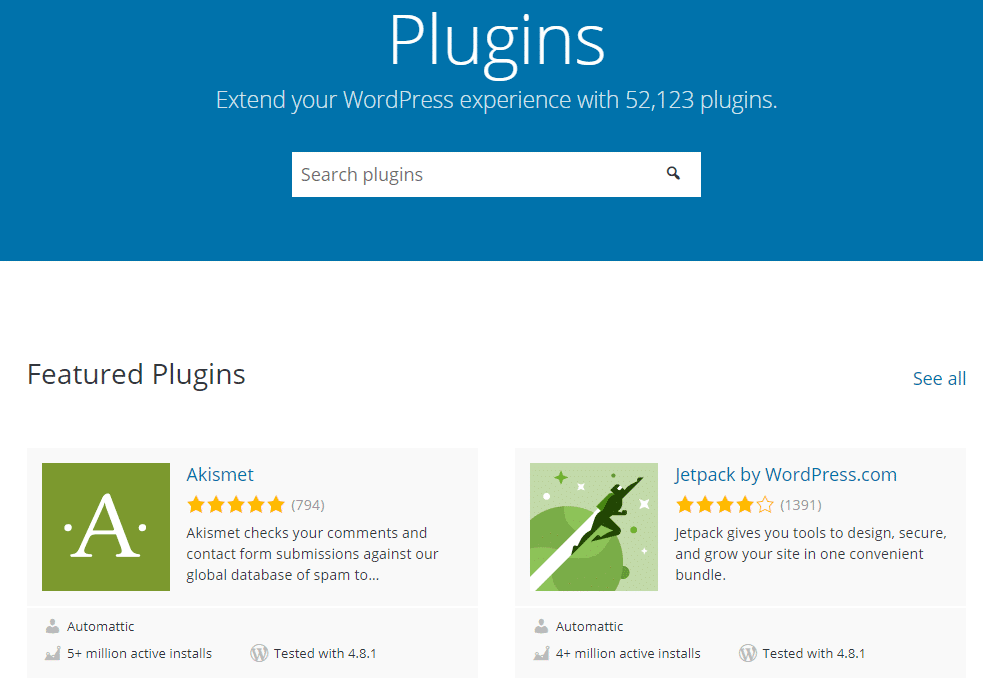
Reviews and ratings help you know if a plug-in is good. Look for plug-ins with high ratings. Read the reviews to see what others say. A plug-in with many positive reviews is usually safe to use.
Credit: wedevs.com
Installing And Managing Plug-ins
WordPress plug-ins are easy to install. First, go to your WordPress dashboard. Find the “Plugins” option and click on it. Then, choose “Add New”. Use the search bar to find the plug-in you need. Once you find it, click “Install Now”. After installation, hit “Activate” to start using it. Some plug-ins might need extra setup. Follow any on-screen instructions carefully.
Plug-ins need regular updates. Check for updates in the “Plugins” section. Click “Update Now” when you see updates. Keeping plug-ins updated ensures they work well. It also keeps your site safe. Remove plug-ins you don’t use. This saves space and keeps things tidy. Always backup your site before updates. This protects your data if anything goes wrong.
Common Issues And Troubleshooting
A WordPress plug-in is a tool that adds features to your website. Common issues include compatibility problems and installation errors. Troubleshooting involves checking for conflicts and updating plug-ins regularly.
Conflicts With Themes
Themes and plugins sometimes do not work well together. This can cause issues on your website. A plugin might change how a theme looks. Or, a theme might not support a plugin. To fix this, try switching to a default theme. See if the problem goes away. You can also disable the plugin to check for issues. If the problem stops, the plugin might be the cause. Always update both themes and plugins. Updates can fix many problems. Ask for help from the theme or plugin support team if needed.
Performance Impact
Some plugins can slow down your website. This makes it load slower. A slow website can upset visitors. Check if a plugin is causing the slowdown. Turn off plugins one by one. See if the site runs faster. Use tools like GTmetrix or PageSpeed Insights. These tools show which plugins are slow. Remove or replace slow plugins. Choose plugins known for speed. Fewer plugins can also mean a faster site. Always choose plugins with good reviews.
Credit: kinsta.com
Security Considerations
WordPress plug-ins extend functionality, but security considerations are crucial. Keep plug-ins updated to prevent vulnerabilities. Choose reputable sources to ensure safe installations.
Protecting Your Site
Always keep your plug-ins updated. Updates fix security issues. They also add new features. Use plug-ins from trusted sources only. Unknown sources can be risky. Install a security plug-in for extra protection. It helps monitor threats. Regularly back up your site. This ensures you don’t lose data.
Recognizing Vulnerabilities
Every plug-in can have weaknesses. Scan your site often. This finds potential vulnerabilities. Use tools that check for weaknesses. They alert you to problems. Avoid using too many plug-ins. More plug-ins mean more risks. Disable unused plug-ins. They might still pose threats. Keep an eye on plug-in reviews. Bad reviews can signal issues.
Future Of WordPress Plug-ins
WordPress plug-ins are tools that add features to your website. They help customize and enhance functionality without coding. Future plug-ins may focus on improving user experience and integrating advanced technologies like AI for better performance.
Emerging Trends
WordPress plug-ins are getting smarter every day. New trends are shaping their future. Artificial Intelligence is one of them. Many plug-ins now use AI to help users. They make websites easier to manage.
Mobile optimization is important too. Plug-ins are adapting to mobile needs. More people use phones to browse. So plug-ins must work well on small screens. This helps websites reach more users.
Impact Of New Technologies
Virtual Reality is changing how plug-ins work. Some plug-ins now support VR. This makes websites more interactive. Users can explore in new ways. It creates exciting experiences.
Blockchain technology is another big change. It brings new security features. Plug-ins use it to protect data. This makes websites safer for everyone. Secure websites build trust with users.
Frequently Asked Questions
What Is A WordPress Plug-in?
A WordPress plug-in is a software add-on. It enhances functionality and features on your WordPress site. Plug-ins allow customization without altering core code. They can add features like contact forms, SEO tools, and e-commerce capabilities. There are thousands of plug-ins available, both free and premium.
How Do Plug-ins Improve WordPress Websites?
Plug-ins enhance your website’s capabilities significantly. They offer solutions for SEO optimization, security, and design customization. With plug-ins, you can add e-commerce functions, social media integration, and analytics tools. They provide flexibility, allowing you to tailor your site to meet specific needs.
Are WordPress Plug-ins Safe To Use?
WordPress plug-ins are generally safe when sourced from reputable developers. Regular updates ensure security and compatibility. Poorly coded or outdated plug-ins can pose risks. Always check reviews and update regularly. Use plug-ins from trusted sources to minimize security vulnerabilities and ensure site stability.
How To Install A WordPress Plug-in?
Installing a WordPress plug-in is straightforward. Access your dashboard, go to “Plugins,” then “Add New. ” Search for the desired plug-in and click “Install Now. ” Activate it to start using its features. Ensure compatibility with your WordPress version before installing to avoid issues.
Conclusion
WordPress plug-ins are key for customizing your website. They add features without coding. Easy to install. They enhance functionality. From SEO tools to contact forms. There’s a plug-in for every need. Beginners find them friendly. Experts appreciate the flexibility. Always check reviews before installing.
Update regularly for security. This ensures smooth performance. Explore the WordPress plug-in directory. Discover what suits your site best. Experiment with different plug-ins. Find what works for you. Your website can grow and improve. Plug-ins make it possible. Start enhancing your site today.
Enjoy the benefits of WordPress plug-ins!



