
Have you ever wondered how WordPress organizes all your content seamlessly? If you’re managing a website, understanding WordPress archives is crucial.
These powerful tools not only help you categorize and store posts but also enhance your site’s navigation and user experience. Imagine effortlessly guiding your visitors through past articles, organized by date, category, or even author. By the end of this article, you’ll know exactly how WordPress archives work and how to use them to your advantage.
Get ready to unlock the secrets of your site’s hidden gems and make your content more accessible and engaging. Dive in and discover how mastering archives can transform your WordPress site into a reader-friendly powerhouse.
WordPress Archive Basics
A WordPress Archive collects and shows posts by date, category, or tag. Archives help organize content. Visitors find older posts easily. Important for blogs with many posts. Readers explore past content without scrolling forever. Archives keep things neat. They are great for user experience. Simple to set up in WordPress. Archives can be monthly or yearly. Categories and tags also create archives. Archives boost site navigation. Users locate topics of interest fast. WordPress themes often include archive templates. Customization is possible with plugins. Archives improve site structure. They enhance readability and access.

Credit: usablewp.com
Types Of WordPress Archives
Category archives group posts by topics. This helps users find related content. Imagine you have a food blog. You might have categories like “Desserts” or “Healthy Snacks”. Each category shows all posts related to it.
Tags are like keywords. They connect posts with similar topics. Unlike categories, tags are more specific. For example, a dessert post might have tags like “chocolate” or “easy”. Tag archives show all posts with the same tag.
Date archives organize posts by time. Readers can view posts from a certain month or year. This is helpful for finding older posts. It keeps your content timely and organized.
Author archives show posts by the same writer. This is useful for blogs with many contributors. Readers can find all posts written by their favorite author. It highlights the author’s style and topics.
Creating Custom Archives
WordPress archives organize past posts by date, category, or author. Custom archives allow tailored organization, enhancing user experience. This feature aids in easy content retrieval, keeping websites tidy and accessible.
Using Plugins
Plugins can help make custom archives. They are easy to use. Popular plugins include Custom Post Type UI and WP Archive. These plugins have many features. You can create archives without coding. This saves time. It is perfect for beginners. Always check plugin compatibility. Updates are important too. Plugins are a great tool. They offer flexibility. They make tasks simple and quick.
Custom Coding Approaches
Custom coding gives more control. It can create unique archives. Developers can use PHP for this. It needs coding skills. WordPress Codex is helpful. It provides guidelines. Always test the code. Errors can occur. Make sure to back up data. Custom coding is powerful. It allows full customization. It is ideal for experienced users.
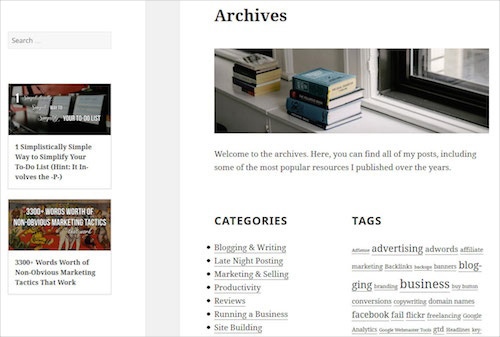
Credit: www.smashingmagazine.com
Seo Benefits Of Archives
Archives help in organizing old posts. They make your website easier to use. Visitors can find content quickly. This improves the user experience. Happy visitors stay longer. Search engines like that. It makes your site rank better.
Archives help new readers find old posts. Old content still has value. It should be easy to reach. This keeps your website fresh. Search engines see this as a plus. They rank your site higher. More people will visit when it’s easy to find content.
Designing Archives For User Experience
WordPress archives organize past posts or content by date, category, or tag. Users easily find relevant information. A well-designed archive enhances user experience, making navigation simple and intuitive.
Layout Considerations
Designing WordPress archives is important for user experience. Simple layouts help users find information quickly. Clear headings guide users through content. Easy navigation makes exploring fun.
Choose colors that are easy on the eyes. Avoid too many bright colors. Stick to a few shades for balance. Consistent fonts make reading easy. Users can focus on the content.
Mobile Responsiveness
All archives should work on phones and tablets. Many people use phones to browse. Responsive design adjusts to different screens. Buttons should be big enough to tap. Text must be readable on small screens.
Images should load quickly. Small file sizes help speed. Test on different devices to ensure quality. Everyone should enjoy a smooth experience.
“`
Credit: www.wpthemedetector.com
Common Challenges
Large archives can slow down a website. This happens when many posts or pages exist. Sorting and searching become tough. Visitors might leave if pages load slowly. It is vital to keep archives neat. Use categories and tags wisely. Regularly clean up old content. This will help keep the site fast.
Performance is key for happy users. Fast loading times make people stay. Ensure images are not too big. Use plugins to help speed up the site. Cache plugins can be useful. They save data for quick loading later. Always update plugins and themes. This keeps everything running well.
Best Practices
Keeping a consistent structure is important for WordPress archives. It helps users find what they need. Use clear headings and neat lists. This makes everything easy to read. The design should be simple and clean. Avoid too many colors and fonts. This keeps the focus on the content.
Regular updates keep archives fresh. New content should be added often. Old content needs checking. Fix broken links and update information. This keeps users happy. They will find what they need easily. Make sure everything works well. Check for errors and fix them quickly.
Future Trends
WordPress archives organize past posts by date, category, or tag, enhancing website navigation. They help users find older content easily. Archives improve site structure and boost user experience.
Ai-driven Archives
Smart computers will help organize WordPress archives. They will sort posts by topic. AI can learn what users like. It will show them posts they enjoy. This means more happy readers. Blogs will be easier to find.
Personalized User Experiences
Websites will change to fit each person. Archives will show different posts to different users. Visitors will see things they care about. This keeps them on the site longer. People feel special when websites are just for them. They will visit more often.
Frequently Asked Questions
What Is A WordPress Archive Used For?
A WordPress Archive organizes and displays a collection of posts. It helps users navigate content by categories, tags, or dates. Archives improve user experience and SEO by structuring content efficiently. They are essential for blogs, news sites, and any content-heavy website.
How Do I Create A WordPress Archive?
Creating a WordPress Archive involves using themes or plugins. Themes often come with built-in archive templates. Plugins offer more customization options. Customize archives by selecting categories, tags, or dates. Ensure your theme or plugin is compatible with your WordPress version.
Can WordPress Archives Be Customized?
Yes, WordPress Archives can be customized. Use themes and plugins to change layouts and styles. Customize by selecting specific categories, tags, or dates. This enhances user experience and aligns with your site’s design. Ensure compatibility with your WordPress version when customizing.
Are WordPress Archives Good For Seo?
WordPress Archives are beneficial for SEO. They organize content, making it easier for search engines to index. Well-structured archives improve user navigation and dwell time. This positively impacts SEO rankings. Use descriptive titles and meta descriptions for better optimization.
Conclusion
WordPress archives are crucial for organizing and displaying past content. They enhance website navigation and user experience. Archives make finding older posts easier for visitors. They help keep your site structured and tidy. Using archives effectively can boost your site’s traffic.
It helps maintain a smooth flow of information. With archives, content remains accessible and relevant. They also aid in improving your site’s SEO. Proper use of archives contributes to a well-managed site. Remember, organized content leads to satisfied visitors and better engagement.
Keep your archives updated and optimized for the best results.



