
Imagine landing on a website where the content grabs your attention, and the design feels sleek and modern. You might notice that the header blends seamlessly with the background, creating a visual harmony that draws you in.
This captivating effect is often achieved through a transparent header in WordPress. But what exactly is a transparent header, and why should you consider using it for your site? If you’re looking to enhance your website’s aesthetic appeal and engage visitors more effectively, understanding transparent headers can be your secret weapon.
You’ll discover the benefits of transparent headers, how they can transform your site’s design, and step-by-step guidance on implementing them. Get ready to explore how this simple design element can captivate your audience and elevate your online presence.
Transparent Header Basics
A transparent header makes your website look modern. It shows the background image or color through the header. This can make the site more visually appealing. Many WordPress themes support this feature. It helps in keeping the design clean and simple.
A transparent header is often used for homepages. It is also used on pages with large images or sliders. This design choice can improve the user experience. It creates a seamless transition between the header and the page content. Website owners can adjust the transparency level. This ensures it fits with their site’s overall look.
Benefits Of Transparent Headers
Transparent headers make websites look modern and sleek. They create a seamless blend with the background. Visitors see more of the content without distraction. This design can make pages feel open and airy.
Users often find it easy to navigate with transparent headers. The style helps in drawing attention to the main content. Brand logos and menus can stand out more. This design choice can enhance user experience. It’s a popular choice for many WordPress themes.
Design Considerations
Choosing the right color and contrast is key for a transparent header. Light text on a dark background stands out well. Dark text on light backgrounds can also work. Balance is important for readability. Avoid colors that blend with the background. This makes text hard to see. Use colors that pop against the background. Adjust transparency so text remains clear. Test different combinations to find the best one.
Fonts should be easy to read. Simple fonts work best. Avoid fancy fonts that are hard to understand. Large font size helps. It makes text clear for everyone. Bold text can highlight important words. Use italics sparingly. They can be hard to read. Spacing between letters should be balanced. Too close or too far can confuse readers.
Credit: totalwptheme.com
Implementation Techniques
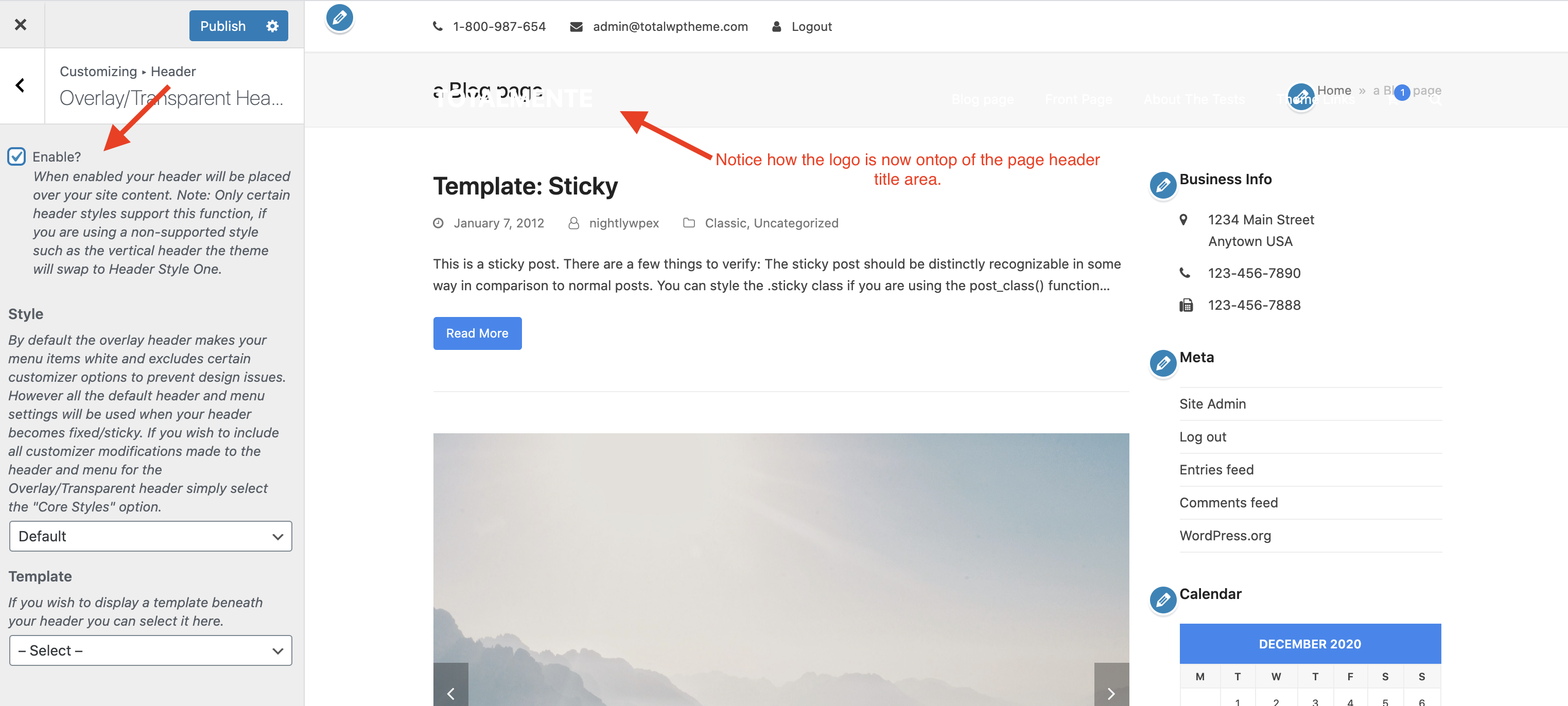
Many WordPress themes come with a transparent header option. This allows your website to look stylish. The header blends with the page. Check your theme’s settings to see if this feature exists. It can be found in the theme customizer. Try different settings. See what works best for you. Some themes make it very easy. Others may need a bit more tweaking. Always save your changes. Preview them on different devices. This ensures everything looks good everywhere.
CSS lets you create a transparent header even if your theme doesn’t have one. Use custom CSS code. You can add this in your WordPress dashboard. Go to Appearance, then Customize. Click on Additional CSS. Write code to make the header transparent. This might take some trial and error. Be patient. Check online for code examples. Many resources are available. Using CSS gives you more control. But it requires basic coding skills. Always back up your site first. This prevents accidental mistakes.
Plugins For Transparent Headers
Some plugins help make headers see-through. Elementor is one of them. It is used by many people. It has a drag-and-drop builder. Beaver Builder is another popular choice. It is user-friendly and has many features. WPBakery lets you customize headers easily. All these plugins make designs look neat. They have many options to try.
Installing plugins is easy. First, go to the WordPress dashboard. Next, click on Plugins and then Add New. Search for the plugin name. Click Install and then Activate. After that, go to the plugin settings. Choose your header options. Save changes to see the new header.

Credit: wp-pagebuilderframework.com
Troubleshooting Common Issues
Transparent headers can cause responsive design problems. They may look different on various devices. Sometimes, the text can be hard to read. Adjust the font size and color for better visibility. Test the website on different screens. Ensure that the header remains clear and readable. Use media queries in CSS for adjustments. This helps in maintaining a good look across devices.
Not all themes support transparent headers. This can create compatibility concerns. Check if the theme supports it before using. Some plugins might help in solving this issue. Make sure the plugins are updated. Also, clear the browser cache after changes. This ensures that new settings are applied. Test the header on different browsers. This helps in catching any issues early.
Best Practices
A transparent header in WordPress offers a modern look by allowing the website’s background image to show through. It enhances visual appeal and provides a seamless browsing experience. Ideal for creating engaging websites that highlight visual content.
User Experience Considerations
A transparent header helps users focus on content. It should not block any important text or images. The header should be easy to read. Choose a color that stands out against the background. Links in the header should be easy to click. Use clear fonts for better readability. Make sure the header looks good on all devices. This includes phones, tablets, and computers.
Seo Implications
Transparent headers can improve SEO. They make your website look clean. A clean site loads faster. Faster loading can help with search rankings. Ensure the header contains important keywords. This helps search engines understand your site. Navigation links in the header should be clear. This makes it easier for search engines to crawl your site. A good header can boost user engagement. More engagement can lead to better SEO results.
Case Studies
Discover the concept of a transparent header in WordPress. It seamlessly blends the header with the background, creating a modern and stylish look for websites. This design choice can enhance user engagement by offering a clean and visually appealing interface.
Successful Examples
Many websites use a transparent header to create a modern look. One example is a travel blog that uses stunning images. The images show through the header, making the site look beautiful. Another example is a tech site that uses a transparent header. This makes their content pop.
Transparent headers often make sites look clean and neat. Users can see more of the background image or video. This style can also help with branding. It allows logos and text to stand out more. Many brands find this style effective in keeping visitors engaged.
Lessons Learned
A transparent header can improve a site’s appearance. But it’s important to check its readability. Text on the header should always be clear. Some sites use a dark overlay for better readability. This ensures visitors can read the text easily.
Designers must consider the overall look of the site. The header should blend with other elements. Planning is key to making a transparent header work well. This style can enhance user experience if done right.

Credit: www.youtube.com
Frequently Asked Questions
What Is A Transparent Header In WordPress?
A transparent header in WordPress is a design feature. It makes the header blend seamlessly with the page background. This effect is achieved using CSS. It enhances the visual appeal of your website. Transparent headers are popular in modern web design for their sleek look.
How To Create A Transparent Header In WordPress?
Creating a transparent header involves editing the theme’s CSS or using a page builder. Many WordPress themes offer built-in options for transparency. Plugins can also help achieve this effect. Always preview changes to ensure compatibility with your design.
Why Use A Transparent Header On Your Website?
A transparent header offers a clean, modern aesthetic. It helps highlight the content and background imagery. This design element can enhance user experience. It also makes navigation elements more visually appealing. Transparent headers are popular for creating a minimalist look.
Does A Transparent Header Affect Website Speed?
A transparent header generally does not affect website speed. It primarily involves CSS styling, which is lightweight. However, poorly optimized images or scripts can impact speed. Always optimize images and code to ensure fast loading times. Regular performance checks help maintain speed.
Conclusion
Transparent headers create a clean and modern look. They blend seamlessly with your design. Easy to customize, they enhance your website’s aesthetic. Visitors appreciate the sleek appearance. It makes your site stand out. No technical skills are needed to implement.
Just choose the right theme. Ensure readability with contrasting text. Consider user experience and brand identity. Transparent headers offer flexibility in design. Perfect for creative sites and portfolios. They provide a fresh, professional feel. Explore options and find what suits your needs.
A stylish header can elevate your website’s appeal.


