
Imagine having the power to customize your WordPress website effortlessly, enhancing its appeal and functionality without delving into complex coding. This is where the text widget comes into play.
With a simple drag and drop, you can add anything from vibrant announcements to engaging content in your sidebar or footer areas. You might be wondering, “What exactly is a text widget, and how can it transform my website? ” By the end of this article, you’ll discover how this versatile tool can be your secret weapon to capture attention, convey your message effectively, and create a more dynamic online presence.
Curious to unlock these possibilities? Keep reading to find out how a text widget can revolutionize your WordPress experience.
Text Widget Basics
A Text Widget in WordPress is a simple tool. It lets you add text to your site. You can put it in sidebars or footers. This widget is very flexible. It can hold HTML code, plain text, or links. Many users love it for its ease. You can use it to share important information. Or display a short message. Some people use it for contact details. Others share a quick welcome note. The Text Widget is part of WordPress by default. This means you do not need to install anything. It is ready to use right away. Just drag it to your desired area. Then type your content. It’s that easy!
Credit: www.greengeeks.com
Functions Of A Text Widget
A text widget in WordPress helps you add text content to your site. It’s very simple to use. Drag it to your desired location on the page. You can enter plain text or even HTML code. This allows for more customizations. It’s great for adding messages or small notes. You can also use it for links or images. Text widgets are found in the widgets area. This area is in the WordPress dashboard. They are very flexible and versatile. Many website owners use them. They help make the site more informative and interactive. You can easily update the text. This is useful for announcements or news updates. The text widget is a handy tool for many tasks.
Adding A Text Widget
A Text Widget is a tool in WordPress. It lets you add text to your website. This can be simple text or HTML code. HTML allows you to format your text. You can make words bold or add links.
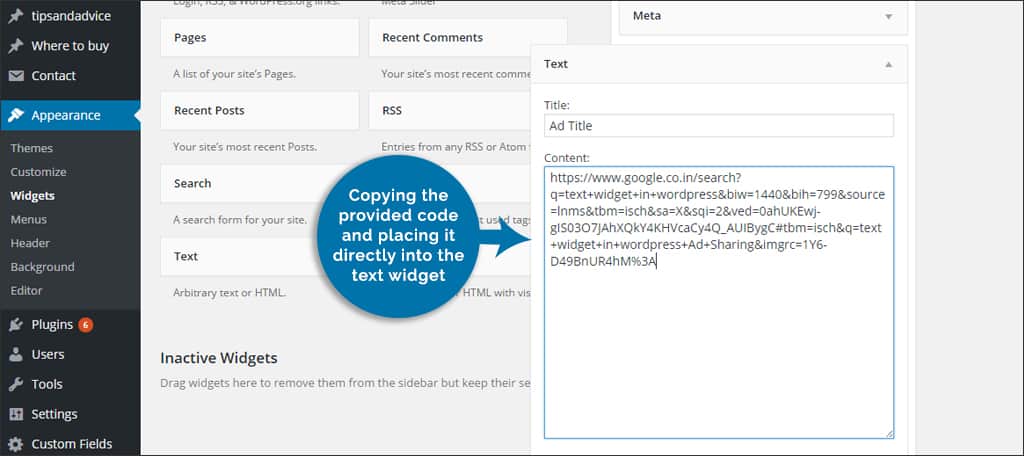
To add a Text Widget, go to your WordPress dashboard. Click on Appearance. Then select Widgets. Drag the Text Widget to your sidebar or footer area. This will display your text on the website.
You can use the Text Widget for many things. Share a short bio, promote an event, or display a message. It’s a simple way to make your website better.

Credit: make.wordpress.org
Customization Options
A text widget lets you add custom code in WordPress. You can use HTML to make your text bold or italic. Add links to other pages with simple tags. CSS helps you style the text. Change colors or fonts easily. Make your text stand out. It’s like painting with words!
Text widgets can show more than just words. You can add images or videos inside. Use simple code to put a picture or a video. This makes your website fun and lively. Visitors enjoy seeing different content types. A colorful page keeps their interest. They stay longer and explore more.
Benefits Of Using Text Widgets
Text widgets are easy to use. They help add content to your site. You can add text, links, and images. This makes your site look better. It’s simple to update them. Change the text anytime you need.
They are flexible tools. Add them to any widget area. You can use them in sidebars or footers. They fit well on different pages. This helps keep your site organized.
Text widgets save time. No coding skills needed. Just drag and drop to use. This makes it easy for beginners. They make your website more interesting.

Credit: www.inmotionhosting.com
Common Uses
A text widget in WordPress displays custom text, HTML, or scripts on your site. It helps add contact info, announcements, or advertisements easily. Users enjoy flexibility in customizing their site’s appearance and content.
Displaying Contact Information
Text widgets help show important details easily. Contact information like phone numbers and email addresses can be added. This makes it easy for visitors to reach you. The widget is easy to update. Just change the text when details change.
Promotional Banners
Banners catch attention quickly. Promotional banners can be placed in text widgets. Great for sales or special offers. Visitors see these banners right away. Easy to edit whenever needed. Just update the text and images.
Social Media Links
Text widgets are perfect for social media links. These links connect visitors to your profiles. Adding them is simple. Visitors can follow your updates easily. It’s a quick way to grow your online presence. Just copy and paste the links.
Best Practices
Keep the design of your text widget consistent with your website. Use the same fonts and colors across all pages. This helps the site look professional and neat. Avoid using too many different styles. It can make the site look messy and confusing. Simple design choices make text easier to read. They also help users stay focused on content.
Ensure the text widget looks good on phones. Many people use phones to view websites. Text should be easy to read on small screens. Avoid using very small fonts. They can be hard to read on mobile devices. Check that images in the widget fit well on phone screens. Proper spacing helps keep the text clear and organized. Test your site on different phones. Ensure everything appears as it should.
Troubleshooting Tips
A text widget in WordPress allows users to display text, images, or HTML code in sidebar areas. It’s handy for adding extra information or custom content without coding knowledge. Easily customize your site’s appearance and functionality with this simple tool.
Widget Not Displaying
Sometimes, the text widget may not show up. This can be very frustrating. First, make sure the widget is added to the right area. Also, check if the theme supports widgets. Not all themes do.
Another reason could be a plugin conflict. Disable plugins one by one. See if the widget appears. If it does, you found the problem.
Formatting Issues
Text widgets can have formatting problems. Sometimes, text looks messy. Check the HTML code in the widget. It might have errors. Fix any broken tags or missing elements.
Also, check the theme’s CSS. It might override widget styles. Use custom CSS to solve this. It can help make the text look right.
Advanced Techniques
Discover the simplicity of a Text Widget in WordPress. It allows you to add and display custom text or HTML in widget-ready areas, enhancing your site’s functionality. Perfect for adding announcements or custom messages.
Using Shortcodes
Shortcodes make tasks easy in WordPress. They are like magic words. Place them inside a text widget. They perform special tasks. For example, show a gallery or add a contact form. Shortcodes save time and effort. They turn plain text into functional features. Many plugins provide these codes. Use them wisely to add features.
Custom Scripts
Custom scripts add special features to your site. You can add them in the text widget. Scripts can be JavaScript or CSS. They help style or animate parts of your site. Ensure scripts are safe and clean. Test them before applying to your site. A small mistake can cause problems. Always backup your data first.
Frequently Asked Questions
What Is A Text Widget In WordPress?
A text widget in WordPress allows users to add text, HTML, or scripts to their site. It’s a versatile tool for displaying content like announcements, promotions, or custom code. Users can simply drag and drop the widget into a widget-ready area on their WordPress site.
How Do I Add A Text Widget?
To add a text widget, navigate to Appearance > Widgets in your WordPress dashboard. Find the Text widget and drag it into the desired widget area. You can then add your content and click ‘Save’. Your text widget will now be live on your site.
Can I Use Html In A Text Widget?
Yes, you can use HTML in a WordPress text widget. This allows you to format text, add links, images, or other HTML elements. Simply enter your HTML code into the text widget and it will render on the front end of your website.
What Are Common Uses For Text Widgets?
Text widgets are commonly used for displaying custom messages, advertisements, or contact information. They are also great for adding simple HTML or JavaScript snippets. Many users utilize text widgets to enhance their site’s functionality and appearance without altering theme files.
Conclusion
Text widgets in WordPress offer flexibility and simplicity. They help you customize your website easily. You can add text, images, and even HTML. This improves your site’s appearance and functionality. Explore different uses to maximize their potential. Engage visitors by adding valuable content in widgets.
Keep your website dynamic and user-friendly. These small tools make a big difference. Start experimenting with text widgets today. Enhance your site without complex coding. WordPress text widgets are a valuable resource for any site owner. Embrace them to create a more interactive experience.
Your visitors will appreciate it.



