
Have you ever wondered how websites keep their content fresh and dynamic without constantly updating every single page? The answer lies in a powerful tool known as a syndication feed.
If you’re navigating the world of WordPress, understanding this feature can transform the way you manage and share content. Imagine saving time while ensuring your audience always gets the latest updates. Intrigued? This guide will unravel what a syndication feed is in WordPress, showing you how it can be a game-changer for your site.
Stick around to discover how it can streamline your content strategy and enhance your readers’ experience, keeping them engaged and coming back for more.
Credit: kinsta.com
Syndication Feed Basics
A syndication feed in WordPress helps share content. It uses a simple format called RSS. This format helps deliver new posts to readers. Many websites use RSS to connect with visitors. When a new post is published, the feed updates automatically. This keeps readers informed without visiting the site.
Syndication feeds save time and effort. Visitors can use feed readers to gather updates. Popular feed readers include Feedly and Inoreader. These tools collect feeds in one place. They make it easy to follow favorite sites. Feeds are useful for both blog owners and readers. They create a strong connection between them.
Types Of Syndication Feeds
RSS stands for Really Simple Syndication. It helps share content easily. RSS Feeds deliver the latest posts to users. These feeds show titles, links, and summaries. They work automatically. Users get updates without visiting websites. It’s very convenient for readers. Many websites use RSS Feeds. They keep readers informed. Content is always fresh and new. RSS Feeds are popular on blogs. They make sharing content simple.
Atom Feeds are another way to share updates. They are similar to RSS Feeds. Atom Feeds can include more information. They give details about content. These feeds support more formats. They are flexible and customizable. Atom is a newer technology. It offers more features than RSS. Atom Feeds are great for tech-savvy users. They provide content in a structured way. Websites use Atom to enhance user experience.
Benefits For Bloggers
A syndication feed helps share your content with more readers. More people can see your blog posts. This increases your blog’s reach. New audiences can discover your work. Readers from different websites might visit your blog. This brings more traffic to your site.
Engagement means readers spend time on your blog. They read more posts. Comments and shares increase. This is good for your blog. A syndication feed keeps readers coming back. They find your content interesting. Your audience grows with time. More interaction happens on your blog.
Setting Up A Feed In WordPress
WordPress automatically creates a syndication feed for your site. This feed shares your latest posts. Visitors can use it to follow your updates. The default feed is simple. It shows recent posts in a list. Each post has a title and link. This helps readers find content quickly. You do not need to set it up. WordPress does it for you.
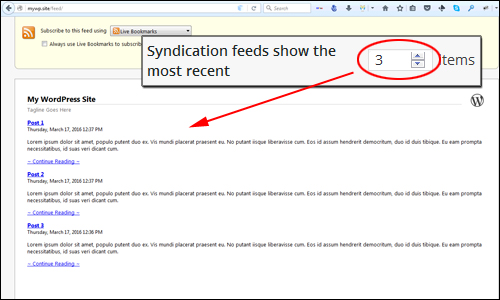
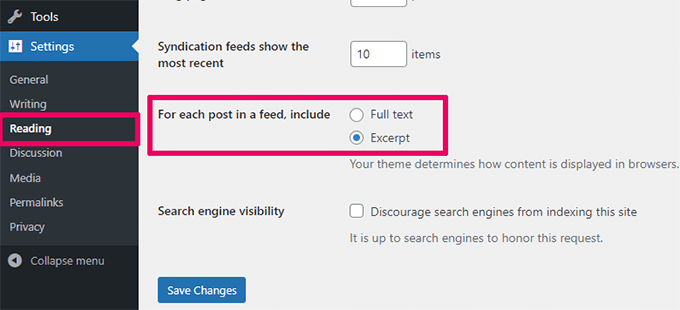
Change your feed settings if needed. Go to the settings menu. Click on Reading. Here, adjust how many posts show in the feed. You can choose to show full text or summaries. This helps control the amount of content. For more changes, use plugins. Plugins offer extra features for feeds. They make it easier to customize.
Managing Feed Content
Choosing What to Include in a syndication feed is important. You can select specific categories to share. This helps in showing only relevant posts. You might wish to include recent updates. This keeps your audience informed. Images can also be included. They make the feed more appealing.
Excluding Specific Posts is also possible. Some posts may not be suitable for sharing. You can hide these posts from the feed. This keeps your feed clean and focused. It is easy to manage the feed settings. This way, only the desired content appears. This helps in controlling the feed’s quality.
Credit: wpcompendium.org
Using Plugins For Enhanced Feeds
Syndication feeds in WordPress distribute content to a wider audience by sharing updates from your site. Plugins enhance these feeds, offering customizable options to improve content delivery and user engagement. Boost your site’s reach with enriched feeds that cater to diverse platforms and audiences.
Popular Feed Plugins
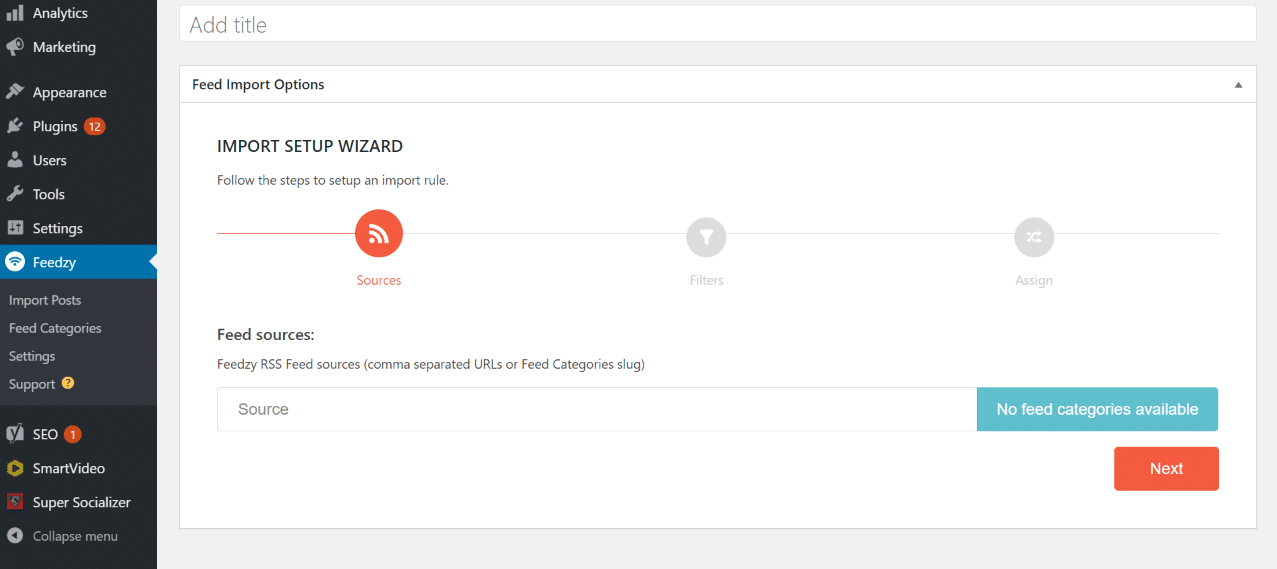
WordPress offers many plugins for feeds. Some popular options include Feedzy, WP RSS Aggregator, and RSSImport. These plugins help make feeds better. Feedzy allows users to fetch and display RSS feeds. It is easy to use and set up. WP RSS Aggregator is great for combining multiple feeds. It is flexible and offers many settings. RSSImport is simple and lightweight. It helps in displaying feeds with shortcodes. Using these plugins can make feeds more useful and attractive.
Advantages Of Using Plugins
Plugins make feed management easy. They offer many features and settings. Users can customize feed appearance. This means making feeds look nice and neat. Plugins also help in fetching feeds automatically. No need to do it by hand. They save time and effort. Some plugins even offer filter options. This means showing only what is needed. Plugins can also provide statistics. These can help understand feed performance. Overall, plugins are useful tools for managing syndication feeds.
Common Issues And Solutions
Syndication feeds in WordPress often face issues like broken links or outdated content. Solutions include regularly updating plugins and checking feed URLs. Ensuring compatibility with various browsers also helps maintain smooth functionality and user experience.
Feed Errors
Feed errors can be confusing. Sometimes, the feed does not update. This can frustrate users. The first step is to check the feed URL. Ensure it’s correct. A wrong URL causes errors. Next, check the feed settings. Sometimes, settings need adjusting. This can fix the problem.
Plugins can also cause issues. Deactivate them one by one. See if the feed works after each. This helps find the problem. Themes might also interfere. Try switching to a default theme. Check if the feed works then.
Troubleshooting Tips
Clearing the cache can help. Cached pages may show old data. Clear the browser cache. Also, clear the WordPress cache. This can solve many problems. Ensure WordPress is updated. Updates fix bugs and errors. Keeping updated is important.
Check for HTML errors in your feed. Use a validator tool. It finds and fixes errors. This helps the feed work properly. Following these steps can resolve most feed issues.
Credit: www.wpbeginner.com
Best Practices For Feed Optimization
Update your feed often. This keeps content fresh. Daily updates are great. Weekly is also okay. Too few updates can lose readers. They like new and interesting content. Check your schedule. Make sure it works for you.
Quality matters. Good content gets more readers. They share it with friends. Use simple words. Make it easy to read. Check for mistakes. Correct spelling and grammar are important. Add images. They make content better. Engage your readers with questions. Keep them interested.
Frequently Asked Questions
What Is A Syndication Feed In WordPress?
A syndication feed in WordPress allows content to be shared across platforms. It distributes blog posts and updates to subscribers. This helps increase visibility and engagement by reaching audiences on different channels.
How Do Syndication Feeds Work?
Syndication feeds work by generating an XML file with content summaries. This file is updated regularly and can be accessed by feed readers. It allows users to see new content without visiting the website directly.
Why Use Syndication Feeds For Blogs?
Using syndication feeds for blogs helps expand your audience reach. It automatically updates subscribers with new posts, increasing engagement. This boosts site traffic and improves SEO by keeping content fresh and accessible.
Can Syndication Feeds Improve Seo?
Yes, syndication feeds can improve SEO by increasing content visibility. They help distribute content widely, attracting more visitors. Consistent updates keep your site active, which is favorable for search engine rankings.
Conclusion
Syndication feeds in WordPress help share content efficiently. They allow automatic updates of your blog posts. Readers receive new content without visiting your site. This boosts engagement and keeps audiences connected. Setting up feeds is simple in WordPress. You can tailor them to your needs.
It’s a useful tool for bloggers and site owners. Helps grow your audience and improve visibility. Keep content flowing easily with syndication feeds. It’s essential for maintaining an active online presence. Try using feeds to enhance your site’s reach. Simple steps make a big impact.
Stay connected, stay relevant.



