
Imagine having the power to test every tweak and change on your WordPress site without the risk of breaking it. Sounds ideal, right?
That’s exactly what a staging site offers. If you’re using Managed WordPress at GoDaddy, understanding this tool can transform the way you manage your website. You might be wondering, “What is a staging site, and why do I need one?
” Well, this little-known feature is your secret weapon for a seamless website experience. As you dive deeper into this article, you’ll discover how staging sites can prevent disasters, enhance your site’s performance, and ultimately save you time and stress. Ready to unlock the full potential of your WordPress site? Let’s explore the world of staging sites at GoDaddy!

Credit: www.godaddy.com
Staging Site Basics
A staging site is a copy of your main website. It allows you to test changes safely. Mistakes won’t affect the live site. This is helpful for checking design and functionality updates.
Developers use staging sites to test new code. Designers can try out new layouts. It ensures everything works perfectly. No risk to your live site. This keeps your visitors happy.
Credit: www.godaddy.com
Godaddy’s Managed WordPress Hosting
Godaddy’s Managed WordPress Hosting offers many features. It makes website building easy. It has easy-to-use tools. Users get fast website speed. Security is strong. Backup happens daily. You won’t lose your data.
It includes automatic updates. This keeps your website fresh. The dashboard is simple. Users can manage everything from one place. Support is available 24/7. Help is always near.
Godaddy provides a staging site. You can test changes here. Your main site stays safe. Mistakes won’t affect it. This feature is important. It helps keep your site professional.
Creating A Staging Site
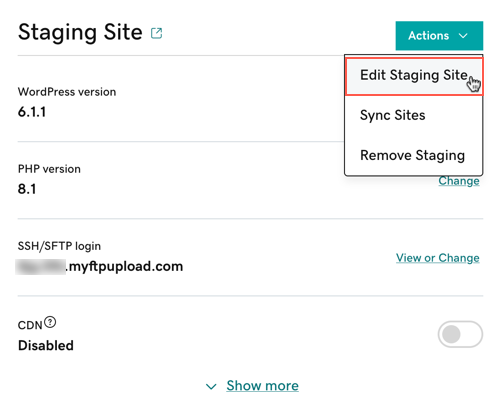
First, log into your GoDaddy account. Find your WordPress Hosting section. Click on the site you want to stage. Look for the Staging tab or button. Click it to begin. Follow the prompts to create your staging site. This may take a few minutes. Once done, you can make changes safely. Test new plugins, themes, or settings. Nothing will affect your live site. Your changes will stay in staging. When happy, push them live. The process is simple and safe.
Sometimes, changes don’t sync correctly. This can happen with big updates. Check settings before pushing live. Another challenge is forgetting to stage changes. Always test before going live. It saves time and stress. Keep backups of your site. This helps if something goes wrong. Staging is a powerful tool. Use it wisely for best results.
Testing Changes Safely
Testing new features on a staging site keeps your live site safe. You can try out new plugins and designs here. No risk to your visitors. This space is like a playground. Explore new ideas without fear. Make changes and see the results.
Finding errors and detecting bugs is easy on a staging site. Spot problems before they reach your main site. It’s like a detective game. Bugs have nowhere to hide. Fix them here, and your live site stays smooth. Keep visitors happy and your website running well.
Deploying From Staging To Live
Always test your site in the staging environment first. This helps catch errors. Double-check all links and pages before going live. Ensure all plugins and themes are up to date. Use a backup plugin to save your current site. This provides a safety net.
Don’t skip the backup process. It’s a common error. Avoid rushing deployments. Take your time. Ensure the staging site mirrors the live site. This prevents surprises. Check for broken links and missing images. Always review changes thoroughly. Deploy during low traffic times. This minimizes impact on users.
Credit: www.godaddy.com
Maintaining A Staging Environment
Regular updates keep your staging site healthy. Updates bring new features. They also fix bugs and improve security. Always update themes and plugins. This helps your site run smoothly. Check for updates often. Make it a habit. Back up your site before updating. This avoids losing important data.
Security is very important for your staging site. Use strong passwords. Change them regularly. Install a security plugin. This helps protect against threats. Keep your software updated. Outdated software can have security holes. Monitor your site for strange activity. Always be cautious. Your site’s security is like a lock on your door.
Frequently Asked Questions
What Is A Staging Site?
A staging site is a test environment for your website. It allows you to make changes and test them before going live. This prevents errors and ensures a smooth user experience. With GoDaddy Managed WordPress, creating a staging site is easy and beneficial.
Why Use A Staging Site For WordPress?
Using a staging site for WordPress helps avoid potential errors on your live site. It allows you to test updates, plugins, and themes safely. This ensures your website remains functional and error-free. With GoDaddy Managed WordPress, you can easily manage and test changes efficiently.
How To Create A Staging Site On Godaddy?
Creating a staging site on GoDaddy is straightforward. Log into your GoDaddy account and navigate to your Managed WordPress dashboard. Select “Staging” and follow the prompts to set up your test environment. This process ensures your live site remains unaffected by changes.
Can I Make Changes Directly On A Staging Site?
Yes, you can make changes directly on a staging site. This includes testing new plugins, themes, or custom code. Once satisfied, you can push these changes to your live site. This process helps maintain your website’s integrity and functionality without risking downtime.
Conclusion
A staging site for managed WordPress at GoDaddy is essential. It offers a safe environment to test updates and changes. This ensures your live site remains error-free. You can experiment without affecting your main site. This tool is crucial for businesses and bloggers alike.
By using a staging site, you maintain professionalism and avoid downtime. It simplifies updates and boosts site reliability. Explore this feature to keep your website running smoothly. Give your site the care it deserves with a staging environment. Happy managing!



