
Have you ever found yourself wondering how search engines like Google know exactly what content is on your WordPress site? The secret lies in a powerful tool called a sitemap.
If you’re looking to boost your site’s visibility and improve its ranking, understanding what a sitemap is and how it can benefit your WordPress site is crucial. Imagine having a roadmap that guides search engines through every corner of your website, ensuring no page is left undiscovered.
That’s precisely what a sitemap does for you. By the end of this article, you’ll grasp the importance of sitemaps, how they work, and how you can easily implement one to optimize your WordPress site for better search engine performance. So, if you’re ready to unlock the potential of your website and attract more visitors, keep reading!
What Is A Sitemap?
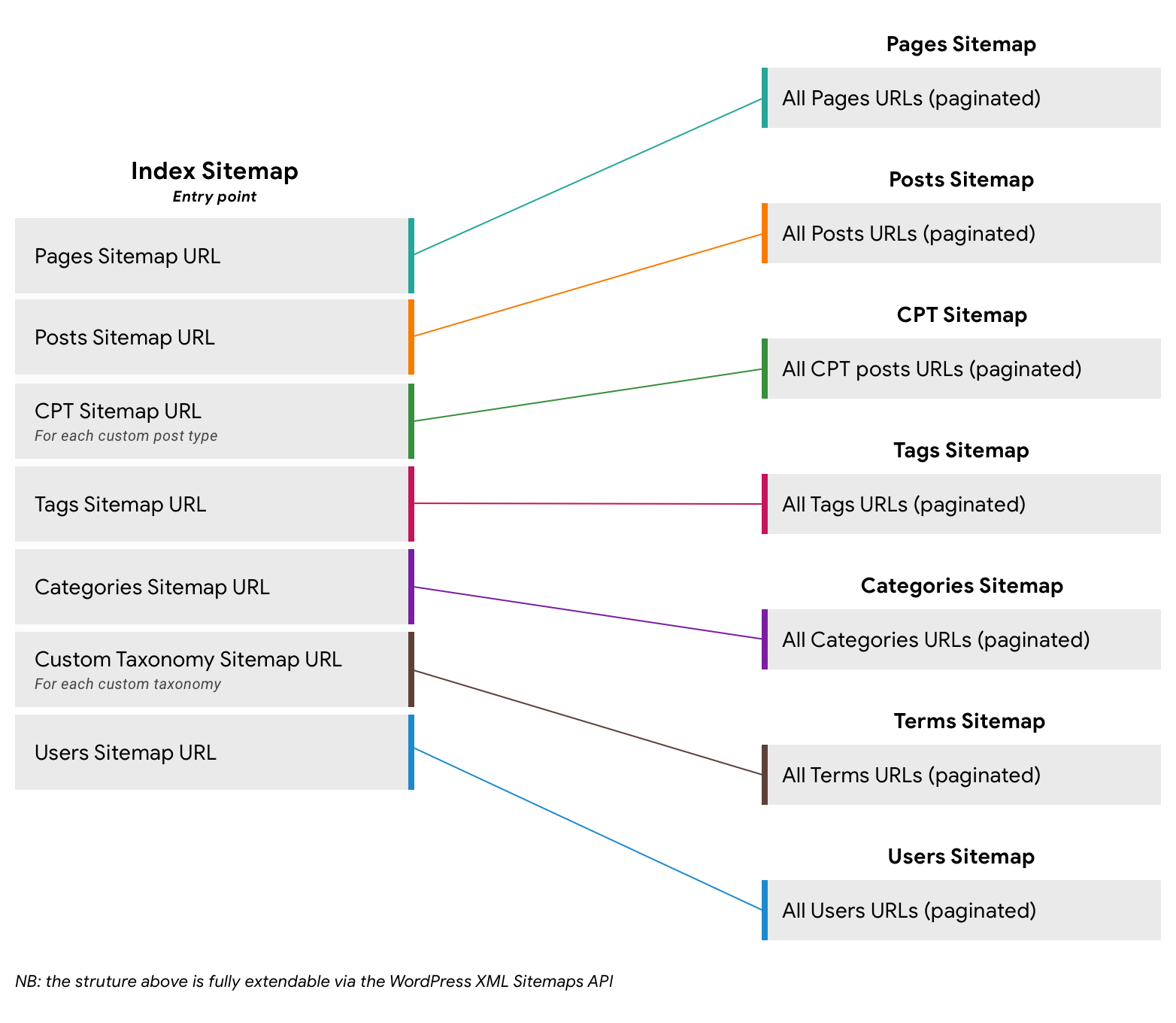
A sitemap is a map of a website. It lists all pages and posts. Search engines use sitemaps to find content. This helps them index your site better. It improves your site’s visibility in search results.
Sitemaps help search engines understand your site. They see how pages are linked. This helps with site navigation. It is easier for search engines to crawl your site. This can lead to better search rankings.
Plugins can create sitemaps for you. Yoast SEO is a popular plugin. It makes sitemaps automatically. This saves time and effort. You can also use other plugins. They offer similar features.
Credit: make.wordpress.org
Types Of Sitemaps
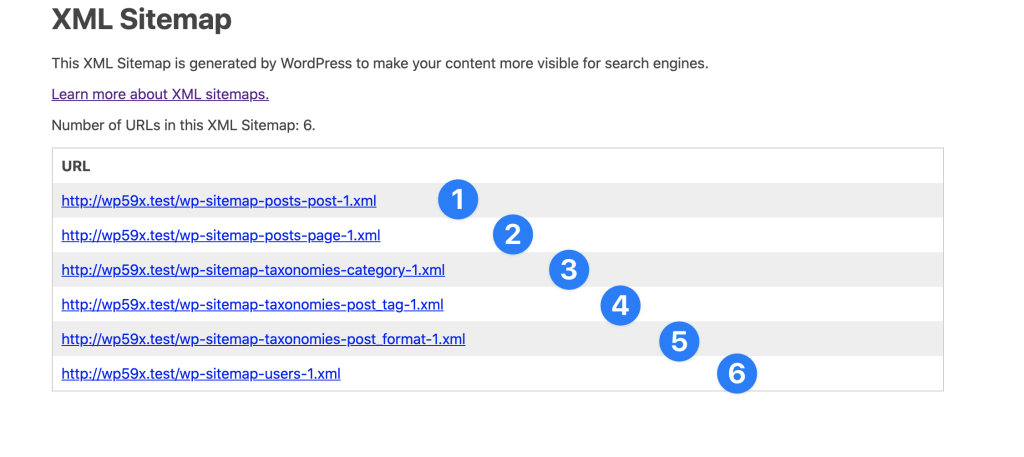
XML sitemaps help search engines find your website pages. They are important for website visibility. These sitemaps list pages in a special format. Search engines like Google and Bing read them easily. They help search engines know which pages to check first. Updating XML sitemaps often is a good idea. This way, search engines stay up-to-date with your content.
HTML sitemaps are for people visiting your website. They show a list of all pages. Users can find what they are looking for easily. HTML sitemaps improve user experience. They can be a simple list or a more organized table. Visitors can navigate your site faster with an HTML sitemap. It’s like a map for your website. Simple and clear.
Importance Of Sitemaps
Sitemaps help search engines find your website pages. This makes them important for SEO. They tell search engines what pages are on your site. This helps in indexing your site faster. A good sitemap can boost your site’s visibility. Search engines love well-structured sitemaps. With a sitemap, you guide them better. This means more chance for better rankings.
Sitemaps also improve user experience. They help users find pages easily. Users can see all pages in one place. This makes navigation smoother. A sitemap acts like a map for your website. Visitors can reach their desired page without hassle. It reduces confusion. Users will spend more time on your site. This can lead to more engagement. Happy users are likely to return.
Creating A Sitemap In WordPress
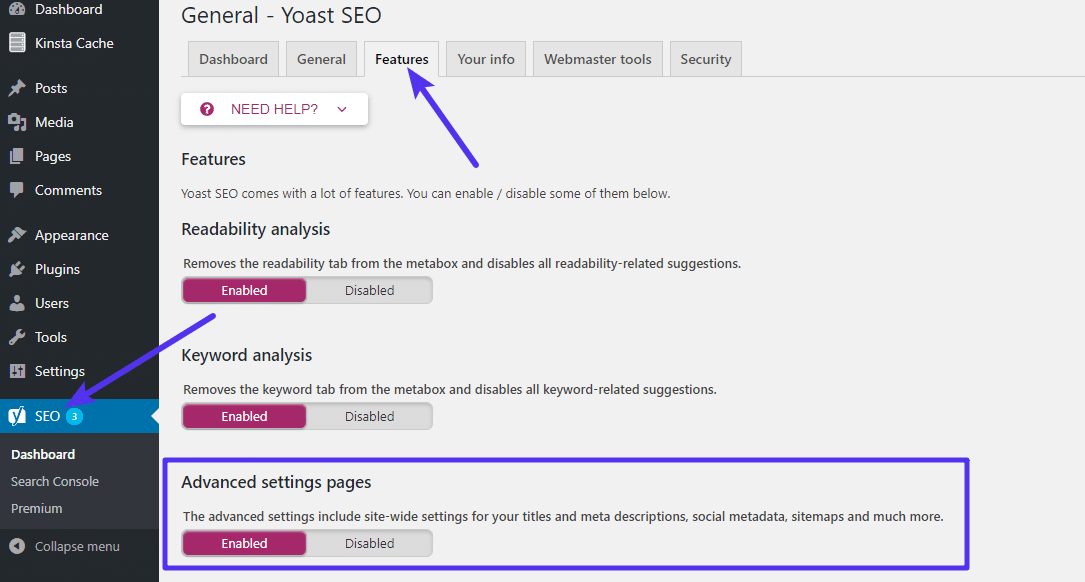
Plugins make sitemap creation easy. Yoast SEO is a popular choice. It automates sitemap creation. Install it from the WordPress plugin directory. Activate the plugin. Go to the SEO settings. Find the XML Sitemaps option. Enable it. Your sitemap is now ready. It’s a simple way to manage your site. The plugin updates your sitemap automatically. This keeps search engines informed.
You can also create a sitemap manually. Use a text editor. List all your website links. Save the file as sitemap.xml. Upload it to your site’s root directory. This method requires more effort. It’s less convenient than using plugins. Changes need manual updates. This keeps the sitemap current. Not recommended for beginners.
Best Plugins For Sitemaps
Yoast SEO is a popular plugin for WordPress. It helps create sitemaps easily. Users like it for its simple setup. The plugin guides you step-by-step. It also offers SEO tips. These tips help your website rank better. Yoast SEO is great for beginners. It works well with other plugins too. Many people trust it for their websites.
Google XML Sitemaps is another great plugin. It is known for its easy use. This plugin makes sure search engines find your site. It updates the sitemap when you add content. This helps your site stay fresh and visible. No special skills are needed to use it. It works with all kinds of WordPress sites. Many site owners recommend it.
All in One SEO offers a simple sitemap solution. It’s easy for anyone to use. This plugin gives your site an SEO boost. It provides tools for beginners and experts. All in One SEO keeps your website organized and visible. It is a favorite among many WordPress users. This tool helps improve your site’s performance.
Credit: learn.wordpress.org
Submitting Sitemaps To Search Engines
Google Search Console helps your site be seen. First, go to Google Search Console. Sign in with your Google account. Click on the Sitemaps section. Enter your sitemap URL. This URL is often like yourwebsite.com/sitemap.xml. Click on “Submit”. Google will start checking your site. This helps your site show up in Google searches.
Bing Webmaster Tools is for Bing search. Sign in to Bing Webmaster Tools. Go to the “Sitemaps” section. Enter your sitemap URL. It will look like yourwebsite.com/sitemap.xml. Click on “Submit”. Bing will begin to index your site. This helps in showing your site on Bing search results. Both Google and Bing need sitemaps. They help search engines understand your site better.
Common Sitemap Issues
Broken links can confuse users. They also confuse search engines. They lead to pages that don’t exist. This affects your website’s SEO badly. Search engines might think your site is not good. Fix broken links quickly. Use tools to find them. This keeps your site healthy. It also keeps users happy.
Duplicate content can harm your site. Search engines may not like it. They may lower your site’s ranking. Each page should be unique. Write different content for each page. This helps search engines and users. Use tools to check for duplicate content. Keep your content fresh and original.
Credit: kinsta.com
Maintaining Your Sitemap
Regular updates to your sitemap are important. They help search engines find new content. Your website may change often. New pages might be added. Old pages might be removed. Update the sitemap to show these changes. This helps search engines understand your site better. You can use plugins to make this easier. Many plugins update sitemaps automatically. This saves time and effort. Check your sitemap after big changes. Make sure everything is correct.
Monitoring performance of your sitemap is crucial. This helps know if search engines read it. Tools like Google Search Console can help. They show sitemap status and any errors. Fix errors quickly. A healthy sitemap improves search visibility. It makes your site easier to find. Keep an eye on your sitemap’s health regularly. This ensures it works well for your site.
Frequently Asked Questions
How Do I Create A WordPress Sitemap?
Creating a sitemap in WordPress is simple. Use plugins like Yoast SEO to generate it automatically. Once installed, navigate to the plugin settings to enable the sitemap feature. This will create an XML file, helping search engines to index your site efficiently.
Why Is A Sitemap Important For Seo?
A sitemap enhances SEO by helping search engines index your site’s pages effectively. It ensures that all pages are crawled and ranked. This boosts visibility and helps improve search rankings. Moreover, it provides information about the site’s structure, which is crucial for SEO optimization.
Can I Edit My WordPress Sitemap?
Yes, you can edit your WordPress sitemap using plugins. Most SEO plugins offer customization options. You can exclude certain pages or adjust settings to fit your needs. This allows you to control which pages are visible to search engines, optimizing your site’s indexing.
What Should Be Included In A Sitemap?
A sitemap should include all important pages of your site. Include posts, pages, categories, and media files. Ensure it reflects your site’s structure accurately. This helps search engines understand your content better, improving indexing and boosting SEO performance.
Conclusion
Sitemaps play a crucial role in optimizing your WordPress site. They guide search engines through your content. This improves indexing and visibility. Creating a sitemap is simple with plugins like Yoast. It helps organize your site structure. Better structure leads to improved search rankings.
Users find your content easily. This enhances user experience. Regular updates keep your sitemap effective. Monitor its performance periodically. Make adjustments as necessary. A well-maintained sitemap boosts your site’s success. Start using a sitemap today. Witness improved site performance and engagement.
Stay ahead in the digital landscape.



