
Have you ever noticed a mysterious link in your WordPress comments section that seems to point back to your own site? If you’ve stumbled upon this, you’re likely dealing with a self pingback.
Understanding what a self pingback is can be crucial for managing your website effectively and ensuring optimal user experience. You might be wondering if it’s something you should worry about or simply ignore. We’ll unravel the mystery behind self pingbacks, explaining why they occur and how they can impact your site.
By the end of this post, you’ll not only know what self pingbacks are but also how to manage them to keep your WordPress site running smoothly. Ready to dive in and demystify this intriguing aspect of WordPress? Let’s get started!
Self Pingback Basics
A self pingback happens when you link your own post. It sends a notification to your blog. This tells you about the link. Pingbacks help track connections between posts. They act like reminders. You can see who links to your content.
Pingbacks can fill your comment section. Many find this annoying. So, some bloggers disable self pingbacks. But, they are useful for organizing content. They show how posts relate. This helps readers explore more topics.
Managing self pingbacks is easy. You can turn them off in settings. Or, use plugins to control them. Remember, pingbacks are part of blog interactions. They keep your blog lively and connected.
How Self Pingbacks Work
Self pingbacks happen when you link to your own posts. This occurs automatically in WordPress. These links are called internal links. They help connect your content. Self pingbacks alert you of these links. They appear in the comments section. This can be useful for tracking connections.
Some people find them annoying. They clutter the comments area. But others like the reminders. Turning off self pingbacks is possible. It requires changing settings. Or using plugins. Some plugins block these notifications. This keeps the comments section clean.
Understanding self pingbacks helps manage your blog. It improves organization. It also helps with SEO. Linking your posts is good for readers. It guides them through your site.
Purpose Of Self Pingbacks
Self pingbacks happen when you link to your own posts. They help show connections between your posts. This can be useful for readers. It makes your site feel like a web of content.
Readers can easily find related topics. This keeps them on your site longer. Longer visits mean better engagement with your content. Search engines also take note. More engagement can improve your search rankings.
Avoiding self pingbacks can be wise sometimes. It keeps your comment section clean. Some bloggers prefer it this way. Decide what works best for your blog.

Credit: ultimateblocks.com
Benefits Of Self Pingbacks
Self pingbacks help keep track of your own blog links. They create a connection between your posts. This makes your blog more organized. It helps readers find related content easily. Your blog can become a network of information. This improves the user experience on your site.
Self pingbacks can also boost your site’s SEO. They tell search engines that your content is linked. This can improve your site’s visibility. More visibility can lead to more traffic. More traffic can mean more readers and followers.
Keeping track of these links is important. It helps you see which topics are popular. This can guide you in creating more content. Your blog can grow and reach more people.
Common Issues With Self Pingbacks
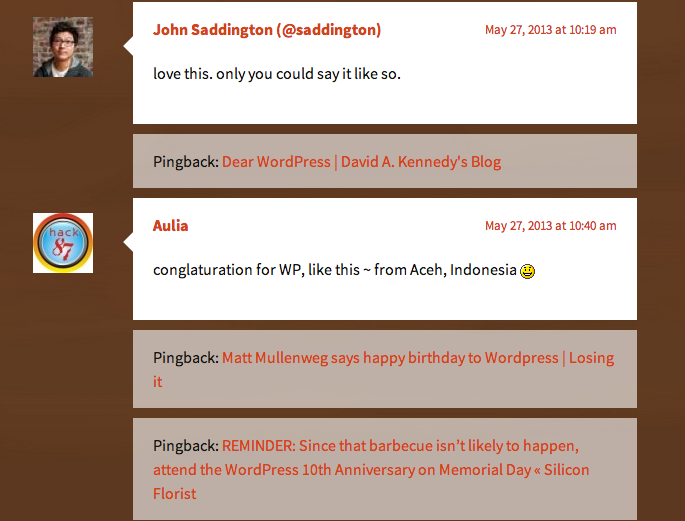
Self pingbacks can lead to confusion. They often appear as comments. This is not always wanted. Many users find them annoying. They clutter the comment section. People might think there are new comments. But they are not. This can be misleading.
Some users try to disable them. This is not easy. Settings are often hidden. You need to dig deep. Find the right section. This takes time. It can be frustrating. Many give up. They learn to ignore them.
Others use plugins. These help manage pingbacks. They offer better control. Users can stop them. They find this helpful. It makes the site cleaner. Comments are less messy. Visitors have a better experience.
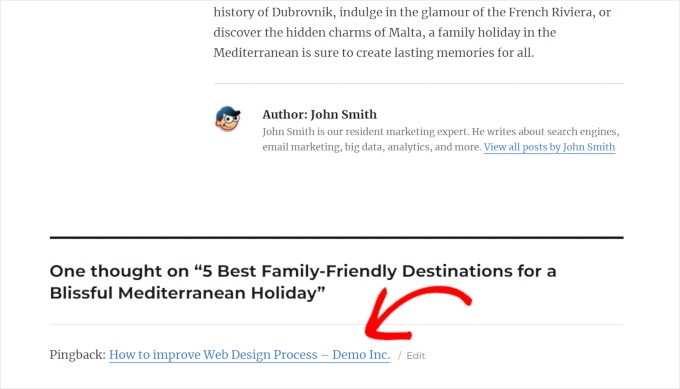
Credit: www.wpbeginner.com
Managing Self Pingbacks
Self pingbacks can be annoying. They clutter the comment section. Many users want to disable them. Using a plugin is an easy solution. Plugins can help manage self pingbacks. They offer simple settings. You don’t need coding skills.
Search for a reliable plugin. Install it through your WordPress dashboard. Activate the plugin after installation. You can customize settings. Each plugin has different features. Most plugins are free. Some offer premium options. Choose what suits you best.
Self Pingbacks And Seo
Self pingbacks happen when you link to your own posts. WordPress creates these links. They appear in your comments section. These links can be useful. They help connect your articles. Readers find more related content. This improves user experience. It keeps visitors on your site longer.
Longer visits can help your SEO. Search engines notice this. It can improve your site’s rank. Self pingbacks might not always be helpful. Sometimes they can clutter the comments. It may confuse readers. Moderation is key. Review them regularly. Ensure they add value. Remove any unnecessary links.
Alternatives To Self Pingbacks
External services can help replace self pingbacks. These services track links for you. They give you updates. This can be very useful. You don’t need self pingbacks with them.
Turning off self pingbacks is easy. It stops the clutter. Your site stays clean. This helps in organizing your content better.
Manual linking is another way. You choose which links to add. This gives you control. It keeps your site organized.
Credit: www.wpstuffs.com
Frequently Asked Questions
What Is A Self Pingback In WordPress?
A self pingback occurs when a WordPress site links to its own content. This automatic notification lets you know that a link within your own site points to another page or post. Self pingbacks help manage internal links and improve site structure, enhancing search engine optimization.
How Do Self Pingbacks Work?
Self pingbacks work by sending a notification when your site links internally. When you publish a post linking to another part of your site, WordPress automatically generates a pingback. This informs you of the connection, helping track internal linking and maintaining site cohesion.
Are Self Pingbacks Useful For Seo?
Yes, self pingbacks can be useful for SEO. They help manage and track internal linking, which is vital for search engine optimization. Internal links guide search engines through your site, improving indexability. Properly structured links can enhance user experience and boost site rankings.
Can Self Pingbacks Be Disabled?
Yes, self pingbacks can be disabled in WordPress. You can do this by editing your theme’s functions. php file or using a plugin. Disabling self pingbacks prevents notifications for internal links but doesn’t affect their functionality. Choose this option if you find them distracting or unnecessary.
Conclusion
Understanding self pingbacks in WordPress is crucial for bloggers. They help track internal linking. This can improve your SEO efforts. Self pingbacks also keep your site organized. They offer a way to monitor content connections. Knowing how to manage them is beneficial.
Avoid clutter by disabling them if needed. This keeps your notifications clean. Self pingbacks might seem small, but they matter. They play a role in content management. Keep them in mind as you build your site. Your WordPress journey will be smoother.
Explore more about WordPress features and grow your blog.



