
Are you scratching your head trying to understand what a Page Post ID in WordPress is? You’re not alone.
Navigating the backend of WordPress can sometimes feel like deciphering a secret code. But don’t worry, we’re here to make it simple for you. Knowing what a Page Post ID is and how it can be used is crucial for managing your site efficiently.
Imagine having the power to easily identify and organize your content, streamline your updates, and enhance your site’s functionality—all with a simple ID. Ready to unlock this mystery? Let’s dive in and explore how this little number can make your life easier. Keep reading to discover the key to mastering your WordPress website.

Credit: themesharbor.com
Page Post Id Basics
Every page in WordPress has a unique number. This number is called the Page Post ID. It helps WordPress know which page to show. You can find this ID in the WordPress dashboard. It’s in the URL when you edit a page.
The Page Post ID is important for developers. They use it to make special changes to a page. It helps in adding custom features. Without it, coding can become tricky.
Log in to your WordPress. Go to the dashboard. Click on Pages. Choose the page you want to check. Look at the URL in the browser bar. You will see a number there. That is your Page Post ID.
Locating The Page Post Id
Find the Page Post ID easily in the dashboard. Go to the Pages or Posts section. Hover over any page or post title. Look at the bottom of your screen. The ID appears in the status bar. It looks like this: post=123. This number is your Page Post ID.
Another way is by checking the URL. Edit any page or post in WordPress. Look at the URL in the browser. You will see post=123 in the URL. This is the Page Post ID. Use this method to quickly find IDs.
Plugins can help find Page Post IDs. Install a plugin that shows IDs. Popular plugins like Reveal IDs make this easy. Once activated, go to your pages or posts. The ID will be visible next to each title. This makes finding IDs simple and fast.
Significance Of Page Post Id
The Page Post ID helps keep content tidy. Each page has its own ID. This makes it easy to find and manage. You can edit and sort pages better. It is like a special number for each page. This helps in making a neat website.
Search engines use the Page Post ID for tracking. It helps in understanding user behavior. You can see which pages get more visits. This helps in improving your website. More organized data makes better decisions.
Developers use the Page Post ID for custom tasks. It helps in creating unique features. They can make special tools for your needs. The ID is like a key for developers. It opens doors to many possibilities.

Credit: kinsta.com
Common Issues And Troubleshooting
Page Post ID is essential. It helps identify content. Sometimes, it goes missing. This happens often. Reasons can vary. Maybe a theme update caused it. Or a plugin might hide it. Check settings first. Look for hidden options. Themes sometimes change settings. Plugins can interfere too. Reinstalling can help. This might restore the missing ID.
Incorrect IDs are confusing. They show wrong information. This happens due to bugs. Themes might have errors. Or plugins could be faulty. Updates can fix bugs. Always use the latest versions. Check for known issues online. Forums can offer solutions. Many people face similar problems. Sharing experiences helps solve them.
Plugins can clash. This leads to errors. Some plugins don’t work well together. They might block Post IDs. Identify conflicting plugins. Disable them one by one. Check if the issue resolves. Sometimes, updates fix conflicts. Developers often release patches. Always keep plugins updated. This prevents many problems.
Advanced Use Cases
A Page Post ID in WordPress identifies specific pages or posts. Essential for advanced customization and plugin functionality. Enhance site management by linking unique IDs with targeted actions, improving user experience through precise control.
Custom Queries With Post Ids
Custom queries use Post IDs to fetch specific content. They help in retrieving posts from the database. Developers can target posts for unique layouts. This makes your site flexible. Post IDs can improve user experience. They ensure the right content appears. Using Post IDs, you can create custom loops. These loops display only desired posts. It’s like asking the database for exactly what you need. Queries become more efficient and precise.
Conditional Logic In Themes
Themes use conditional logic with Post IDs. This logic decides what to show users. It changes the theme’s look based on the post. Developers can show or hide elements with this. For example, different headers for different posts. This customization boosts engagement. Users see tailored content. It’s like giving each post its own personality. Themes react smartly, enhancing user interaction.
Automating Tasks With Post Ids
Automating tasks uses Post IDs to save time. They streamline processes on your site. For example, updating content automatically. Post IDs can trigger specific actions. These actions run without manual input. It makes site management easier. Automation ensures tasks happen on time. Your site runs smoothly, with less effort. Post IDs are key in this efficiency. They help in managing content seamlessly.
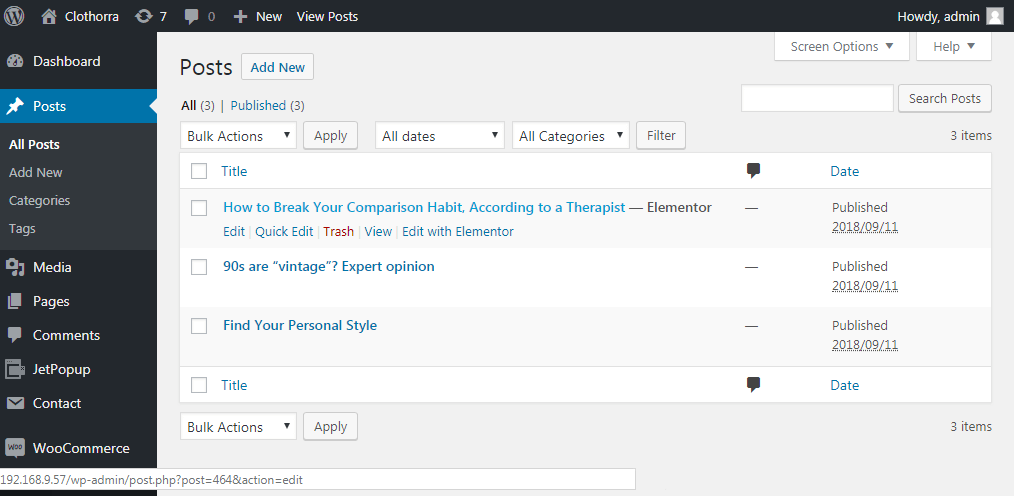
Credit: crocoblock.com
Tools And Resources
Discovering the Page Post ID in WordPress is crucial for website management. This unique identifier helps you track and organize content efficiently. Easily find it in the URL or through the WordPress dashboard, simplifying your digital tasks.
Recommended Plugins
Yoast SEO helps your site rank better. Jetpack provides security features. WordFence keeps your site safe. WooCommerce is great for online stores. Akismet stops spam comments. These plugins make WordPress easier to use.
Helpful Online Communities
WordPress Forums offer answers to many questions. Stack Overflow is full of coding tips. Reddit’s WordPress community shares ideas. Facebook groups connect WordPress users. Join these communities. Learn and share with others.
Further Reading And Tutorials
WordPress.org has guides and docs. WPMU DEV Blog shares tips and tricks. WPBeginner offers easy tutorials. YouTube has many helpful videos. Books about WordPress give in-depth knowledge. Discover new skills. Improve your WordPress site.
Frequently Asked Questions
What Is A Page Post Id In WordPress?
A Page Post ID in WordPress is a unique identifier for each page or post. It helps WordPress distinguish between different content items. This ID is crucial for developers and users when customizing themes or plugins. It can be found in the URL when editing a page or post.
How Do I Find My WordPress Page Id?
To find your WordPress Page ID, go to the Pages section in your dashboard. Click on the page you want. The ID appears in the URL as “post=number. ” This number is your Page ID. It’s essential for customization and troubleshooting tasks.
Why Is The Page Id Important In WordPress?
The Page ID is important for customization and plugin configuration. It helps developers target specific pages for styling or functionality. Without the Page ID, applying changes to individual pages becomes challenging. It’s a crucial element in theme development and specific page targeting.
Can I Change A Page Post Id In WordPress?
No, you cannot change a Page Post ID in WordPress. The ID is automatically assigned by WordPress. Altering it can disrupt site functionality. If you need to change content, edit the page itself. The ID remains constant to maintain the site’s structure and integrity.
Conclusion
Understanding Page Post IDs in WordPress is essential. They help identify content easily. You can locate them through simple methods. Knowing IDs streamlines website management. It boosts efficiency in organizing posts. You can enhance navigation without much effort. IDs are key to customizing site features.
They’re essential for developers and site owners alike. With this knowledge, managing WordPress becomes smoother. Simplifying tasks is the ultimate benefit. Embrace the ease of using Page Post IDs. Your WordPress journey just got simpler. Keep exploring and optimizing your site for better results.



