
Are you looking to manage multiple websites effortlessly? Have you ever wished for a way to control them all from a single dashboard?
If so, you’re in the right place. A Multisite WordPress could be the perfect solution for you. It’s a powerful tool that lets you create and manage a network of websites all from one WordPress installation. Imagine the time and energy you’ll save by streamlining your workflow.
But how exactly does it work, and how can it benefit you? Keep reading to uncover the ins and outs of WordPress Multisite and discover whether it’s the game-changer you’ve been searching for.
Credit: www.mooveagency.com
Multisite WordPress Basics
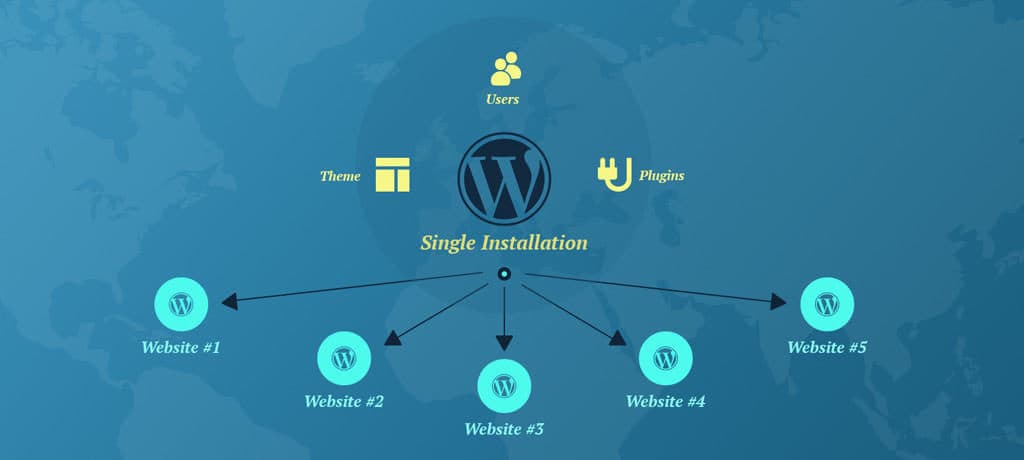
Multisite WordPress is a cool feature. It lets you manage many sites. All from one dashboard. You only need one WordPress install. This saves time and space. Each site can have its own theme. Its own plugins too. But they share the same WordPress core. It is like a big family of sites. They all live together.
Users can be added to all sites. Or just one. This makes control easy. Updates are simple too. Do it once for all sites. This feature is great for schools. Or big businesses with many branches.
There are some limits. Not all plugins work well. Some themes may not either. It is best for advanced users. Beginners might find it hard. But with practice, it gets easier. Multisite can be a helpful tool.
Setup And Configuration
Install multisite by enabling the network feature. Follow simple steps. Access your WordPress dashboard. Click “Tools” and then “Network Setup.” Configure settings. Choose subdomains or subdirectories. Subdomains need DNS setup. Subdirectories are simpler. Activate your network. Make changes to wp-config.php and .htaccess files. Backup your data before changes. Test your setup thoroughly.
Domain mapping allows custom domains for sites. Install a domain mapping plugin. Configure it in the network admin. Add domains to individual sites. Ensure your DNS points to the server. Use primary domains for branding. Secondary domains can be used too. Check settings for each site. Make sure visitors reach the correct domain. Optimize for search engines. Each domain should be unique.
Features Of Multisite
Multisite allows all sites to use the same themes and plugins. This helps save time and keeps everything the same. If an update is needed, it is done in one place. This ensures all sites get the latest features. Admins do not need to update each site separately. This makes management easy and simple.
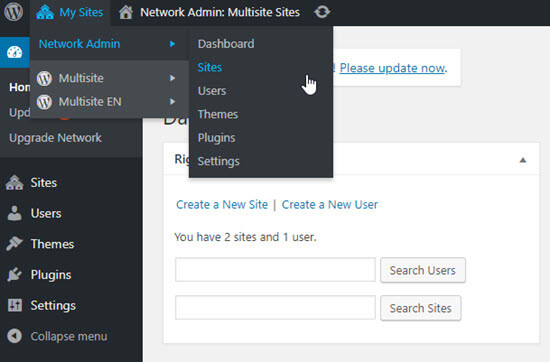
Multisite has a special user system. Admins can give users access to many sites. Users do not need separate logins for each site. This keeps things easy and fast. Admins can decide who sees what. This control makes sure everyone has the right access. It helps keep sites safe and organized.

Credit: kinsta.com
Advantages Of Multisite
A WordPress Multisite lets you manage many sites. You use one dashboard. This saves time. You don’t need to log in to each site. All updates happen in one place. Plugins update across all sites. Themes update too. This makes life easy. With one click, you can change a setting. All sites change at once. This keeps your sites secure and current.
Using Multisite helps save money. You need only one hosting plan. This plan covers all your sites. You buy one set of plugins. You share them across sites. Themes work the same way. No need to buy for each site. This reduces costs. Managing one site is cheaper. It is less work. Less work means less time and money spent.
Challenges And Considerations
Managing a Multisite WordPress setup involves unique challenges, like handling updates across various sites efficiently. Considerations include ensuring security and performance without compromising user experience. Proper planning is essential to streamline operations and maintain consistency across all sites.
Performance Issues
Multisite setups can face performance challenges. Each site shares the same server resources. This can slow down the entire network. High traffic on one site affects all sites. Server load increases with more sites. Sites may need more memory and CPU power. Optimization is crucial. Using caching plugins helps. Regular updates and maintenance are necessary. Without them, sites might lag. Slow sites can lead to poor user experience.
Security Concerns
Security is vital for multisite networks. A security breach on one site risks all sites. Shared plugins can introduce vulnerabilities. Strong passwords are essential. Regularly update all plugins and themes. Consider using security plugins. Monitor unusual activities closely. Limit user access to important areas. Backup sites often to prevent data loss. Educate users about safe practices. Vigilance is key to maintaining security.
Credit: www.wpbeginner.com
Use Cases For Multisite
Schools and universities use WordPress Multisite for easy site management. Each department can have its own site. Students get access to resources tailored for them. Teachers share materials directly on their site. This saves time for everyone involved. No need to create separate websites for each group. It keeps everything organized.
Companies with different branches benefit from WordPress Multisite. Each branch manages its content independently. The main office controls the network settings. All sites use the same themes and plugins. This reduces costs and ensures consistency across sites. Employees find information quickly. It improves communication within the company.
Tools And Plugins For Multisite
WordPress multisite needs some key plugins. WordFence helps keep your sites safe. It watches for any threats. Yoast SEO makes your site easy to find. It helps with search engines. UpdraftPlus is for backups. It saves your data if something goes wrong. These plugins make managing your multisite easier.
ManageWP helps you watch all your sites. It checks updates and security. Google Analytics shows how many people visit your site. It helps you see what they like. InfiniteWP is good for updates. It makes sure plugins and themes are current. Monitoring tools keep everything running smooth.
Frequently Asked Questions
What Is WordPress Multisite Used For?
WordPress Multisite is used to manage multiple websites from one WordPress installation. It’s ideal for networks, educational institutions, or businesses. This feature simplifies administration tasks, such as updates and user management, across several sites. With Multisite, you can create and manage a network of sites efficiently.
How Do I Set Up Multisite In WordPress?
To set up Multisite, first enable the feature in your wp-config. php file. Next, configure network settings in the WordPress dashboard. Follow the prompts to complete the setup process. Ensure your hosting supports Multisite, and backup your site before starting.
Can Multisite Handle Different Domain Names?
Yes, WordPress Multisite can handle different domain names using domain mapping. This allows each site in the network to have a unique domain. Configure domain mapping in the network settings. It’s a versatile solution for managing diverse site identities within one WordPress installation.
Is Multisite Suitable For Beginners?
Multisite can be complex for beginners due to its advanced configuration options. It’s best for users with some technical expertise. However, with proper guidance, beginners can learn to use it effectively. Familiarize yourself with WordPress basics before diving into Multisite features.
Conclusion
Exploring multisite WordPress offers valuable insights. It helps manage multiple sites efficiently. Developers and businesses benefit from its flexibility. Easy setup and centralized control make it user-friendly. Ideal for educational institutions, large companies, or bloggers with diverse content. Multisite WordPress provides powerful tools to streamline site management.
It saves time and resources. Consider the unique needs of your project. Choose the right plugins and themes. Ensure security measures are in place. Multisite WordPress can enhance your online presence. Navigate complex site structures with ease. Start exploring multisite options today.
Unleash its potential in your WordPress journey.


