
Have you ever uploaded an image to your WordPress site, only to find it slows everything down? Or perhaps it looks blurry and just not quite right?
You’re not alone. The size of the images you choose can make or break the performance and appearance of your site. But what is a good image size for WordPress? It’s a question that can puzzle even the most seasoned webmasters.
In this post, we’re diving into the ideal image sizes that will keep your WordPress site running smoothly and looking sharp. Get ready to boost your site’s speed, enhance user experience, and possibly improve your SEO. Curious to learn the secrets behind perfectly sized images? Let’s explore together.
Credit: nicepage.com
Importance Of Image Optimization
Images should load fast on websites. Slow images make users leave. Image optimization helps speed up your site. This keeps visitors happy. It also helps your site rank better on search engines.
Large images take longer to load. Use smaller image sizes for faster loading. Compress images to make them smaller. There are tools online to help with this.
Use the right format for images. JPEGs are good for photos. PNGs are better for graphics with few colors. Always use the best format for your needs.
Proper image size keeps your site looking good. It also helps save bandwidth. This can save money if you pay for data. Always remember to optimize!

Credit: www.abstractapi.com
Common Image Formats
JPEG images are great for photos. They have small file sizes. This makes websites load fast. But, they lose some quality. PNG images are different. They keep all details. They are good for logos and art. PNG files are bigger. This can slow down a site. Choose JPEG for speed. Choose PNG for quality.
WebP is a modern format. It mixes good quality with small size. This is ideal for the web. WebP works well with many browsers. But not all. It’s a good choice for images. Helps your site load faster. Keeps them looking nice. WebP might be new to some. But it’s worth trying.
Ideal Image Dimensions
Featured images are important. They usually appear at the top of posts. A good size is 1200 x 628 pixels. This size looks nice on most screens. It helps your site load fast. A large image size can make the site slow.
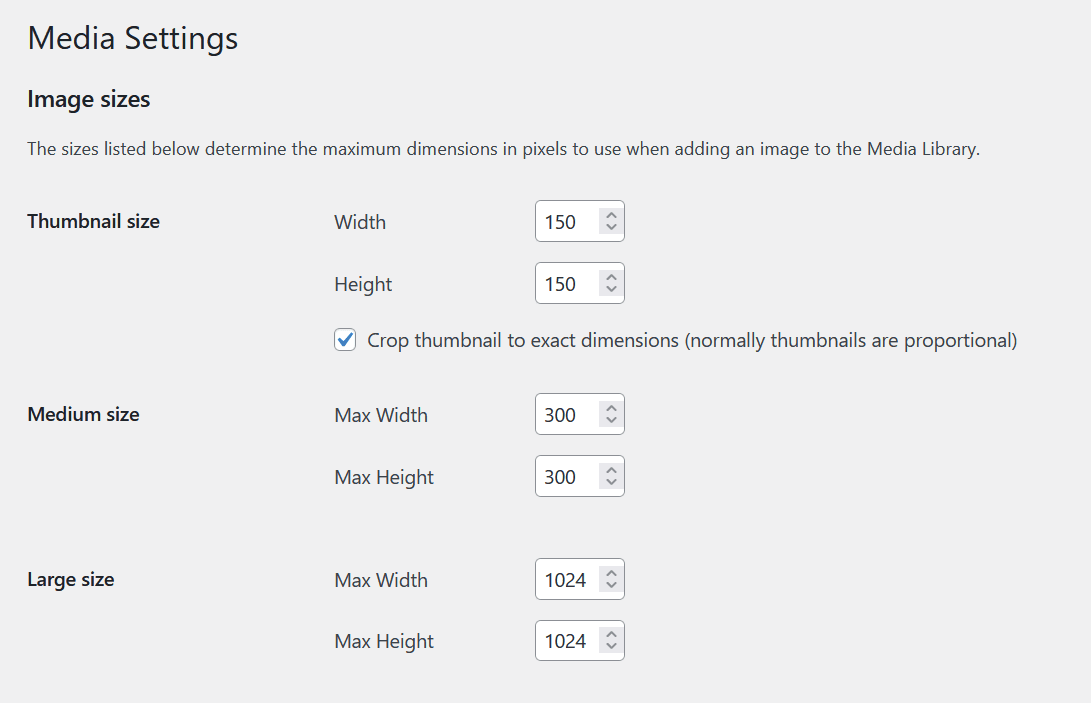
Thumbnails are small. They are often used in galleries. A common size is 150 x 150 pixels. This size works well. It keeps your site neat. Thumbnails should be square. It looks better that way.
Background images cover large areas. They should be big but not too big. A good size is 1920 x 1080 pixels. This size covers most screens. Make sure the file size is small. It helps the site to load faster.
File Size Considerations
Images make websites look nice. But large files slow sites down. Compression techniques help reduce file size. Smaller files load faster. This improves user experience. Tools like TinyPNG and JPEGmini are great for image compression. They keep quality high while reducing size. It’s a win-win.
Use lossless compression for photos. This keeps quality intact. Another option is lossy compression. It removes some data to make files smaller. Choose wisely for each image. Balance is key.
High-quality images are beautiful. But they can slow sites. Consider file formats. JPEG is good for photos. PNG is better for graphics. Adjust resolution and dimensions. Reduce pixels without losing clarity. Maintain a balance between image quality and loading speed.
Responsive Design Needs
Responsive design means images look good on all devices. Images must adjust their size based on the screen. A big screen may show a large image. A small screen will need a smaller image. This saves data and loads pages fast.
Adaptive image solutions help make this possible. They allow images to fit different sizes. This way, images stay clear and sharp. Users enjoy a better experience. No need to zoom in or out. Everyone sees the same quality.
Retina displays show images with more detail. They need images with high resolution. This keeps them from looking blurry. Using twice the size for these screens is a smart move. It ensures clarity and quality.
WordPress can handle these needs. By setting the right image size, all users are happy. Clear images make websites look better.
Tools For Image Optimization
Choosing the right image size for WordPress improves site speed and user experience. Optimal dimensions often range between 1200×800 pixels. Tools like Photoshop and online resizers help achieve appropriate size without sacrificing quality.
Online Tools
Online tools help make images smaller. TinyPNG is easy to use. It makes images smaller without losing quality. JPEG Optimizer is another tool. It works well for JPEG images. Kraken.io can handle large files. It offers both free and paid plans. These tools are helpful for beginners. They do not require downloads. You can access them through a web browser.
WordPress Plugins
WordPress plugins optimize images easily. Smush is a popular choice. It compresses images automatically. Imagify offers fast optimization. It supports multiple file types. ShortPixel provides advanced settings. It helps to maintain image quality. These plugins save time. They integrate seamlessly with WordPress. Installation is simple and quick. Many offer free versions. Some have premium features for better results.
Seo Benefits Of Optimized Images
Optimized images make web pages load faster. Fast loading pages keep users happy. Happy users stay longer and visit more pages. This helps with search engine ranking. Search engines like Google love fast websites. They rank fast sites higher.
Smaller images save server space. This is cost-effective for website owners. Efficient use of space keeps site maintenance easy. Optimized images help with better user experience. Users find information quickly and easily. Websites appear neat and professional.
Image optimization improves accessibility. Screen readers can read image descriptions better. This helps users with disabilities. Properly optimized images make websites more inclusive. Everyone deserves access to good content. Good content is key for success online.
Credit: shortpixel.com
Common Mistakes To Avoid
Many people use images that are too large. Big images slow down your website. This makes visitors leave quickly. Another mistake is using images that are too small. Small images can look blurry. This makes your site look unprofessional.
Some also forget to compress images. Uncompressed images take up more space. This causes slow loading times. Not using the right format is a common error too. JPEG is good for photos. PNG is better for graphics.
Always check the dimensions of your images. Images should fit well on your page. They should not be wider than your content area. This makes your site look neat and tidy.
Frequently Asked Questions
What Is The Ideal WordPress Image Size?
The ideal WordPress image size is 1200×628 pixels. This size ensures optimal display on various devices and platforms. It balances quality and loading speed, enhancing user experience. Choose this size for featured images, blog posts, and social media sharing.
How Do Image Sizes Affect Website Speed?
Large images slow down website loading times significantly. Optimizing image sizes reduces loading times and improves user experience. Fast-loading sites rank better in search engines. Therefore, resizing images before uploading is crucial for speed and performance.
Which Image Format Is Best For WordPress?
JPEG is best for photographs due to its balance of quality and size. PNG suits graphics with transparency. Both formats ensure optimal display and loading speed. Select the format based on image content to enhance site performance.
Can I Use Plugins For Image Optimization?
Yes, plugins like Smush and ShortPixel optimize images automatically. They compress images without losing quality, improving loading speeds. These tools are essential for maintaining a fast, efficient WordPress site. Explore plugin features for optimal image management.
Conclusion
Choosing the right image size boosts your WordPress site’s performance. Large files slow down loading times. Smaller images enhance speed and user experience. Optimal sizes reduce storage space and improve SEO. Always balance quality and size. Use tools to compress images efficiently.
Test your website speed regularly. Adjust image dimensions as needed. Engaging visuals attract visitors and keep them interested. Proper sizing helps maintain a fast and responsive site. Don’t overlook the importance of image optimization. A well-sized image makes a big difference.
Keep your site appealing and efficient with smart image choices.



