
Are you ready to unlock the secret weapon lurking at the bottom of your WordPress site? Meet the footer—a powerful yet often overlooked part of your website.
You might wonder, “What is a Footer in WordPress, and why should I care? ” Think of it as the anchor that holds your site together, guiding your visitors even when they’ve scrolled all the way down. Imagine your website as a captivating book.
The footer is the final chapter that leaves a lasting impression, offering direction and valuable resources. It’s not just a place to park your contact details; it’s a strategic tool that can boost your site’s functionality and user experience. By understanding its potential, you can transform your footer into a magnet for engagement and conversions. Curious about how to make your footer work wonders for you? Dive into this article and discover how this small section can make a big impact on your website’s success.

Credit: wpmarmite.com
Importance Of A Footer
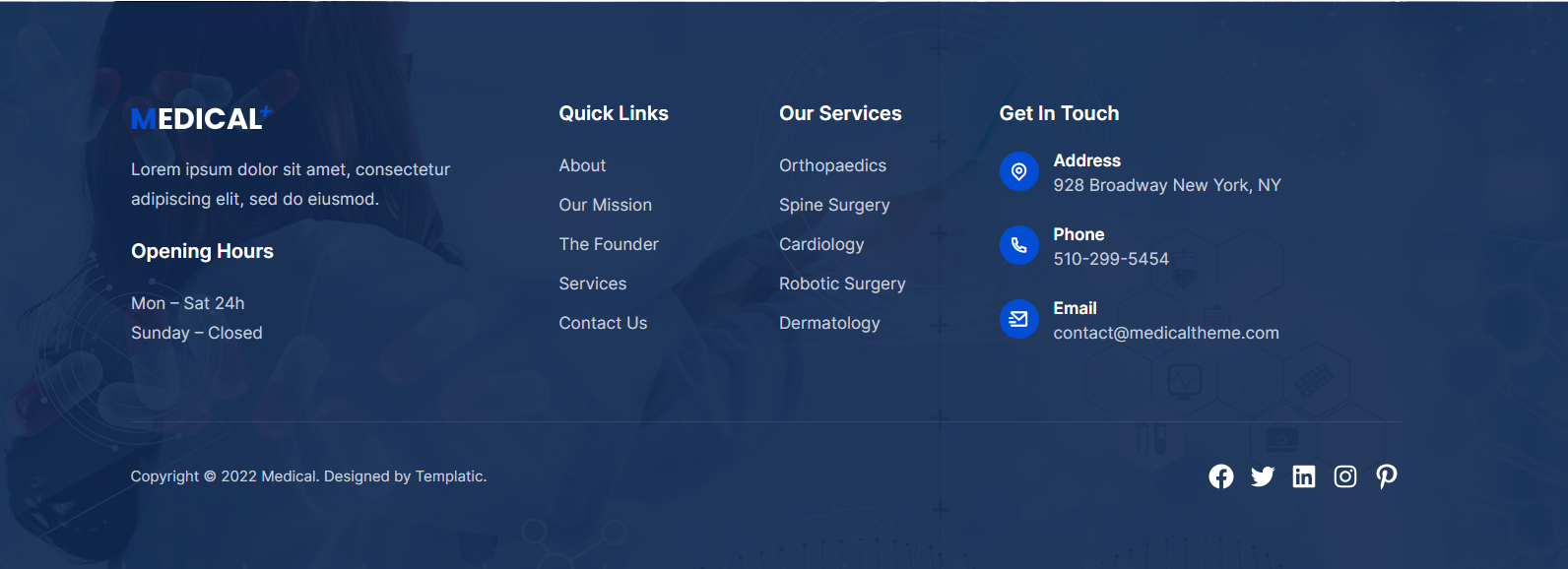
Footers are at the bottom of a website. They hold key information. Contact details are often found here. Copyright notices protect content. Footer links improve site navigation. Users find important pages easily. Search engines also find these pages. This helps in SEO. A well-designed footer is user-friendly. It makes the site look complete and professional. Businesses gain trust with a good footer. It shows they care about details.
Footers can include social media links. This connects users to other platforms. Newsletters sign-up forms can be added too. This helps in building an email list. Many websites add privacy policies in footers. This informs users about data use. Terms and conditions are often listed here. Users know what to expect on the site. Including these elements is smart. It builds transparency and trust.
Credit: templatic.com
Basic Elements Of A Footer
A WordPress footer sits at the bottom of your site. It holds important details. You might find contact information there. This helps users reach you easily. Social media links often appear too. They guide visitors to your social pages. Many footers also contain copyright notices. This protects your content from misuse. Some sites add quick links in the footer. These links help users navigate the site fast.
A footer might also have a site map. This map shows all the pages of the site. It makes exploring easy. Some footers display subscribe options. Users can join your newsletter here. Adding a privacy policy link is common. This informs users about data use. A well-designed footer enhances user experience.
Customizing Footer In WordPress
The WordPress Customizer helps change your site’s footer easily. Click “Customize” in your dashboard. Find the Footer section. Here, you can add text, images, or links. Make the footer look how you want. This tool is easy to use. No coding needed.
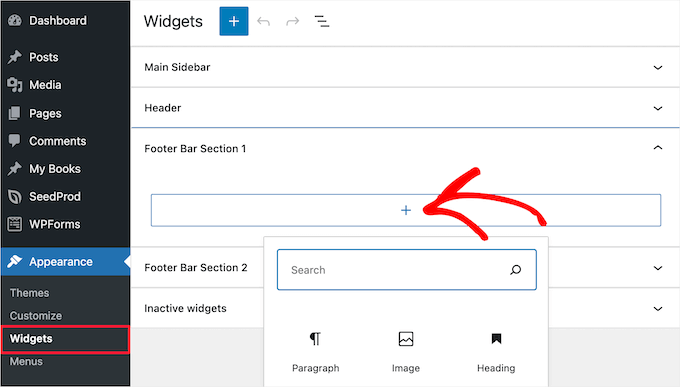
Widgets add features to your footer. Go to Appearance and select Widgets. Drag and drop items into the footer area. Use text, calendar, or social icons. Widgets make your site more useful. You can change them anytime.
Custom HTML and CSS let you style the footer. Open the Theme Editor in your dashboard. Find the footer.php file. Here, you can add custom code. CSS changes the look. HTML changes the layout. Be careful with coding. Mistakes can break your site. Always backup first.
Best Practices For Footer Design
A footer should have consistent branding. Use the same colors and fonts. This helps visitors recognize your site. Keep the style simple and clean. A cluttered footer can confuse users.
Add clear navigation links in the footer. These links help users find important pages. Include links to the home page and about page. Users should also find links to services or products. Make sure links are easy to click.
Include legal and contact information. This information builds trust. Add a link to your privacy policy. Include terms and conditions too. List your contact email or phone number. Users feel safer with this information.
Enhancing Seo With Footer
The footer in WordPress is crucial for enhancing SEO. It provides space for important links and keywords. These elements help search engines understand your site’s structure, improving visibility and ranking. A well-structured footer supports navigation and user experience, contributing to a more effective website.
Keyword Optimization
Keywords in the footer can boost your site’s SEO. These words help search engines know what your site is about. Place them naturally in the text. Avoid stuffing too many. Use words that fit your site’s theme. This helps in ranking better. People search using these words. So, it’s important to choose them wisely.
Internal Linking Strategies
Internal links are important for a website’s structure. These links guide users to other pages. They help users find more content. Links in the footer can improve navigation. They make the site user-friendly. Search engines like sites with good linking. It tells them your site is well organized. This can improve your site’s ranking.
Tools And Plugins For Footer Customization
Page builders offer great options for footer design. You can use plugins like Elementor and Beaver Builder. These plugins help you design footers easily. They have drag-and-drop features. This makes customization fun and simple.
Elementor is popular for its user-friendly interface. It allows many design choices. Beaver Builder also provides a wide range of templates. These templates help create unique footers.
Both plugins support responsive design. This means your footer looks good on all devices. They offer pre-made blocks and widgets. These elements speed up the design process. These plugins make footer customization easy and enjoyable.
Common Mistakes In Footer Design
Creating an effective footer in WordPress means avoiding common pitfalls like overcrowding with links or irrelevant information. A cluttered footer confuses visitors and detracts from essential content. Keep it clear, concise, and relevant to ensure a positive user experience.
Overloading With Information
Many websites have too much text in the footer. This makes it look messy. Users feel lost with too many links. It’s hard to find what they need. A clean footer is better. Keep only important details there. Like contact info or main links. This makes it easy for users.
Ignoring Mobile Responsiveness
Footers should work well on phones. Many people use phones to browse. A footer that does not fit on a small screen is bad. Texts become tiny and hard to read. Links might not work well. Make sure the footer changes size. It should fit any screen. This helps all users have a good time.
Credit: www.wpbeginner.com
Frequently Asked Questions
What Is A Footer In WordPress?
A footer in WordPress is the bottom section of a website. It typically contains contact information, copyright notices, and links. Footers can also include widgets, menus, and social media icons. They enhance navigation and provide additional information. Customizing footers helps improve user experience and site functionality.
How Do I Customize A WordPress Footer?
To customize a WordPress footer, go to the WordPress dashboard. Navigate to Appearance, then Customize. Select Footer and adjust settings as needed. You can add widgets, change text, and modify styles. Use a theme’s options for more customization. Ensure your footer is user-friendly and informative.
Can I Add Widgets To My Footer?
Yes, you can add widgets to your WordPress footer. Go to the WordPress dashboard, select Appearance, then Widgets. Drag and drop desired widgets into the footer area. Widgets can include recent posts, social media links, or contact forms. Adding widgets enhances your footer’s functionality and user engagement.
Why Is A WordPress Footer Important?
A WordPress footer is important for site navigation and branding. It provides essential information like contact details and legal notices. Footers can also improve user experience with quick links and social media icons. A well-designed footer helps retain visitors and strengthens your website’s overall structure.
Conclusion
A footer in WordPress is vital for website navigation. It organizes links, contact details, and legal information. Visitors find it at the bottom of each page. This area enhances user experience and site credibility. Customizing your footer can reflect your brand identity.
Make sure it’s clean and easy to navigate. Avoid clutter, keep it simple. A well-designed footer encourages users to explore more. It plays a crucial role in user engagement and retention. Remember, every detail in your footer contributes to overall site success.
Keep it updated, relevant, and user-friendly.



