
Ever stumbled upon a website feature and wondered, “How did they do that?” If you’re diving into the world of WordPress, you’re not alone.
Many find themselves puzzled by the realm of widgets, especially when it comes to the custom HTML widget. This tool is more than just a mysterious piece of tech jargon—it’s your secret weapon for transforming your site into a unique, engaging experience.
Imagine having the power to tweak, personalize, and enhance your website effortlessly. The custom HTML widget allows you to do just that, giving you the flexibility to add unique content, style elements, or even interactive features. Curious about how this can elevate your WordPress game? Let’s explore how this widget can bring your creative visions to life, making your site not only functional but also unforgettable.
Custom Html Widget Basics
A custom HTML widget is a small tool for WordPress sites. It helps you add unique code. This code can be HTML, JavaScript, or CSS. These codes make your site look special. You can add buttons or forms. It helps show ads or videos too. Many site owners use it.
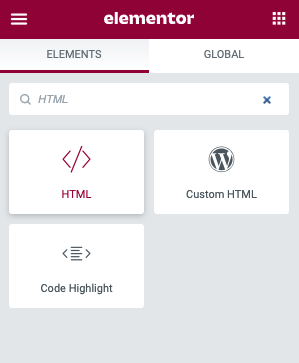
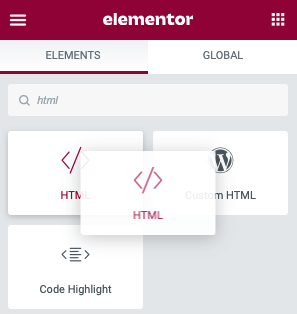
You find it in the WordPress dashboard. Drag it to the place you want. Paste your code inside. Save changes when done. This tool is very flexible. It can make your site more interactive. Adding custom code is easy with this widget.
Installation Process
Start by logging into your WordPress dashboard. Look for the Appearance tab. Click on it. Then, select Widgets.
You will see a list of available widgets. Find the Custom HTML Widget. Drag it to your desired widget area. This could be the sidebar or footer.
A new box appears. You can now enter your HTML code here. Once you are done, click Save. Your changes will appear on the site.
This process lets you add custom content. Make your website unique and interesting with HTML. It’s that simple!
Adding Custom Code
A custom HTML widget lets you add special code. This code can change how your website looks. HTML snippets are small pieces of code. They can add buttons or pictures. It’s simple to use. Just copy the code and paste it in the widget area.
JavaScript can make your site interactive. Slideshows and pop-ups use JavaScript. You can add this using the widget. Be careful with the code. Wrong code can break the site. Always check the code first.
Styling With Css
CSS helps make your website look nice. It changes colors, fonts, and more. A custom HTML widget lets you add your own CSS. You can make text bold or change its color. Want to make a button bigger? Use CSS in your widget! This helps you stand out. Your site looks unique. It’s like dressing up your website.
You control how things look. Add margins or padding to spaces. Use CSS to adjust layouts. This makes your site easier to read. Visitors will enjoy a well-styled page. They stay longer when it’s pretty. With a custom widget, it’s easy to learn CSS. Try different styles and see what works best.
Improving Site Functionality
Custom HTML widgets add interactive elements to WordPress sites. Users can create unique buttons, forms, and galleries. These features make the site more engaging. It helps visitors stay longer. Visitors enjoy clicking and exploring. They might find useful information. This increases site activity. Engagement boosts the site’s popularity.
Widgets help integrate third-party services. Users link social media, videos, and maps. Easy to connect with other platforms. This makes the site versatile. People can share posts on Facebook or Twitter. Videos from YouTube can play smoothly. Maps show locations clearly. These integrations improve user experience. Visitors appreciate these added features. They make the site more useful.
Credit: elementor.com
Enhancing User Experience
A Custom HTML Widget helps make websites look good on any device. It adjusts the layout to fit different screen sizes. Whether on a phone or a tablet, the site looks great. This is important for keeping visitors happy. They can read and navigate easily. This helps in making them stay longer on your site.
With this widget, you can add dynamic content to your site. It means showing different content at different times. You can display special offers or changing news. It makes your site interesting and alive. Visitors will find new things every time. This keeps them coming back. It’s a simple way to engage your audience.
Common Use Cases
Custom HTML widgets help create special forms. These forms can collect user information. You might need a contact form or a feedback form. The widget allows you to add unique fields. This means you can ask specific questions. Businesses use these forms to know their customers better. Forms collect names, emails, and more. You can also add checkboxes and dropdowns. This makes the form interactive and fun to fill out.
Social media widgets connect your website with social platforms. They display live feeds from Facebook, Twitter, or Instagram. This keeps your website lively and current. Visitors can see your latest posts easily. Social buttons let users share your content. This can bring more visitors to your site. Embedding these widgets is simple with HTML. Just copy and paste the code. Now, your website is more engaging and social.
Credit: elementor.com
Troubleshooting Tips
Widgets may not show on your page. Check if the widget is activated. Sometimes, the widget is not compatible with your theme. Switch to another theme to test. Ensure your WordPress and plugins are up-to-date. Outdated software causes issues.
Text looks different than expected. Verify HTML tags are closed. Check for missing brackets or slashes. A small error changes the look entirely. Preview changes before publishing. It helps catch mistakes.
Shortcodes not working? Ensure shortcodes are enabled. Some themes block them. Install a plugin to enable them. Some widgets need extra plugins. Install them for full functionality.
Best Practices
Always keep your WordPress updated. This ensures all security patches are applied. Use strong passwords for your admin account. Strong passwords keep hackers away. Install security plugins to monitor activities. These plugins alert you of suspicious behavior. Avoid using too many plugins. They can make your site vulnerable.
Ensure the widget code is clean and efficient. This helps the site load faster. Use compressed images to save space. Large images slow down websites. Enable caching for better performance. Caching stores data for quick access. Limit the number of widgets on a page. Too many widgets can make your site slow.

Credit: make.wordpress.org
Frequently Asked Questions
What Is A Custom Html Widget In WordPress?
A custom HTML widget allows you to add personalized HTML code to your WordPress site. This gives you the flexibility to customize your site’s appearance and functionality. It’s perfect for embedding custom forms, scripts, or third-party content. This widget enhances your site’s design without altering core files.
How Do I Add A Custom Html Widget?
To add a custom HTML widget, navigate to your WordPress dashboard. Go to Appearance > Widgets. Drag the Custom HTML widget to your desired widget area. Paste your HTML code into the widget. Click Save to finalize your changes. It’s a straightforward process requiring no coding knowledge.
Can Beginners Use Custom Html Widgets?
Yes, beginners can easily use custom HTML widgets. The widget interface is user-friendly and doesn’t require advanced coding skills. With basic HTML knowledge, you can effectively customize your WordPress site. Many online resources and tutorials can guide beginners through the process.
What Can I Do With Custom Html Widgets?
Custom HTML widgets enable you to insert various elements like forms, videos, or advertisements. You can enhance site functionality by adding interactive content. They allow for unique styling and scripts, making your site stand out. This flexibility helps tailor your site’s user experience.
Conclusion
Custom HTML widgets enhance your WordPress site. They offer flexibility. You can tailor content to fit your needs. Want unique designs? These widgets make it possible. They add personal touches. Adjust layouts easily. Create engaging elements. Improve site functionality without coding expertise.
Visitors appreciate a smooth experience. Keep site interactive. Increase user engagement. Widgets help achieve your vision. Perfect for those who seek creativity. Ideal for adding special features. Custom HTML widgets boost your site’s potential. Explore the possibilities today.



