
Are you trying to organize your blog but feeling overwhelmed by the chaos? Imagine transforming your cluttered content into a neatly arranged library where your readers can effortlessly find what they’re looking for.
That’s where blog post categories in WordPress come into play. They act as the backbone of your blog, guiding your audience and enhancing their experience. By understanding and utilizing blog post categories, you can make your site more intuitive and user-friendly.
You’ll discover how these categories can elevate your blog’s structure, increase engagement, and ultimately drive more traffic to your site. Ready to bring order to your content and captivate your readers? Let’s dive in!
Blog Post Categories
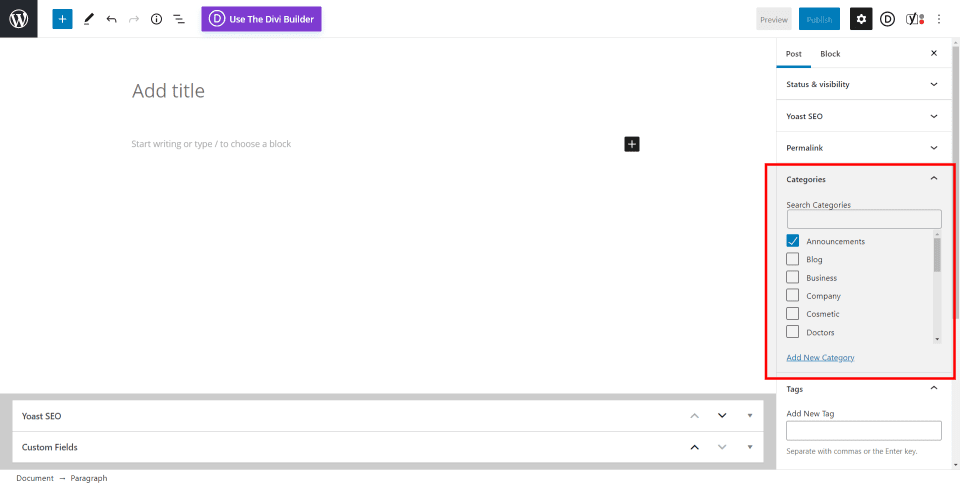
Categories help organize blog posts. They group related posts together. This makes it easy to find similar topics. Categories act like labels. They give structure to your blog. Readers can find content quickly. Writers can manage posts better.
Readers benefit from categories. They can find topics they like. Categories save their time. They make the blog easier to use. Writers also benefit. They can track their posts. Categories help them plan. They can see what topics they cover. Both readers and writers enjoy a better experience.
Credit: www.elegantthemes.com
Setting Up Categories In WordPress
First, find the dashboard in WordPress. Look for the Posts menu. Click on Categories. This opens the category section. It’s easy to find and use.
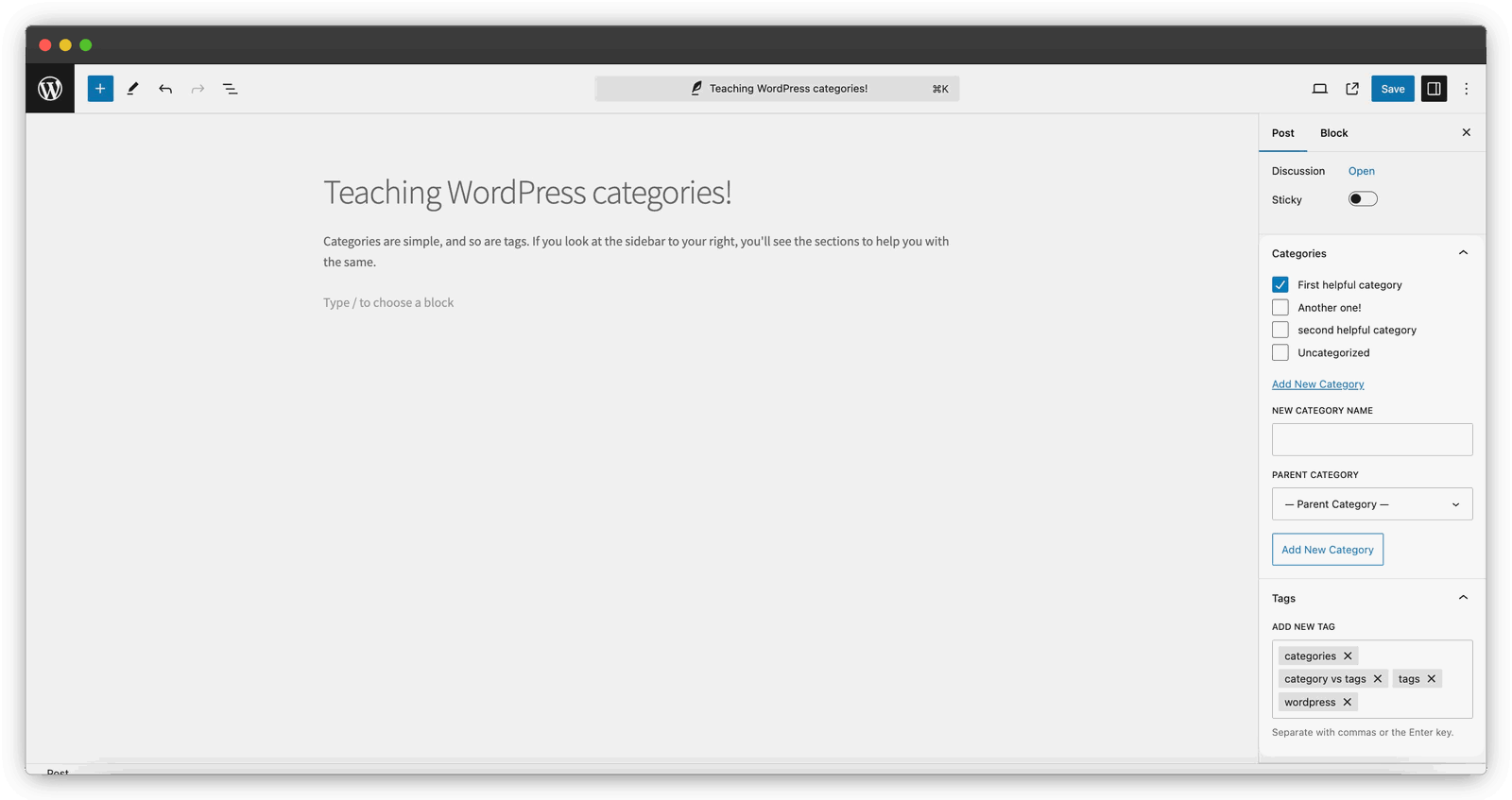
Locate the Add New Category option. Type a name for your new category. Fill in the slug if needed. Click Add New Category to save it. Now, your category is ready to use.
Use categories to group similar posts. This helps readers find topics easily. You can edit or delete categories anytime. Keep your blog neat and easy to explore.
Best Practices For Using Categories
Choose categories that fit your blog post topic. This helps readers find content easily. Relevant categories keep your blog organized. They also improve SEO. Search engines rank well-organized blogs higher. Use specific words for categories. This attracts the right audience.
Use fewer categories to keep your blog tidy. Too many categories confuse readers. They also make your blog messy. Limit categories for better user experience. This makes browsing easier. It helps users find what they need quickly.
Avoid using the same category twice. Duplicates make navigation hard. They confuse search engines. Unique categories improve website structure. This boosts your SEO. It also enhances user experience. Readers find content faster with clear categories.

Credit: m.youtube.com
Impact On Seo
Improving Site Navigation is key for a blog. Categories help users find topics fast. This makes the site easy to use. A well-organized blog attracts more visitors. Visitors stay longer when they find what they need. Search engines notice this. They rank the site higher. A higher rank means more traffic. More traffic can lead to more readers. More readers can mean more success.
Enhancing Search Engine Visibility is vital. Categories help search engines understand content. Each category is like a label. It tells search engines what the page is about. Clear categories help search engines show your site in results. More people will see your site. This increases views and engagement. Better visibility means better SEO. Good SEO brings more readers.
Common Mistakes
Using too many categories can confuse readers. It makes your blog look messy. Keep it simple. Choose a few main categories. This helps readers find what they want. Less is more. Too many choices can be bad.
Ignoring category management can hurt your blog. Categories need care. Check them often. Remove ones you don’t use. Add new ones if needed. This keeps your blog fresh. Well-managed categories help search engines. They like tidy blogs. Readers like them too.
Credit: plausible.io
Tools And Plugins
Blog post categories in WordPress help organize content for easy navigation. They group similar topics, making it simpler for readers to find related articles. This enhances user experience and boosts search engine optimization by structuring your website’s content logically.
Popular Category Management Plugins
Using plugins can make category management easy. Category Order lets users drag and drop categories. This helps arrange them quickly. Enhanced Category Pages improves category pages. It adds images and descriptions. Categories to Tags Converter changes categories into tags. This helps clean up a site. WP Category Permalink helps with permalinks. It lets users add categories to URLs. These plugins improve site organization. They make browsing easier for visitors. Each plugin has unique features. Users can choose what fits their needs best.
Enhancing Functionality With Plugins
Plugins add extra features to a site. They make tasks simple and fast. Users can install plugins easily. Most plugins come with guides. This helps users learn quickly. Plugins can be free or paid. Free plugins often have basic features. Paid ones offer more advanced options. Users should check plugin ratings. Good ratings show the plugin works well. Plugins update often. Updates fix bugs and add new features. Keeping plugins updated is important. It ensures the site runs smoothly.
Frequently Asked Questions
What Is A Blog Post Category?
A blog post category in WordPress organizes content into specific groups. It helps readers find related posts easily. Categories enhance navigation, improving user experience and SEO. They provide a structure, making your blog more organized. Proper categorization can boost engagement and increase page views.
How Do Categories Improve Seo In WordPress?
Categories improve SEO by organizing content, making it easier for search engines to index. They help in structuring the site, enhancing user navigation. Clear categories reduce bounce rates by guiding users to relevant content. This can lead to better rankings in search results.
Can I Have Multiple Categories For One Post?
Yes, you can assign multiple categories to a single post in WordPress. This flexibility allows your content to reach broader audiences. However, it’s best to limit categories to avoid confusion. Choose the most relevant categories to maintain clarity and focus on your blog’s structure.
How To Create A Category In WordPress?
To create a category, go to the WordPress dashboard. Navigate to “Posts” and then “Categories. ” Here, you can add a new category by entering its name. Assign it to your posts as needed. This process helps in organizing your content effectively.
Conclusion
Understanding blog post categories in WordPress is crucial. They help organize content. Readers find what they need quickly. Better navigation improves user experience. Clear categories boost SEO. They make a site appear organized. Search engines favor structured content. Easy-to-find information attracts more visitors.
Visitors stay longer on well-structured sites. Categories also enhance content management. They simplify the creation process. Bloggers save time and effort. Using categories strategically is wise. It improves site performance. Consider your audience’s needs. Choose categories that speak to them.
Keep them relevant and concise. The right categories make a big difference.



