
Imagine logging into your WordPress site only to find things aren’t quite as you remember them. You’re left wondering, “What has been edited on my WordPress site?”
It’s a question that can lead to feelings of frustration and uncertainty. But don’t worry, you’re not alone. Many WordPress users share this concern, and there’s a straightforward way to get to the bottom of it. We’ll guide you through the process of identifying changes on your site with ease.
Whether it’s a new blog post, a theme adjustment, or a plugin update, knowing exactly what’s been tweaked will empower you to take control and maintain your site’s integrity. You’ll discover tools and strategies that will not only help you track changes but also give you peace of mind. So, let’s dive in and explore how you can ensure your WordPress site is exactly how you want it to be.
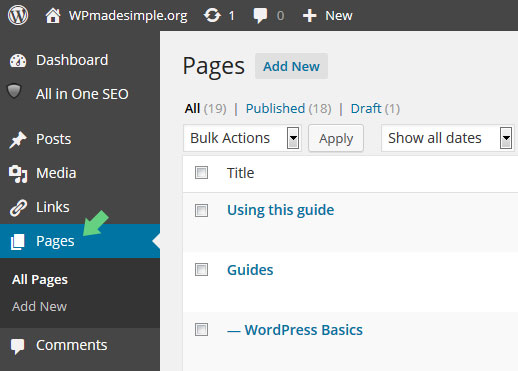
Credit: www.wpmadesimple.org
Identifying Recent Changes
WordPress keeps a record of every change. This is called revision history. It shows what has been added or removed. You can access this easily. Go to your post or page editor. Click on “Revisions” to see the changes. Each revision shows a time stamp. It also shows the name of the editor. Compare different versions with ease. Highlighted parts show what was edited. This helps in understanding the modifications.
Tracking updates is important. It helps keep your site fresh. You can use plugins for this. They notify you about changes. Some plugins show what has been updated. Others send an email alert. This keeps you informed. Stay aware of all content updates. It helps in maintaining your site effectively.

Credit: www.bluehost.com
Monitoring Plugin Modifications
Plugin update logs show the changes made by plugins. These logs can help you keep track of plugin updates. Updates might include new features or bug fixes. Look for a section in your dashboard. It is usually labeled “Updates” or “Changelog”. Click on it to see recent changes. You can also see the date of each update. This helps you know when the changes happened. Keeping an eye on logs is vital. It helps ensure that your site is running smoothly.
New plugin installations can change your site’s behavior. Check your plugin list regularly. This list shows all installed plugins. You might find a plugin you didn’t install. Remove unwanted plugins to avoid issues. Each plugin should have a description. Read it to understand its purpose. This helps you decide if you need it. Be careful with new installations. Always make sure they are necessary for your site.
Theme Alterations
Checking changes in your theme is important. Look at the colors and fonts. Did they change? Custom fonts can make a site unique. Also, see if the layout is different. A new layout might have been added. This can change how your site looks.
Updates often bring new features. Sometimes, they fix old problems. Check if new features are added. These can improve user experience. Look for any bug fixes. These fixes make the site work better. Always ensure your theme is up-to-date.
User Activity Insights
Roles and permissions shape your WordPress site. Admins control everything. They can edit themes, plugins, and settings. Authors write and publish posts. Editors review content and manage comments. Contributors draft posts, but can’t publish. Subscribers only read and comment. Each role has unique powers. Understanding roles helps in managing site security. Proper role assignment avoids mistakes and ensures smooth operations.
User actions can be tracked for insights. Logs show what users do on your site. You can see who edits posts or changes settings. Monitoring helps keep your site secure. It can highlight suspicious activities. Logs help understand user behavior. They can improve site performance. Keeping track is essential for healthy site management. Regular checks can prevent issues.
Security And Backup Changes
Analyzing security logs helps keep your site safe. Logs show who accessed your site. Check for any suspicious actions. Look for failed login attempts. Also, notice any changes in user roles. This can help spot hacking attempts. Regularly reviewing logs is crucial. It ensures your site stays secure. Don’t ignore this important task.
Verifying backup schedules is vital for your site. Make sure backups happen regularly. Check the timing of each backup. Confirm the location where backups are stored. Ensure backups are complete and not corrupted. This protects against data loss. It saves your site during emergencies. Never skip checking your backup schedule.
Credit: www.wpzoom.com
Database Adjustments
The database logs show changes clearly. Each log entry tells a story. Who made the change? What was changed? These logs are like a diary for your site. They help in tracking all updates. You can see if the content was added or removed. Logs are crucial for knowing the site’s history. They save time and reduce mistakes. Changes are not a mystery now.
Data entry changes need careful attention. Every change is recorded in detail. This helps in spotting errors fast. It also helps in keeping the site organized. The database shows all past entries. You can easily check what was added. Or removed. This keeps the data clean. And reliable. Tracking these changes is a smart practice.
Frequently Asked Questions
How Can I Track Changes On My WordPress Site?
To track changes on your WordPress site, use activity log plugins. These plugins record edits, user actions, and settings changes. Popular options include WP Activity Log and Simple History. They help you monitor updates, identify issues, and ensure site security.
Regularly reviewing logs can prevent unauthorized edits.
What Plugins Help Monitor WordPress Site Edits?
Plugins like WP Activity Log and Simple History help monitor WordPress site edits. They provide detailed logs of changes, user actions, and system events. These tools enhance security, allowing you to track who made changes and when. They ensure you stay informed about all site activities.
Why Is Tracking WordPress Edits Important?
Tracking WordPress edits is crucial for maintaining security and content integrity. It helps identify unauthorized changes and errors. Monitoring edits ensures your site remains consistent and reliable. By knowing who made changes and when, you can quickly address issues and maintain control over your site.
How Do I Restore Previous WordPress Versions?
To restore previous WordPress versions, use the built-in revisions feature. Access it through the post or page editor. Revisions allow you to view and revert to earlier versions. This feature helps recover content after accidental edits or errors. It ensures your content remains accurate and intact.
Conclusion
Editing your WordPress site enhances its functionality and appeal. Each tweak makes a difference. Regular updates keep your site fresh and engaging. Remember, small changes can lead to big improvements. Monitor your site’s performance after each edit. This helps identify what works best for your audience.
Keep experimenting and learning. Your site reflects your creativity and dedication. Stay consistent with updates for the best results. Happy editing, and watch your site grow!



