
Imagine you’ve just crafted the perfect blog post on WordPress. You hit publish, and suddenly, you wonder: what happens to your home page now?
If you’ve ever asked yourself this question, you’re not alone. Understanding how WordPress handles new posts is crucial to ensuring your website always looks its best and serves your audience effectively. Whether you’re a seasoned blogger or just starting out, knowing the impact of each post on your home page can shape your site’s success.
Stick with us, as we unravel the mystery behind this process and equip you with the insights to manage your content effectively. You’ll learn what changes to expect, how to optimize the layout, and ensure your visitors keep coming back for more. Ready to dive in? Let’s explore what really happens when you post in WordPress.
Home Page Dynamics
Posting in WordPress can change your home page. New posts often appear at the top. Visitors see the most recent posts first. Your older posts move down. This keeps your site fresh and engaging. You can also pin important posts. Pinned posts stay at the top. Featured images can grab attention too. Choose images that stand out. Use tags and categories for organization. They help visitors find what they need. Good tags make your site easy to navigate. WordPress gives you many options. Customize your home page layout as you like.
Default Settings
Your home page shows the latest posts by default. This is the default setting in WordPress. The newest post appears at the top. Older posts move down. Visitors see fresh content first. This keeps your site dynamic and engaging.
In WordPress, settings can be changed easily. Go to the Settings menu. Click on Reading. You can choose a static page. This means the home page stays the same. Static pages are good for business sites. They show important information all the time.
Choose wisely based on your needs. Both options have benefits. A dynamic page is great for blogs. A static page suits businesses. Understanding these settings helps your site grow.
Static Vs Blog Page
A static page does not change often. It shows the same content to everyone. This is good for businesses and services. People can find important information quickly. They see details like contact info and services. This page looks the same until updated.
A blog page updates often with new posts. It shows the latest content first. This is perfect for sharing news and stories. Readers see new articles every time they visit. This keeps your site fresh and engaging. It helps in showing your latest ideas.
Impact On Layout
Publishing a new post in WordPress changes your homepage layout. The latest content often appears at the top, pushing older posts down. This keeps your site fresh and engaging for visitors, presenting the newest information first.
Content Arrangement
Posting in WordPress changes your home page. It may shift the content arrangement. New posts appear at the top. Older posts move down. This keeps your page fresh. Visitors see the latest updates first. Each post takes space. Too many can clutter your page.
Featured Images And Excerpts
Featured images catch the eye. They make the page look better. Images can make your page load slower. Excerpts are short text previews. They show a bit of each post. This helps visitors decide what to read. Both images and excerpts are important.
Customizing Appearance
Page builders help make your home page look nice. They let you drag and drop elements easily. You can use blocks, images, and text. This makes editing simple for everyone. Page builders offer many designs and layouts. Choose one that fits your style. This tool is great for beginners. It helps make pages without coding. You can change colors and fonts quickly. Page builders save time and effort.
Theme customization changes how your site looks. You can edit headers, footers, and sidebars. Choose colors and backgrounds that match your brand. Many themes come with settings for easy changes. You can update your home page without hassle. Themes offer unique designs and features. Pick a theme that suits your needs. It makes your site stand out. Customization allows personal touches.

Credit: www.reddit.com
Navigation And User Experience
Posting in WordPress can change your menu layout. New posts might need new links. This keeps your menu updated. Visitors find what they need quickly. Sometimes, the menu grows with more posts. It might need a different style. Keeping it neat helps everyone. Always check after posting. Make sure everything works right.
Widgets show extra info on the site. New posts may change these spaces. They might need an update. Sidebars might show recent posts. This helps visitors see new content. Arrange widgets to show the best info. A clean sidebar looks better. It helps in finding things easily. Always keep widgets tidy and useful.
Seo Considerations
URLs play an important role in SEO. A clean URL helps users and search engines. Include keywords in the URL. This can improve visibility. Avoid using numbers or special characters. They confuse readers and search engines. Keep URLs short and descriptive. This makes them easy to remember.
Metadata is a brief info about your page. It includes a title and description. Keywords are words people search for. Use keywords wisely. Do not overuse them. Search engines may penalize your site. Place keywords naturally in sentences. This helps your page rank better. Focus on quality content. Good content attracts more visitors.
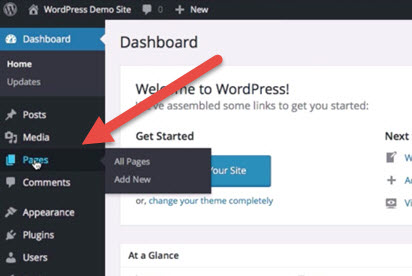
Credit: docs.presscustomizr.com
Common Issues
Posts might not show up on the home page. The layout could change unexpectedly. Images might not load properly. A blank screen might appear. This can confuse users. Plugins might cause conflicts. Ensure plugins are updated. Check theme settings.
Visibility errors can happen. Check your settings. Confirm your post is published. Review the visibility options. Sometimes posts are set to private. Verify the post status. Make sure it is not a draft. Review the date settings. Future-dated posts won’t appear. Clear your cache. It can refresh the page display.
Tips For Optimization
Speed is key for a good website. Slow pages can lose visitors. Use lightweight themes. They help your site load faster. Avoid big images. Large files take more time to load. Use image compression tools. They make images smaller. This helps your page load quicker. Plugins can slow your site. Use only the important ones. Keep your WordPress updated. Updates can fix bugs and improve speed.
Clear text is easy to read. Use short words and sentences. Break text into small parts. This helps people understand better. Use headings and subheadings. They guide readers through your content. Choose a simple font. Simple fonts are easier to read. Use bullet points for lists. They make information clear and easy to find. Keep your paragraphs short. This helps keep the reader’s attention.

Credit: learn.wordpress.org
Frequently Asked Questions
How Does Posting Affect My WordPress Homepage?
When you post in WordPress, your homepage dynamically updates. It typically displays your latest posts. The changes depend on your theme settings. You can control this through the WordPress customizer or settings. Understanding these settings helps maintain your homepage’s appearance.
Can I Customize My WordPress Homepage Layout?
Yes, you can customize your WordPress homepage layout. Use the WordPress customizer or a page builder plugin. These tools offer flexible design options. You can choose between static pages or latest posts display. Customizing enhances user experience and brand consistency.
Why Isn’t My New Post Showing On Homepage?
If your new post isn’t showing, check your theme settings. Ensure your homepage is set to display recent posts. Also, verify your post’s status is published, not draft. Sometimes, caching issues might delay updates. Clearing cache can resolve this problem.
How To Set A Static Homepage In WordPress?
To set a static homepage, go to your WordPress dashboard. Navigate to Settings > Reading. Select “A static page” option. Choose your desired page for the homepage. This replaces the default latest posts display. Customize the page for better engagement.
Conclusion
Your homepage changes when you publish a WordPress post. Posts appear in reverse chronological order. The latest content stays on top. This keeps your site fresh and updated. Visitors find new information easily. It boosts engagement and interest. Ensure your posts are relevant.
Align them with your audience’s needs. This enhances user experience and satisfaction. Organize your content with categories and tags. Navigation becomes simpler. Your site looks neat and professional. Regular updates improve SEO. Search engines favor active sites. Publishing frequently helps your homepage shine.
Keep your audience informed. They appreciate timely content.



