
Have you ever stumbled upon a WordPress site and thought, “What font am I using here?” You’re not alone.
The right font can make or break your website’s appeal, and choosing the perfect one can feel like finding a needle in a haystack. Fonts aren’t just about aesthetics; they shape your site’s readability and user experience. Don’t let font confusion hold you back.
Discover how to identify, choose, and change fonts on your WordPress site effortlessly. Dive into this guide and unlock the secrets to making your content not just seen, but remembered. Keep reading, and transform your website’s style today.
Identifying Fonts In WordPress
Discovering the right font can be fun. Many themes use unique fonts. To find out which font your site uses, right-click on the text. Choose “Inspect” from the menu. A new window will open. Look for the word “font-family”. It shows the name of the font. Some sites use more than one font. Check different parts of the site to see all fonts. Plugins can help too. Font Finder is a popular choice. Install it from the WordPress plugin section. It gives detailed font info. This method works for both text and headings. Knowing your font style can improve your site’s look. Try it today!
Credit: www.inmotionhosting.com
Tools For Font Detection
Many browsers have built-in tools. These help you find fonts. Right-click on any text. Choose “Inspect” from the menu. A panel will open at the bottom. Look for the “Fonts” tab. Here, you can see the font name. It’s easy and quick.
Extensions can help find fonts. WhatFont is a popular choice. Install it from the extension store. Click the icon when on a webpage. Hover over any text. The font name will show. It’s fun and simple to use.
Online tools also check fonts. FontSquirrel is a good one. Upload an image with text. The tool will scan it. Then, it tells you the font name. It works well for images. Try it for free.
Using Browser Developer Tools
The Inspect Element tool helps you see website code. Right-click on a page to start. Choose “Inspect” from the menu. It opens the developer tools. There, you find lots of information. The code can look confusing. But it’s very helpful. You can see how things work. You can even change the code. But only on your screen. It’s a good way to learn.
CSS styles make websites look nice. They include colors, fonts, and layouts. In developer tools, find the Styles tab. It shows CSS rules for elements. Scroll to find the rules you need. Look for font-size, color, and font-family. These tell you about text styles. It’s like a treasure map. You follow clues to learn more.
Finding the font family is easy. Look in the Styles tab. Find “font-family” in the CSS rules. It shows the font name. Maybe it says Arial or Times New Roman. These names tell you the font style. Fonts change how text looks. Some fonts are fancy. Some are plain. Knowing font families helps in designing websites.

Credit: rocket.net
WordPress Themes And Fonts
Discovering which font you are using in WordPress can be simple. Check the theme customizer or use browser tools to identify it. This helps in keeping your site’s design consistent and appealing.
Theme Customizer Options
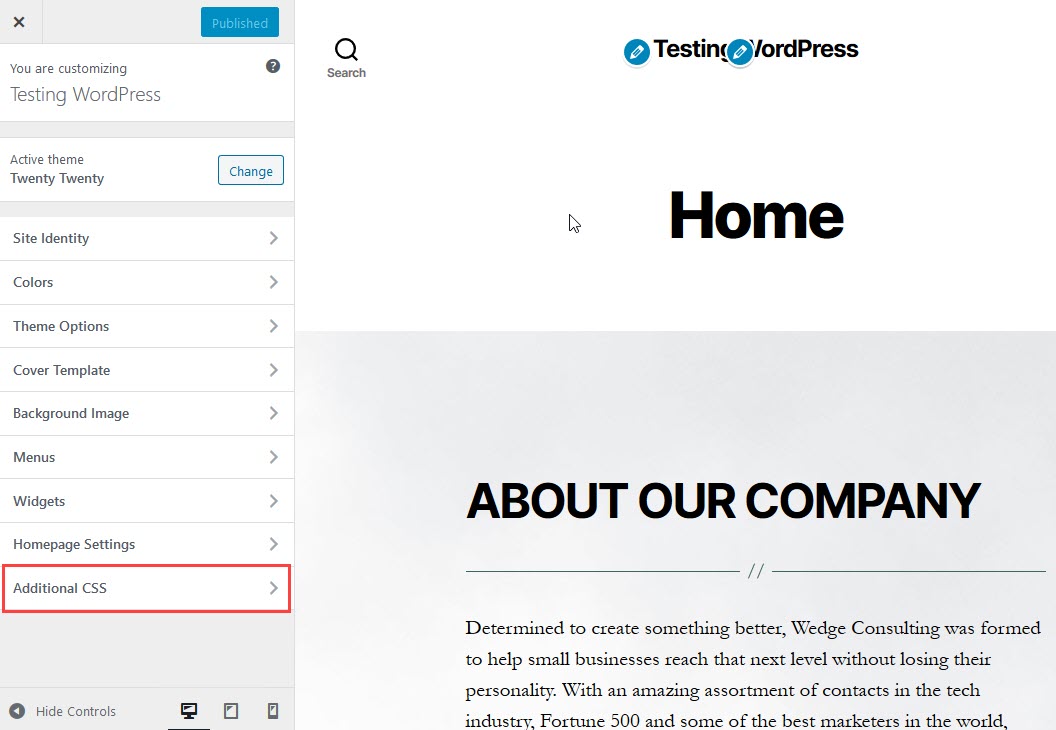
The Theme Customizer helps change fonts easily. Open the Customizer from the dashboard. Look for the Typography section. Here, you can pick different fonts. Some themes offer many font choices. Google Fonts are popular in themes. Select a font and see changes instantly. Remember to save when finished. This keeps your font changes.
Theme Files And Stylesheets
Fonts can also be in the theme files. Look for a file named style.css. This file shows the fonts used. You might see font names like Arial or Times New Roman. Changing this file needs some care. It can affect how your site looks. Always save a backup before making changes. This protects your site if something goes wrong.
Custom Fonts In WordPress
Google Fonts make websites look nice. They are free and easy to use. You just pick a font from Google Fonts. Then, add it to your WordPress site. It’s simple to change the style of your site. Many people like the many choices. You can find fun, serious, or modern fonts. Google Fonts help make your website special. Make sure to choose a font that fits your site. It should match your content and style. Google Fonts work well for many themes. They are popular and trusted by designers.
Custom fonts add a unique look. They give a website a special touch. You can upload your own font to WordPress. First, find a font you like. Make sure it is free to use. Then, upload it to your site. Use WordPress settings to add your font. You can change the size and color. Custom fonts help your site stand out. They make your content look better. Many people use custom fonts for their brand. It shows personality and style. Remember to check how your font looks on screens. It should be easy to read.

Credit: elementor.com
Font Plugins For WordPress
Popular font plugins help change fonts in WordPress. Easy to use and useful. Some known plugins include Google Fonts, Use Any Font, and FontPress. Google Fonts gives many free options. Use Any Font lets you upload fonts. FontPress offers font styling tools. Each plugin has unique features. They help make your site look nice.
Setting up these plugins is simple. First, download the plugin. Next, activate it on your WordPress site. Follow the instructions on the plugin page. You can choose fonts and styles. Change colors, sizes, and more. Make your site pretty with fonts. Configuration takes only a few minutes. Enjoy customizing your WordPress fonts!
Troubleshooting Font Issues
Fonts can be tricky in WordPress. Sometimes the font doesn’t appear as expected. It could be missing or look different. This might happen due to theme settings or plugin conflicts. Another issue is the font size. It may be too small or too big.
Checking your theme settings is a good start. Look for font options in the customizer. If the font is still not right, try deactivating plugins one by one. This helps to find conflicts. Updating your theme can also fix font issues. Always keep backups before making changes. If you see a strange font, check the font file URL. Sometimes, the file might be missing or moved.
Frequently Asked Questions
How Do I Find The Font On My Site?
To find the font on your WordPress site, use the browser’s inspection tool. Right-click on the text, select “Inspect,” and check the CSS styles. The font-family property will reveal the font name.
Can I Change My WordPress Font Easily?
Yes, changing fonts in WordPress is simple. Use the customizer or a theme with typography options. Plugins like Google Fonts can also help you customize fonts effortlessly without coding.
What Are Popular WordPress Fonts?
Popular WordPress fonts include Arial, Times New Roman, and Roboto. Many themes offer Google Fonts integration. This provides access to a wide range of stylish and modern fonts.
Why Is Font Choice Important In WordPress?
Font choice impacts readability, user experience, and brand identity. Choosing the right font enhances your site’s aesthetics and improves engagement. Consistent typography across your site creates a cohesive look.
Conclusion
Finding the right font in WordPress can be tricky. But now, it’s easier. You know how to identify fonts using simple tools. This knowledge helps you maintain consistent branding. It also ensures your website looks professional and appealing. Remember, fonts play a vital role in user experience.
Choose wisely. Make your site stand out. The right font enhances readability and style. So, explore and experiment. Discover what works best for your content. Your readers will appreciate the effort. Keep learning and adapting. Your WordPress site will shine with the perfect font choice.



